
liquid_glass_lens_navbar 0.1.0  liquid_glass_lens_navbar: ^0.1.0 copied to clipboard
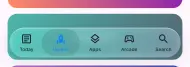
An iOS 26 Liquid Glass bottom navigation bar for Flutter: frosted glass, a refracting liquid lens selection, hide on scroll, and adaptive quality.
liquid_glass_lens_navbar #


A floating Liquid Glass bottom navigation bar for Flutter, modelled on the iOS 26 tab bar.
| Light | Liquid lens | Dark |
|---|---|---|
 |
 |
 |
- Frosted, saturated glass floating above your content, with light refraction along its rim.
- The selection lifts into a liquid glass lens while it moves or is dragged — it magnifies and refracts what is behind it, with chromatic fringing (fragment shader on Impeller).
- Drag along the bar to scrub between tabs, with haptic ticks.
- Hides on scroll, or collapses into a circle like iOS 26.
- Clear / Tinted / Solid glass, adjustable opacity, light and dark styles.
- Follows iOS Reduce Transparency, Increase Contrast and Reduce Motion.
- Adaptive quality: steps the effect down automatically on slow GPUs.
- Pure Flutter, no platform views. Tested on iOS and Android.
Install #
flutter pub add liquid_glass_lens_navbar
Requires Flutter 3.35 or newer.
Usage #
Scaffold(
  extendBody: true, // let content scroll under the glass
  body: ...,
  bottomNavigationBar: LiquidGlassNavBar(
    currentIndex: _index,
    onTap: (i) => setState(() => _index = i),
    items: const [
      LiquidGlassNavItem(icon: Icons.article_outlined, selectedIcon: Icons.article, label: 'Today'),
      LiquidGlassNavItem(icon: Icons.rocket_outlined, selectedIcon: Icons.rocket, label: 'Games'),
      LiquidGlassNavItem(icon: Icons.layers_outlined, selectedIcon: Icons.layers, label: 'Apps'),
      LiquidGlassNavItem(icon: Icons.search, label: 'Search'),
    ],
  ),
)
Hide on scroll #
Scrolling down slides the whole bar off screen; scrolling up or reaching the top brings it back. Set minimizeStyle: LiquidGlassMinimizeStyle.circle to instead collapse it into a circle showing the selected tab (iOS 26 tabBarMinimizeBehavior), which expands when tapped.
final _tabBar = LiquidGlassNavBarController(); // dispose() it with the State

Scaffold(
  extendBody: true,
  body: LiquidGlassScrollMinimizer(
    controller: _tabBar,
    child: ListView(...),
  ),
  bottomNavigationBar: LiquidGlassNavBar(
    controller: _tabBar,
    ...
  ),
)
You can also drive it yourself with _tabBar.minimize() / _tabBar.expand().
Transparency & system settings #
LiquidGlassNavBar(
  appearance: LiquidGlassAppearance.tinted, // clear (default) | tinted | solid
  backgroundOpacity: 0.4,                // 0 = see-through … 1 = opaque
  ...
)
With respectSystemSettings: true (default) the bar follows iOS settings live:
| iOS setting | Effect |
|---|---|
| Accessibility › Display & Text Size › Reduce Transparency | solid bar, no blur, no lens (read via the bundled iOS plugin) |
| Accessibility › Display & Text Size › Increase Contrast | near-opaque glass with a visible border |
| Accessibility › Motion › Reduce Motion | no liquid lens / stretch |
iOS 26.1's Display & Brightness › Liquid Glass Clear / Tinted choice has no public API for apps to read, so expose appearance as an in-app setting if you want to offer it.
Options #
| Parameter | Default | |
|---|---|---|
style |
from theme brightness | LiquidGlassStyle.light / .dark / copyWith(...) |
height |
62 |
bar height |
margin |
horizontal: 20 |
outer margin; bottom safe area is handled |
enableDrag |
true |
finger scrubbing |
enableLens |
true |
liquid lens while moving |
enableHaptics |
true |
selection haptics |
duration |
460ms |
move animation |
controller |
null |
LiquidGlassNavBarController for the minimized state |
minimizedSize |
50 |
diameter of the minimized circle |
appearance |
clear |
clear / tinted / solid |
backgroundOpacity |
null |
overrides the tint alpha (0..1) |
respectSystemSettings |
true |
follow Reduce Transparency / Increase Contrast / Reduce Motion |
minimizeStyle |
hide |
hide (slide off screen) / circle |
enableEdgeRefraction |
true |
bend the backdrop along the bar's rim (Impeller) |
LiquidGlassLens is exported too, so you can reuse the refracting glass lens elsewhere.
Performance #
Backdrop blur is the expensive part of glass, and some GPUs (Android emulators, older OpenGL ES devices) render it very slowly. By default quality: LiquidGlassQuality.adaptive measures real raster times while the bar animates and steps down if frames are missed — usually within the first second:
| Level | Renders |
|---|---|
high |
blur + rim refraction + liquid lens shader |
medium |
blur only; the lens is a plain bright capsule |
low |
no backdrop effects — a near-opaque frosted fill |
The level never goes back up within a session. Force a level with quality: LiquidGlassQuality.high (or medium / low). LiquidGlassPerformance.instance.level exposes the current adaptive level.
Measured with example/lib/main_perf.dart (16 automatic tab switches, profile mode):
| Device | Raster p50 / p90 |
|---|---|
iPhone 18 Pro simulator (high) |
1.9 / 2.3 ms |
| Android emulator, Impeller GLES, before | 1366 / 2598 ms |
Android emulator, adaptive (ends at low) |
31 / 43 ms — the emulator alone needs ~28 ms for this page without any tab bar |
Platforms #
| Glass + blur | Liquid lens & rim refraction | Reduce Transparency | |
|---|---|---|---|
| iOS (Impeller/Metal) | ✓ | ✓ | ✓ (native plugin) |
| Android, Impeller (Vulkan or OpenGLES) | ✓ | ✓ | – (no such setting) |
| Android on Skia (older devices, Impeller off) | ✓ | bright glass capsule instead | – |
| Web / desktop | untested | bright glass capsule expected (no shader filters) | – |
On Android the bar sits above the gesture-navigation handle (iOS lets it overlap the home-indicator area). Android's Remove animations setting maps to the Reduce Motion behaviour.
Example #
cd example && flutter run
Metadata

Documentation
Publisher
unverified uploader
Weekly Downloads
Metadata
An iOS 26 Liquid Glass bottom navigation bar for Flutter: frosted glass, a refracting liquid lens selection, hide on scroll, and adaptive quality.
Repository (GitHub)
View/report issues
Topics
#liquid-glass #bottom-navigation #tab-bar #glassmorphism #ios
License
 MIT (license)
Dependencies
More
Packages that depend on liquid_glass_lens_navbar
Packages that implement liquid_glass_lens_navbar