
hyper_snackbar 0.5.0  hyper_snackbar: ^0.5.0 copied to clipboard
A highly customizable and animated snackbar package for Flutter.


HyperSnackbar 🚀 #
A highly customizable, animated, and powerful snackbar package for Flutter. Designed to be "Hyper" flexible — supports Stack/Queue modes, custom animations (Scale, Slide, Fade), progress bars, and highly interactive actions.

👉 Try the Interactive Playground!
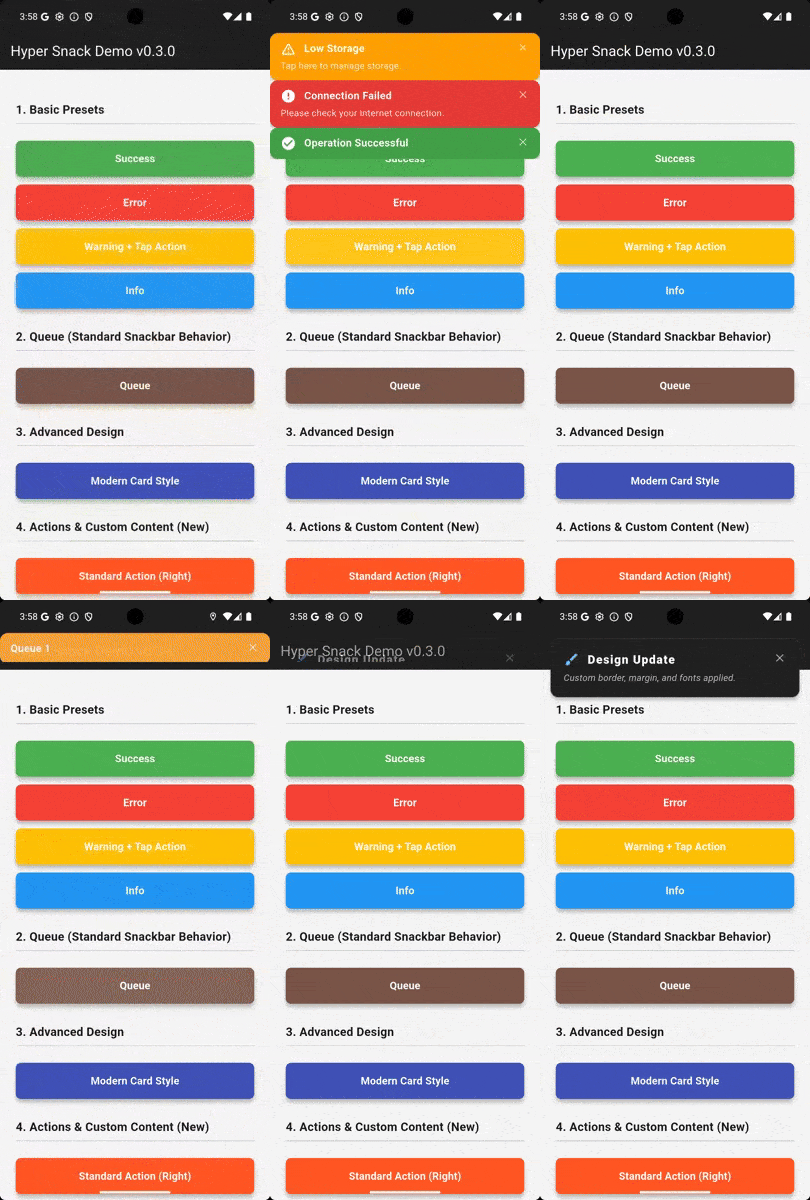
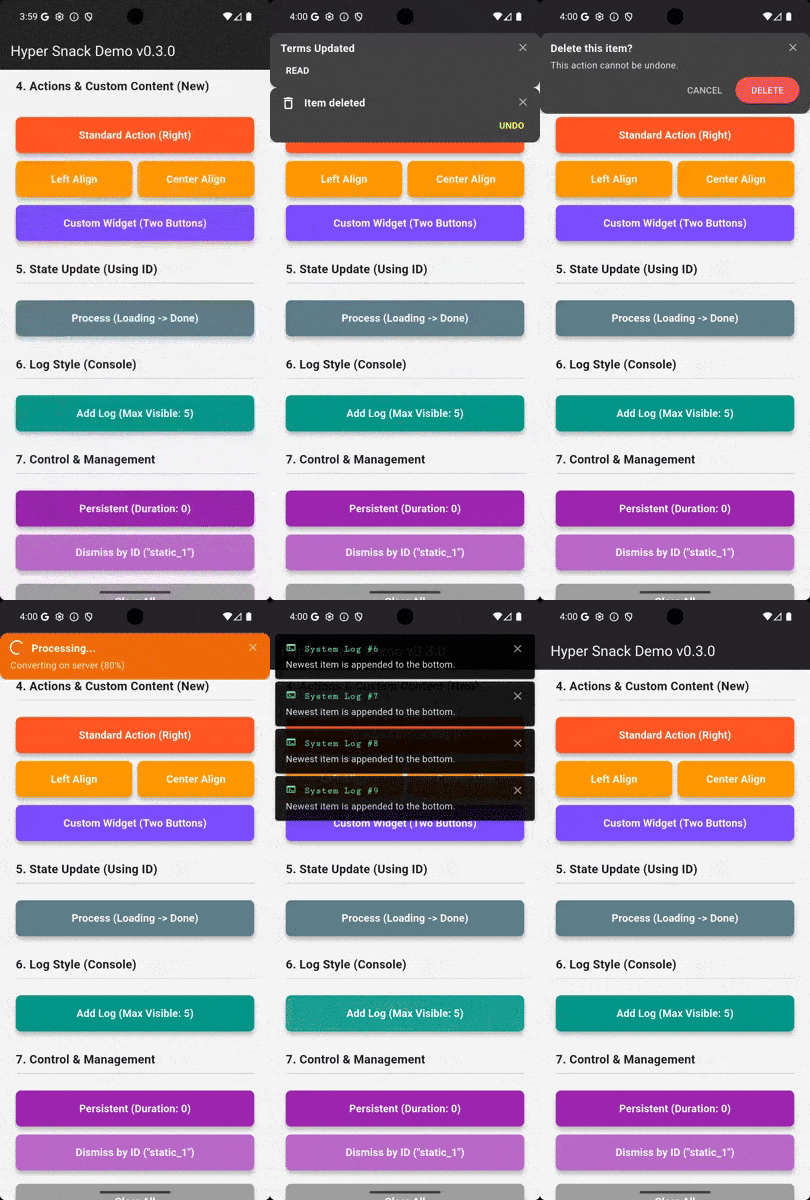
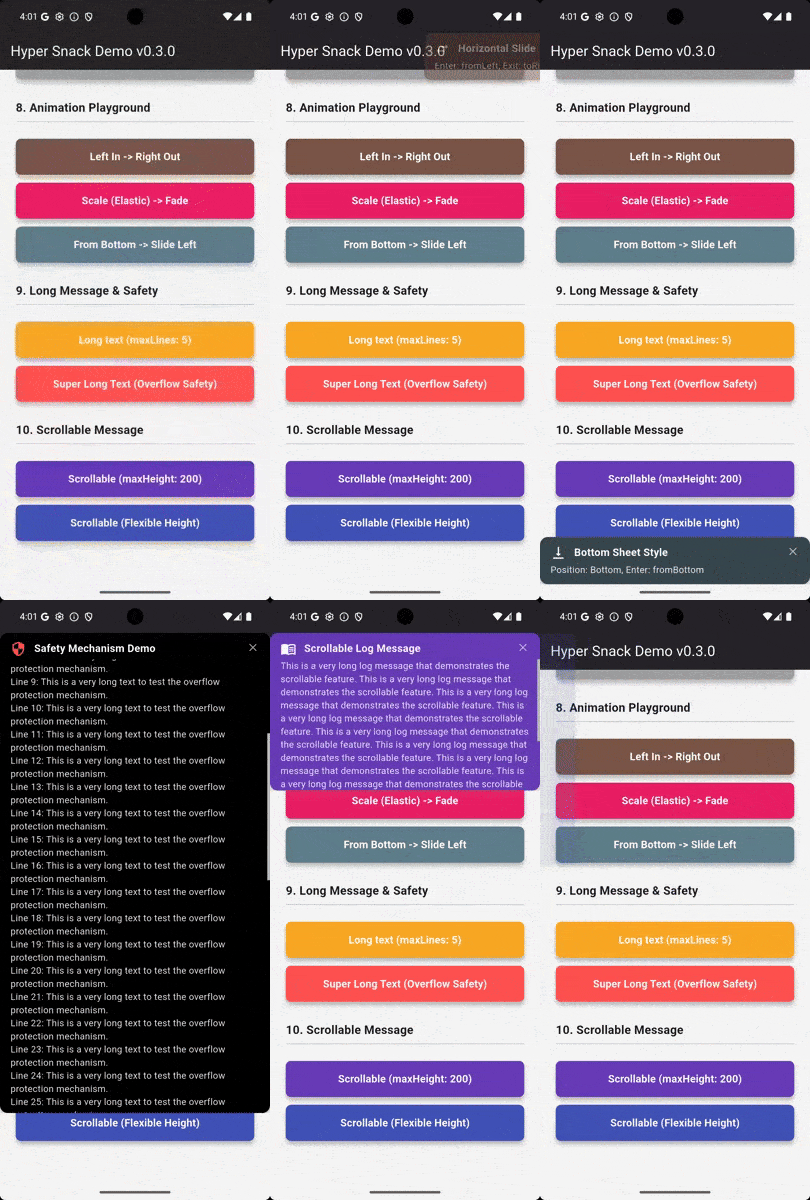
✨ Features #
- Flexible Positioning: Top or Bottom.
- Display Modes: Stack (overlay) or Queue (sequential).
- Rich Animations: Slide, Fade, and New! Scale (Elastic Zoom).
- Progress Bar:
- Line: A thin progress line at the bottom.
- Wipe: Background fills up like a gauge.
- Customizable: Colors, borders, shadows, margins, and padding.
- Interactive: Tap callbacks, Action buttons, and Dismissible swipes.
- Presets:
showSuccess,showError,showWarning,showInfofor quick usage. - No Context Required: Uses
NavigatorKeyfor easy calling from anywhere (Logic/Controllers).
🚀 Installation #
Add this to your package's pubspec.yaml file:
dependencies:
  hyper_snackbar: ^0.5.0
🛠 Setup #
Register the navigatorKey in your MaterialApp to show snackbars without a BuildContext.
import 'package:hyper_snackbar/hyper_snackbar.dart';

void main() {
  runApp(const MyApp());
}

class MyApp extends StatelessWidget {
  const MyApp({super.key});

  @override
  Widget build(BuildContext context) {
    return MaterialApp(
      // Important: Register the key here to show snackbars without BuildContext
      navigatorKey: HyperSnackbar.navigatorKey,
      home: const HomePage(),
    );
  }
}
📖 Usage #
Basic Presets #
The easiest way to show a message. Now supports position, margin, displayDuration and progressBarWidth.
// Simple Success
HyperSnackbar.showSuccess(
  title: 'Operation Successful',
  message: 'Your data has been saved.',
);

// Error with Custom Position
HyperSnackbar.showError(
  title: 'Connection Failed',
  position: HyperSnackPosition.bottom,
  margin: const EdgeInsets.all(12),
);
// Warning
HyperSnackbar.showWarning(title: 'Low Storage');

// Info
HyperSnackbar.showInfo(title: 'New Message Received');
Action Alignment (Right / Center / Left) 🆕 #
You can now control the position of the action button.
// Center Alignment
HyperSnackbar.show(
  title: 'Update Available',
  action: HyperSnackAction(
    label: 'INSTALL',
    onPressed: () => installUpdate(),
  ),
  actionAlignment: MainAxisAlignment.center, // <--- Center the button
);
Custom Content (Arbitrary Widget) 🆕 #
Need more than one button? Use content to pass any widget.
HyperSnackbar.show(
  title: 'Delete this item?',
  message: 'This action cannot be undone.',
  // Embed your own widget
  content: Row(
    mainAxisAlignment: MainAxisAlignment.end,
    children: [
      TextButton(
        onPressed: () => HyperSnackbar.dismissById('delete_confirm'),
        child: Text('CANCEL', style: TextStyle(color: Colors.white)),
      ),
      SizedBox(width: 8),
      ElevatedButton(
        onPressed: () => deleteItem(),
        child: Text('DELETE'),
        style: ElevatedButton.styleFrom(backgroundColor: Colors.red),
      ),
    ],
  ),
  id: 'delete_confirm',
);
Update by ID (Loading -> Done) ⚡ #
Update the state of a snackbar by providing a unique id.
const String processId = 'upload_process';

// 1. Show Loading state
HyperSnackbar.show(
  id: processId,
  title: 'Uploading...',
  displayDuration: null, // Keep it visible
  icon: CircularProgressIndicator(color: Colors.white),
);

// ... do some work ...

// 2. Update to "Done" state (using the same ID)
HyperSnackbar.show(
  id: processId, // Replaces the content
  title: 'Upload Complete!',
  backgroundColor: Colors.green,
  icon: Icon(Icons.check_circle, color: Colors.white),
  displayDuration: Duration(seconds: 3), // Auto-dismiss
);
Advanced Usage #
Style Templates (Reusable Config) 🆕 #
You can create a base configuration without a title and reuse it across your app.
// 1. Define a style template (No title required!)
final errorStyle = HyperConfig(
  backgroundColor: Colors.red,
  icon: Icon(Icons.error, color: Colors.white),
  borderRadius: 8,
);

// 2. Use it anywhere
HyperSnackbar.showFromConfig(
  errorStyle.copyWith(
    title: 'Network Error',
    message: 'Please check your connection.',
  ),
);

HyperSnackbar.showFromConfig(
  errorStyle.copyWith(
    title: 'Server Error',
    message: 'Please try again later.',
  ),
);
Persistent Notification
Set displayDuration to Duration.zero (or null) to make the snackbar stay until manually dismissed.
HyperSnackbar.show(
  title: 'Persistent Message',
  message: 'I will stay here until you close me.',
  displayDuration: Duration.zero, // <--- Persistent
);
Handling Long Text (Overflow Safety)
Even with maxLines: null, the snackbar will safely handle extremely long text by enabling internal scrolling, ensuring it never exceeds the screen height.
HyperSnackbar.show(
  title: 'System Log',
  message: 'Very long error log...\nLine 1\nLine 2\n...',
  maxLines: null, // Unlimited lines (scrollable if needed)
  backgroundColor: Colors.grey[900],
);
🆕 Progress Bar Effects #
You can visualize the remaining duration using a progress bar.
Style 1: Line Effect (Standard progress bar)
HyperSnackbar.show(
  title: 'Processing...',
  progressBarWidth: 4.0, // Height of the bar
  progressBarColor: Colors.redAccent, // Custom color
  displayDuration: const Duration(seconds: 5),
);
Style 2: Wipe Effect (Background fill)
HyperSnackbar.show(
  title: 'Downloading...',
  progressBarWidth: 0.0, // 0.0 triggers the Wipe Effect
  backgroundColor: Colors.blue,
  displayDuration: const Duration(seconds: 3),
);
🆕 Scale Animation (Elastic Pop) #
Create a modern "Pop" effect using the Scale animation type and an elastic curve.
HyperSnackbar.show(
  title: 'New Message',
  message: 'You have a new notification!',
  backgroundColor: Colors.indigo,

  // Animation Settings
  enterAnimationType: HyperSnackAnimationType.scale,
  enterCurve: Curves.elasticOut, // Bouncy effect
  enterAnimationDuration: const Duration(milliseconds: 800),
);
Action Button #
Add an interactive button to your snackbar.
HyperSnackbar.show(
  title: 'Item Deleted',
  message: 'It has been moved to trash.',
  action: HyperSnackAction(
    label: 'UNDO',
    textColor: Colors.amber,
    onPressed: () {
      // Handle undo action
      print('Undo clicked!');
    },
  ),
);
Using with GoRouter #
If you are using go_router, simply assign HyperSnackbar.navigatorKey to the navigatorKey property.
final _router = GoRouter(
  navigatorKey: HyperSnackbar.navigatorKey, // Add this line
  routes: [ ... ],
);
📚 API Reference #
HyperSnackbar Methods #
All methods are static and can be called from anywhere.
| Method | Description |
|---|---|
show(...) |
Displays a fully customizable snackbar. |
showSuccess(...) |
Preset: Green background, Check icon. |
showError(...) |
Preset: Red background, Error icon. |
showWarning(...) |
Preset: Orange background, Warning icon. |
showInfo(...) |
Preset: Blue background, Info icon. |
showFromConfig(config) |
Displays a snackbar using a HyperConfig object. |
dismissById(id) |
Dismisses a specific snackbar by its ID. |
clearAll({animated}) |
Dismisses all currently visible snackbars. |
isSnackbarOpen |
Returns true if any snackbar is visible. |
isSnackbarOpenById(id) |
Returns true if the specific snackbar is visible. |
⚙️ Configuration Parameters #
HyperSnackbar is highly customizable. You can configure it using the HyperConfig object or directly via parameters in HyperSnackbar.show / context.showHyperSnackbar.
🎨 General & Appearance #
| Parameter | Type | Default | Description |
|---|---|---|---|
title |
String? |
null |
The title of the snackbar. |
message |
String? |
null |
The main message body. |
icon |
Widget? |
null |
Custom icon widget displayed on the left. |
useAdaptiveLoader |
bool |
false |
(New) If true, displays a platform-adaptive loading indicator (CupertinoActivityIndicator / CircularProgressIndicator) instead of the icon. |
backgroundColor |
Color? |
null |
Background color (defaults to dark grey). |
textColor |
Color? |
null |
Color for title and message text. |
borderRadius |
double |
12.0 |
Corner radius of the snackbar. |
elevation |
double |
4.0 |
Shadow elevation. |
border |
BoxBorder? |
null |
Custom border for the snackbar container. |
margin |
EdgeInsetsGeometry |
zero |
Margin around the snackbar. |
padding |
EdgeInsetsGeometry |
16, 12 |
Internal padding. |
👆 Actions & Interaction #
| Parameter | Type | Default | Description |
|---|---|---|---|
action |
HyperSnackAction? |
null |
Action button configuration (label, callback, colors). |
actionAlignment |
MainAxisAlignment |
.end |
Alignment of the action button (e.g., .start, .center). |
content |
Widget? |
null |
Custom widget to replace the action button area. |
onTap |
VoidCallback? |
null |
Callback when the snackbar itself is tapped. |
showCloseButton |
bool |
true |
Whether to show the "X" close button. |
enableSwipe |
bool |
true |
Allow dismissing the snackbar by swiping horizontally. |
⏱️ Behavior & Positioning #
| Parameter | Type | Default | Description |
|---|---|---|---|
id |
String? |
null |
Unique ID. Updating a snackbar with the same ID modifies the existing one. |
displayDuration |
Duration? |
4s |
How long the snackbar stays visible. null means persistent. |
position |
HyperSnackPosition |
.top |
Vertical position (.top or .bottom). |
displayMode |
HyperSnackDisplayMode |
.stack |
.stack (overlays on top) or .queue (shows one by one). |
newestOnTop |
bool |
true |
(Stack mode) If true, new snackbars appear on top of the stack. |
maxVisibleCount |
int |
3 |
Maximum number of snackbars visible at once (Stack mode). |
📝 Text Handling #
| Parameter | Type | Default | Description |
|---|---|---|---|
titleStyle |
TextStyle? |
null |
Custom style for the title text. |
messageStyle |
TextStyle? |
null |
Custom style for the message text. |
maxLines |
int? |
5 |
Maximum lines for the message text. |
scrollable |
bool |
false |
If true, the message becomes scrollable within constraints. |
messageMaxHeight |
double? |
null |
Max height for the scrollable message area. |
✨ Animation #
| Parameter | Type | Default | Description |
|---|---|---|---|
enterAnimationType |
HyperSnackAnimationType |
.top |
Animation style for entry (scale, fade, left, etc.). |
exitAnimationType |
HyperSnackAnimationType |
.left |
Animation style for exit. |
enterAnimationDuration |
Duration |
300ms |
Duration of entry animation. |
exitAnimationDuration |
Duration |
500ms |
Duration of exit animation. |
enterCurve |
Curve |
easeOutQuart |
Animation curve for entry. |
exitCurve |
Curve |
easeOut |
Animation curve for exit. |
📊 Progress Bar #
| Parameter | Type | Default | Description |
|---|---|---|---|
progressBarWidth |
double? |
null |
Height of the progress bar. 0.0 creates a background "wipe" effect. null disables it. |
progressBarColor |
Color? |
null |
Color of the progress bar. Defaults to a semi-transparent contrast color. |
📱 Example #
Check out the example folder for a complete playground app where you can test all animations and generate code snippet interactively!
📄 License #
MIT License
Metadata
Publisher
unverified uploader
Weekly Downloads
Metadata
A highly customizable and animated snackbar package for Flutter.
Repository (GitHub)
View/report issues
License
 unknown (license)

