
fifty_ui 0.7.1  fifty_ui: ^0.7.1 copied to clipboard
 fifty.dev
FDL v2 styled Flutter components for the fifty.dev ecosystem. Buttons, cards, inputs, and more.
Changelog #
All notable changes to this project will be documented in this file.
The format is based on Keep a Changelog, and this project adheres to Semantic Versioning.
0.7.1 - 2026-03-04 #
Documentation #
- Rewrite README with selling-points-first structure and customization section
0.7.0 - 2026-03-01 #
BREAKING CHANGES #
constkeyword removed from all widget expressions usingFiftySpacing.*(values are now getters, not compile-time constants)- Widgets now resolve colors from
Theme.of(context).colorSchemeandFiftyThemeExtensioninstead of directFiftyColors.*/FiftyShadows.*access
Changed #
FiftyButton._getShadow()usesFiftyThemeExtension.shadowPrimaryinstead ofFiftyShadows.primaryFiftyBadgevariant colors resolved fromcolorScheme(tertiary, onSurfaceVariant)- 8 shadow references migrated from
FiftyShadows.sm/md/lgtoFiftyThemeExtension.shadowSm/Md/Lg extension()!force-unwrap converted to nullable fallback pattern
0.6.2 - 2026-02-22 #
Fixed #
- Synced CHANGELOG.md with published version history (pub.dev compliance)
0.6.0 - 2026-01-28 #
Added #
Display Components
-
FiftyStatCard- Metric/KPI display card with trend indicators- Icon in colored container
- Large value with label display
- Trend indicator (up/down/neutral) with percentage
- Highlight variant with primary background
- Mode-aware colors
-
FiftyListTile- List item component with comprehensive layout options- Leading icon in colored circular background
- Title and optional subtitle
- Trailing text with optional subtext, or custom widget
- Hover state with background change and icon scale
- Optional divider
- Mode-aware colors
-
FiftyProgressCard- Progress metric card with gradient bar- Slate-grey background per FDL v2
- Icon in subtle container
- Title with optional percentage display
- Gradient progress bar (powder-blush to primary)
- Subtitle text
- Animated progress changes
Input Components
FiftyRadioCard<T>- Card-style radio selection component- Centered icon with label below
- Border highlight when selected with ring effect
- Generic type support for radio groups
- Kinetic hover animation on icon
- Disabled state support
FiftyButton Enhancements
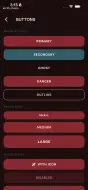
secondaryvariant - Slate-grey background for secondary actionsoutlinevariant - Mode-aware border (burgundy in light, powder-blush in dark)trailingIconproperty - Icon displayed after the label- All variants now fully support light and dark modes
FiftyTextField Enhancements
shapeproperty withFiftyTextFieldShapeenumstandard- Rectangular with xl radius (16px) - defaultrounded- Full pill radius for search inputs
Fixed #
- Outline button variant now uses mode-aware colors (powder-blush in dark, burgundy in light)
Brief References #
- BR-043: FiftyButton Variants Update
- BR-044: FiftyStatCard
- BR-045: FiftyListTile
- BR-046: FiftyRadioCard
- BR-047: FiftyProgressCard
- BR-048: FiftyTextField Variants
0.5.0 - 2025-12-31 #
Fixed #
Theme-Aware Components
All core components now properly support light and dark mode switching. Previously, several components had hardcoded dark theme colors that prevented proper theming.
FiftyCard- Background now usescolorScheme.surfaceContainerHighestinstead of hardcodedFiftyColors.gunmetalFiftyChip- Non-selected background now usescolorScheme.surfaceContainerHighestinstead of hardcodedFiftyColors.gunmetalFiftyDataSlate- Background now usescolorScheme.surfaceContainerHighestinstead of hardcodedFiftyColors.gunmetalFiftyBadge- Fixed warning color fallback to useFiftyColors.warninginstead ofColors.amberFiftySwitch- Replaced drop shadow with FDL-compliant glow (no offset) for zero-elevation designFiftyDropdown- Replaced drop shadow with FDL-compliant shadow (no offset) for zero-elevation designFiftyNavBar- Standardized color reference to useFiftyColors.voidBlackinstead ofColors.blackHalftonePainter- Default colors now useFiftyColors.terminalWhiteinstead ofColors.white
Changed #
- Components now respond to system theme changes and
ThemeModeswitching - Light mode displays proper surface colors instead of dark-only values
Migration Notes #
- No API changes required
- Components automatically use theme-appropriate colors
- Custom color overrides via component parameters continue to work as expected
0.4.0 - 2025-12-26 #
Added #
Form Components
-
FiftySwitch- Kinetic toggle switch with brutalist aesthetic- Snap animation (150ms with overshoot)
- Three sizes: small (36x20), medium (48x24), large (60x32)
- Crimson thumb when active, HyperChrome when inactive
- Optional label support
-
FiftySlider- Range selector with FDL styling- Thin track with crimson active fill
- Square brutalist thumb with rounded corners
- Optional value label on hover/drag
- Discrete divisions support
-
FiftyDropdown- Terminal-styled dropdown selector- Looks like FiftyTextField with chevron indicator
- Slide-down animation for menu expansion
- Crimson highlight on hover
- Check mark for selected item
- Icon support for items
0.3.0 - 2025-12-26 #
Added #
FiftyButton Enhancements
isGlitchproperty - Enables RGB chromatic aberration effect on hovershapeproperty - Choose betweenFiftyButtonShape.sharp(4px radius) orFiftyButtonShape.pill(100px radius)
FiftyTextField Enhancements
borderStyleproperty - Control border rendering:full,bottom, ornoneprefixStyleproperty - Terminal prefix options:chevron(">"),comment("//"),custom, ornonecustomPrefixproperty - Custom prefix string when usingFiftyPrefixStyle.customcursorStyleproperty - Cursor appearance:line,block, orunderscore
FiftyCard Enhancements
hasTextureproperty - Enable halftone dot pattern overlayhoverScaleproperty - Configurable scale factor on hover (default 1.02)
FiftyBadge Enhancements
FiftyBadge.tech()factory - Gray/hyperChrome tech labelsFiftyBadge.status()factory - Green status indicator with glowFiftyBadge.ai()factory - IgrisGreen AI indicator with glowcustomColorproperty - Override variant color
FiftyLoadingIndicator Enhancements
FiftyLoadingStyle.sequence- Cycle through custom text sequencessequencesproperty - Custom sequence list for sequence mode- Default sequences: INITIALIZING, MOUNTING, SYNCING, COMPILING
Changed #
- All components now fully respect
MediaQuery.disableAnimationsfor accessibility
0.2.0 - 2025-12-25 #
Added #
Organisms
-
FiftyNavBar- Floating "Dynamic Island" style navigation bar- Glassmorphism: 20px blur + 50% black opacity
- Pill or standard shape options
- Crimson underbar for selected item
FiftyNavItemdata class for navigation items
-
FiftyHero- Monument Extended headline text- Three sizes: display (64px), h1 (48px), h2 (32px)
- Optional glitch effect on mount
- Optional gradient fill
FiftyHeroSectionconvenience widget with subtitle support
Molecules
FiftyCodeBlock- Terminal-style code display- Syntax highlighting (keywords, strings, comments, numbers)
- Line numbers (optional)
- Copy button with feedback
- Languages: dart, javascript, json, plain
Utils
-
KineticEffect- Reusable hover/press scale animation wrapper- Configurable hover scale (default 1.02)
- Configurable press scale (default 0.95)
- Respects reduced-motion settings
-
GlitchEffect- RGB chromatic aberration effect- Trigger on hover or mount
- Configurable intensity (0.0-1.0)
- Configurable pixel offset
-
HalftonePainter- CustomPainter for halftone dot patterns -
HalftoneOverlay- Widget wrapper for halftone textures
Changed #
- Updated library documentation with comprehensive component catalog
0.1.0 - 2025-12-25 #
Added #
Buttons
FiftyButton- Primary action button with variants (primary, secondary, ghost, danger) and sizes (small, medium, large)FiftyIconButton- Circular icon button with required tooltip for accessibility
Inputs
FiftyTextField- Text input with focus glow, validation support, and prefix/suffix icons
Containers
FiftyCard- Card container with optional tap interaction and selected state
Display
FiftyChip- Tag/label component with variants (default, success, warning, error)FiftyDivider- Themed horizontal or vertical dividerFiftyDataSlate- Terminal-style key-value display panelFiftyBadge- Small status indicator with optional glow pulse animationFiftyAvatar- Circular avatar with image or fallback initialsFiftyProgressBar- Linear progress indicator with crimson fillFiftyLoadingIndicator- Text-based loading indicator (dots, pulse, static styles)
Feedback
FiftySnackbar- Toast notification with variants (info, success, warning, error)FiftyDialog- Modal dialog with border glow and animated entranceFiftyTooltip- Hover-triggered tooltip wrapper
Utils
GlowContainer- Reusable container with animated glow effect
Features #
- All components follow Fifty Design Language (FDL) specification
- Crimson glow focus states on all interactive elements
- Zero elevation design (no drop shadows)
- Motion animations using FDL timing tokens
- Dark-first design optimized for OLED displays
- Full accessibility support with semantics
- Comprehensive widget tests for all components
- Example gallery app demonstrating all components
Metadata

Documentation
Publisher
Weekly Downloads
Metadata
FDL v2 styled Flutter components for the fifty.dev ecosystem. Buttons, cards, inputs, and more.
Homepage
Repository (GitHub)
View/report issues
Topics
#flutter #ui #components #design-system #widget
License
 MIT (license)
Dependencies
fifty_theme, fifty_tokens, flutter, flutter_animate