
date_picker_plus 8.0.0  date_picker_plus: ^8.0.0 copied to clipboard
A Flutter library that provides a customizable Material Design date and range picker widgets.
8.0.0 [Breaking] #
Requires Flutter 3.47+ (Dart 3.13+).
- Adds
intlandmaterial_uidependencies. - Month names, weekday names, first day of week, and date strings follow the locale and no longer require Material localizations.
- Adds
DatePickerPlusTheme.localeto override that locale. Defaults toLocalizations.localeOf. - Adds
HeaderTheme.nextPageSemanticLabelandpreviousPageSemanticLabel. - Adds
RangePickerTheme.dateRangeStartDateSemanticLabelanddateRangeEndDateSemanticLabel.
7.0.1 #
7.0.0 [Breaking] #
Theming API #
All per-widget styling parameters on DatePicker, RangeDatePicker, DaysPicker, RangeDaysPicker, MonthPicker, YearsPicker, showDatePickerDialog, and showRangePickerDialog were removed. Use a single theme argument of type DatePickerPlusTheme instead.
Removed parameters (names vary slightly between single-date and range pickers):
daysOfTheWeekTextStyleenabledCellsTextStyle/enabledCellsDecorationdisabledCellsTextStyle/disabledCellsDecorationcurrentDateTextStyle/currentDateDecorationselectedCellTextStyle/selectedCellDecoration- On range pickers:
selectedCellsTextStyle/selectedCellsDecoration,singleSelectedCellTextStyle/singleSelectedCellDecoration leadingDateTextStyleslidersColor/slidersSizehighlightColor/splashColor/splashRadiuscenterLeadingDate
How to fix: Build a DatePickerPlusTheme and pass it as theme:. It merges with DatePickerPlusTheme.defaults(context) and any Theme.of(context).extension<DatePickerPlusTheme>().
// Before (v6)
DatePicker(
  minDate: minDate,
  maxDate: maxDate,
  initialDate: DateTime.now(),
  slidersColor: Colors.blue,
  centerLeadingDate: true,
  selectedCellDecoration: BoxDecoration(color: Colors.red, shape: BoxShape.circle),
);

// After (v7)
DatePicker(
  minDate: minDate,
  maxDate: maxDate,
  displayedDate: DateTime.now(),
  theme: const DatePickerPlusTheme(
    headerTheme: HeaderTheme(
      centerLeadingDate: true,
    ),
    daysPickerTheme: DaysPickerTheme(
      selectedCellDecoration: BoxDecoration(color: Colors.red, shape: BoxShape.circle),
    ),
    // Notice how each picker has its own theme now.
    monthsPickerTheme: MonthsPickerTheme(
      selectedCellDecoration: BoxDecoration(color: Colors.red, shape: BoxShape.circle),
    ),
    yearsPickerTheme: YearsPickerTheme(
      selectedCellDecoration: BoxDecoration(color: Colors.red, shape: BoxShape.circle),
    ),
    rangePickerTheme: RangePickerTheme(
      selectedCellsDecoration: BoxDecoration(color: Colors.red, shape: BoxShape.circle),
    ),
  ),
);
You can also register defaults app-wide via ThemeData.extensions:
MaterialApp(
  theme: ThemeData(
    extensions: const <ThemeExtension<dynamic>>[
      DatePickerPlusTheme(
        headerTheme: HeaderTheme(centerLeadingDate: true),
      ),
    ],
  ),
);
For defaults that depend on ColorScheme / TextTheme, build the extension where you have a BuildContext (e.g. inside build) or merge DatePickerPlusTheme.defaults(context) with your overrides on each picker’s theme argument.
initialDate renamed to displayedDate #
On all pickers and on showDatePickerDialog / showRangePickerDialog, rename initialDate to displayedDate. Behavior is unchanged: it controls which month/year grid is shown first.
// Before
showDatePickerDialog(context: context, minDate: minDate, maxDate: maxDate, initialDate: someDate);

// After
showDatePickerDialog(context: context, minDate: minDate, maxDate: maxDate, displayedDate: someDate);
Removed previousPageSemanticLabel & nextPageSemanticLabel #
All semantic labels are now managed internally using Material localizations.
New in v7 #
-
onDisplayedMonthChanged: Fires when the days grid’s visible month changes (including initial build and page swipes). Argument is the first day of that month. Available onDatePicker,RangeDatePicker,DaysPicker,RangeDaysPicker, and both dialog helpers. -
cellBuilder: OptionalCellBuilderto customize cells. UsesCellDatavariants (WeekDayCell,DayCell,MonthCell,YearCell) andCellState. -
DatePickerPlusTheme.isEnabled: Whenfalse, the picker is view-only (no taps, header navigation, or page swipes). -
HeaderTheme.forwardButtonDecoration/backwardButtonDecorationnarrowed toShapeDecoration[Breaking]: The type wasDecoration?and is nowShapeDecoration?. This eliminates an internal conversion heuristic that could not reliably derive an ink-clip shape from arbitraryDecorationsubclasses. Migrate by replacing anyBoxDecorationpassed to these fields with an equivalentShapeDecoration:// Before forwardButtonDecoration: BoxDecoration( borderRadius: BorderRadius.circular(6), color: Colors.red, ), // After forwardButtonDecoration: ShapeDecoration( color: Colors.red, shape: RoundedRectangleBorder(borderRadius: BorderRadius.circular(6)), ), -
Non-square grid cells and the range picker: Grid cell width and height are now fully independent (width from
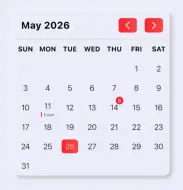
columnCount, height fromrowCount), enabling taller cells for content such as event dots below the day number. When cells are taller than they are wide, the default circle edge decoration will be smaller than the full-height range highlight rectangle painted byRangeSelectionPainter. UseOvalBorderorStadiumBorderforRangePickerTheme.selectedEdgeCellDecorationto match the highlight, or supply a custom painter viaRangePickerTheme.resolvePainter:rangePickerTheme: RangePickerTheme( selectedEdgeCellDecoration: ShapeDecoration( color: colorScheme.primary, shape: const OvalBorder(), ), ),
6.0.0 #
5.0.0 #
- Remove
DeviceOrientationBuilderin favor of Flutter Native one interduce in Material Package. - Add Flutter v27.0.0 and dart 3.6 constraints.
4.2.0 #
- Adding pass-thru callbacks for onLeadingDateTap, onStartDateChanged, and onEndDateChanged for the RangeDatePicker widget. thanks to @coogle here.
4.1.0 #
- Add
disabledDayPredicateto provide a way to disable days with custom logic.
SizedBox(
  height: 400,
  child: DatePicker(
    centerLeadingDate: true,
    minDate: DateTime(2020, 10, 10),
    maxDate: DateTime(2024, 10, 30),
    disabledDayPredicate: (date) {
      // This will disable every Sunday and Monday.
      return date.weekday == DateTime.sunday || date.weekday == DateTime.monday;
    },
  ),
),
4.0.0 [Breaking] #
This update introduces significant changes to the layout behavior of the picker. It now adapts to small sizes up to 150x150px, providing more flexibility in integrating the widget tree to match your design aesthetics.
The picker will only be assigned a preset size when it's unconstrained, e.g., when used inside Flex Widgets or a scrollable widget. This allows for customizable sizing of the picker according to your needs.
You should always specify the desired size for the picker as shown below:
SizedBox(
  width: 300,
  height: 400,
  child: RangeDatePicker(
    centerLeadingDate: true,
    minDate: DateTime(2020, 10, 10),
    maxDate: DateTime(2024, 10, 30),
  ),
),
For the DatePicker dialog, it now has a preset size that adapts to both landscape and portrait orientations. The size can be adjusted using the method parameters:
final date = await showDatePickerDialog(
  context: context,
  minDate: DateTime(2020, 10, 10),
  maxDate: DateTime(2024, 10, 30),
  width: 300,
  height: 300,
);
- Fixed an overflow issue when displaying the picker dialog with the keyboard open.
- Fixed an overflow issue when the device orientation is set to portrait mode.
- Fixed forward & back arrow buttons in RTL.
2.1.0 #
2.0.2 #
- Fix Images url in README.md
- Fix Broken golden tests.
2.0.0 [Breaking] #
- Add
RangeDatePicker. - Remove color properties in favor of providing a textStyle.
- Rename properties to avoid confusion.
- Expose
DaysPicker,MonthPicker,YearsPickerwidgets to use instead of using a full picker. - Update docs and README and Example.
1.1.3 #
- Add ability to modify splash & highlight colors.
1.1.2 #
- fix docs
1.1.1 #
- Add the ability to customize header.
1.1.0 #
- Update to flutter 3.10
- Fix ReadMe.
- Add library screenshots.
1.0.2 #
- Change library name.
1.0.1 #
- Fix example url in Readme.
1.0.0 #
- initial release.
Metadata

Documentation
Publisher
unverified uploader
Weekly Downloads
Metadata
A Flutter library that provides a customizable Material Design date and range picker widgets.
Repository (GitHub)
View/report issues
License
 MIT (license)