
date_picker_plus 8.0.0  date_picker_plus: ^8.0.0 copied to clipboard
A Flutter library that provides a customizable Material Design date and range picker widgets.

Date Picker Plus #
A Flutter package with highly customizable Material date and range pickers.


Features #
- Material 3 friendly out of the box.
- Rich theming via one top-level theme object.
- Inline widgets and dialog helpers.
- Powerful
cellBuilderfor custom content inside cells. - Built-in localization support.
- View-only mode for read-only calendars.
Install #
dependencies:
  date_picker_plus: ^7.0.1
import 'package:date_picker_plus/date_picker_plus.dart';
Quick Start #
Show a date picker dialog #
final date = await showDatePickerDialog(
  context: context,
  minDate: DateTime(2020, 1, 1),
  maxDate: DateTime(2030, 12, 31),
);
Show a range picker dialog #
final range = await showRangePickerDialog(
  context: context,
  minDate: DateTime(2020, 1, 1),
  maxDate: DateTime(2030, 12, 31),
);
Use an inline picker widget #
SizedBox(
  width: 320,
  height: 400,
  child: DatePicker(
    minDate: DateTime(2020, 1, 1),
    maxDate: DateTime(2030, 12, 31),
    onDateSelected: (date) {},
  ),
);
Available Widgets #
DatePicker #
Use this for a full single-date picker with days, months, and years flow.
RangeDatePicker #
Use this when users must select a start and end date. It supports:
onRangeSelectedfor the final result.onStartDateChangedandonEndDateChangedfor step-by-step tracking.
DaysPicker #
Use this if you want day-only selection UI.
MonthPicker #
Use this for month-only selection.
YearsPicker #
Use this for year-only selection.
showDatePickerDialog and showRangePickerDialog #
Use these when you want ready-made dialogs returning:
Future<DateTime?>Future<DateTimeRange?>
Sizing and Layout #
Always give inline pickers a size #
In unconstrained layouts (for example inside some Column, Row, or scrollable situations), pickers fall back to internal limits through a LimitedBox (portrait around 328x402, landscape around 328x300). If you need exact behavior, wrap the picker with SizedBox.
SizedBox(
  width: 280,
  height: 360,
  child: DatePicker(
    minDate: DateTime(2020),
    maxDate: DateTime(2050),
  ),
);
The widgets also work at very small sizes (for example 100x100) if your content choices (font size, padding, custom cell UI) fit.
Dialog size and paddings #
showDatePickerDialog and showRangePickerDialog default to:
- Portrait:
328x400 - Landscape:
328x300
You can override with width and height.
There are two different paddings:
padding: outside the dialog widget itself (defaultEdgeInsets.all(36)).contentPadding: inside the picker content area (defaultEdgeInsets.all(16)).
Dialog background #
Use dialogBackground to set the background color of the dialog surface behind the picker:
final date = await showDatePickerDialog(
  context: context,
  minDate: DateTime(2020, 1, 1),
  maxDate: DateTime(2030, 12, 31),
  dialogBackground: Colors.white,
);
It is available on both showDatePickerDialog and showRangePickerDialog. When omitted, the ambient DialogTheme / Material default background applies.
Theming Model #
DatePickerPlusTheme is a ThemeExtension.
DatePickerPlusTheme
  +-- headerTheme
  +-- daysPickerTheme
  |     +-- daysOfTheWeekTheme
  +-- monthsPickerTheme
  +-- yearsPickerTheme
  +-- rangePickerTheme
  +-- isEnabled
  +-- locale
Picker theme resolution is merged in this order:
- Internal defaults:
DatePickerPlusTheme.defaults(context)(MaterialColorScheme/TextTheme,intlfirst day of week, optional Material page labels) - App-level extension from
ThemeData.extensions - Per-widget
theme:argument
Set app-wide overrides once #
MaterialApp(
  theme: ThemeData(
    extensions: const [
      DatePickerPlusTheme(
        headerTheme: HeaderTheme(centerLeadingDate: true),
      ),
    ],
  ),
  home: const MyHomePage(),
);
InkResponseTheme #
If you want to control interaction feel (splash/highlight/focus/hover/radius/border behavior), set inkResponseTheme in the specific picker theme (daysPickerTheme, monthsPickerTheme, yearsPickerTheme, rangePickerTheme). This is useful when your cell shapes are custom and default ripple clipping does not match.
Header Customization #
Hide header completely #
theme: const DatePickerPlusTheme(
  headerTheme: HeaderTheme(enableHeader: false),
)
Hide arrow buttons #
theme: const DatePickerPlusTheme(
  headerTheme: HeaderTheme(enableArrowKeys: false),
)
Center leading date text #
theme: const DatePickerPlusTheme(
  headerTheme: HeaderTheme(centerLeadingDate: true),
)
Replace arrow icons #
theme: const DatePickerPlusTheme(
  headerTheme: HeaderTheme(
    forwardArrowWidget: Icon(Icons.keyboard_arrow_right_rounded),
    backwardArrowWidget: Icon(Icons.keyboard_arrow_left_rounded),
  ),
)
Arrow button decoration must be ShapeDecoration #
HeaderTheme.forwardButtonDecoration and HeaderTheme.backwardButtonDecoration accept ShapeDecoration (not BoxDecoration). This avoids ink clipping mismatches and guarantees shape-aware splash behavior.
theme: DatePickerPlusTheme(
  headerTheme: HeaderTheme(
    forwardButtonDecoration: ShapeDecoration(
      color: Colors.red,
      shape: RoundedRectangleBorder(borderRadius: BorderRadius.circular(6)),
    ),
    backwardButtonDecoration: ShapeDecoration(
      color: Colors.red,
      shape: RoundedRectangleBorder(borderRadius: BorderRadius.circular(6)),
    ),
  ),
)
Control spacing and sizing #
headerPaddingcontrols distance around header content.arrowButtonsSpacecontrols spacing between arrow buttons.forwardButtonWidth/forwardButtonHeightand backward equivalents control button size.
Weekday Row Behavior #
Change first day of week #
By default, the first day comes from locale (for example many en_GB setups start with Monday while many en_US setups start with Sunday). Override it using startOfWeek (ISO 8601 weekday number: 1 Monday ... 7 Sunday):
theme: const DatePickerPlusTheme(
  daysPickerTheme: DaysPickerTheme(
    daysOfTheWeekTheme: DaysOfTheWeekTheme(startOfWeek: DateTime.sunday),
  ),
)
Choose weekday label length #
weekdayLength supports:
WeekdayLength.long(Monday)WeekdayLength.short(Mon)WeekdayLength.narrow(M)
theme: const DatePickerPlusTheme(
  daysPickerTheme: DaysPickerTheme(
    daysOfTheWeekTheme: DaysOfTheWeekTheme(
      weekdayLength: WeekdayLength.narrow,
    ),
  ),
)
Cell Layout and Padding #
Cell padding vs grid padding #
cellsPaddingis per-cell inner spacing around the decorated cell content.paddingon each picker theme is spacing around the entire grid view.
Defaults worth knowing:
DaysPickerTheme.cellsPaddingdefaults toEdgeInsets.zero.MonthsPickerTheme.cellsPaddingandYearsPickerTheme.cellsPaddingdefault toEdgeInsets.symmetric(horizontal: 8, vertical: 12).
Non-square cells are supported #
Grid cell width and height are not forced to match. If your custom UI needs taller cells (events under the date number, badges, extra lines), this is supported naturally. If you increase vertical cell content heavily, review the range section below for edge-shape behavior.
Custom Cell Builder #
cellBuilder gives you precise control over cell UI while preserving picker logic.
What cellBuilder receives #
You get a CellData subtype:
WeekDayCellwithweekDay(1..7, ISO 8601 weekday number)DayCellwithday(DateTime)MonthCellwithmonthandyearYearCellwithyear
data.child is the default decorated content for that cell. You can return it unchanged, wrap it, or fully replace it.
data.state can be:
disabledenabledselectedselectedEdgecurrentcurrentAndDisabled
Precedence detail:
- If a cell is both current and selected, it is reported as selected.
currentAndDisabledis used when current date exists but is not selectable.
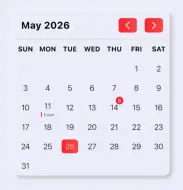
Add a badge on a specific day #
cellBuilder: (context, data) {
  if (data case DayCell cell when cell.day.day == 14) {
    return Stack(
      clipBehavior: Clip.none,
      children: [
        cell.child,
        const Positioned(
          right: 4,
          top: -2,
          child: Badge.count(count: 6),
        ),
      ],
    );
  }
  return data.child;
}
Replace a cell with an event layout #
cellBuilder: (context, data) {
  if (data case DayCell cell when cell.day.day == 11) {
    return Column(
      mainAxisSize: MainAxisSize.min,
      children: [
        const SizedBox(height: 6),
        const Text('11'),
        const Spacer(),
        Row(
          mainAxisAlignment: MainAxisAlignment.center,
          children: const [
            SizedBox(width: 2, height: 10),
            SizedBox(width: 4),
            Flexible(child: Text('Event', maxLines: 1, overflow: TextOverflow.ellipsis)),
          ],
        ),
      ],
    );
  }
  return data.child;
}
Range Picker Specific Behavior #
Edge cells and in-range cells are different #
Range theming distinguishes:
- Start/end (or single selected edge):
selectedEdgeCellDecoration,selectedEdgeCellTextStyle - Middle range cells:
selectedCellsDecoration,selectedCellsTextStyle
Decoration color extraction limitation #
When drawing range background behind edge cells, the package tries to extract color from the resolved in-range decoration. It currently extracts only from ShapeDecoration and BoxDecoration:
if (resolvedDecoration case ShapeDecoration(color: final color) || BoxDecoration(color: final color)) {
  decorationColor = color;
}
If you use any other Decoration implementation, color cannot be extracted automatically. In that case, provide your own resolvePainter.
Reuse the default painter with your own color #
theme: DatePickerPlusTheme(
  rangePickerTheme: RangePickerTheme(
    selectedCellsDecoration: const MyFancyDecoration(),
    resolvePainter: (textDirection, _, start) {
      return RangeSelectionPainter(
        textDirection: textDirection,
        color: const Color(0xFFCCE5FF), // provide your intended range color
        start: start,
      );
    },
  ),
)
Non-square edge shape gap #
If cells become taller than wide, a circular edge decoration can look visually detached from the full-height range background.
Fix options:
- Use
OvalBorderorStadiumBorderfor edge shape. - Adjust
cellsPaddingto reduce height/width mismatch.
selectedEdgeCellDecoration: ShapeDecoration(
  color: colorScheme.primary,
  shape: const OvalBorder(),
)
Behavioral Features #
Disable specific days #
Use disabledDayPredicate in DatePicker / DaysPicker:
disabledDayPredicate: (date) {
  return date.weekday == DateTime.saturday || date.weekday == DateTime.sunday;
}
View-only mode #
Set DatePickerPlusTheme.isEnabled to false:
- No taps
- No header navigation
- No month swiping
- Accessibility reports controls as disabled
theme: const DatePickerPlusTheme(isEnabled: false)
Start from month or year view #
initialPickerType: PickerType.months
// or
initialPickerType: PickerType.years
Track displayed month changes #
onDisplayedMonthChanged fires:
- On initial build
- On page swipes that change month
It passes the first day of the visible month.
Localization #
Enable Flutter localization delegates and locales in your app:
MaterialApp(
  localizationsDelegates: GlobalMaterialLocalizations.delegates,
  locale: const Locale('en', 'US'),
  supportedLocales: const [
    Locale('en', 'US'),
    Locale('en', 'GB'),
    Locale('ar'),
    Locale('zh'),
    Locale('ru'),
    Locale('es'),
    Locale('hi'),
  ],
  home: const MyHomePage(),
);
Then optionally override first day of week via DaysOfTheWeekTheme.startOfWeek if locale default is not desired.
Migration from v6 to v7 #
Theming moved to one theme object #
Per-widget visual parameters were removed. Use DatePickerPlusTheme and sub-themes.
// v6 style
DatePicker(
  minDate: minDate,
  maxDate: maxDate,
  slidersColor: Colors.blue,
  centerLeadingDate: true,
  selectedCellDecoration: BoxDecoration(color: Colors.red, shape: BoxShape.circle),
);

// v7 style
DatePicker(
  minDate: minDate,
  maxDate: maxDate,
  theme: const DatePickerPlusTheme(
    headerTheme: HeaderTheme(centerLeadingDate: true),
    daysPickerTheme: DaysPickerTheme(
      selectedCellDecoration: BoxDecoration(color: Colors.red, shape: BoxShape.circle),
    ),
  ),
);
initialDate renamed to displayedDate #
// v6
showDatePickerDialog(
  context: context,
  minDate: minDate,
  maxDate: maxDate,
  initialDate: someDate,
);

// v7
showDatePickerDialog(
  context: context,
  minDate: minDate,
  maxDate: maxDate,
  displayedDate: someDate,
);
Header button decoration type changed #
forwardButtonDecoration and backwardButtonDecoration now use ShapeDecoration.
Semantic label overrides removed #
previousPageSemanticLabel and nextPageSemanticLabel are no longer exposed. Material localizations are used internally.
Contribution #
Contributions are welcome. If you find a bug or want a feature, open an issue or PR on the GitHub repository.
Before creating a PR:
- Cover new features with tests.
- Ensure tests pass.
- Open an issue/feature discussion before large work.
- Provide a minimal reproducible example for reported issues.
- Use the official Dart Extension formatter (or
flutter format .). - Keep changes focused and minimal.
License #
This project is licensed under the MIT License. See LICENSE.
Metadata

Documentation
Publisher
unverified uploader
Weekly Downloads
Metadata
A Flutter library that provides a customizable Material Design date and range picker widgets.
Repository (GitHub)
View/report issues
License
 MIT (license)