
Error Stack for Flutter


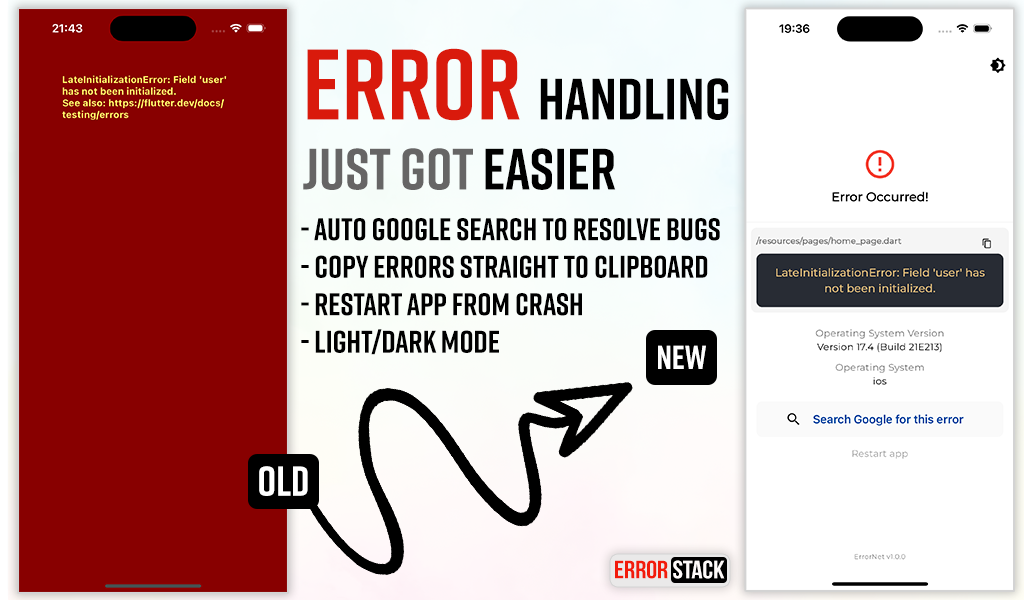
Error Stack is a comprehensive error handling and debugging toolkit for Flutter. It provides beautiful error screens in debug mode with actionable information, customizable error pages for production, and a powerful dev panel for runtime debugging.
Features
- Beautiful debug error screens with Google search links and stack traces
- Customizable production error pages
- Light and dark mode support
- Dev Panel - Runtime debugging tool with:
- API request/response logging
- Console logging with severity levels
- Navigation route tracking
- Local storage viewer (Secure Storage & Shared Preferences)
- UI debugging overlays (grid, layout bounds, etc.)
- Dio interceptor for automatic HTTP logging
- SOLID architecture with dependency injection support
Installation
Add the following to your pubspec.yaml:
dependencies:
  error_stack: ^2.0.0
Or install via command line:
dart pub add error_stack
Quick Start
Basic Setup
import 'package:flutter/material.dart';
import 'package:error_stack/error_stack.dart';

void main() async {
  WidgetsFlutterBinding.ensureInitialized();
  await ErrorStack.init();
  runApp(MyApp());
}

class MyApp extends StatelessWidget {
  @override
  Widget build(BuildContext context) {
    return MaterialApp(
      builder: ErrorStack.builder, // Adds dev panel and UI debug overlays
      home: HomePage(),
    );
  }
}
Nylo Integration
import 'package:error_stack/error_stack.dart';

class AppProvider {
  @override
  boot(Nylo nylo) async {
    nylo.useErrorStack();
  }
}
Configuration
Full Initialization Options
await ErrorStack.init(
  level: ErrorStackLogLevel.verbose,  // verbose | minimal
  initialRoute: '/',                   // Route for "Restart app" button
  forceDebugWidget: false,             // Show debug widget in release mode
  enableDevPanel: true,                // Enable/disable dev panel (default: debug mode only)
  devPanelConfig: DevPanelConfig(
    enableApiLogging: true,
    enableConsoleLogging: true,
    enableRouteTracking: true,
    apiLogLimit: 100,
    consoleLogLimit: 100,
    routeHistoryLimit: 50,
  ),
  errorWidget: (errorDetails) {        // Custom release mode error widget
    return Scaffold(
      body: Center(
        child: Text('Something went wrong'),
      ),
    );
  },
);
Log Levels
ErrorStackLogLevel.verbose(default) - Full stack trace and detailsErrorStackLogLevel.minimal- Basic error information only
Dev Panel
The Dev Panel is a runtime debugging tool accessible in debug mode. It provides 4 main tabs plus UI debugging tools.
Setup
import 'package:error_stack/error_stack.dart';

void main() async {
  WidgetsFlutterBinding.ensureInitialized();
  await ErrorStack.init();
  runApp(MyApp());
}

class MyApp extends StatelessWidget {
  @override
  Widget build(BuildContext context) {
    return MaterialApp(
      navigatorObservers: [ErrorStackNavigatorObserver()], // Route tracking
      builder: ErrorStack.builder, // Dev panel bar and UI overlays
      home: HomePage(),
    );
  }
}
Opening the Dev Panel
Option 1: Long-press the "Dev Mode" bar at the bottom of the screen
Option 2: Call programmatically:
ErrorStack.showDevPanel(context);
API Tab
View HTTP requests and responses with timing, headers, and body data.
Dio Integration
import 'package:error_stack/error_stack_dio.dart';

final dio = Dio();
dio.interceptors.add(ErrorStackDioInterceptor());

// All requests are automatically logged
final response = await dio.get('https://api.example.com/users');
Manual API Logging
// Log a complete request
DevPanelStore.instance.logApi(
  method: 'GET',
  url: 'https://api.example.com/users',
  statusCode: 200,
  durationMs: 150,
  requestHeaders: {'Authorization': 'Bearer token'},
  responseBody: {'users': []},
);

// Or track pending requests
final requestId = DevPanelStore.instance.startApiRequest(
  method: 'POST',
  url: 'https://api.example.com/data',
  requestBody: {'key': 'value'},
);

// Later, complete the request
DevPanelStore.instance.completeApiRequest(
  requestId: requestId,
  statusCode: 201,
  durationMs: 250,
  responseBody: {'success': true},
);
Logs Tab
Console logs with filtering by severity level.
import 'package:error_stack/error_stack.dart';

// Log at different levels
DevPanelStore.instance.debug('Debug message');
DevPanelStore.instance.info('User logged in', tag: 'auth');
DevPanelStore.instance.warning('Cache miss for key');
DevPanelStore.instance.error('Failed to load data', stackTrace: trace.toString());

// With metadata
DevPanelStore.instance.info(
  'Payment processed',
  tag: 'payments',
  metadata: {'amount': 99.99, 'currency': 'USD'},
);
Routes Tab
Navigation history with route names, arguments, and actions.
Route tracking is automatic when using ErrorStackNavigatorObserver:
MaterialApp(
  navigatorObservers: [ErrorStackNavigatorObserver()],
  // ...
)
Manual tracking is also available:
DevPanelStore.instance.trackRoutePush('/profile', arguments: {'userId': 123});
DevPanelStore.instance.trackRoutePop('/profile');
DevPanelStore.instance.trackRouteReplace('/home');
Storage Tab
View all local storage data from both Secure Storage and Shared Preferences.
UI Debug Tools
The dev panel includes visual debugging overlays:
| Tool | Description |
|---|---|
| Grid Paper | Overlay grid for alignment checking |
| Layout Bounds | Show widget boundaries |
| Text Scale | Override text scale (0.5-3.0x) |
| Color Blindness | Simulate protanopia, deuteranopia, tritanopia |
| Slow Animations | 5x animation slowdown |
| Performance Overlay | Flutter performance metrics |
| Safe Areas | Visualize safe area boundaries |
Control programmatically:
final store = DevPanelStore.instance;

store.toggleGridPaper(true);
store.setGridSpacing(24.0);
store.toggleLayoutBounds(true);
store.setTextScaleFactor(1.5);
store.setColorBlindnessMode(ColorBlindnessMode.protanopia);
store.toggleSlowAnimations(true);
store.togglePerformanceOverlay(true);
store.toggleSafeAreas(true);

// Reset all to defaults
store.resetUIDebugSettings();
Architecture
Error Stack follows SOLID principles with a modular design:
lib/
├── error_stack.dart              # Main entry point & exports
├── error_stack_dio.dart          # Dio interceptor export
├── src/
│   ├── config/                   # Configuration classes
│   ├── storage/                  # Storage abstraction
│   ├── handler/                  # Error handling logic
│   └── dev_panel/                # Dev panel components
│       ├── data/                 # Store, models, collections
│       ├── widgets/              # Panel UI widgets
│       ├── interceptors/         # Dio interceptor
│       └── observers/            # Navigator observer
└── widgets/                      # Error display widgets
Example
Check out the example app for comprehensive demos including:
- Basic setup
- Custom error widgets
- Dev panel features
- Dio integration
Changelog
See CHANGELOG for release history.
Social
License
The MIT License (MIT). See LICENSE for details.
Libraries
- error_stack
- ErrorStack - Custom error handling for Flutter applications.
- error_stack_dio
- widgets/error_stack_debug_widget
- widgets/error_stack_release_widget