
error_stack 2.0.0  error_stack: ^2.0.0 copied to clipboard
 nylo.dev
ErrorStack helps you swiftly deal with errors in your Flutter applications! Custom error handling UI and logging to keep you productive.
Error Stack for Flutter #


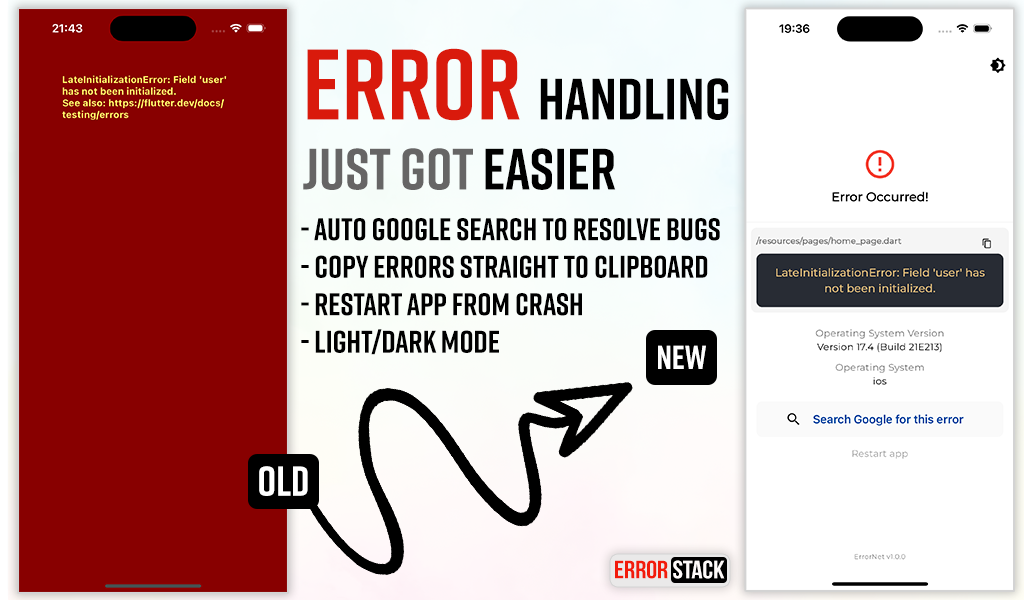
Error Stack is a comprehensive error handling and debugging toolkit for Flutter. It provides beautiful error screens in debug mode with actionable information, customizable error pages for production, and a powerful dev panel for runtime debugging.
Features #
- Beautiful debug error screens with Google search links and stack traces
- Customizable production error pages
- Light and dark mode support
- Dev Panel - Runtime debugging tool with:
- API request/response logging
- Console logging with severity levels
- Navigation route tracking
- Local storage viewer (Secure Storage & Shared Preferences)
- UI debugging overlays (grid, layout bounds, etc.)
- Dio interceptor for automatic HTTP logging
- SOLID architecture with dependency injection support
Installation #
Add the following to your pubspec.yaml:
dependencies:
  error_stack: ^2.0.0
Or install via command line:
dart pub add error_stack
Quick Start #
Basic Setup #
import 'package:flutter/material.dart';
import 'package:error_stack/error_stack.dart';

void main() async {
  WidgetsFlutterBinding.ensureInitialized();
  await ErrorStack.init();
  runApp(MyApp());
}

class MyApp extends StatelessWidget {
  @override
  Widget build(BuildContext context) {
    return MaterialApp(
      builder: ErrorStack.builder, // Adds dev panel and UI debug overlays
      home: HomePage(),
    );
  }
}
Nylo Integration #
import 'package:error_stack/error_stack.dart';

class AppProvider {
  @override
  boot(Nylo nylo) async {
    nylo.useErrorStack();
  }
}
Configuration #
Full Initialization Options #
await ErrorStack.init(
  level: ErrorStackLogLevel.verbose,  // verbose | minimal
  initialRoute: '/',                   // Route for "Restart app" button
  forceDebugWidget: false,             // Show debug widget in release mode
  enableDevPanel: true,                // Enable/disable dev panel (default: debug mode only)
  devPanelConfig: DevPanelConfig(
    enableApiLogging: true,
    enableConsoleLogging: true,
    enableRouteTracking: true,
    apiLogLimit: 100,
    consoleLogLimit: 100,
    routeHistoryLimit: 50,
  ),
  errorWidget: (errorDetails) {        // Custom release mode error widget
    return Scaffold(
      body: Center(
        child: Text('Something went wrong'),
      ),
    );
  },
);
Log Levels #
ErrorStackLogLevel.verbose(default) - Full stack trace and detailsErrorStackLogLevel.minimal- Basic error information only
Dev Panel #
The Dev Panel is a runtime debugging tool accessible in debug mode. It provides 4 main tabs plus UI debugging tools.
Setup #
import 'package:error_stack/error_stack.dart';

void main() async {
  WidgetsFlutterBinding.ensureInitialized();
  await ErrorStack.init();
  runApp(MyApp());
}

class MyApp extends StatelessWidget {
  @override
  Widget build(BuildContext context) {
    return MaterialApp(
      navigatorObservers: [ErrorStackNavigatorObserver()], // Route tracking
      builder: ErrorStack.builder, // Dev panel bar and UI overlays
      home: HomePage(),
    );
  }
}
Opening the Dev Panel #
Option 1: Long-press the "Dev Mode" bar at the bottom of the screen
Option 2: Call programmatically:
ErrorStack.showDevPanel(context);
API Tab #
View HTTP requests and responses with timing, headers, and body data.
Dio Integration
import 'package:error_stack/error_stack_dio.dart';

final dio = Dio();
dio.interceptors.add(ErrorStackDioInterceptor());

// All requests are automatically logged
final response = await dio.get('https://api.example.com/users');
Manual API Logging
// Log a complete request
DevPanelStore.instance.logApi(
  method: 'GET',
  url: 'https://api.example.com/users',
  statusCode: 200,
  durationMs: 150,
  requestHeaders: {'Authorization': 'Bearer token'},
  responseBody: {'users': []},
);

// Or track pending requests
final requestId = DevPanelStore.instance.startApiRequest(
  method: 'POST',
  url: 'https://api.example.com/data',
  requestBody: {'key': 'value'},
);

// Later, complete the request
DevPanelStore.instance.completeApiRequest(
  requestId: requestId,
  statusCode: 201,
  durationMs: 250,
  responseBody: {'success': true},
);
Logs Tab #
Console logs with filtering by severity level.
import 'package:error_stack/error_stack.dart';

// Log at different levels
DevPanelStore.instance.debug('Debug message');
DevPanelStore.instance.info('User logged in', tag: 'auth');
DevPanelStore.instance.warning('Cache miss for key');
DevPanelStore.instance.error('Failed to load data', stackTrace: trace.toString());

// With metadata
DevPanelStore.instance.info(
  'Payment processed',
  tag: 'payments',
  metadata: {'amount': 99.99, 'currency': 'USD'},
);
Routes Tab #
Navigation history with route names, arguments, and actions.
Route tracking is automatic when using ErrorStackNavigatorObserver:
MaterialApp(
  navigatorObservers: [ErrorStackNavigatorObserver()],
  // ...
)
Manual tracking is also available:
DevPanelStore.instance.trackRoutePush('/profile', arguments: {'userId': 123});
DevPanelStore.instance.trackRoutePop('/profile');
DevPanelStore.instance.trackRouteReplace('/home');
Storage Tab #
View all local storage data from both Secure Storage and Shared Preferences.
UI Debug Tools #
The dev panel includes visual debugging overlays:
| Tool | Description |
|---|---|
| Grid Paper | Overlay grid for alignment checking |
| Layout Bounds | Show widget boundaries |
| Text Scale | Override text scale (0.5-3.0x) |
| Color Blindness | Simulate protanopia, deuteranopia, tritanopia |
| Slow Animations | 5x animation slowdown |
| Performance Overlay | Flutter performance metrics |
| Safe Areas | Visualize safe area boundaries |
Control programmatically:
final store = DevPanelStore.instance;

store.toggleGridPaper(true);
store.setGridSpacing(24.0);
store.toggleLayoutBounds(true);
store.setTextScaleFactor(1.5);
store.setColorBlindnessMode(ColorBlindnessMode.protanopia);
store.toggleSlowAnimations(true);
store.togglePerformanceOverlay(true);
store.toggleSafeAreas(true);

// Reset all to defaults
store.resetUIDebugSettings();
Architecture #
Error Stack follows SOLID principles with a modular design:
lib/
├── error_stack.dart              # Main entry point & exports
├── error_stack_dio.dart          # Dio interceptor export
├── src/
│   ├── config/                   # Configuration classes
│   ├── storage/                  # Storage abstraction
│   ├── handler/                  # Error handling logic
│   └── dev_panel/                # Dev panel components
│       ├── data/                 # Store, models, collections
│       ├── widgets/              # Panel UI widgets
│       ├── interceptors/         # Dio interceptor
│       └── observers/            # Navigator observer
└── widgets/                      # Error display widgets
Example #
Check out the example app for comprehensive demos including:
- Basic setup
- Custom error widgets
- Dev panel features
- Dio integration
Changelog #
See CHANGELOG for release history.
Social #
License #
The MIT License (MIT). See LICENSE for details.
Metadata


Publisher
Weekly Downloads
Metadata
ErrorStack helps you swiftly deal with errors in your Flutter applications! Custom error handling UI and logging to keep you productive.
Homepage
Repository (GitHub)
View/report issues
Topics
#error-handling #error-ui #logging #custom-error
Documentation
Funding
Consider supporting this project:
github.com
License
 MIT (license)
Dependencies
dio, flutter, flutter_secure_storage, shared_preferences, url_launcher

