
zeba_academy_multi_device_sync 1.0.0  zeba_academy_multi_device_sync: ^1.0.0 copied to clipboard
 zeba.academy
Offline-first multi device sync over LAN or Bluetooth for Flutter apps
zeba_academy_multi_device_sync #
Offline-first multi-device synchronization for Flutter apps using LAN or Bluetooth.
zeba_academy_multi_device_sync allows Flutter applications to share and synchronize data across multiple nearby devices even without internet connectivity. The package is designed with an offline‑first architecture, enabling seamless collaboration between devices and automatic synchronization when a network becomes available.
✨ Features #
- Offline‑first data synchronization
- Sync devices over LAN or Bluetooth
- Automatic sync when network becomes available
- Event‑based notification system
- Conflict resolution strategies
- Optional encryption support
- Lightweight and developer‑friendly API
📦 Installation #
Add the dependency to your pubspec.yaml:
dependencies:
  zeba_academy_multi_device_sync: ^1.0.0
Then run:
flutter pub get
🚀 Quick Start #
Import the package:
import 'package:zeba_academy_multi_device_sync/zeba_academy_multi_device_sync.dart';
Create an instance:
final sync = ZebaMultiDeviceSync();
Start the sync server:
await sync.start();
Save shared data:
sync.save("task_1", "Finish Flutter project");
Listen for sync events:
sync.events.stream.listen((event) {
  print(event);
});
📱 Example UI #
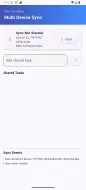
Below is a simple example demonstrating a shared task list synced across devices.
final ZebaMultiDeviceSync sync = ZebaMultiDeviceSync();

await sync.start();

sync.save("task_1", "Build offline sync app");
The example app included in the /example folder demonstrates:
- Starting a sync server
- Adding shared tasks
- Viewing synchronization events
- Displaying device IDs
🔐 Encryption Support #
Optional encryption can be enabled to secure synchronized data.
sync.enableEncryption("your-secret-key");
This ensures device‑to‑device communication remains secure.
🔄 Conflict Resolution #
When multiple devices update the same key, the package supports different conflict strategies:
- Last write wins
- Timestamp based merge
- Custom conflict handler
Example:
sync.setConflictStrategy(ConflictStrategy.lastWriteWins);
📂 Project Structure #
zeba_academy_multi_device_sync
 ├── lib
 ├── example
 ├── screenshots
 ├── test
 └── pubspec.yaml
📸 Screenshot #
See the example app UI demonstrating multi‑device synchronization.
🧪 Testing #
Run the tests with:
flutter test
Static analysis:
flutter analyze
🤝 Contributing #
Contributions, issues, and feature requests are welcome.
If you find a bug or want to improve the package, feel free to open an issue or submit a pull request.
📄 License #
This project is licensed under the GPL-3.0 License.
👨💻 About Me #
✨ I’m Sufyan bin Uzayr, an open-source developer passionate about building and sharing meaningful projects. You can learn more about me and my work at sufyanism.com or connect with me on Linkedin
Your all-in-one no-bloat hub! #
🚀 Explore cutting-edge resources in coding, tech, and development at zeba.academy and code.zeba.academy. Empower yourself with practical skills through curated directives, real-world projects, and hands-on experience. Level up your tech game today! 💻✨
Zeba Academy is a learning platform dedicated to coding, technology, and development.
➡ Visit our main site: https://zeba.academy ➡ Explore hands-on courses and resources at: https://code.zeba.academy ➡ Check out our YouTube for more tutorials: https://www.youtube.com/@zeba.academy ➡ Follow us on Instagram: https://www.instagram.com/zeba.academy/
Thank you for visiting!
Metadata

Documentation
Publisher
Weekly Downloads
Metadata
Offline-first multi device sync over LAN or Bluetooth for Flutter apps
License
 GPL-3.0 (license)
Dependencies
bluetooth_low_energy, crypto, encrypt, flutter, network_info_plus, rxdart, uuid

