
textfields 0.0.2  textfields: ^0.0.2 copied to clipboard
A custom textField Which can save your time.
Use prebuild flutter customTextField and save your quality time
Features #
Currently there are three types of textFields Available #
- Simple TextField With Border
- TextField With Prefix and suffix Icon
- TextField With Country Code
Getting started #
just install the pakage and use custome text Fields
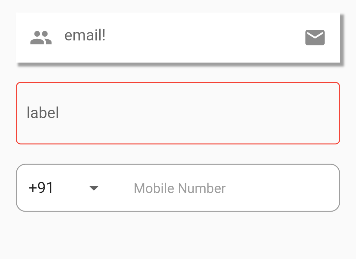
Code Snippet watch full example below #
- BorderTextFieldWithIcon
                BorderTextFieldWithIcon(
                hintText: "email",
                prefixIcon: Icon(
                  Icons.people,
                  // color: Colors.white,
                ),
                suffixIcon: Icon(
                  Icons.email,
                  // color: Colors.white,
                ),
              ),
- SimpleTextFieldWithBorder
                SimpleTextFieldWithBorder(
                label: "label",
                bordercolor: Colors.red,
              ),
- TextFieldWithCountryCodesDropDown
                  TextFieldWithCountryMobileNo(
                selectedCountryCode: selectedCountryCode,
                onChangedDropDown: (String? value) {
                  print(value);
                  selectedCountryCode = value!;
                  setState(() {});
                },
                onChanged: (String? text) {
                  print(text);
                },
              )
Usage #
class _MyHomePageState extends State<MyHomePage> {
  String selectedCountryCode = "+91";

  @override
  Widget build(BuildContext context) {
    return SafeArea(
      child: Scaffold(
        body: Padding(
          padding: const EdgeInsets.all(28.0),
          child: Column(
            mainAxisAlignment: MainAxisAlignment.center,
            children: [
              const BorderTextFieldWithIcon(
                hintText: "email",
                prefixIcon: Icon(
                  Icons.people,
                  // color: Colors.white,
                ),
                suffixIcon: Icon(
                  Icons.email,
                  // color: Colors.white,
                ),
              ),
              const SizedBox(
                height: 20,
              ),
              const SimpleTextFieldWithBorder(
                label: "label",
                bordercolor: Colors.red,
              ),
              const SizedBox(
                height: 20,
              ),
              TextFieldWithCountryMobileNo(
                selectedCountryCode: selectedCountryCode,
                onChangedDropDown: (String? value) {
                  print(value);
                  selectedCountryCode = value!;
                  setState(() {});
                },
                onChanged: (String? text) {
                  print(text);
                },
              )
            ],
          ),
        ),
      ),
    );
  }
}
Additional information #
Contribution is always welcome https://github.com/aman246149/flutter-custom-textfields
Metadata
6
likes
140
points
18
downloads
Publisher
unverified uploader
Weekly Downloads
Metadata
A custom textField Which can save your time.
Documentation
License
 MIT (license)

