
text_ko 0.1.1  text_ko: ^0.1.1 copied to clipboard
 curogom.dev
Korean-friendly text utilities for Flutter, including keep-all style word breaks and stable underline rendering.
example/lib/main.dart
import 'package:flutter/material.dart';
import 'package:text_ko/text_ko.dart';

const List<_TextScenario> _kTextScenarios = <_TextScenario>[
  _TextScenario(
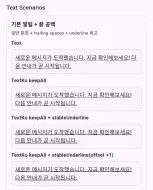
    title: '기본 알림 + 끝 공백',
    description: '일반 문장 + trailing spaces + underline 비교',
    text: '새로운 메시지가 도착했습니다. 지금 확인해보세요! 다음 안내가 곧 시작됩니다.  ',
    underline: true,
  ),
  _TextScenario(
    title: '한/영 혼합 + URL',
    description: '영문 버전/URL/숫자가 섞인 실제 공지 문장',
    text:
        '업데이트 v2.1.0 released. 한국어 문서와 release-note를 함께 확인하세요: https://example.com/docs/release-notes',
  ),
  _TextScenario(
    title: '이모지 혼합 문장',
    description: '이모지 시퀀스 포함 시 keepAll 처리 확인',
    text: '오늘의 상태 😀👍🔥 정상입니다. 안내 메시지를 꼭 확인해 주세요.',
  ),
  _TextScenario(
    title: '긴 어절(무공백) 테스트',
    description: '공백이 거의 없는 긴 한국어 어절의 동작 확인',
    text: '초장문어절테스트용문자열입니다한번에줄바꿈되면보기어렵습니다다양한기기폭에서확인하세요',
  ),
  _TextScenario(
    title: '연속 공백/탭 포함',
    description: '두 칸/세 칸/탭이 섞일 때 원문 보존 여부 확인',
    text: '공백  두 칸   세 칸\t탭 포함   끝공백  ',
    underline: true,
  ),
  _TextScenario(
    title: '개행 포함 문단',
    description: '멀티 라인 문단에서 변환/overflow 동작 확인',
    text: '첫 번째 줄입니다.\n두 번째 줄은 더 길게 작성해서 줄바꿈을 확인합니다.\n세 번째 줄입니다.',
  ),
];

void main() {
  runApp(const TextKoExampleApp());
}

class TextKoExampleApp extends StatelessWidget {
  const TextKoExampleApp({super.key});

  @override
  Widget build(BuildContext context) {
    return MaterialApp(
      title: 'text_ko example',
      theme: ThemeData(useMaterial3: true),
      home: const TextKoExamplePage(),
    );
  }
}

class TextKoExamplePage extends StatefulWidget {
  const TextKoExamplePage({super.key});

  @override
  State<TextKoExamplePage> createState() => _TextKoExamplePageState();
}

class _TextKoExamplePageState extends State<TextKoExamplePage> {
  double _previewWidth = 220;
  bool _limitLines = true;
  bool _useEllipsis = true;

  int? get _maxLines => _limitLines ? 3 : null;

  TextOverflow get _overflow {
    if (!_limitLines) {
      return TextOverflow.visible;
    }

    return _useEllipsis ? TextOverflow.ellipsis : TextOverflow.clip;
  }

  @override
  Widget build(BuildContext context) {
    final TextTheme textTheme = Theme.of(context).textTheme;

    return Scaffold(
      appBar: AppBar(title: const Text('text_ko playground')),
      body: ListView(
        key: const ValueKey<String>('playground_list'),
        padding: const EdgeInsets.all(16),
        children: <Widget>[
          _ControlCard(
            previewWidth: _previewWidth,
            limitLines: _limitLines,
            useEllipsis: _useEllipsis,
            onWidthChanged: (double value) {
              setState(() {
                _previewWidth = value;
              });
            },
            onLimitLinesChanged: (bool value) {
              setState(() {
                _limitLines = value;
              });
            },
            onUseEllipsisChanged: (bool value) {
              setState(() {
                _useEllipsis = value;
              });
            },
          ),
          const SizedBox(height: 16),
          Text('Text Scenarios', style: textTheme.titleMedium),
          const SizedBox(height: 8),
          for (final _TextScenario scenario in _kTextScenarios) ...<Widget>[
            _TextScenarioCard(
              scenario: scenario,
              previewWidth: _previewWidth,
              maxLines: _maxLines,
              overflow: _overflow,
            ),
            const SizedBox(height: 12),
          ],
          const SizedBox(height: 8),
          Text('RichText Scenarios', style: textTheme.titleMedium),
          const SizedBox(height: 8),
          _RichScenarioCard(
            title: '상태 배지 + 밑줄 끝 공백',
            description: 'rich span에서 keepAll 변환 비교',
            previewWidth: _previewWidth,
            maxLines: _maxLines,
            overflow: _overflow,
            spanBuilder: _buildStatusRichSpan,
          ),
          const SizedBox(height: 12),
          _RichScenarioCard(
            title: 'WidgetSpan + 이모지',
            description: 'WidgetSpan이 섞여도 RichTextKo 변환이 안전한지 확인',
            previewWidth: _previewWidth,
            maxLines: _maxLines,
            overflow: _overflow,
            spanBuilder: _buildWidgetRichSpan,
          ),
        ],
      ),
    );
  }
}

class _ControlCard extends StatelessWidget {
  const _ControlCard({
    required this.previewWidth,
    required this.limitLines,
    required this.useEllipsis,
    required this.onWidthChanged,
    required this.onLimitLinesChanged,
    required this.onUseEllipsisChanged,
  });

  final double previewWidth;
  final bool limitLines;
  final bool useEllipsis;
  final ValueChanged<double> onWidthChanged;
  final ValueChanged<bool> onLimitLinesChanged;
  final ValueChanged<bool> onUseEllipsisChanged;

  @override
  Widget build(BuildContext context) {
    final TextTheme textTheme = Theme.of(context).textTheme;

    return _CardShell(
      child: Column(
        crossAxisAlignment: CrossAxisAlignment.start,
        children: <Widget>[
          Text('Preview Controls', style: textTheme.titleSmall),
          const SizedBox(height: 4),
          Text(
            '폭/줄수/overflow를 바꿔서 줄바꿈과 underline 동작을 빠르게 비교하세요.',
            style: textTheme.bodySmall,
          ),
          const SizedBox(height: 8),
          Text('Preview width: ${previewWidth.toStringAsFixed(0)} px'),
          Slider(
            value: previewWidth,
            min: 140,
            max: 360,
            divisions: 11,
            label: previewWidth.toStringAsFixed(0),
            onChanged: onWidthChanged,
          ),
          SwitchListTile(
            contentPadding: EdgeInsets.zero,
            title: const Text('Limit maxLines (3)'),
            value: limitLines,
            onChanged: onLimitLinesChanged,
          ),
          SwitchListTile(
            contentPadding: EdgeInsets.zero,
            title: const Text('Use ellipsis when limited'),
            value: useEllipsis,
            onChanged: limitLines ? onUseEllipsisChanged : null,
          ),
        ],
      ),
    );
  }
}

class _TextScenarioCard extends StatelessWidget {
  const _TextScenarioCard({
    required this.scenario,
    required this.previewWidth,
    required this.maxLines,
    required this.overflow,
  });

  final _TextScenario scenario;
  final double previewWidth;
  final int? maxLines;
  final TextOverflow overflow;

  @override
  Widget build(BuildContext context) {
    final TextStyle baseStyle = TextStyle(
      fontSize: 15,
      height: 1.45,
      decoration: scenario.underline ? TextDecoration.underline : null,
    );

    return _CardShell(
      child: Column(
        crossAxisAlignment: CrossAxisAlignment.start,
        children: <Widget>[
          Text(
            scenario.title,
            style: const TextStyle(fontSize: 15, fontWeight: FontWeight.w700),
          ),
          const SizedBox(height: 4),
          Text(
            scenario.description,
            style: Theme.of(context).textTheme.bodySmall,
          ),
          const SizedBox(height: 10),
          _PreviewBlock(
            label: 'Text',
            previewWidth: previewWidth,
            child: Text(
              scenario.text,
              style: baseStyle,
              maxLines: maxLines,
              overflow: overflow,
            ),
          ),
          const SizedBox(height: 8),
          _PreviewBlock(
            label: 'TextKo keepAll',
            previewWidth: previewWidth,
            child: TextKo(
              scenario.text,
              style: baseStyle,
              wordBreak: TextKoWordBreak.keepAll,
              maxLines: maxLines,
              overflow: overflow,
            ),
          ),
          if (scenario.underline) ...<Widget>[
            const SizedBox(height: 8),
            _PreviewBlock(
              label: 'TextKo keepAll + stableUnderline',
              previewWidth: previewWidth,
              child: TextKo(
                scenario.text,
                style: baseStyle,
                wordBreak: TextKoWordBreak.keepAll,
                stableUnderline: true,
                maxLines: maxLines,
                overflow: overflow,
              ),
            ),
            const SizedBox(height: 8),
            _PreviewBlock(
              label: 'TextKo keepAll + stableUnderline(offset +1)',
              previewWidth: previewWidth,
              child: TextKo(
                scenario.text,
                style: baseStyle,
                wordBreak: TextKoWordBreak.keepAll,
                stableUnderline: true,
                stableUnderlineOffset: 1,
                maxLines: maxLines,
                overflow: overflow,
              ),
            ),
          ],
        ],
      ),
    );
  }
}

class _RichScenarioCard extends StatelessWidget {
  const _RichScenarioCard({
    required this.title,
    required this.description,
    required this.previewWidth,
    required this.maxLines,
    required this.overflow,
    required this.spanBuilder,
  });

  final String title;
  final String description;
  final double previewWidth;
  final int? maxLines;
  final TextOverflow overflow;
  final InlineSpan Function() spanBuilder;

  @override
  Widget build(BuildContext context) {
    return _CardShell(
      child: Column(
        crossAxisAlignment: CrossAxisAlignment.start,
        children: <Widget>[
          Text(
            title,
            style: const TextStyle(fontSize: 15, fontWeight: FontWeight.w700),
          ),
          const SizedBox(height: 4),
          Text(description, style: Theme.of(context).textTheme.bodySmall),
          const SizedBox(height: 10),
          _PreviewBlock(
            label: 'RichText',
            previewWidth: previewWidth,
            child: RichText(
              text: spanBuilder(),
              maxLines: maxLines,
              overflow: overflow,
            ),
          ),
          const SizedBox(height: 8),
          _PreviewBlock(
            label: 'TextKo.rich keepAll',
            previewWidth: previewWidth,
            child: TextKo.rich(
              spanBuilder(),
              wordBreak: TextKoWordBreak.keepAll,
              maxLines: maxLines,
              overflow: overflow,
            ),
          ),
          const SizedBox(height: 8),
          _PreviewBlock(
            label: 'RichTextKo keepAll',
            previewWidth: previewWidth,
            child: RichTextKo(
              spanBuilder(),
              wordBreak: TextKoWordBreak.keepAll,
              maxLines: maxLines,
              overflow: overflow,
            ),
          ),
        ],
      ),
    );
  }
}

class _PreviewBlock extends StatelessWidget {
  const _PreviewBlock({
    required this.label,
    required this.previewWidth,
    required this.child,
  });

  final String label;
  final double previewWidth;
  final Widget child;

  @override
  Widget build(BuildContext context) {
    return Column(
      crossAxisAlignment: CrossAxisAlignment.start,
      children: <Widget>[
        Text(label, style: const TextStyle(fontWeight: FontWeight.w600)),
        const SizedBox(height: 6),
        DecoratedBox(
          decoration: BoxDecoration(
            borderRadius: BorderRadius.circular(8),
            border: Border.all(color: Colors.black12),
            color: Colors.black.withValues(alpha: 0.015),
          ),
          child: Padding(
            padding: const EdgeInsets.all(10),
            child: Align(
              alignment: Alignment.centerLeft,
              child: SizedBox(width: previewWidth, child: child),
            ),
          ),
        ),
      ],
    );
  }
}

class _CardShell extends StatelessWidget {
  const _CardShell({required this.child});

  final Widget child;

  @override
  Widget build(BuildContext context) {
    return DecoratedBox(
      decoration: BoxDecoration(
        border: Border.all(color: Colors.black12),
        borderRadius: BorderRadius.circular(12),
      ),
      child: Padding(padding: const EdgeInsets.all(12), child: child),
    );
  }
}

class _TextScenario {
  const _TextScenario({
    required this.title,
    required this.description,
    required this.text,
    this.underline = false,
  });

  final String title;
  final String description;
  final String text;
  final bool underline;
}

InlineSpan _buildStatusRichSpan() {
  return const TextSpan(
    style: TextStyle(fontSize: 15, height: 1.45, color: Colors.black87),
    children: <InlineSpan>[
      TextSpan(
        text: '[긴급] ',
        style: TextStyle(fontWeight: FontWeight.w800, color: Colors.redAccent),
      ),
      TextSpan(text: '배포 상태: '),
      TextSpan(
        text: '승인대기  ',
        style: TextStyle(decoration: TextDecoration.underline),
      ),
    ],
  );
}

InlineSpan _buildWidgetRichSpan() {
  return const TextSpan(
    style: TextStyle(fontSize: 15, height: 1.45, color: Colors.black87),
    children: <InlineSpan>[
      TextSpan(text: '서비스 상태 '),
      WidgetSpan(
        alignment: PlaceholderAlignment.middle,
        child: Icon(Icons.check_circle, size: 16, color: Colors.green),
      ),
      TextSpan(text: ' 정상 😀\n'),
      TextSpan(text: '다음 점검: 09:30, '),
      TextSpan(
        text: '점검안내링크  ',
        style: TextStyle(decoration: TextDecoration.underline),
      ),
    ],
  );
}Metadata
4
likes
160
points
136
downloads

Publisher
Weekly Downloads
Metadata
Korean-friendly text utilities for Flutter, including keep-all style word breaks and stable underline rendering.
Topics
#flutter #korean #text #typography #cjk
Documentation
License
 MIT (license)

