
teqani_youtube_player 1.0.0  teqani_youtube_player: ^1.0.0 copied to clipboard
 teqani.org
A fully custom, dependency-free video player specifically optimized for YouTube video streams on both iOS and Android.
🎬 Teqani YouTube Player for Flutter #
The most powerful and flexible YouTube video player for Flutter applications, developed by Teqani.org.




A complete solution for integrating YouTube videos in your Flutter apps with unmatched customization, superior performance, and advanced features not available in other packages.
💡 NO API KEY REQUIRED! Unlike other YouTube player packages, Teqani YouTube Player works without requiring a YouTube API key or quota.
☕ Support This Project #
If you find this package helpful, consider buying us a coffee to support ongoing development and maintenance!

🤝 Need a custom Flutter package? Don't hesitate to reach out! We're passionate about building solutions that help the Flutter community. Contact us to discuss your ideas!
✨ Key Features #
- ✅ No YouTube API key needed - start using immediately without API quota limitations
- ✅ Fully customizable player UI - complete control over every visual element
- ✅ High-quality video playback - supports up to 4K resolution
- ✅ Advanced video quality selection - from 144p to 4K Ultra HD
- ✅ Professional visual filters - adjust brightness, contrast, sharpness, and saturation
- ✅ Branding with watermarks - add text or image watermarks with full positioning control
- ✅ Hardware acceleration - optimized performance on all devices
- ✅ Flexible playback controls - play, pause, seek, volume, and more
- ✅ Responsive design - works beautifully on any screen size
- ✅ Comprehensive event system - track all player states
- ✅ Cross-platform support - works on Android and iOS flawlessly
🔑 Zero API Key Requirements #
Teqani YouTube Player works right out of the box without needing a YouTube API key!
This means:
- No need to create a Google Developer account
- No API quota limitations to worry about
- No unexpected costs for high-traffic applications
- Simple setup without complex API configurations
- Immediate integration into your project
Simply add the package and start embedding YouTube videos in minutes!
🚀 PREMIUM FEATURE: Monetization with Advanced Ad Integration #
[SPECIAL HIGHLIGHT] Unlike other YouTube player packages, Teqani YouTube Player offers built-in advertising capabilities for monetizing your content!
Our advanced ad system supports:
- 📊 Multiple ad formats - image ads, video ads, and interactive ads
- ⏱️ Strategic ad placement - start, middle, end, or at custom timestamps
- 💰 Revenue generation - integrate with your ad networks
- 🎯 Customizable ad behavior - configurable durations and skip options
- 📱 Cross-platform ads - consistent experience on all devices
- 📈 Ad performance tracking - monitor impressions and interactions
No other Flutter YouTube player package offers such comprehensive ad integration capabilities!
🔥 COMING SOON: Exclusive Flutter Ads Network #
[EXCITING ANNOUNCEMENT] Soon you'll be able to supercharge your app monetization with our dedicated Flutter Ads Network!
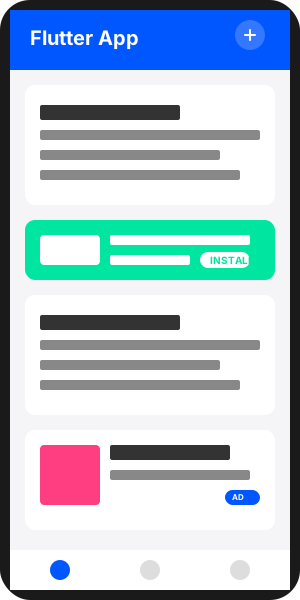
The Premium Ad Network Built Specifically for Flutter Developers #
Our upcoming Flutter Ads Network is built from the ground up to meet the unique needs of Flutter developers:
- 🚀 Flutter-First SDK - Native Flutter implementation for seamless integration
- ⚡ Lightning Fast - Optimized ad loading that doesn't slow down your application
- 🎨 Customizable Ad Units - Tailor ad appearance to match your app's design
- 📊 Real-time Analytics - Comprehensive dashboard with detailed performance metrics
- 🎯 Audience Targeting - Serve relevant ads to maximize engagement and revenue
- 🔒 Privacy Focused - Compliant with global privacy regulations including GDPR and CCPA
Why Flutter Developers Will Choose Our Platform #
- 💰 Higher Revenue - Our specialized Flutter ad network achieves up to 3x higher eCPMs
- 🔌 Easy Integration - Simple SDK with clear documentation makes implementation a breeze
- ⚡ Performance Optimized - Ads designed specifically for Flutter apps with minimal impact
- 💸 Fast Payments - Lower payment thresholds and multiple payout options
Join thousands of Flutter developers on our platform!
Learn more and sign up for early access
📦 Installation #
Add this top-rated package to your pubspec.yaml file:
dependencies:
  teqani_youtube_player: ^latest_version
Then run:
flutter pub get
🔍 Basic Usage #
Get started quickly with this simple implementation:
import 'package:flutter/material.dart';
import 'package:teqani_youtube_player/teqani_youtube_player.dart';

class YouTubePlayerExample extends StatelessWidget {
  @override
  Widget build(BuildContext context) {
    // Configure the player
    final playerConfig = PlayerConfig(
      videoId: 'dQw4w9WgXcQ', // Your YouTube video ID
      autoPlay: true,
      showControls: true,
    );

    // Create the player
    return TeqaniYoutubePlayer(
      controller: TeqaniYoutubePlayerController(
        initialConfig: playerConfig,
        onReady: () => print('Player is ready'),
        onStateChanged: (state) => print('Player state: $state'),
      ),
      aspectRatio: 16 / 9,
    );
  }
}
⚙️ Advanced Configuration Options #
Player Configuration #
Customize every aspect of your player:
final playerConfig = PlayerConfig(
  videoId: 'dQw4w9WgXcQ',
  autoPlay: true,
  showControls: true,
  fullscreenByDefault: false,
  allowFullscreen: true,
  muted: false,
  loop: false,
  playbackRate: 1.0,
  enableCaption: true,
  enableJsApi: true,
  showRelatedVideos: false,
  startAt: 30, // Start at 30 seconds
  endAt: 120, // End at 2 minutes
  enableHardwareAcceleration: true,
  volume: 0.8,
  styleOptions: YouTubeStyleOptions(
    showPlayButton: true,
    showVolumeControls: true,
    showProgressBar: true,
    showFullscreenButton: true,
  ),
);
Professional Watermarking #
Protect your content and enhance branding:
final playerConfig = PlayerConfig(
  videoId: 'dQw4w9WgXcQ',
  // Text watermark
  textWatermark: TextWatermarkConfig(
    text: '© Teqani.org',
    style: TextStyle(color: Colors.white.withOpacity(0.7)),
    position: WatermarkPosition.bottomRight,
    padding: EdgeInsets.all(16),
  ),
  // Image watermark
  imageWatermark: ImageWatermarkConfig(
    image: Image.asset('assets/logo.png'),
    size: Size(80, 40),
    position: WatermarkPosition.topRight,
    padding: EdgeInsets.all(16),
    opacity: 0.7,
  ),
);
Video Quality and Visual Enhancement #
Provide the best viewing experience:
// Set video quality
await controller.setVideoQuality('hd1080'); // 1080p

// Apply video filters
await controller.applyVideoFilters(
  brightness: 120, // Slightly brighter (100 is normal)
  contrast: 110,   // Slightly more contrast (100 is normal)
  sharpness: 130,  // Sharpen the video (100 is normal)
  saturation: 110, // Slightly more saturation (100 is normal)
);

// Reset filters
await controller.resetVideoFilters();
Comprehensive Player Controls #
Full control over the video playback:
// Play/pause controls
await controller.play();
await controller.pause();

// Volume controls
await controller.setVolume(0.5); // 50% volume
await controller.mute();
await controller.unmute();

// Seeking controls
await controller.seekTo(30.0); // Seek to 30 seconds
await controller.fastForward(10); // Forward 10 seconds
await controller.rewind(10); // Rewind 10 seconds

// Playback rate
await controller.setPlaybackRate(1.5); // 1.5x speed
💰 Monetization with Ad Integration #
[EXCLUSIVE FEATURE] Unlock revenue potential with our advanced ad integration system!
final playerConfig = PlayerConfig(
  videoId: 'dQw4w9WgXcQ',
  ads: [
    AdConfig(
      id: 'ad1',
      displayTime: AdDisplayTime.start,
      duration: Duration(seconds: 5),
      adType: AdType.image,
      imageUrl: 'https://example.com/ad.jpg',
      skipOffset: Duration(seconds: 3),
    ),
    AdConfig(
      id: 'ad2',
      displayTime: AdDisplayTime.half, // Show at 50% of video
      duration: Duration(seconds: 10),
      adType: AdType.video,
      videoUrl: 'https://example.com/ad.mp4',
    ),
    // Place ads at strategic points for maximum engagement
    AdConfig(
      id: 'ad3',
      displayTime: AdDisplayTime.quarter, // Show at 25% of video
      duration: Duration(seconds: 7),
      adType: AdType.image,
      imageUrl: 'https://example.com/ad2.jpg',
    ),
    AdConfig(
      id: 'ad4',
      displayTime: AdDisplayTime.custom,
      customStartTime: Duration(seconds: 180), // Custom timestamp
      duration: Duration(seconds: 15),
      adType: AdType.video,
      videoUrl: 'https://example.com/premium_ad.mp4',
      skipOffset: Duration(seconds: 5),
    ),
  ],
);
📱 Complete Implementation Example #
Create a fully-featured YouTube player with just a few lines of code:
import 'package:flutter/material.dart';
import 'package:teqani_youtube_player/teqani_youtube_player.dart';

void main() {
  runApp(MyApp());
}

class MyApp extends StatelessWidget {
  @override
  Widget build(BuildContext context) {
    return MaterialApp(
      title: 'Teqani YouTube Player Demo',
      theme: ThemeData(
        primarySwatch: Colors.blue,
      ),
      home: YouTubePlayerDemo(),
    );
  }
}

class YouTubePlayerDemo extends StatefulWidget {
  @override
  _YouTubePlayerDemoState createState() => _YouTubePlayerDemoState();
}

class _YouTubePlayerDemoState extends State<YouTubePlayerDemo> {
  late TeqaniYoutubePlayerController _controller;

  @override
  void initState() {
    super.initState();

    final playerConfig = PlayerConfig(
      videoId: 'dQw4w9WgXcQ',
      autoPlay: true,
      showControls: true,
      textWatermark: TextWatermarkConfig(
        text: '© Teqani.org',
        style: TextStyle(color: Colors.white.withOpacity(0.7)),
        position: WatermarkPosition.bottomRight,
      ),
      // Add monetization with ads
      ads: [
        AdConfig(
          id: 'welcome_ad',
          displayTime: AdDisplayTime.start,
          duration: Duration(seconds: 5),
          adType: AdType.image,
          imageUrl: 'https://example.com/ad.jpg',
          skipOffset: Duration(seconds: 3),
        ),
      ],
    );

    _controller = TeqaniYoutubePlayerController(
      initialConfig: playerConfig,
      onReady: () => print('Player is ready'),
      onStateChanged: (state) {
        print('Player state: $state');
        if (state == PlayerState.ended) {
          print('Video ended');
        }
      },
      onError: (error) => print('Error: ${error.message}'),
    );
  }

  @override
  void dispose() {
    _controller.dispose();
    super.dispose();
  }

  @override
  Widget build(BuildContext context) {
    return Scaffold(
      appBar: AppBar(
        title: Text('Teqani YouTube Player'),
      ),
      body: Column(
        children: [
          TeqaniYoutubePlayer(
            controller: _controller,
            aspectRatio: 16 / 9,
          ),
        ],
      ),
    );
  }
}
📋 System Requirements #
- Flutter: >=2.12.0
- Dart: >=2.12.0
- Android: minSdkVersion 17 or higher
- iOS: iOS 9.0 or higher
🏢 About Teqani.org #
This premium package is developed and maintained by Teqani.org, a leading company specializing in innovative digital solutions and advanced Flutter applications. With years of experience creating high-performance media tools, our team ensures you get the best YouTube integration possible.
📢 Why Choose Teqani YouTube Player? #
- No API Key Required: Start using immediately, no Google account or quota setup needed
- Superior Performance: Optimized for smooth playback on all devices
- Advanced Features: More capabilities than any other YouTube player package
- Monetization Ready: Built-in ad support for revenue generation
- Professional Support: Backed by Teqani.org's expert team
- Regular Updates: Continuous improvements and new features
📄 License #
This project is licensed under the MIT License - see the LICENSE file for details.
Copyright © 2025 Teqani.org. All rights reserved.
Metadata
Publisher
Weekly Downloads
Metadata
A fully custom, dependency-free video player specifically optimized for YouTube video streams on both iOS and Android.
Documentation
License
 MIT (license)
Dependencies
flutter, plugin_platform_interface, video_player, wakelock_plus, webview_flutter
More
Packages that depend on teqani_youtube_player
Packages that implement teqani_youtube_player

