
svg_splitter 1.0.2  svg_splitter: ^1.0.2 copied to clipboard
A Dart tool to automatically split SVG files into static and dynamic parts for Flutter theming. Perfect for creating themed icons that change colors based on app themes.
SVG Splitter #
A Dart command-line tool to automatically split SVG files into static and dynamic parts for Flutter theming. Perfect for creating themed icons that change colors based on app themes.

🎥 Video Preview #
Features #
- 🎨 Automatic splitting - Detects dynamic colors and splits SVG files automatically
- 🔧 Customizable - Specify custom dynamic colors via command-line flags
- 🚀 Easy to use - Simple command-line interface
- 📦 No dependencies - Pure Dart, no external dependencies
- ✅ Flutter ready - Perfect for use with
ThemedSvgIconor similar widgets
Installation #
As a dev dependency (Recommended) #
Add to your pubspec.yaml:
dev_dependencies:
  svg_splitter: ^1.0.1
Then run:
dart pub get
Global installation #
dart pub global activate svg_splitter
Make sure $HOME/.pub-cache/bin is in your PATH.
For detailed installation instructions, see INSTALL.md.
Usage #
Basic Usage #
Split an SVG file with default dynamic colors (#DB1C42, #FF0000):
# If installed as dev dependency
dart pub run svg_splitter assets/icons/my_icon.svg

# Or if globally installed
svg_splitter assets/icons/my_icon.svg

# Or use direct path
dart run packages/svg_splitter/bin/svg_splitter.dart assets/icons/my_icon.svg
With Custom Dynamic Colors #
# Single custom color
dart pub run svg_splitter assets/icons/icon.svg --dynamic-color=#FF0000

# Multiple custom colors
dart pub run svg_splitter assets/icons/icon.svg \
  --dynamic-color=#FF0000 \
  --dynamic-color=#DB1C42
Custom Output Directory #
dart pub run svg_splitter assets/icons/icon.svg --output-dir=assets/icons/split
Help #
dart pub run svg_splitter --help
How It Works #
- Reads your SVG file and parses all
<path>elements - Identifies dynamic parts by their fill color (default:
#DB1C42,#FF0000) - Creates static SVG with only non-dynamic paths (grey parts, etc.)
- Creates dynamic SVG with only dynamic paths, replacing their color with
#000000(black) soColorFiltercan tint them in Flutter
Example #
Input: my_icon.svg
<svg>
  <path fill="#B4B4B4" d="..."/> <!-- Static grey -->
  <path fill="#DB1C42" d="..."/> <!-- Dynamic red -->
</svg>
Output: my_icon_static.svg
<svg>
  <path fill="#B4B4B4" d="..."/> <!-- Only static parts -->
</svg>
Output: my_icon_dynamic.svg
<svg>
  <path fill="#000000" d="..."/> <!-- Dynamic parts in black -->
</svg>
Complete Workflow #
1. Design in Figma #
- Design your icon
- Use static colors (grey
#B4B4B4, black, etc.) for parts that should never change - Use dynamic colors (
#FF0000,#DB1C42, etc.) for parts that should change with theme
2. Export from Figma #
- Export as SVG
- Save to your project:
assets/icons/my_icon.svg
3. Split the SVG #
dart pub run svg_splitter assets/icons/my_icon.svg
4. Use in Flutter #
Use with a widget that supports selective coloring (like ThemedSvgIcon):
ThemedSvgIcon(
  assetPath: 'assets/icons/my_icon.svg',
  width: 45,
  height: 56,
)
The widget will automatically:
- Load
my_icon_static.svg(unchanged grey parts) - Load
my_icon_dynamic.svg(tinted with theme color)
For detailed Flutter setup, see SETUP.md.
Command Reference #
dart pub run svg_splitter <input.svg> [options]

Options:
  --dynamic-color=<color>    Colors to treat as dynamic (can be used multiple times)
                            Default: #DB1C42, #FF0000
  --output-dir=<dir>        Output directory (default: same as input file)
  --help, -h                Show this help message
Tips #
- Default dynamic colors:
#DB1C42(red),#FF0000(pure red) - detected automatically - Static colors: Everything else (grey
#B4B4B4, black, etc.) - One-time setup: Split once, use forever!
- File naming: Generated files follow pattern
{name}_static.svgand{name}_dynamic.svg
Documentation #
- Installation Guide - Detailed installation instructions
- Setup Guide - Integration with Flutter projects
- Publishing Guide - How to publish updates
- Adding Video Preview - How to add video demos
Example App #
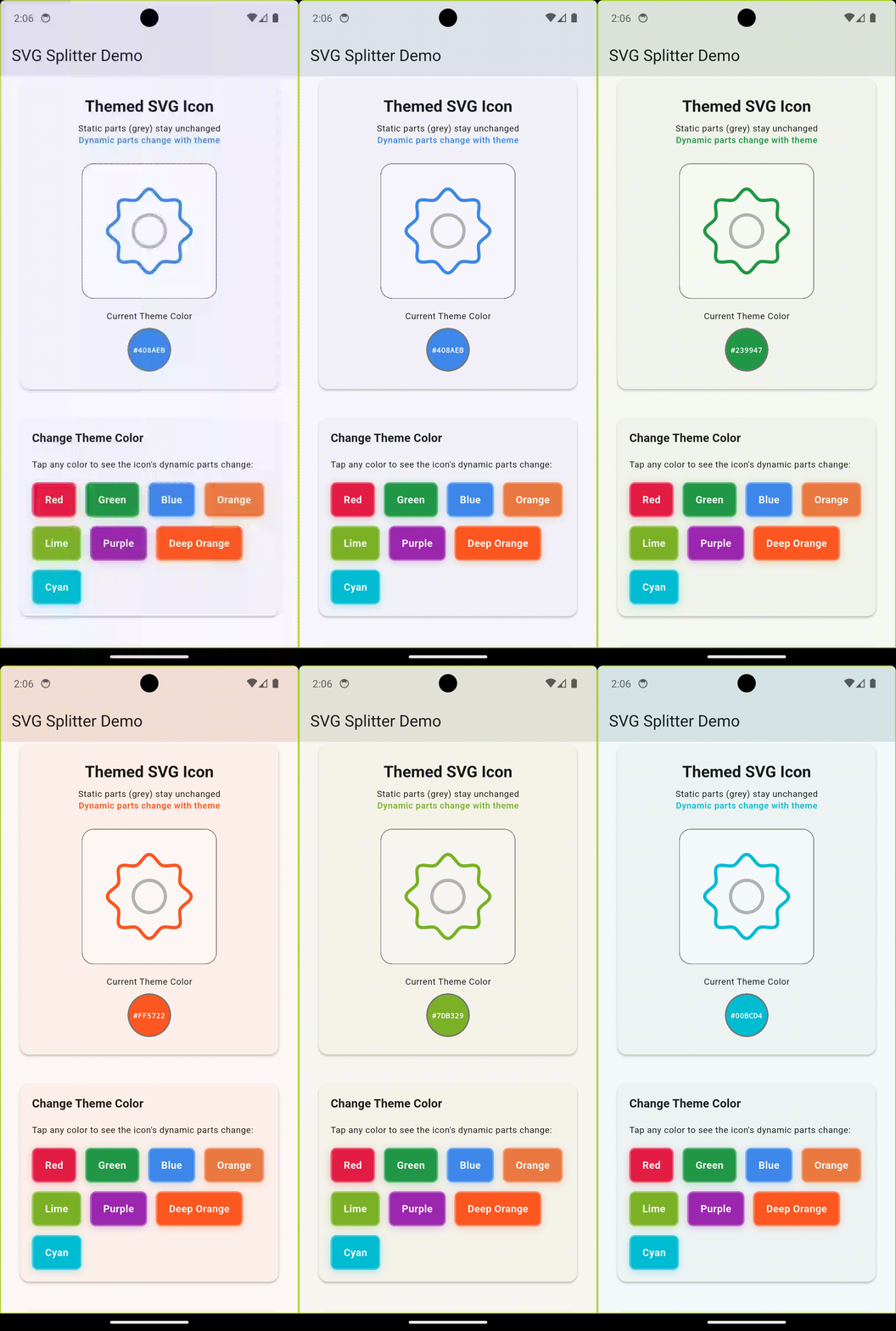
A complete example Flutter app is included in the example/ directory that demonstrates:
- ✅ Interactive SVG icon with theme color changes
- ✅ Color picker buttons to change theme colors
- ✅ Visual demonstration of static vs dynamic parts
- ✅ Complete working implementation
Run the example:
cd example
flutter pub get
flutter run
See example/README.md for detailed instructions.
Troubleshooting #
Tool not found?
dart pub get
dart pub run svg_splitter --help
Wrong colors detected? Specify your exact dynamic colors:
dart pub run svg_splitter icon.svg --dynamic-color=#YOUR_EXACT_COLOR
Paths not split correctly?
- Ensure SVG uses
fill="#COLOR"format (not CSS classes) - Check that colors are in hex format
- Verify SVG structure is valid
Contributing #
Contributions are welcome! Please feel free to submit a Pull Request.
License #
MIT License - see LICENSE file for details
Related Packages #
- Use the generated files with themed SVG widgets for Flutter
- Perfect for multi-tenant app theming
- Works great with
flutter_svgpackage
Metadata
Publisher
unverified uploader
Weekly Downloads
Metadata
A Dart tool to automatically split SVG files into static and dynamic parts for Flutter theming. Perfect for creating themed icons that change colors based on app themes.
Repository (GitHub)
View/report issues
License
 unknown (license)

