
sudoku_generator 1.0.5  sudoku_generator: ^1.0.5 copied to clipboard
A modern, identifiable Sudoku game widget built with Flutter and Riverpod.
Sudoku Generator #

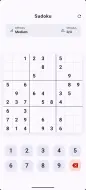
A modern, beautiful Sudoku game widget built with Flutter and Riverpod. This package provides a complete, production-ready Sudoku game that you can easily integrate into your Flutter applications.
✨ Features #
- 🎮 Complete Game Logic: Automatic puzzle generation, validation, and solution checking
- 🎨 Modern UI: Beautiful Material Design 3 interface with smooth animations
- 🌓 Theme Support: Automatically adapts to light and dark themes
- 📱 Responsive Design: Works seamlessly on phones, tablets, and desktop
- 🎯 State Management: Built with Riverpod for predictable state management
- ⚙️ Configurable: Adjustable difficulty levels and mistake limits
- 🏆 Game Features:
- Cell selection with highlighting
- Mistake tracking
- Win/lose detection
- New game generation
- Visual feedback for errors
|  |
|  |
|
📦 Installation #
Add this to your package's pubspec.yaml file:
dependencies:
  sudoku_generator: ^1.0.0
  flutter_riverpod: ^3.1.0
Then run:
flutter pub get
🚀 Quick Start #
Basic Usage #
- Wrap your app with
ProviderScope(required for Riverpod):
import 'package:flutter/material.dart';
import 'package:flutter_riverpod/flutter_riverpod.dart';
import 'package:sudoku_generator/sudoku_generator.dart';

void main() {
  runApp(const ProviderScope(child: MyApp()));
}

class MyApp extends StatelessWidget {
  const MyApp({super.key});

  @override
  Widget build(BuildContext context) {
    return MaterialApp(
      title: 'Sudoku Game',
      theme: ThemeData(
        colorScheme: ColorScheme.fromSeed(seedColor: Colors.deepPurple),
        useMaterial3: true,
      ),
      home: const GamePage(),
    );
  }
}
That's it! The GamePage widget provides a complete Sudoku game experience.
Advanced Usage #
For more control over the game state, you can access the gameProvider:
import 'package:flutter_riverpod/flutter_riverpod.dart';
import 'package:sudoku_generator/sudoku_generator.dart';

class CustomGameScreen extends ConsumerWidget {
  const CustomGameScreen({super.key});

  @override
  Widget build(BuildContext context, WidgetRef ref) {
    final gameState = ref.watch(gameProvider);

    // Access game state
    print('Mistakes: ${gameState.mistakes}/${gameState.maxMistakes}');
    print('Is Complete: ${gameState.isComplete}');

    // Or trigger actions
    ref.read(gameProvider.notifier).startNewGame(40); // Difficulty 40

    return const GamePage();
  }
}
📚 Documentation #
GamePage Widget #
The main widget that displays the complete Sudoku game interface.
const GamePage({Key? key})
Features:
- App bar with refresh button
- Game statistics display
- Interactive 9x9 Sudoku grid
- Number pad for input
- Automatic win/lose dialogs
Game State #
Access the current game state through the gameProvider:
final gameState = ref.watch(gameProvider);

// Available properties:
gameState.board           // 9x9 grid of SudokuCell
gameState.mistakes        // Current mistake count
gameState.maxMistakes     // Maximum allowed mistakes
gameState.isComplete      // Whether puzzle is solved
gameState.isLoading       // Whether new game is generating
gameState.selectedRow     // Currently selected row (0-8)
gameState.selectedCol     // Currently selected column (0-8)
Game Actions #
Control the game through the GameNotifier:
final notifier = ref.read(gameProvider.notifier);

// Start a new game
notifier.startNewGame(50); // difficulty: 50 cells removed

// Select a cell
notifier.selectCell(3, 5); // row 3, col 5

// Input a number
notifier.inputNumber(7); // enters 7 in selected cell
🎯 Difficulty Levels #
The difficulty is controlled by the number of cells removed from the complete puzzle:
- Easy: 20-35 cells removed
- Medium: 36-50 cells removed (default)
- Hard: 51-65 cells removed
// Start a hard game
ref.read(gameProvider.notifier).startNewGame(60);
🎨 Theming #
The game automatically adapts to your app's theme. It supports:
- Material Design 3
- Light and dark color schemes
- Custom color themes
The game uses your app's ColorScheme for consistent styling.
📱 Example #
Check out the example directory for a complete working application.
To run the example:
cd example
flutter pub get
flutter run
🤝 Dependencies #
- flutter_riverpod - State management
📄 License #
MIT License - see the LICENSE file for details.
🙏 Contributing #
Contributions are welcome! Please feel free to submit a Pull Request.
📧 Support #
If you have any questions or issues, please file them in the issue tracker.
☕ Support the Project
If Sudoku Generator has saved you development time or helped you ship faster, consider supporting the project.
This package is maintained in my free time, and your support helps:
Improve stability & performance
Add new widgets and features
Maintain long-term compatibility with Flutter updates

Metadata

Publisher
unverified uploader
Weekly Downloads
Metadata
A modern, identifiable Sudoku game widget built with Flutter and Riverpod.
Repository (GitHub)
View/report issues
Documentation
License
 MIT (license)
Dependencies
cupertino_icons, flutter, flutter_riverpod

