
spinning_wheel 0.0.6  spinning_wheel: ^0.0.6 copied to clipboard
 niteshmandal1.com.np
A customizable and animated spinning wheel for Flutter, perfect for games, lucky draws, and prize wheels.
🎡 Spinning Wheel - Flutter Package #


A fully customizable spinning wheel for Flutter applications! Easily create fortune wheels, prize spinners, or game-based random selectors with smooth animations and custom segments.
🌟 Features #
- ✅ Fully customizable spinning wheel 🎨
- ✅ Dual Image Support (Local Assets & Network URLs) 🖼️🌐
- ✅ Advanced Label Styling (Control rotation, style, and alignment) ✍️
- ✅ Supports text labels, colors, and images 🖼️
- ✅ Smooth animation with realistic spin physics 🎯
- ✅ Weighted Probability Support (Control win frequencies) ⚖️
- ✅ Callback for detecting spin completion 🔥
📸 Preview #
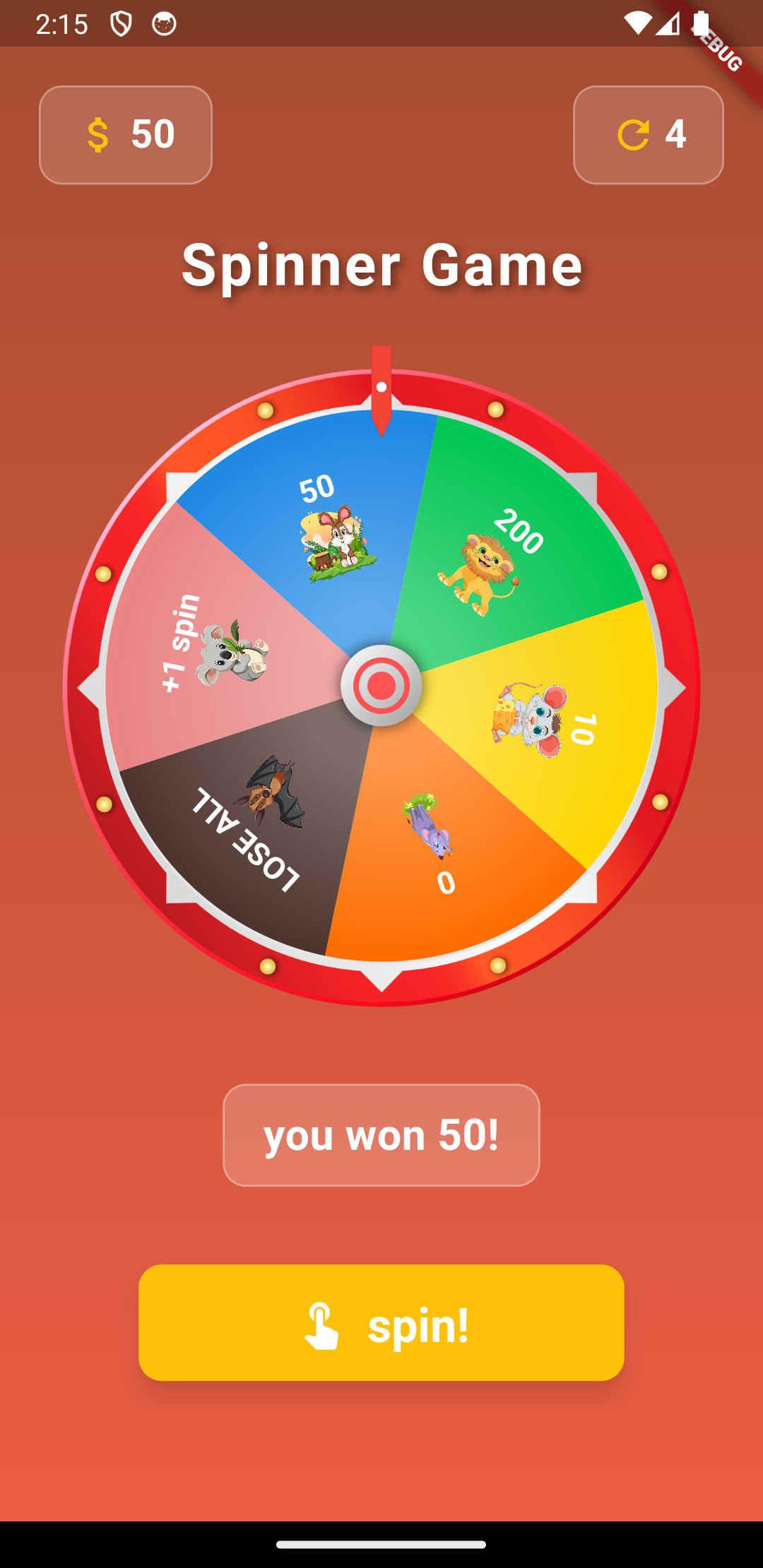
📦 Installation #
Add this package to your pubspec.yaml:
dependencies:
  spinning_wheel: ^0.0.6
🔧 Usage #
1️⃣ Import the Package #
import 'package:spinning_wheel/spinning_wheel.dart';
2️⃣ Create a SpinnerController #
final SpinnerController controller = SpinnerController();
3️⃣ Define Wheel Segments #
List<WheelSegment> segments = [
  WheelSegment("Prize 1", 10, color: Colors.red, probability: 0.5), // 50% chance
  WheelSegment("Prize 2", 20, color: Colors.blue, probability: 0.3), // 30% chance
  // Supports Network Images! 🌐
  WheelSegment("Gift", 100, path: "https://example.com/gift_icon.png"),
  WheelSegment("Prize 3", 30, color: Colors.green, probability: 0.2), // 20% chance
];
4️⃣ Add the SpinnerWheel Widget #
SpinnerWheel(
  controller: controller,
  segments: segments,
  wheelColor: Colors.white,
  // NEW: Advanced Label Styling 🎨
  labelStyle: const WheelLabelStyle(
    labelStyle: TextStyle(
      color: Colors.white,
      fontWeight: FontWeight.bold,
      fontSize: 14,
    ),
    angle: 0.0, // Rotate text labels as needed
  ),
  background: Image.asset('assets/wheel.png'), // Custom background widget
  shouldDrawBackground: true, // Toggle background visibility
  onComplete: (result, index) {
    print("You won: ${result.label}... at index $index");
  },
),
5️⃣ Start Spinning! #
controller.startSpin();
📜 API Reference #
SpinnerWheel #
| Property | Type | Description | Default |
|---|---|---|---|
controller |
SpinnerController |
Controls the spin animation | Required |
segments |
List<WheelSegment> |
List of wheel segments (labels, colors, images) | Required |
onComplete |
Function(WheelSegment, int) |
Callback triggered when spin completes | Required |
labelStyle |
WheelLabelStyle? |
Advanced styling for segment labels | Optional |
wheelColor |
Color? |
Background color tint of the wheel | Optional |
centerChild |
Widget? |
Custom widget for the wheel center | Optional |
indicator |
Widget? |
Custom widget for the indicator | Optional |
indicatorColor |
Color? |
Color for the default indicator | Optional |
imageHeight |
double? |
Height of segment images | Optional |
imageWidth |
double? |
Width of segment images | Optional |
background |
Widget? |
Custom widget for the wheel background layer | Optional |
shouldDrawBackground |
bool |
Toggle background visibility | true |
WheelLabelStyle #
| Property | Type | Description | Default |
|---|---|---|---|
labelStyle |
TextStyle? |
The theme/style of the text | Default |
angle |
double |
Additional rotation for the text (in radians) | 0.0 |
📄 License #
This package is licensed under the MIT License.
🙏 Support #
If you like this package, ⭐ Star it on GitHub!
For issues or feature requests, open an issue on GitHub.
Metadata
6
likes
160
points
235
downloads
Publisher
Weekly Downloads
Metadata
A customizable and animated spinning wheel for Flutter, perfect for games, lucky draws, and prize wheels.
Repository (GitHub)
View/report issues
Documentation
License
 MIT (license)

