
speech_to_text_native 1.0.1  speech_to_text_native: ^1.0.1 copied to clipboard
A powerful, easy-to-use Flutter plugin for real-time speech-to-text conversion using native iOS Speech Framework and Android SpeechRecognizer.
speech_to_text_native #


Speech to text native plugin for Flutter.
This Flutter package was vibe coded from react-native-speech-to-text by Arthur Delbeke. Thanks to his excellent work on the React Native version, this Flutter implementation was made possible!
✨ Features #
- 🎤 Real-time transcription with partial results as you speak
- 📱 Cross-platform support for iOS, Android, and macOS
- 🎯 Confidence scores for transcription accuracy
- 🌍 Multi-language support
- ⚡ Stream-based architecture for reactive programming
- 🔒 Built-in permission handling
- 📝 Full Dart/Flutter types included
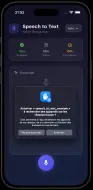
📸 Screenshots #
📦 Installation #
Add this to your package's pubspec.yaml file:
dependencies:
  speech_to_text_native: ^1.0.0
iOS Setup #
Add the following to your Info.plist:
<key>NSSpeechRecognitionUsageDescription</key>
<string>This app needs speech recognition to convert your voice to text</string>
<key>NSMicrophoneUsageDescription</key>
<string>This app needs microphone access to record your voice</string>
Android Setup #
Add the following permission to your AndroidManifest.xml:
<manifest xmlns:android="http://schemas.android.com/apk/res/android">
  <uses-permission android:name="android.permission.RECORD_AUDIO" />
</manifest>
The package handles runtime permission requests automatically.
macOS Setup #
Add the following to your macos/Runner/DebugProfile.entitlements and macos/Runner/Release.entitlements:
<key>com.apple.security.device.audio-input</key>
<true/>
Add the following to your macos/Runner/Info.plist:
<key>NSSpeechRecognitionUsageDescription</key>
<string>This app needs speech recognition to convert your voice to text</string>
<key>NSMicrophoneUsageDescription</key>
<string>This app needs microphone access to record your voice</string>
Note: On macOS, you may need to manually grant permissions in System Settings > Privacy & Security > Speech Recognition and Microphone. Use the
openSettings()method to direct users there.
🚀 Quick Start #
import 'package:speech_to_text_native/speech_to_text_native.dart';

class MyApp extends StatefulWidget {
  @override
  _MyAppState createState() => _MyAppState();
}

class _MyAppState extends State<MyApp> {
  final SpeechToText _speechToText = SpeechToText();
  String _transcript = '';
  bool _isListening = false;

  @override
  void initState() {
    super.initState();
    _initSpeechToText();
  }

  void _initSpeechToText() {
    // Listen for results
    _speechToText.onResult.listen((result) {
      setState(() {
        _transcript = result.transcript;
      });
      print('Confidence: ${result.confidence}');
      print('Is final: ${result.isFinal}');
    });

    // Listen for errors
    _speechToText.onError.listen((error) {
      print('Error: ${error.message}');
      setState(() => _isListening = false);
    });

    // Listen for end of speech
    _speechToText.onEnd.listen((_) {
      setState(() => _isListening = false);
    });
  }

  Future<void> _startListening() async {
    final available = await _speechToText.isAvailable();
    if (!available) {
      print('Speech recognition not available');
      return;
    }

    final hasPermission = await _speechToText.requestPermissions();
    if (!hasPermission) {
      print('Permission denied');
      return;
    }

    await _speechToText.start(); // Uses device language, or specify: language: 'en-US'
    setState(() => _isListening = true);
  }

  Future<void> _stopListening() async {
    await _speechToText.stop();
  }

  @override
  void dispose() {
    _speechToText.dispose();
    super.dispose();
  }

  @override
  Widget build(BuildContext context) {
    return Scaffold(
      body: Center(
        child: Column(
          mainAxisAlignment: MainAxisAlignment.center,
          children: [
            Text(_transcript.isEmpty ? 'Press start to begin' : _transcript),
            ElevatedButton(
              onPressed: _isListening ? _stopListening : _startListening,
              child: Text(_isListening ? 'Stop' : 'Start'),
            ),
          ],
        ),
      ),
    );
  }
}
📚 API Reference #
SpeechToText Class #
Methods
start({String? language})
Starts speech recognition.
// Use device language (auto-detected)
await speechToText.start();

// Or specify a language explicitly
await speechToText.start(language: 'en-US');
Parameters:
language(String?, optional): Language code (e.g., "en-US", "fr-FR", "es-ES"). If not provided, defaults to the device's locale.
Throws:
SpeechErrorwith appropriate error code
stop()
Stops speech recognition and sends the final transcript.
await speechToText.stop();
requestPermissions({PermissionOptions? options})
Requests necessary permissions for speech recognition.
final granted = await speechToText.requestPermissions(
  options: PermissionOptions(
    title: 'Microphone Permission',
    message: 'We need microphone access for speech recognition.',
    buttonPositive: 'Allow',
  ),
);
Returns: Future<bool> - true if permission granted
isAvailable()
Checks if speech recognition is available on the device.
final available = await speechToText.isAvailable();
Returns: Future<bool>
openSettings()
Opens the system settings for speech recognition permissions.
final hasPermission = await speechToText.requestPermissions();
if (!hasPermission) {
  // Ask user to grant permissions manually
  final opened = await speechToText.openSettings();
}
This is useful when:
- Permissions have been denied and need to be granted manually
- On macOS where requesting permissions programmatically can be problematic
Returns: Future<bool> - true if settings were opened successfully
Platform behavior:
- iOS: Opens Settings > Privacy > Speech Recognition
- macOS: Opens System Settings > Privacy & Security > Speech Recognition
- Android: Opens the app's settings page
Streams
onResult
Stream of transcription results (both partial and final).
speechToText.onResult.listen((result) {
  print('Transcript: ${result.transcript}');
  print('Confidence: ${result.confidence}');
  print('Is final: ${result.isFinal}');
});
onError
Stream of error events.
speechToText.onError.listen((error) {
  print('Error code: ${error.errorCode}');
  print('Error message: ${error.message}');
});
onEnd
Stream that emits when speech recognition ends.
speechToText.onEnd.listen((_) {
  print('Speech recognition ended');
});
Types #
SpeechResult
class SpeechResult {
  final String transcript;   // The recognized text
  final double confidence;   // Confidence score from 0.0 to 1.0
  final bool isFinal;        // true for final result, false for partial
}
SpeechError
class SpeechError {
  final SpeechErrorCode errorCode;
  final String message;
}
SpeechErrorCode
enum SpeechErrorCode {
  permissionDenied,
  notAvailable,
  requestFailed,
  startFailed,
  stopFailed,
  audioError,
  clientError,
  networkError,
  networkTimeout,
  recognizerBusy,
  serverError,
  unknownError,
}
PermissionOptions
class PermissionOptions {
  final String? title;           // Dialog title (Android only)
  final String? message;         // Dialog message (Android only)
  final String? buttonNeutral;   // Neutral button text
  final String? buttonNegative;  // Negative button text
  final String? buttonPositive;  // Positive button text
}
🌍 Supported Languages #
You can use any standard locale identifier. Here are some examples:
- English:
en-US,en-GB,en-AU - French:
fr-FR,fr-CA - Spanish:
es-ES,es-MX - German:
de-DE - Italian:
it-IT - Portuguese:
pt-BR,pt-PT - Japanese:
ja-JP - Chinese:
zh-CN,zh-TW - Korean:
ko-KR - Arabic:
ar-SA
Availability depends on the device and platform. Use isAvailable() to check.
🔧 Troubleshooting #
"Permission denied" error #
iOS:
- Make sure you've added
NSSpeechRecognitionUsageDescriptionandNSMicrophoneUsageDescriptionto yourInfo.plist - Check that the user granted permissions in Settings > Your App
Android:
- Ensure
RECORD_AUDIOpermission is inAndroidManifest.xml - Call
requestPermissions()beforestart()
"Speech recognition not available" #
- iOS: Speech recognition requires iOS 10+ and may not work in the simulator. Test on a real device.
- macOS: Speech recognition requires macOS 10.15+. Ensure permissions are granted in System Settings > Privacy & Security.
- Android: Ensure Google app or speech recognition service is installed and up to date.
No partial results showing #
- Partial results are enabled by default on both platforms
- On Android, partial results appear after a short delay
- Check that you're handling the
isFinalflag correctly
Recognition stops automatically #
- iOS: May stop automatically after detecting silence
- Android: Configured with 2-second pause detection
- Call
start()again to restart recognition
📄 License #
MIT
🔗 Links #
Metadata

Documentation
Publisher
unverified uploader
Weekly Downloads
Metadata
A powerful, easy-to-use Flutter plugin for real-time speech-to-text conversion using native iOS Speech Framework and Android SpeechRecognizer.
Topics
#speech-recognition #speech-to-text #voice #audio
License
 MIT (license)
Dependencies
flutter, plugin_platform_interface
More
Packages that depend on speech_to_text_native
Packages that implement speech_to_text_native

