
smart_search_list 0.8.0  smart_search_list: ^0.8.0 copied to clipboard
Searchable list and grid widget for Flutter. Offline filtering, async loading, pagination, fuzzy search, grouped lists and grids, and multi-select. Zero dependencies.
Smart Search List #
Every Flutter app with a list eventually needs search, filtering, sorting, and pagination. Building that properly means debouncing, async race conditions, disposal safety, empty states, accessibility -- roughly 200 lines of boilerplate per screen. Smart Search List handles all of it with a single widget. Zero dependencies.
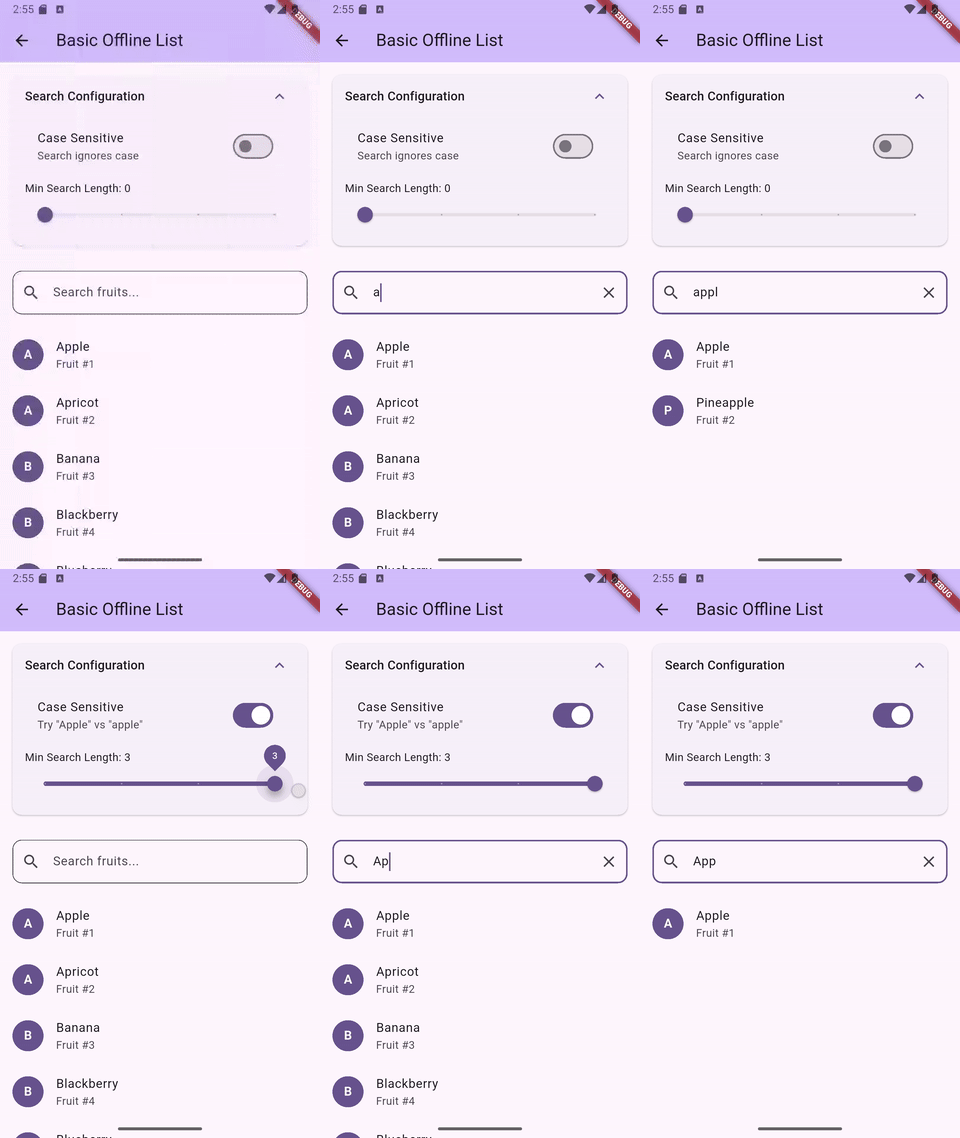
Offline search -- instant multi-field filtering
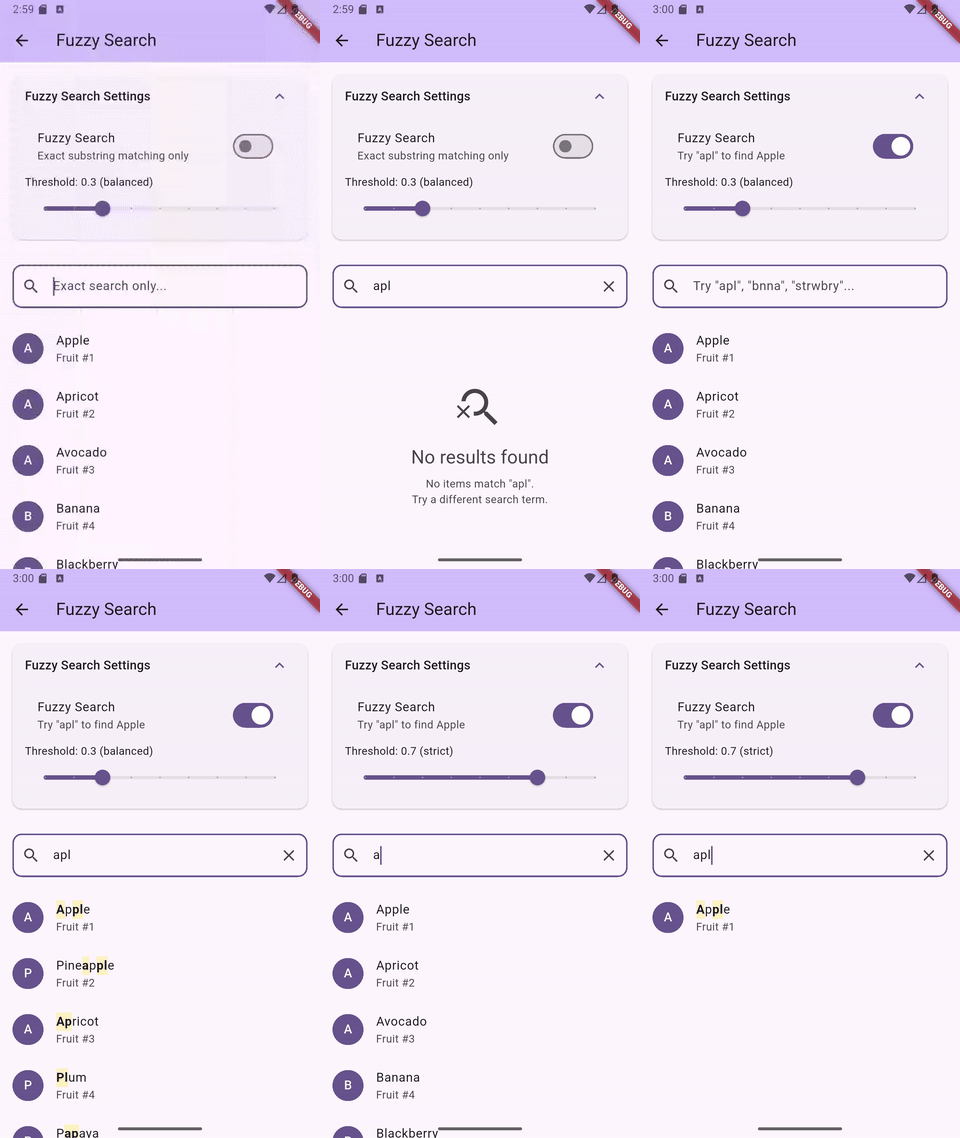
Fuzzy search -- typo-tolerant matching with character highlighting
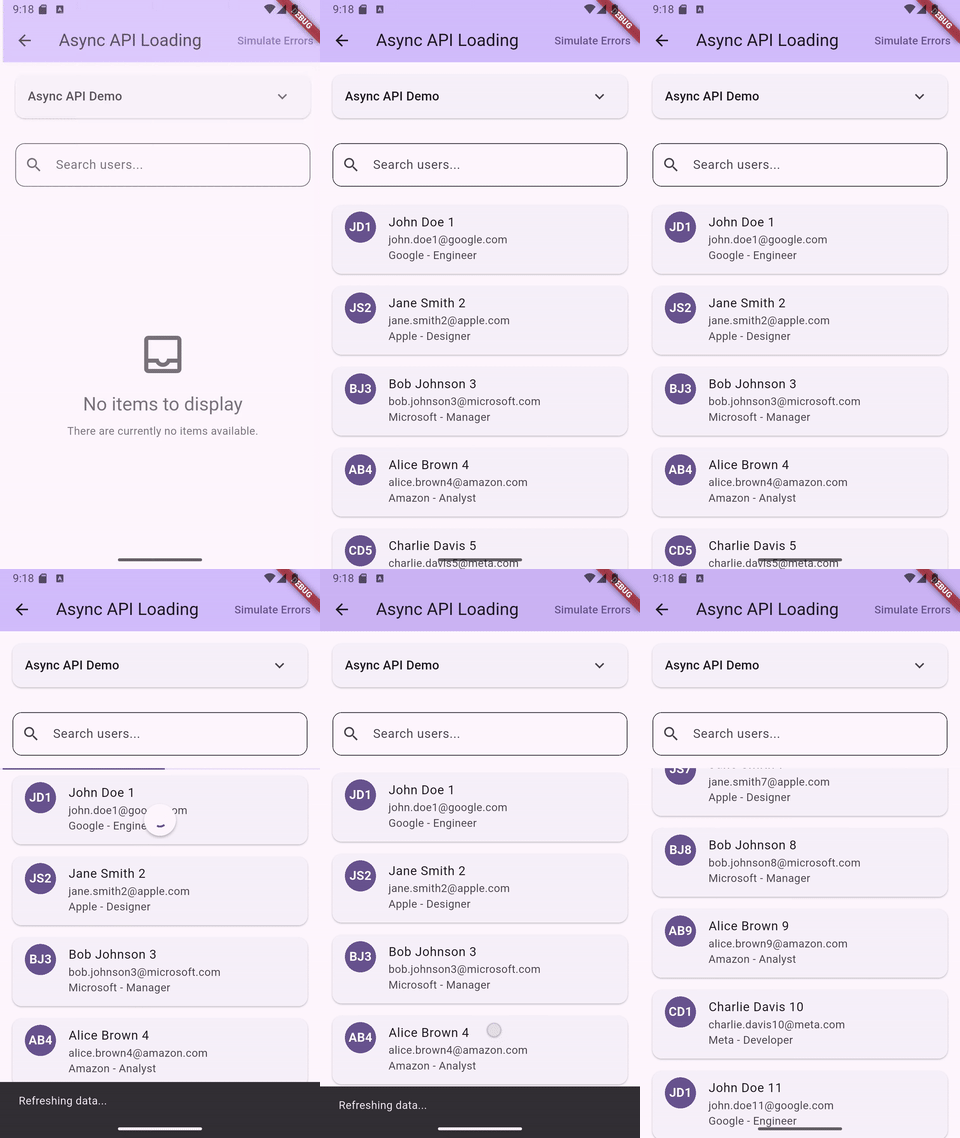
Async loading -- API pagination with search
Features #
- List and Grid layouts with search, filter, sort, and pagination
- Offline filtering with multi-field search
- Async data loading with pagination and pull-to-refresh
- Fuzzy search with typo tolerance and scored ranking (opt-in)
- Built-in search term highlighting widget
- Multi-select with checkboxes and programmatic selection
- Grouped lists and grids with section headers (sticky headers in slivers)
- Sliver variants for both list and grid (
SliverSmartSearchList,SliverSmartSearchGrid) - TalkBack/VoiceOver accessible with localizable labels
- All platforms -- Android, iOS, Web, macOS, Windows, Linux
Installation #
flutter pub add smart_search_list
Requires Flutter 3.35.0 or higher.
Upgrading from v0.7.x #
v0.8.0 adds grid widgets and has two breaking changes for SliverSmartSearchList users:
onRefreshremoved: Sliver widgets cannot contain aRefreshIndicator. Wrap yourCustomScrollViewwithRefreshIndicatorand callcontroller.refresh()directly.onSearchChangednow fires: Previously accepted but silently ignored on sliver variants. It now fires post-debounce when the controller's query value changes. Remove the callback if you don't need it, or update it for the new timing.
Note:
onSearchChangedtiming differs by widget type. OnSmartSearchListandSmartSearchGrid, it fires on every keystroke (pre-debounce). OnSliverSmartSearchListandSliverSmartSearchGrid, it fires only when the controller's query value actually changes (post-debounce). This is because sliver variants do not own a text field — they observe controller state changes instead.
Upgrading from v0.6.x #
v0.7.0 introduced named constructors for compile-time mode enforcement. Migration is straightforward:
- Offline lists (items + searchableFields): No change needed. The default constructor is identical.
- Async loading (asyncLoader): Change to
SmartSearchList.async(asyncLoader: ...)and removesearchableFields:. - External controller: Change to
SmartSearchList.controller(controller: ...). PasssearchableFields,debounceDelay, and fuzzy/case settings to the controller constructor instead ofsearchConfig.
See the CHANGELOG for full migration details with code examples.
Quick Start #
Offline List #
SmartSearchList<String>(
  items: ['Apple', 'Banana', 'Cherry', 'Date'],
  searchableFields: (item) => [item],
  itemBuilder: (context, item, index, {searchTerms = const []}) {
    return ListTile(title: Text(item));
  },
)
Async Loading #
SmartSearchList<Product>.async(
  asyncLoader: (query, {page = 0, pageSize = 20}) async {
    return await api.searchProducts(query, page: page);
  },
  itemBuilder: (context, product, index, {searchTerms = const []}) {
    return ProductCard(product: product);
  },
  paginationConfig: const PaginationConfiguration(
    pageSize: 20,
    enabled: true,
  ),
)
External Controller #
Use .controller() when you need programmatic access to search, filter, and sort state from outside the widget:
class ProductScreen extends StatefulWidget {
  const ProductScreen({super.key});
  @override
  State<ProductScreen> createState() => _ProductScreenState();
}

class _ProductScreenState extends State<ProductScreen> {
  final controller = SmartSearchController<Product>(
    searchableFields: (p) => [p.name, p.category],
  );

  @override
  void initState() {
    super.initState();
    controller.setFilter('in-stock', (p) => p.inStock);
    controller.setSortBy((a, b) => a.price.compareTo(b.price));
    controller.setItems(products);
  }

  @override
  void dispose() {
    controller.dispose();
    super.dispose();
  }

  @override
  Widget build(BuildContext context) {
    return SmartSearchList<Product>.controller(
      controller: controller,
      itemBuilder: (context, product, index, {searchTerms = const []}) {
        return ListTile(title: Text(product.name));
      },
    );
  }
}
Search Highlighting #
Use the built-in SearchHighlightText widget. It handles both exact and fuzzy matches:
itemBuilder: (context, item, index, {searchTerms = const []}) {
  return ListTile(
    title: SearchHighlightText(
      text: item,
      searchTerms: searchTerms,
      fuzzySearchEnabled: true,
      highlightColor: Colors.yellow.withValues(alpha: 0.3),
    ),
  );
},
Fuzzy Search #
Enable typo-tolerant matching with a single flag. Uses a 3-phase cascade: exact substring, ordered subsequence, then bounded edit distance (max 2 edits). Results are scored -- exact matches rank first.
searchConfig: const SearchConfiguration(
  fuzzySearchEnabled: true,
  fuzzyThreshold: 0.3,
),
Threshold Guide #
| Threshold | Behavior |
|---|---|
0.1 |
Very lenient -- includes weak fuzzy matches |
0.3 |
Default -- good balance for most use cases |
0.5 |
Moderate -- filters out edit-distance matches |
0.6+ |
Strict -- only exact and strong subsequence |
1.0 |
Exact substring only |
For lists over 5,000 items, test performance on target devices. Raising the threshold to 0.6+ skips the expensive edit-distance phase. Using SearchTriggerMode.onSubmit also helps by reducing search frequency.
Multi-Select #
SmartSearchList<String>(
  items: ['Apple', 'Banana', 'Cherry'],
  searchableFields: (item) => [item],
  itemBuilder: (context, item, index, {searchTerms = const []}) {
    return ListTile(title: Text(item));
  },
  selectionConfig: const SelectionConfiguration(
    enabled: true,
    showCheckbox: true,
    position: CheckboxPosition.leading,
  ),
  onSelectionChanged: (selected) {
    // selected is a Set<String> of currently checked items
    // Example: setState(() => _selectedItems = selected);
  },
)
Programmatic control via the controller: selectAll(), deselectAll(), selectWhere((item) => ...), toggleSelection(item).
Grouped Lists #
SmartSearchList<Product>(
  items: products,
  searchableFields: (p) => [p.name, p.category],
  itemBuilder: (context, product, index, {searchTerms = const []}) {
    return ListTile(title: Text(product.name));
  },
  groupBy: (product) => product.category,
  groupComparator: (a, b) => (a as String).compareTo(b as String),
)
Sticky headers are supported in SliverSmartSearchList via SliverMainAxisGroup.
Grid Layout #
Use SmartSearchGrid for grid-based layouts. It shares the same constructors and features as SmartSearchList -- the main difference is gridConfig (with a required gridDelegate) instead of listConfig:
SmartSearchGrid<Product>(
  items: products,
  searchableFields: (p) => [p.name, p.category],
  itemBuilder: (context, product, index, {searchTerms = const []}) {
    return ProductCard(product: product);
  },
  gridConfig: GridConfiguration(
    gridDelegate: SliverGridDelegateWithFixedCrossAxisCount(
      crossAxisCount: 2,
      childAspectRatio: 0.7,
    ),
  ),
)
For async grids with pagination, use SmartSearchGrid.async() — the API is identical to SmartSearchList.async().
All features work the same: .async() and .controller() constructors, grouping, multi-select, fuzzy search, pagination, accessibility. Use SliverSmartSearchGrid for CustomScrollView integration.
Customization #
Every UI component is replaceable via builders:
SmartSearchList<T>(
  items: myItems,
  searchableFields: (item) => [item.name],
  itemBuilder: (context, item, index, {searchTerms = const []}) => ...,
  searchFieldBuilder: (context, controller, focusNode, onClear) {
    return CustomSearchField(controller: controller);
  },
  loadingStateBuilder: (context) => const CircularProgressIndicator(),
  errorStateBuilder: (context, error, onRetry) {
    return ErrorWidget(error: error, onRetry: onRetry);
  },
  emptyStateBuilder: (context) => const Text('No data'),
  emptySearchStateBuilder: (context, query) => Text('No results for "$query"'),
  progressIndicatorBuilder: (context, isLoading) {
    if (!isLoading) return const SizedBox.shrink();
    return const LinearProgressIndicator(minHeight: 2);
  },
  belowSearchWidget: Wrap(
    spacing: 8,
    children: [
      FilterChip(label: Text('In Stock'), onSelected: (_) {}),
      FilterChip(label: Text('On Sale'), onSelected: (_) {}),
    ],
  ),
)
Configuration #
SmartSearchList<T>(
  items: myItems,
  searchableFields: (item) => [item.name],
  itemBuilder: (context, item, index, {searchTerms = const []}) => ...,
  searchConfig: const SearchConfiguration(
    enabled: true,
    autofocus: false,
    debounceDelay: Duration(milliseconds: 300),
    hintText: 'Search...',
    caseSensitive: false,
    minSearchLength: 0,
    triggerMode: SearchTriggerMode.onEdit, // or .onSubmit
    fuzzySearchEnabled: false,
    fuzzyThreshold: 0.3,
  ),
  listConfig: const ListConfiguration(
    pullToRefresh: true,
    shrinkWrap: false,
    itemExtent: 72.0, // fixed height for better scroll performance
  ),
  paginationConfig: const PaginationConfiguration(
    pageSize: 20,
    enabled: true,
    triggerDistance: 200.0,
  ),
)
Accessibility #
TalkBack and VoiceOver work out of the box. Default widgets include semantic labels, tooltips, and result count announcements via SemanticsService.sendAnnouncement().
Customize labels for localization:
SmartSearchList<String>(
  accessibilityConfig: AccessibilityConfiguration(
    searchFieldLabel: 'Buscar frutas',
    clearButtonLabel: 'Borrar búsqueda',
    searchButtonLabel: 'Buscar',
    resultsAnnouncementBuilder: (count) {
      if (count == 0) return 'Sin resultados';
      return '$count resultados encontrados';
    },
  ),
  // ...
)
Set searchSemanticsEnabled: false to disable all automatic semantics if you handle accessibility in your own builders.
Example App #
The example app includes 19 demos covering every feature: basic search, async pagination, fuzzy search, multi-select, grouped lists, grid layouts, sliver integration, accessibility, and more.
cd example && flutter run
License #
Apache 2.0. See LICENSE.
Metadata
Publisher
unverified uploader
Weekly Downloads
Metadata
Searchable list and grid widget for Flutter. Offline filtering, async loading, pagination, fuzzy search, grouped lists and grids, and multi-select. Zero dependencies.
Repository (GitHub)
View/report issues
Topics
#search #listview #gridview #fuzzy-search #accessibility
Documentation
License
 Apache-2.0 (license)

