
simple_clean_navbar 1.0.2  simple_clean_navbar: ^1.0.2 copied to clipboard
The ultimate customizable bottom navigation bar for Flutter. Supports Floating, Side Rail, RTL, Dark Mode, Animations, and Immersive System UI.


Simple Clean NavBar #
The Ultimate Navigation Bar for Flutter. Simple, animated, responsive, and highly customizable. Version 1.0.2 introduces Floating Mode, Side Rail support, 3 Animation types, and Immersive System UI integration.
Designed to look clean on phones, tablets, and the web, automatically handling RTL (Persian/Arabic) and Dark Mode.
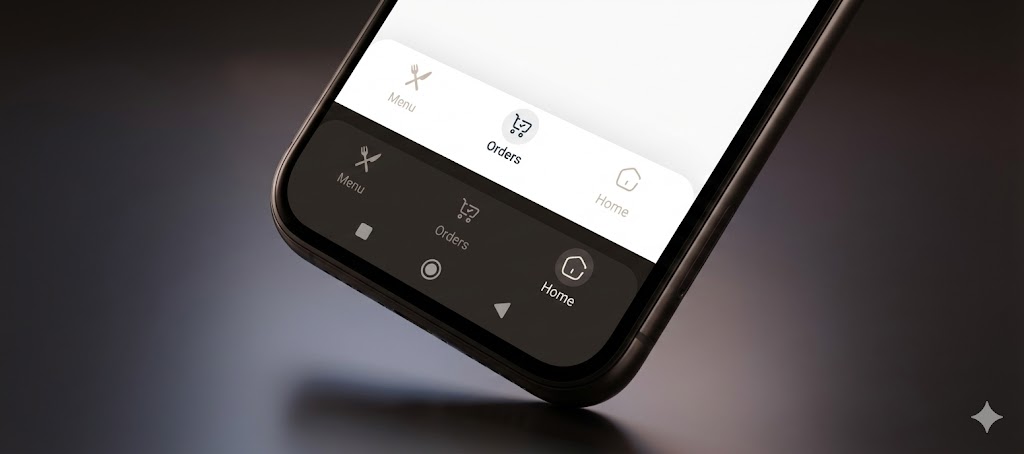
✨ Features #
-
🎈 Floating & Fixed Modes: Switch between a modern floating design or a classic fixed bar.
-
📐 Fully Responsive: Automatically adapts to a Bottom Bar (Mobile) or a vertical Side Rail (Tablet/Web).
-
🎨 3 Animation Types: Choose between Circle, Zoom, and Float (Jump) animations.
-
📝 Smart Text Modes: Control labels with onSelect, alwaysShow, or neverShow.
-
📱 Immersive UI: Automatically matches the Android System Navigation Bar color with your navbar.
-
🌓 Theme Aware: Seamless support for Dark and Light modes.
-
🌍 RTL Support: Built-in support for Right-to-Left languages.
📦 Installation #
Add this to your pubspec.yaml:
dependencies:
  simple_clean_navbar: ^1.0.2
🚀 Usage #
1. Minimal Example

Get started in seconds. Just provide the items and the current index.

import 'package:simple_clean_navbar/simple_clean_navbar.dart';

SimpleCleanNavBar(
  currentIndex: _selectedIndex,
  onTap: (index) => setState(() => _selectedIndex = index),
  items: const [
    SimpleNavBarItem(label: 'Home', icon: Icons.home),
    SimpleNavBarItem(label: 'Explore', icon: Icons.explore),
    SimpleNavBarItem(label: 'Profile', icon: Icons.person),
  ],
)
- The Ultimate Configuration
Unleash the full power of v1.0.0 with animations, floating mode, and side rail support.
SimpleCleanNavBar(
  // Data
  currentIndex: _selectedIndex,
  onTap: (index) => setState(() => _selectedIndex = index),
  items: const [
    SimpleNavBarItem(label: 'Home', icon: Icons.home_rounded),
    SimpleNavBarItem(label: 'Shop', icon: Icons.shopping_bag_rounded),
    SimpleNavBarItem(label: 'Settings', icon: Icons.settings_rounded),
  ],

  // Design & Colors
  backgroundColor: Colors.white,
  selectedColor: Colors.blue,
  unselectedColor: Colors.grey,

  // Layout Modes
  isFloating: true,  // Enables the floating rounded design with shadow
  isSideRail: false, // Set to true for vertical layout (Tablet/Web)
  isRailOnLeft: true,// Position the rail on Left or Right

  // Animations & Text
  animationType: SimpleNavAnimType.float, // Options: .circle, .zoom, .float
  textMode: SimpleNavTextMode.onSelect,   // Options: .alwaysShow, .onSelect, .neverShow

  // System UI
  updateSystemNavBar: true, // Automatically colors the Android bottom bar to match
)
📱 Responsive Layout Guide (Phone vs Tablet) #
One of the best features of simple_clean_navbar is the ability to transform from a Bottom Bar to a Side Rail.
Use MediaQuery or a LayoutBuilder to toggle isSideRail.
@override
Widget build(BuildContext context) {
  // Check if the screen is wide (Tablet/Web)
  final isWide = MediaQuery.of(context).size.width > 600;

  return Scaffold(
    // 1. On Mobile: Show Bottom Navigation Bar
    bottomNavigationBar: isWide
        ? null
        : SimpleCleanNavBar(
            currentIndex: _index,
            onTap: (i) => setState(() => _index = i),
            items: _items,
            isFloating: true, // Optional: Make it floating on mobile
          ),

    // 2. On Tablet/Web: Show Side Rail next to the body
    body: Row(
      children: [
        if (isWide)
          SimpleCleanNavBar(
            isSideRail: true, // Enable vertical mode
            isRailOnLeft: true,
            currentIndex: _index,
            onTap: (i) => setState(() => _index = i),
            items: _items,
            isFloating: true, // Optional: Make the rail floating
          ),

        // Your Main Content
        Expanded(child: MyPageContent()),
      ],
    ),
  );
}
❤️ Support #
If you find this package useful, please give it a generic Like on pub.dev and a ⭐️ on GitHub.
Created with ❤️ by Nima Kharraji.
Metadata
Publisher
unverified uploader
Weekly Downloads
Metadata
The ultimate customizable bottom navigation bar for Flutter. Supports Floating, Side Rail, RTL, Dark Mode, Animations, and Immersive System UI.
Repository (GitHub)
View/report issues
Topics
#navbar #bottom-navigation #side-rail #responsive-ui #animation
Documentation
License
 MIT (license)

