
scroll_spy 0.2.7  scroll_spy: ^0.2.7 copied to clipboard
 tomars.tech
Compute focused items and a stable primary item in a scrollable viewport (feed/autoplay/analytics).
ScrollSpy #
|
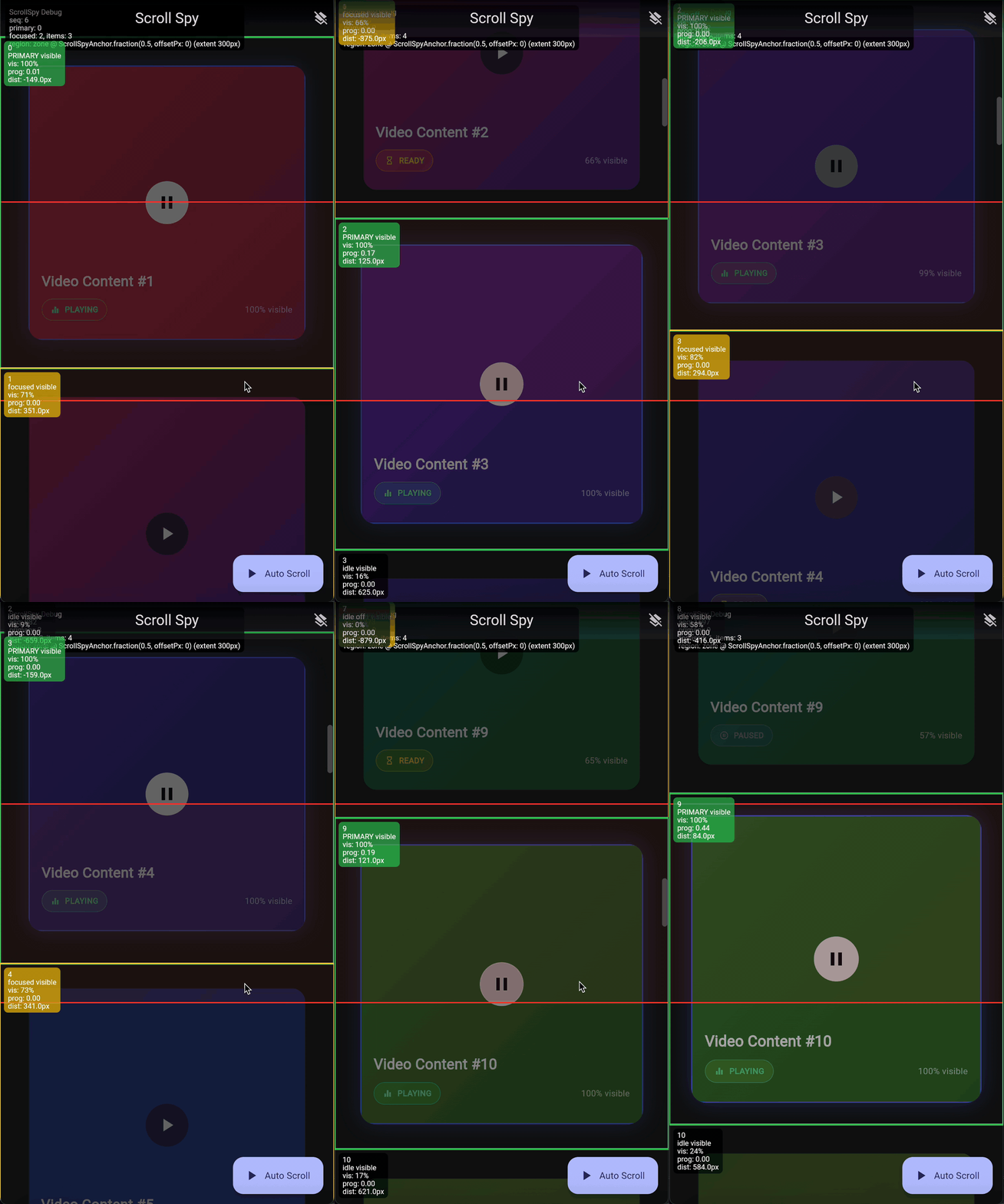
Viewport-aware focus detection for scrollables. Compute focused items and a stable primary item for feeds, autoplay, analytics, and prefetching. |
Features #
- Primary + focused selection
primaryId: one winnerfocusedIds: all items intersecting the focus regionsnapshot: full per-item metrics
- Configurable focus region
ScrollSpyRegion.zone(...)(recommended default)ScrollSpyRegion.line(...)ScrollSpyRegion.custom(...)
- Multiple primary selection policies
- closest to anchor
- largest visible fraction
- largest overlap with focus region
- largest focus progress
- fully custom comparator
- Anti-flicker stability
- hysteresis (px)
- minimum primary duration
- optional keep-primary fallback when no item is focused
- Update policy (performance control)
- per-frame
- scroll-end only (debounced)
- hybrid (per-frame drag + throttled ballistic + final settle)
- Built for scroll performance: O(N mounted) focus computation + O(1) targeted updates. ScrollSpy minimizes rebuild fan-out with per-item notifiers and diff-only global signals, and offers tunable focus detection. Often faster in real feeds; choose the right update policy and listeners for your use case.
- Debug overlay
- paints focus region + primary/focused outlines + optional labels
Install #
Add to pubspec.yaml:
dependencies:
  scroll_spy: ^0.2.7
Then:
import 'package:scroll_spy/scroll_spy.dart';
Quick mental model #
- Scope measures each registered item in viewport coordinates.
- Region decides
isFocusedand computes focus metrics. - Policy picks a primary candidate from the focused set.
- Stability smooths primary changes to avoid flicker.
- Controller exposes the results as listenables.
Quick start (Scope + Item) #
Use this form if you already have a custom scrollable and do not want the convenience wrappers.
final focus = ScrollSpyController<int>();

@override
void dispose() {
  focus.dispose();
  super.dispose();
}

@override
Widget build(BuildContext context) {
  return ScrollSpyScope<int>(
    controller: focus,
    region: ScrollSpyRegion.zone(
      anchor: const ScrollSpyAnchor.fraction(0.5),
      extentPx: 180,
    ),
    policy: const ScrollSpyPolicy<int>.closestToAnchor(),
    stability: const ScrollSpyStability(
      hysteresisPx: 24,
      minPrimaryDuration: Duration(milliseconds: 120),
      preferCurrentPrimary: true,
      allowPrimaryWhenNoItemFocused: true,
    ),
    updatePolicy: const ScrollSpyUpdatePolicy.perFrame(),
    child: ListView.builder(
      itemExtent: 220,
      itemCount: 60,
      itemBuilder: (context, index) {
        return ScrollSpyItem<int>(
          id: index,
          child: /* static subtree (optional) */ null,
          builder: (context, itemFocus, child) {
            return DecoratedBox(
              decoration: BoxDecoration(
                border: Border.all(
                  width: 2,
                  color: itemFocus.isPrimary
                      ? const Color(0xFF34C759)
                      : (itemFocus.isFocused
                          ? const Color(0xFFFFCC00)
                          : const Color(0xFF8E8E93)),
                ),
              ),
              child: SizedBox.expand(child: child),
            );
          },
        );
      },
    ),
  );
}
Listening to focus state #
1) Primary changes (cheap) #
ScrollSpyPrimaryBuilder<int>(
  builder: (context, primaryId, _) {
    return Text('Primary: ${primaryId ?? "-"}');
  },
);
Or listen without rebuilding:
ScrollSpyPrimaryListener<int>(
  onChanged: (prev, curr) {
    // start/stop video playback, log analytics, etc.
  },
  child: const SizedBox.shrink(),
);
2) Focused set changes #
ScrollSpyFocusedIdsBuilder<int>(
  builder: (context, focusedIds, _) {
    return Text('Focused: ${focusedIds.length}');
  },
);
3) Per-item focus (only rebuild that item) #
ScrollSpyItem already does this via controller.itemFocusOf(id).
You can also manually wire:
ScrollSpyItemFocusBuilder<int>(
  id: 7,
  builder: (context, itemFocus, _) => Text('${itemFocus.isPrimary}'),
);
4) Full snapshot (most detail, most updates) #
ScrollSpySnapshotBuilder<int>(
  builder: (context, snapshot, _) {
    return Text('Items in snapshot: ${snapshot.items.length}');
  },
);
Focus regions #
Zone (recommended default) #
A band centered on the anchor; items intersecting the band are focused.
ScrollSpyRegion.zone(
  anchor: const ScrollSpyAnchor.fraction(0.5),
  extentPx: 180,
)
Line #
A thin line at the anchor (optionally with thickness).
ScrollSpyRegion.line(
  anchor: const ScrollSpyAnchor.fraction(0.5),
  thicknessPx: 0, // infinitesimal line
)
Custom region #
Bring your own evaluator:
ScrollSpyRegion.custom(
  anchor: const ScrollSpyAnchor.fraction(0.5),
  evaluator: (input) {
    return const ScrollSpyRegionResult(
      isFocused: true,
      focusProgress: 1.0,
      overlapFraction: 1.0,
    );
  },
)
Primary selection policies #
Built-ins:
const ScrollSpyPolicy<int>.closestToAnchor();
const ScrollSpyPolicy<int>.largestVisibleFraction();
const ScrollSpyPolicy<int>.largestFocusOverlap();
const ScrollSpyPolicy<int>.largestFocusProgress();
Custom comparator:
ScrollSpyPolicy<int>.custom(
  compare: (a, b) {
    // return < 0 when a is better than b
    // return > 0 when b is better
    // return 0 to fall back to deterministic tie-break rules
    return b.visibleFraction.compareTo(a.visibleFraction);
  },
);
Update policies (performance) #
perFrame()Most responsive. Computes at most once per frame while scrolling.onScrollEnd(debounce: ...)Cheapest CPU. Computes only after scroll settles.hybrid(...)(recommended for many feeds) Per-frame while dragging, throttled during ballistic fling, always compute on scroll end.
ScrollSpyUpdatePolicy.hybrid(
  scrollEndDebounce: const Duration(milliseconds: 80),
  ballisticInterval: const Duration(milliseconds: 50),
  computePerFrameWhileDragging: true,
);
Pinned headers / obstructed viewport (SliverAppBar, tabs, SafeArea, bottom nav) #
If part of your viewport is covered by pinned headers (e.g. SliverAppBar(pinned: true) + pinned tabs)
or overlays (SafeArea padding, bottom navigation bar), provide viewportInsets so ScrollSpy’s focus
line/zone sits within the unobstructed portion of the viewport.
final spy = ScrollSpyController<int>();

// Example: SliverAppBar + pinned TabBar = 56 + 48 = 104px pinned height.
// (Adjust to your actual pinned heights; include status bar padding if needed.)
const pinnedHeight = 104.0;

return ScrollSpyCustomScrollView<int>(
  controller: spy,
  region: const ScrollSpyRegion.line(anchor: ScrollSpyAnchor.pixels(0)),
  policy: const ScrollSpyPolicy.closestToAnchor(),
  viewportInsets: const EdgeInsets.only(top: pinnedHeight),
  slivers: [
    const SliverAppBar(
      pinned: true,
      title: Text('Pinned AppBar'),
    ),
    // pinned tabs ...
    SliverList(
      delegate: SliverChildBuilderDelegate(
        (context, i) {
          return ScrollSpyItem<int>(
            id: i,
            builder: (context, focus, child) => ListTile(
              title: Text('Section $i'),
              selected: focus.isPrimary,
            ),
          );
        },
        childCount: 20,
      ),
    ),
  ],
);
By default, viewportInsets also affects visibility (items behind the inset are not considered visible/focused).
If you need to only offset the anchor but still consider the full viewport visible, set
insetsAffectVisibility: false.
Similar use cases:
SafeAreatop/bottom padding- bottom nav bars / player overlays:
viewportInsets: EdgeInsets.only(bottom: kBottomNavigationBarHeight + MediaQuery.paddingOf(context).bottom)
Nested scrollables (important) #
If your list items contain nested scrollables (horizontal carousels, etc.), use
notificationDepth plus predicates (notificationPredicate and/or
metricsNotificationPredicate) so only the correct scrollable drives focus:
ScrollSpyScope<int>(
  notificationDepth: 0, // default
  notificationPredicate: (n) => true,
  metricsNotificationPredicate: (n) => true,
  child: ...
)
Debug overlay #
Enable the overlay:
ScrollSpyScope<int>(
  debug: true,
  debugConfig: const ScrollSpyDebugConfig(
    enabled: true,
    includeItemRectsInFrame: true, // more allocations (debug-only)
    showFocusRegion: true,
    showPrimaryOutline: true,
    showFocusedOutlines: true,
    showLabels: false,
  ),
  child: ...
)
Tip: Keep includeItemRectsInFrame = false in release builds to avoid extra
allocations.
Performance / Low-overhead signals (for large feeds) #
By default, ScrollSpyItem rebuilds whenever focus metrics (like
visibleFraction or distanceToAnchorPx) change. In a large scrolling feed,
this can cause frequent rebuilds even if the item simply remains "focused" but
moves slightly.
For maximum performance, use Low-Overhead Signals to rebuild only when
boolean states change (isPrimary, isFocused, isVisible).
1) Use ScrollSpyItemLite #
This widget is a drop-in replacement for ScrollSpyItem that rebuilds only
when isPrimary or isFocused toggles. It ignores metric drift.
ScrollSpyItemLite<int>(
  id: index,
  child: const FeedCardBody(), // static content
  builder: (context, isPrimary, isFocused, child) {
    // This builder runs rarely (only on state toggles).
    return DecoratedBox(
      decoration: BoxDecoration(
        border: Border.all(
          color: isPrimary ? Colors.green : Colors.transparent,
          width: 3,
        ),
      ),
      child: child,
    );
  },
);
2) Listen to specific booleans #
If you don't need the full item wrapper, you can listen to specific signals directly:
ScrollSpyItemPrimaryBuilder<int>(
  id: index,
  builder: (context, isPrimary, child) {
    return isPrimary ? const PlayingIcon() : const SizedBox.shrink();
  },
);
3) Controller API #
The controller exposes these lightweight notifiers directly:
final isPrimary = controller.itemIsPrimaryOf(id);
final isFocused = controller.itemIsFocusedOf(id);
final isVisible = controller.itemIsVisibleOf(id);
These notifiers are:
- Lazy: Created only when accessed.
- Diff-optimized: Updated only when the boolean value actually changes.
- Auto-evicted: Disposed when the item leaves the viewport and no listeners remain.
What is in the box (API map) #
Core:
ScrollSpyScope<T>ScrollSpyItem<T>ScrollSpyItemLite<T>ScrollSpyController<T>
Models:
ScrollSpyItemFocus<T>ScrollSpySnapshot<T>
Configuration:
ScrollSpyRegion+ScrollSpyAnchorScrollSpyPolicyScrollSpyStabilityScrollSpyUpdatePolicy
Extras:
- Debug overlay (
ScrollSpyDebugOverlay,ScrollSpyDebugConfig) - Convenience wrappers (
ScrollSpyListView,ScrollSpyGridView,ScrollSpyPageView,ScrollSpyCustomScrollView) - Builders/listeners (
ScrollSpyPrimaryBuilder,ScrollSpyPrimaryListener,ScrollSpyItemPrimaryBuilder,ScrollSpyItemPrimaryListener, etc.) - Per-item boolean notifiers (
itemIsPrimaryOf,itemIsFocusedOf,itemIsVisibleOf)
Contributing / Development #
Thank you for your interest in contributing in this package. Make sure before you open up PR to do this:
1- run those and make sure tests are green.
dart format .
flutter analyze
flutter test
flutter pub publish --dry-run
2- If you change public behavior or API surface, update the docs and changelog alongside the code.
License #
MIT. See LICENSE.
Metadata

Publisher
Weekly Downloads
Metadata
Compute focused items and a stable primary item in a scrollable viewport (feed/autoplay/analytics).
Repository (GitHub)
View/report issues
Topics
#flutter #scroll #viewport #feed #autoplay
Documentation
License
 MIT (license)

