
s_packages 1.1.2  s_packages: ^1.1.2 copied to clipboard
A unified package gathering multiple widgets and tools.
S Packages #


A comprehensive collection of 43 Flutter packages designed to accelerate development with reusable UI components, utilities, and tools. Built for modern Flutter applications with Material Design 3 support.
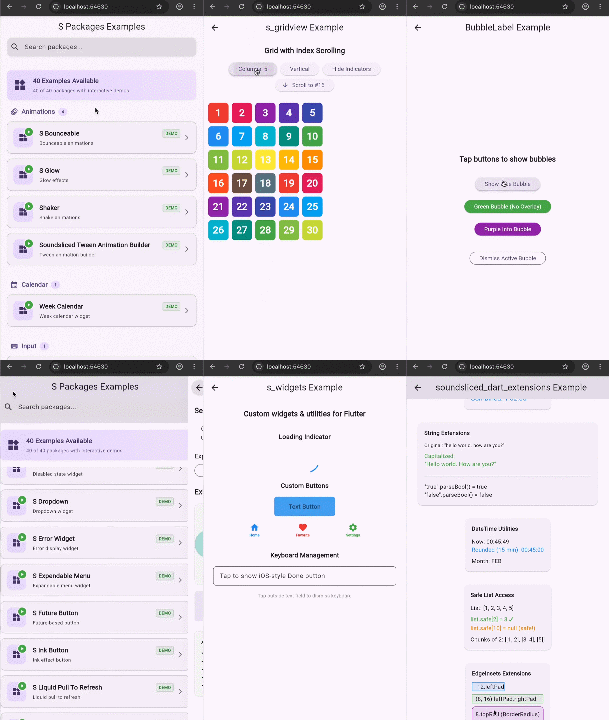
If you want to see a better GIF for each of these sub packages, then find their individual package in pub.dev (eg. search for s_button and you will see it in more detail and clearer).
NOTE: this s_packages package is the grouping of all of these, as a main repo
📦 What's Included #
This unified package brings together 43 carefully crafted packages organized into 11 categories:
🎨 UI Components (20 packages) #
- bubble_label - Bubble-style labels for tags and badges
- s_animated_tabs - Smooth animated tab bars
- s_banner - Customizable notification banners
- s_button - Advanced custom buttons
- s_context_menu - Right-click context menus
- s_disabled - Disabled state management
- s_dropdown - Feature-rich dropdowns
- s_error_widget - Beautiful error displays
- s_expendable_menu - Expandable hierarchical menus
- s_future_button - Async operation buttons
- s_ink_button - Ink ripple effect buttons
- s_liquid_pull_to_refresh - Liquid-style pull-to-refresh
- s_maintenance_button - Maintenance mode buttons
- s_modal - Modal dialog system
- s_standby - Loading state widgets
- s_toggle - Toggle switches
- s_widgets - Widget collection
- settings_item - Settings screen items
- ticker_free_circular_progress_indicator - Ticker-free progress indicators
📋 Lists & Collections #
- indexscroll_listview_builder - Index-scrollable lists
- s_gridview - Enhanced grid views
✨ Animations #
- s_bounceable - Bounceable interactions
- s_glow - Glow effects
- shaker - Shake animations
- soundsliced_tween_animation_builder - Custom tween builders
🧭 Navigation #
- pop_overlay - Overlay management
- pop_this - Navigation utilities
- s_sidebar - Sidebar navigation
🌐 Networking #
- s_client - HTTP client utilities
- s_connectivity - Connectivity monitoring
🔄 State Management #
- signals_watch - Reactive signal watching
- states_rebuilder_extended - Extended state management
⌨️ Input & Interaction #
- keystroke_listener - Keyboard event handling
📐 Layout #
- s_offstage - Conditional rendering utilities
📱 Platform Integration #
- s_webview - WebView integration
🛠️ Utilities #
- post_frame - Post-frame callbacks
- s_screenshot - Screenshot capture
- s_time - Time utilities
- soundsliced_dart_extensions - Dart extensions
📅 Calendar #
- week_calendar - Week-based calendars
🚀 Installation #
Add this to your package's pubspec.yaml file:
dependencies:
  s_packages: ^1.1.2
Then run:
flutter pub get
💡 Basic Usage #
Example 1: Using S Modal #
import 'package:flutter/material.dart';
import 'package:s_modal/s_modal.dart';

void main() {
  runApp(MyApp());
}

class MyApp extends StatelessWidget {
  @override
  Widget build(BuildContext context) {
    return MaterialApp(
      home: HomeScreen(),
      // Wrap your app with Modal builder
      builder: (context, child) => Modal.appBuilder(
        context,
        child,
        backgroundColor: Colors.black54,
      ),
    );
  }
}

class HomeScreen extends StatelessWidget {
  @override
  Widget build(BuildContext context) {
    return Scaffold(
      appBar: AppBar(title: Text('S Modal Example')),
      body: Center(
        child: ElevatedButton(
          onPressed: () {
            Modal.show(
              context: context,
              builder: (context) => Container(
                padding: EdgeInsets.all(24),
                child: Text('Hello from S Modal!'),
              ),
            );
          },
          child: Text('Show Modal'),
        ),
      ),
    );
  }
}
Example 2: Using S Button #
import 'package:flutter/material.dart';
import 'package:s_button/s_button.dart';

class ButtonExample extends StatelessWidget {
  @override
  Widget build(BuildContext context) {
    return Scaffold(
      body: Center(
        child: SButton(
          onPressed: () {
            print('Button pressed!');
          },
          child: Text('Custom Button'),
          backgroundColor: Colors.blue,
          borderRadius: 12,
          padding: EdgeInsets.symmetric(horizontal: 24, vertical: 12),
        ),
      ),
    );
  }
}
Example 3: Using Keystroke Listener #
import 'package:flutter/material.dart';
import 'package:flutter/services.dart';
import 'package:keystroke_listener/keystroke_listener.dart';

class KeyboardExample extends StatelessWidget {
  @override
  Widget build(BuildContext context) {
    return KeystrokeListener(
      onKeyPressed: (KeyEvent event) {
        if (event is KeyDownEvent) {
          print('Key pressed: ${event.logicalKey.keyLabel}');
        }
      },
      child: Scaffold(
        appBar: AppBar(title: Text('Keystroke Listener')),
        body: Center(
          child: Text('Press any key'),
        ),
      ),
    );
  }
}
🎯 Advanced Usage #
Example 4: Combining Multiple Packages #
import 'package:flutter/material.dart';
import 'package:s_modal/s_modal.dart';
import 'package:s_connectivity/s_connectivity.dart';
import 'package:s_future_button/s_future_button.dart';

class AdvancedExample extends StatelessWidget {
  Future<void> _submitData() async {
    // Simulate API call
    await Future.delayed(Duration(seconds: 2));
  }

  @override
  Widget build(BuildContext context) {
    return Scaffold(
      appBar: AppBar(title: Text('Advanced Example')),
      body: Column(
        children: [
          // Connectivity monitoring
          SConnectivity(
            onConnected: () {
              ScaffoldMessenger.of(context).showSnackBar(
                SnackBar(content: Text('Connected to internet')),
              );
            },
            onDisconnected: () {
              ScaffoldMessenger.of(context).showSnackBar(
                SnackBar(content: Text('No internet connection')),
              );
            },
            child: Container(),
          ),

          // Future button with loading state
          SFutureButton(
            onPressed: _submitData,
            builder: (context, isLoading) {
              return ElevatedButton(
                onPressed: isLoading ? null : null,
                child: isLoading
                    ? CircularProgressIndicator()
                    : Text('Submit'),
              );
            },
          ),
        ],
      ),
    );
  }
}
Example 5: Creating Animated UI #
import 'package:flutter/material.dart';
import 'package:s_bounceable/s_bounceable.dart';
import 'package:s_glow/s_glow.dart';
import 'package:shaker/shaker.dart';

class AnimatedUIExample extends StatelessWidget {
  @override
  Widget build(BuildContext context) {
    return Scaffold(
      appBar: AppBar(title: Text('Animations')),
      body: Center(
        child: Column(
          mainAxisAlignment: MainAxisAlignment.center,
          children: [
            // Bounceable widget
            SBounceable(
              onTap: () => print('Bounced!'),
              child: Container(
                padding: EdgeInsets.all(20),
                decoration: BoxDecoration(
                  color: Colors.blue,
                  borderRadius: BorderRadius.circular(12),
                ),
                child: Text('Tap me!'),
              ),
            ),

            SizedBox(height: 24),

            // Glow effect
            SGlow(
              color: Colors.purple,
              child: Icon(Icons.star, size: 48),
            ),

            SizedBox(height: 24),

            // Shake animation
            Shaker(
              duration: Duration(milliseconds: 500),
              child: Text('Shake on error!'),
            ),
          ],
        ),
      ),
    );
  }
}
📱 Running the Example App #
This package includes a comprehensive example app showcasing all 43 packages:
cd example
flutter pub get
flutter run
The example app features:
- 🔍 Search functionality to find packages
- 📂 Category-based organization
- 🎨 Material Design 3 UI
- 🌓 Light and dark theme support
- 📱 Interactive demos for each package
🏗️ Project Structure #
s_packages/
├── lib/                          # Main library exports
├── example/                      # Example application
│   ├── assets/
│   │   └── example.gif          # Demo GIF
│   └── lib/
│       ├── main.dart            # App entry point
│       ├── models/              # Data models
│       ├── screens/             # UI screens
│       └── widgets/             # Reusable widgets
├── bubble_label/                # Individual packages...
├── s_modal/
├── s_button/
└── ... (41 more packages)
🛠️ Development #
Prerequisites #
- Flutter SDK >=3.0.0
- Dart SDK >=3.0.0
Running Tests #
flutter test
Code Analysis #
flutter analyze
Formatting #
dart format .
📚 Documentation #
Each package includes its own documentation. Visit the individual package directories for detailed API documentation and usage examples.
🤝 Contributing #
Contributions are welcome! Please feel free to submit a Pull Request. For major changes, please open an issue first to discuss what you would like to change.
📄 License #
This project is licensed under the MIT License - see the LICENSE file for details.
🔗 Links #
✨ Features #
- ✅ 43 production-ready packages
- ✅ Material Design 3 support
- ✅ Light and dark theme compatibility
- ✅ Cross-platform (iOS, Android, Web, Desktop)
- ✅ Comprehensive example app
- ✅ Extensive documentation
- ✅ Active maintenance
- ✅ MIT licensed
📊 Package Stats #
- Total Packages: 43
- Categories: 11
- Example Demos: 43+
- Minimum Flutter Version: 3.0.0
- Minimum Dart Version: 3.0.0
🙏 Acknowledgments #
Developed and maintained by SoundSliced.
Made with ❤️ for the Flutter community
Metadata
Publisher
unverified uploader
Weekly Downloads
Metadata
A unified package gathering multiple widgets and tools.
Repository (GitHub)
View/report issues
Documentation
License
 MIT (license)
Dependencies
assorted_layout_widgets, async, calendar_date_picker2, circular_countdown_timer, collection, dart_helper_utils, desktop_webview_window, dio, file_saver, flutter, flutter_animate, flutter_web_frame, fpdart, http, icons_plus, internet_connection_checker_plus, lucide_icons, nb_utils, new_loading_indicator, path, pausable_timer, pointer_interceptor, rxdart, shared_preferences, signals, signals_flutter, sizer, states_rebuilder, universal_html, universal_io, web, webview_flutter, webview_flutter_web, xid

