
rotary_scrollbar 1.0.0  rotary_scrollbar: ^1.0.0 copied to clipboard
circular scrollbar for Wear OS devices. It can be controlled with rotary input and it includes haptic feedback.
rotary_scrollbar #
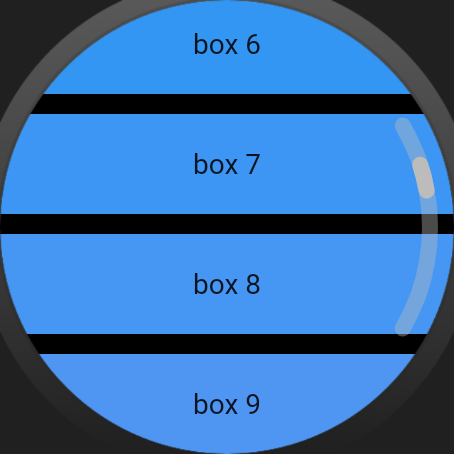
Flutter implementation of a native-looking Wear OS circular scrollbar.
It can be wrapped around a PageView, ListView or any other scrollable view.
And it is able to control the view's ScrollController or PageController with rotary input, including haptic feedback for each rotary event.
Setup #
Wear OS (Android) #
This package depends on wearable_rotary, which requires adding the following to MainActivity.kt:
import android.view.MotionEvent
import com.samsung.wearable_rotary.WearableRotaryPlugin

class MainActivity : FlutterActivity() {
    override fun onGenericMotionEvent(event: MotionEvent?): Boolean {
        return when {
            WearableRotaryPlugin.onGenericMotionEvent(event) -> true
            else -> super.onGenericMotionEvent(event)
        }
    }
}
This package depends on vibration, which needs access to the VIBRATE permission, so make sure the following is added to AndroidManifest.xml
<uses-permission android:name="android.permission.VIBRATE"/>
Usage #
To use this plugin, add rotary_scrollbar as a dependency in your pubspec.yaml file.
dependencies:
  rotary_scrollbar: ^1.0.0
Then, import rotary_scrollbar in your Dart code.
// Import the package.
import 'package:rotary_scrollbar/rotary_scrollbar.dart';
ListView #
class WatchScreen extends StatefulWidget {
  const WatchScreen({super.key});

  @override
  State<WatchScreen> createState() => _WatchScreenState();
}

class _WatchScreenState extends State<WatchScreen> {
  final scrollController = ScrollController();

  @override
  void dispose() {
    scrollController.dispose();
    super.dispose();
  }

  @override
  Widget build(BuildContext context) {
    return Scaffold(
      backgroundColor: Colors.black,
      body: RotaryScrollbar(
        controller: scrollController,
        child: ListView.builder(
          controller: scrollController,
          itemBuilder: (context, index) {
            return Padding(
              padding: const EdgeInsets.only(
                bottom: 10,
              ),
              child: Container(
                color: Colors.blue.withRed(((255 / 29) * index).toInt()),
                width: 50,
                height: 50,
                child: Center(child: Text('box $index')),
              ),
            );
          },
          itemCount: 30,
        ),
      ),
    );
  }
}
PageView #
class WatchScreen extends StatefulWidget {
  const WatchScreen({super.key});

  @override
  State<WatchScreen> createState() => _WatchScreenState();
}

class _WatchScreenState extends State<WatchScreen> {
  final pageController = PageController();

  @override
  void dispose() {
    pageController.dispose();
    super.dispose();
  }

  @override
  Widget build(BuildContext context) {
    return Scaffold(
      backgroundColor: Colors.black,
      body: RotaryScrollbar(
        controller: pageController,
        child: PageView(
          scrollDirection: Axis.vertical,
          controller: pageController,
          children: const [
            Page1(),
            Page2(),
            Page3(),
          ],
        ),
      ),
    );
  }
}
Supported devices #
- Wear OS devices with rotary input and round screens (Galaxy Watch 4, Pixel Watch, etc.)
Metadata
Publisher
unverified uploader
Weekly Downloads
Metadata
circular scrollbar for Wear OS devices. It can be controlled with rotary input and it includes haptic feedback.
Repository (GitHub)
View/report issues
Documentation
License
 BSD-3-Clause (license)
Dependencies
flutter, vibration, wearable_rotary

