
paymob 1.0.1  paymob: ^1.0.1 copied to clipboard
A Flutter plugin for integrating Paymob payment SDK. Provides easy integration with Paymob's native SDKs for iOS and Android.
Paymob Flutter Plugin #
A Flutter plugin for integrating Paymob payment SDK into your Flutter applications. This plugin provides a bridge that connects your Flutter app to the native iOS and Android Paymob SDKs.
Documentation #
For detailed Paymob API documentation and integration guides, visit the Paymob Developer Documentation.
Requirements #
- Android: Minimum SDK 23, Compile SDK 33+
- iOS: Minimum iOS 13.0, Swift 5.0+
Installation #
Run flutter pub add paymob.
Required Native SDK Versions #
Before using this plugin, you must download and configure the native Paymob SDKs:
- Android SDK: Version 1.6.12 (required)
- iOS SDK: Version 1.2.0 (required)
Android Setup #
Important: The Paymob Android SDK is not included in this plugin. You must download and configure version 1.6.12 in your app.
-
Download Paymob Android SDK 1.6.12 from here. Look for
PaymobAndroidSDK1.6.12in the package. -
Add SDK to your app:
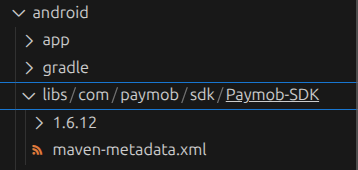
- Create
android/app/libs/directory - Place the AAR file there:
android/app/libs/com/paymob/sdk/Paymob-SDK/1.6.12/Paymob-SDK-1.6.12.aar
- Create
-
Configure repositories in
android/build.gradle.kts(project-level):allprojects { repositories { google() mavenCentral() maven { url = uri("https://jitpack.io") } maven { url = rootProject.projectDir.toURI().resolve("libs") } } } -
Configure repositories in
android/settings.gradle.kts:pluginManagement { repositories { google() mavenCentral() gradlePluginPortal() maven { url = uri("https://jitpack.io") } maven { url = rootProject.projectDir.toURI().resolve("libs") } } } -
Add dependency and enable data binding in
android/app/build.gradle.kts:android { buildFeatures { dataBinding = true } }
iOS Setup #
Important: The Paymob iOS SDK is not included in this plugin. You must download and configure version 1.2.0 in your project.
-
Download Paymob iOS SDK 1.2.0 from here. Look for
PaymobSDK 1.2.0(xcframework) in the package. -
Add SDK to your project:
- Copy the
PaymobSDK.xcframeworkfolder to yourios/Frameworks/directory - Create the
ios/Frameworks/directory if it doesn't exist
- Copy the
-
Add SDK to Xcode:
- Open
ios/Runner.xcworkspacein Xcode - Select Runner target → General tab
- Scroll to Frameworks, Libraries, and Embedded Content
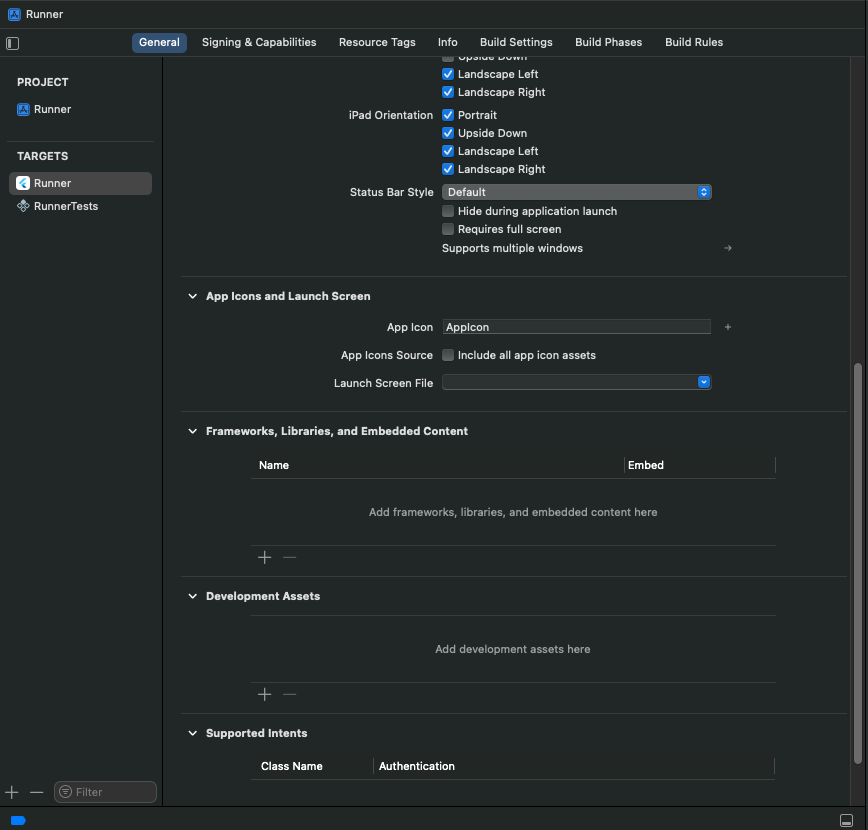
- Click + → Add Other... → Add Files...
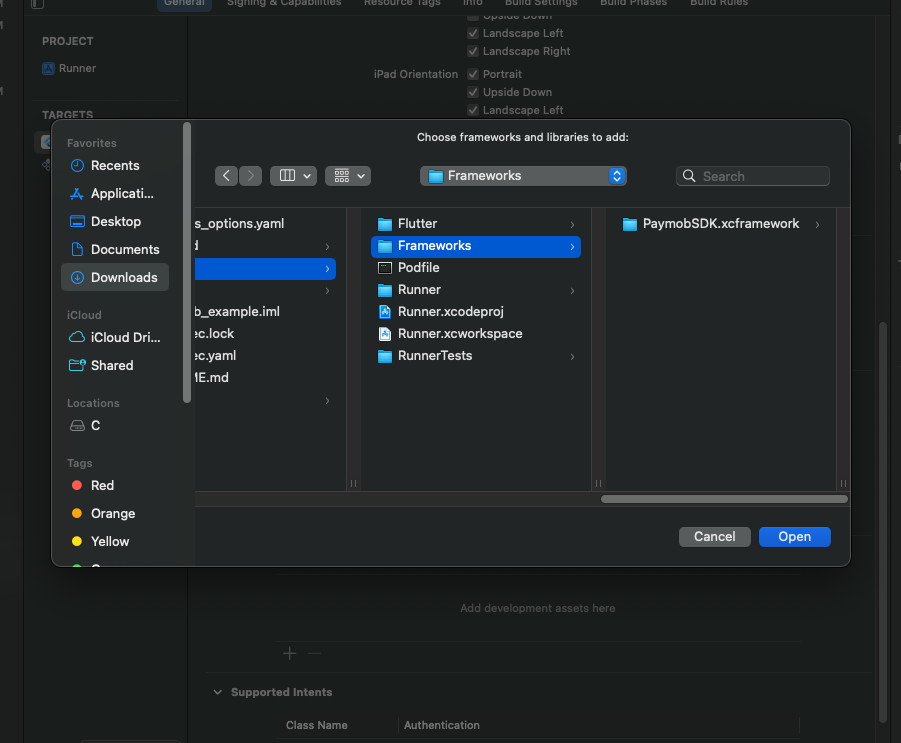
- Navigate to
ios/Frameworks/and selectPaymobSDK.xcframework
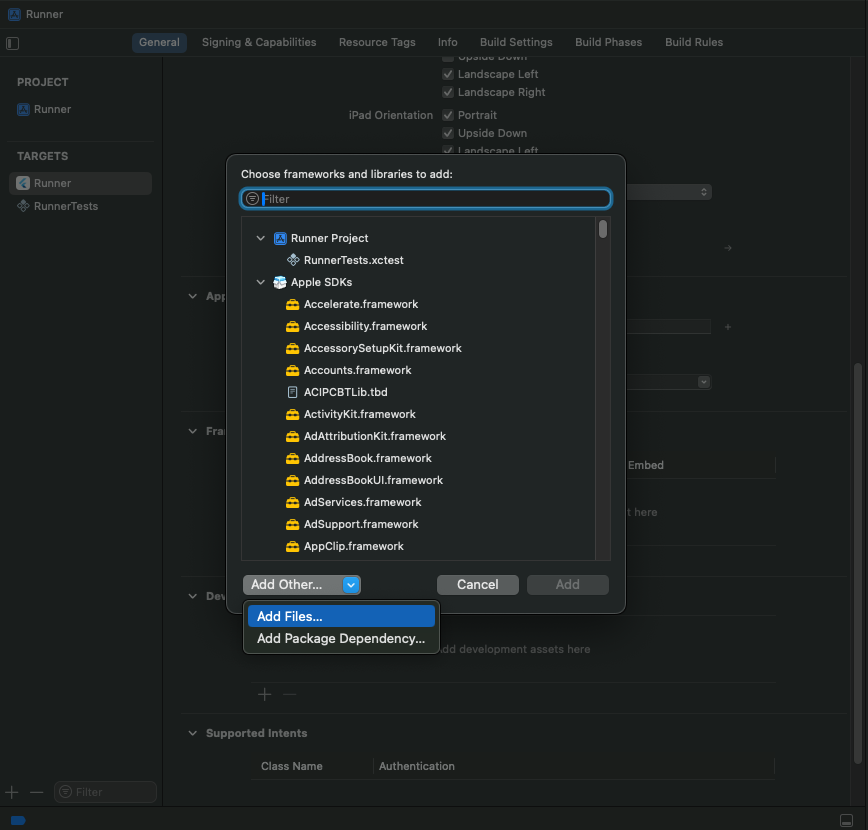
- Click Add
- Change embedding option to "Embed & Sign"
- Open
Configuration #
Important: Configure the response callback for your integration ID to:
https://accept.paymob.com/api/acceptance/post_pay
This ensures after-payment actions are executed based on the actual payment status.
Usage #
Basic Payment Flow #
import 'package:paymob/paymob.dart';

final result = await Paymob.pay(
  publicKey: 'YOUR_PUBLIC_KEY',
  clientSecret: 'YOUR_CLIENT_SECRET',
);

if (result.isSuccessful) {
  print('Payment successful!');
} else if (result.status == PaymobTransactionStatus.rejected) {
  print('Payment rejected');
} else if (result.status == PaymobTransactionStatus.pending) {
  print('Payment pending');
}
With UI Customization #
final result = await Paymob.pay(
  publicKey: 'YOUR_PUBLIC_KEY',
  clientSecret: 'YOUR_CLIENT_SECRET',
  appName: 'My App Name',
  buttonBackgroundColor: Colors.blue,
  buttonTextColor: Colors.white,
  saveCardDefault: false,
  showSaveCard: true,
);
Testing #
When testing your integration, you can use the following test card information:
Card Information for Testing:
- Card Number:
4987654321098769 - Cardholder Name:
Test Account - Expiry Month: Any valid month (e.g., 12)
- Expiry Year: Any valid year (e.g., 2050)
- CVV:
123
API Reference #
Paymob.pay() #
Required Parameters
publicKey(String): Your Paymob public key from the dashboardclientSecret(String): Client secret from the intention creation API
Optional Parameters
appName(String?): Custom header name displayed in the SDKbuttonBackgroundColor(Color?): Color of buttons (default: black)buttonTextColor(Color?): Color of button text (default: white)saveCardDefault(bool?): Initial value for save card checkbox (default: false)showSaveCard(bool?): Whether to show save card checkbox (default: true)
Returns
PaymobPaymentResult with:
status: Transaction status (PaymobTransactionStatusenum)transactionDetails: Map containing transaction details (iOS only)errorMessage: Error message if something went wrongisSuccessful: Convenience getter
Transaction Status #
enum PaymobTransactionStatus {
  successful,  // Payment completed successfully
  rejected,    // Payment was rejected
  pending,     // Payment is pending
  unknown      // Unknown or error status
}
Getting Your Credentials #
Public Key #
- Log in to your Paymob Dashboard
- Go to Settings → Integration Credentials
- Find your Public Key (remains constant)
Client Secret #
The Client Secret is obtained from the Create Intention API request. It changes with each payment transaction.
License #
This project is licensed under the MIT License - see the LICENSE file for details.
Changelog #
See CHANGELOG.md for a list of changes.
Metadata
Publisher
unverified uploader
Weekly Downloads
Metadata
A Flutter plugin for integrating Paymob payment SDK. Provides easy integration with Paymob's native SDKs for iOS and Android.
Repository (GitHub)
View/report issues
Documentation
License
 MIT (license)
Dependencies
flutter, plugin_platform_interface
More
Packages that depend on paymob
Packages that implement paymob

