
particle_text 0.1.1  particle_text: ^0.1.1 copied to clipboard
 mindwaveinfoway.com
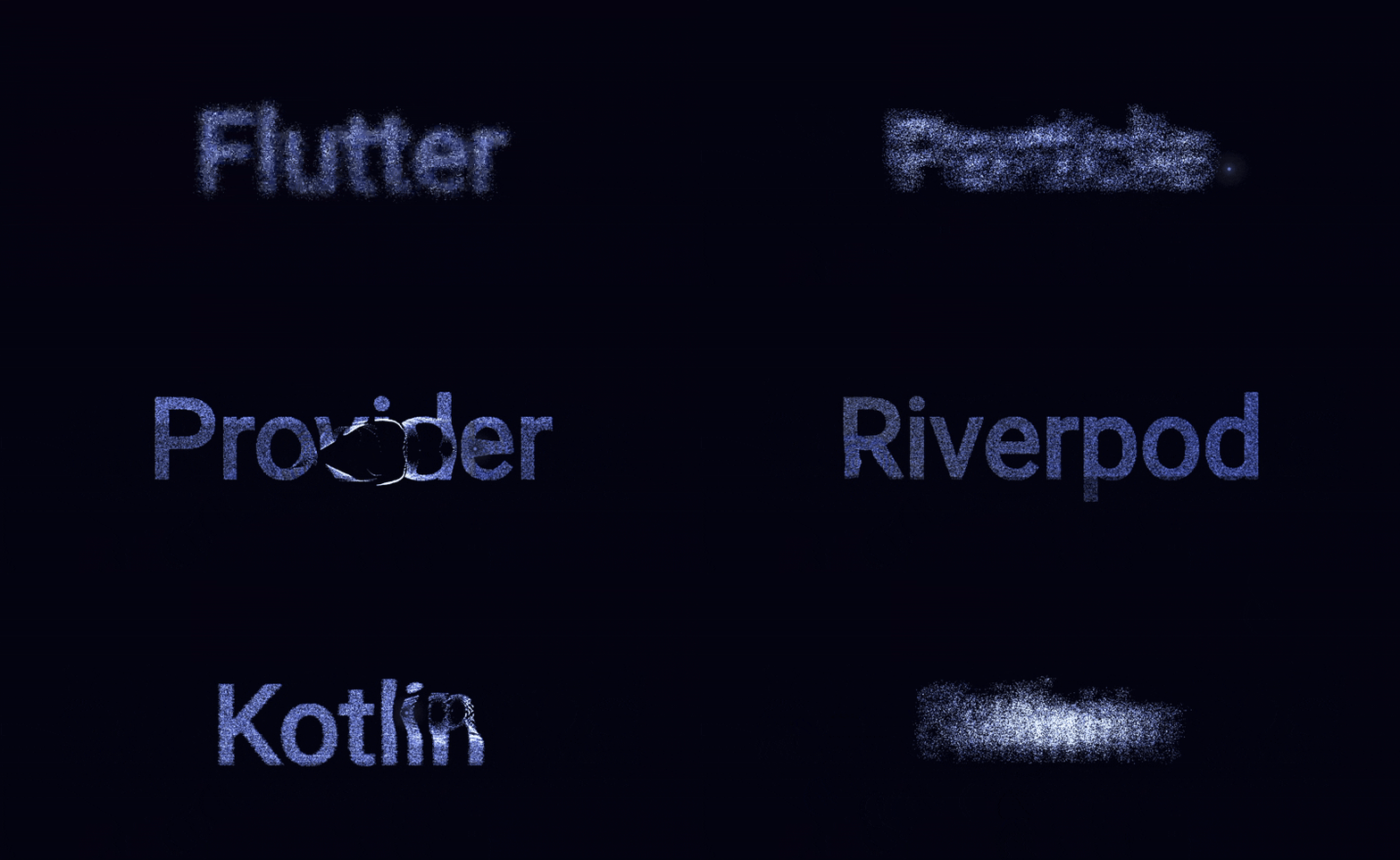
Interactive particle text effect for Flutter. Thousands of particles form text shapes and scatter on touch/hover, with spring-based physics.
particle_text #


Interactive particle text effect for Flutter. Thousands of particles form text shapes and scatter on touch/hover, then spring back — with full customization.
Looking for image-to-particle? See particle_image.
🔴 Live Demo #
Move your cursor or touch to scatter the particles!
Preview #
Features #
- Touch & hover interaction — particles scatter away from your finger/cursor
- Spring physics — smooth, natural particle reformation
- Fully customizable — colors, particle count, physics, font, and more
- Built-in presets — cosmic, fire, matrix, pastel, minimal
- Powered by particle_core — high-performance single GPU draw call engine
- Cross-platform — works on iOS, Android, Web, macOS, Windows, Linux
Getting started #
dependencies:
  particle_text: ^0.1.0
Usage #
Basic #
import 'package:particle_text/particle_text.dart';

ParticleText(text: 'Hello')
With configuration #
ParticleText(
  text: 'Flutter',
  config: ParticleConfig(
    particleDensity: 2000,
    particleColor: Color(0xFF8CAADE),
    displacedColor: Color(0xFFDCE5FF),
    backgroundColor: Color(0xFF020308),
    mouseRadius: 80,
    repelForce: 8.0,
    returnSpeed: 0.04,
  ),
)
Using presets #
// Cosmic blue dust
ParticleText(text: 'Cosmic', config: ParticleConfig.cosmic())

// Fiery warm particles
ParticleText(text: 'Fire', config: ParticleConfig.fire())

// Neon green matrix
ParticleText(text: 'Matrix', config: ParticleConfig.matrix())

// Soft pastel glow
ParticleText(text: 'Pastel', config: ParticleConfig.pastel())

// Fewer, larger particles
ParticleText(text: 'Clean', config: ParticleConfig.minimal())
Dynamic text #
Simply update the text parameter and the particles will morph:
ParticleText(
  text: _currentText, // change this and particles re-target
  onTextChanged: () => print('Morphing!'),
)
Fixed size (non-expanding) #
By default, ParticleText expands to fill its parent. To use a fixed size:
SizedBox(
  width: 400,
  height: 300,
  child: ParticleText(
    text: 'Sized',
    expand: false,
  ),
)
Inside Expanded #
Use ParticleText alongside other widgets in a Column or Row:
Column(
  children: [
    AppBar(title: Text('My App')),
    Expanded(
      child: ParticleText(text: 'Hello'),
    ),
    BottomNavigationBar(...),
  ],
)
ParticleConfig options #
| Parameter | Type | Default | Description |
|---|---|---|---|
particleDensity |
double |
2000 |
Particles per 100k px² of screen area (auto-scales) |
particleCount |
int? |
null |
Fixed count — overrides density when set |
maxParticleCount |
int |
50000 |
Upper cap for density scaling |
minParticleCount |
int |
1000 |
Lower floor for density scaling |
mouseRadius |
double |
80.0 |
Pointer repulsion radius (logical px) |
returnSpeed |
double |
0.04 |
Spring return speed (0.01–0.1) |
friction |
double |
0.88 |
Velocity damping (0.8–0.95) |
repelForce |
double |
8.0 |
Pointer repulsion strength (1.0–20.0) |
backgroundColor |
Color |
#020308 |
Canvas background |
particleColor |
Color |
#8CAADE |
Particle color at rest |
displacedColor |
Color |
#DCE5FF |
Particle color when scattered |
pointerGlowColor |
Color |
#C8D2F0 |
Glow orb color |
minParticleSize |
double |
0.4 |
Min particle radius |
maxParticleSize |
double |
2.2 |
Max particle radius |
minAlpha |
double |
0.5 |
Min particle opacity |
maxAlpha |
double |
1.0 |
Max particle opacity |
sampleGap |
int |
2 |
Pixel sampling density (lower = more targets) |
fontWeight |
FontWeight |
bold |
Text rendering weight |
fontFamily |
String? |
null |
Custom font family |
showPointerGlow |
bool |
true |
Show pointer glow orb |
pointerDotRadius |
double |
4.0 |
Center dot radius |
Responsive particle count #
By default, particle count scales automatically with screen size:
Mobile  (360×800)   → ~5,760 particles
Tablet  (768×1024)  → ~15,729 particles
Desktop (1920×1080) → ~41,472 particles
4K      (3840×2160) → ~50,000 particles (capped)
To force a fixed count (ignores screen size):
ParticleConfig(particleCount: 6000) // always exactly 6000
Performance #
particle_text renders all particles in a single GPU draw call using Canvas.drawRawAtlas (
powered by particle_core). This means 10,000+ particles run smoothly at 60fps.
Key optimizations: pre-allocated typed array buffers (zero GC), squared-distance physics (avoids
sqrt), ChangeNotifier-driven repainting (no setState / no widget rebuilds), and
RepaintBoundary isolation.
Related packages #
| Package | Description |
|---|---|
| particle_core | Core engine (used internally) |
| particle_image | Image-to-particle effect |
License #
MIT License. See LICENSE for details.
Metadata
Publisher
Weekly Downloads
Metadata
Interactive particle text effect for Flutter. Thousands of particles form text shapes and scatter on touch/hover, with spring-based physics.
Homepage
Repository (GitHub)
View/report issues
License
 unknown (license)

