
mgs_connectivity_check 1.2.4  mgs_connectivity_check: ^1.2.4 copied to clipboard
A customizable Flutter connectivity checker with internet validation and automatic no-internet dialog support.
mgs_connectivity_check #
A production-ready Flutter package that verifies real internet access — not just network type — and provides automatic connectivity monitoring with a built-in, customizable no-internet dialog.
Why This Package? #
Most connectivity packages only detect the network type (WiFi, Mobile, etc.) but do not verify actual internet availability. mgs_connectivity_check solves this by performing real DNS validation (except on Web), so you always know whether the device truly has internet access.
Features #
- Real internet validation — DNS-based connectivity check, not just network type detection
- Automatic monitoring — Listens for connectivity changes and responds instantly
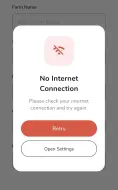
- Built-in no-internet dialog — Fully customizable, shown automatically when connection drops
- Back online snackbar — Notifies users when internet is restored (enabled by default)
- Configurable action buttons — Retry, Open Settings, and Close App (each independently toggleable)
- Full dialog override — Replace the entire dialog UI with your own widget
- Cross-platform — Android, iOS, Web, macOS, Windows, and Linux
Installation #
Add the dependency to your pubspec.yaml:
dependencies:
  mgs_connectivity_check: ^1.2.3+6
Then run:
flutter pub get
Usage #
Import #
import 'package:mgs_connectivity_check/mgs_connectivity_check.dart';
Check Internet Manually #
bool isConnected = await MgsConnectivityCheck.isConnectedToInternet();
Automatic Monitoring with Dialog #
No need for addPostFrameCallback — the package handles it internally.
@override
void initState() {
  super.initState();

  MgsConnectivityCheck.listenChangeInInternetConnectivityWithDialog(
    context: context,
  );
}

@override
void dispose() {
  MgsConnectivityCheck.dispose();
  super.dispose();
}
When the connection drops, the no-internet dialog appears automatically. When internet returns, the dialog closes and a "Back Online" snackbar is shown.
Screenshots #
No Internet Dialog #
[No Internet Dialog]
Back Online Snackbar #
[Back Online Snackbar]
Get Connection Type #
final types = await MgsConnectivityCheck.getConnectionTypes();
print(types); // Returns MgsConnectionType values
Dialog Customization #
Styling and Buttons #
Customize the dialog appearance and enable/disable individual buttons:
MgsConnectivityCheck.listenChangeInInternetConnectivityWithDialog(
  context: context,
  dialogStyle: MgsDialogStyle(
    backgroundColor: Colors.black,
    enableRetryButton: true,
    enableOpenSettingsButton: true,
    enableCloseAppButton: true,
  ),
);
Available Button Options #
| Button | Property | Default |
|---|---|---|
| Retry | enableRetryButton |
false |
| Open Settings | enableOpenSettingsButton |
false |
| Close App | enableCloseAppButton |
false |
| Back Online Snackbar | enableBackOnlineSnackbar |
true |
Back Online Snackbar #
The snackbar is shown by default when internet is restored. You can disable or customize it:
// Disable
MgsDialogStyle(
  enableBackOnlineSnackbar: false,
)

// Customize
MgsDialogStyle(
  backOnlineStyle: MgsBackOnlineStyle(
    message: "Internet Connected Successfully!",
    backgroundColor: Colors.blue,
    duration: Duration(seconds: 3),
  ),
)
Full Dialog Override #
Replace the entire dialog UI with your own widget:
MgsDialogStyle(
  customDialog: YourCustomWidget(),
)
Platform Support #
| Platform | Supported |
|---|---|
| Android | Yes |
| iOS | Yes |
| Web* | Yes |
| macOS | Yes |
| Windows | Yes |
| Linux | Yes |
* Web uses browser connectivity APIs with limited validation.
Important Notes #
- Network type alone does not guarantee internet access — this package performs real validation.
- DNS lookup is used for connectivity verification (except on Web).
- Always implement proper error handling for your API calls.
- Call
MgsConnectivityCheck.dispose()when monitoring is no longer needed.
License #
MIT License
Metadata

Publisher
unverified uploader
Weekly Downloads
Metadata
A customizable Flutter connectivity checker with internet validation and automatic no-internet dialog support.
Repository (GitHub)
View/report issues
Documentation
License
 MIT (license)
Dependencies
app_settings, connectivity_plus, flutter

