
marker_crafter 2.2.2  marker_crafter: ^2.2.2 copied to clipboard
 abdurrahmankaraoglu.com
Draws custom Google Maps markers (text labels, rings and location pins) with Canvas and turns them into BitmapDescriptors.
Marker Crafter #

Draws custom Google Maps markers
with Canvas and turns them into BitmapDescriptors:
| Shape | Method | Default anchor |
|---|---|---|
| Speech bubble with text and an arrow | addLabelMarker / createLabelMarkerBitmap |
bottom center (arrow tip) |
| Colored ring with text in the middle | addRingMarker / createRingMarkerBitmap |
center |
| Circle with two "antennas" | addLocationMarker / createLocationMarkerBitmap |
center |
Sizes are logical pixels. Markers are rendered at the device pixel ratio, so they are sharp and the same size on every screen.


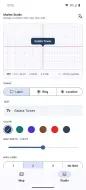
Marker Studio in the example app: edit a marker, see it at its real size with its anchor, copy the code.
Türkçe açıklama için aşağıya bakın.
Installation #
dependencies:
  google_maps_flutter: ^2.13.0
  marker_crafter: ^2.2.0
Requires Dart 3.7 and Flutter 3.29 or newer (the minimum of
google_maps_flutter 2.13).
Set up a Google Maps API key as described in the google_maps_flutter README.
Usage #
import 'package:flutter/material.dart';
import 'package:google_maps_flutter/google_maps_flutter.dart';
import 'package:marker_crafter/marker_crafter.dart';

class MapScreen extends StatefulWidget {
  const MapScreen({super.key});

  @override
  State<MapScreen> createState() => _MapScreenState();
}

class _MapScreenState extends State<MapScreen> {
  final Set<Marker> _markers = <Marker>{};

  @override
  void initState() {
    super.initState();
    _addMarkers();
  }

  Future<void> _addMarkers() async {
    await _markers.addLabelMarker(
      const MarkerCrafter(
        text: 'Galata Kulesi',
        markerId: MarkerId('label'),
        position: LatLng(41.0256, 28.9741),
      ),
    );
    await _markers.addRingMarker(
      const MarkerCrafter(
        text: '12',
        markerId: MarkerId('ring'),
        position: LatLng(41.0086, 28.9802),
        backgroundColor: Colors.teal,
      ),
      radius: 20,
    );
    // The set changes after an await: rebuild once the markers are added.
    if (mounted) setState(() {});
  }

  @override
  Widget build(BuildContext context) {
    return GoogleMap(
      initialCameraPosition: const CameraPosition(target: LatLng(41.0082, 28.9784), zoom: 13),
      markers: _markers,
    );
  }
}
- Adding a marker with a
MarkerIdthat is already in the set replaces it. - Every
MarkerCrafteroption excepttext,backgroundColorandtextStyleis passed toMarkerunchanged (infoWindow,onTap,draggable, ...). - The pixel ratio defaults to the main view's. Calling the methods in
initStateis fine: they wait until the screen metrics are known. PasspixelRatio:to draw for a specific screen; note thatMediaQuery.devicePixelRatioOf(context)can be 1.0 during the very first build, so redraw when it changes (as the example app does). - Pass
textScaler: MediaQuery.textScalerOf(context)to follow the system font size, andmaxWidth:/maxLines:toaddLabelMarkerto keep long text in bounds (it ends with "…"). MarkerCrafter.clusterManagerIdadds the marker to a marker cluster.- Pass
textDirection: Directionality.of(context)(orTextDirection.rtl) to label and ring markers for right-to-left languages. - To build the
Markeryourself, callcreateLabelMarkerBitmap(...)andMarkerCrafter.toMarker(icon).
See the example app for a runnable demo: a map tab and a Marker Studio tab, in English and Turkish.
Use with other packages #
The icons are plain BitmapDescriptors, so they work with any package that
takes a marker icon. Two packages by the same author fit well:
-
animated_route_marker moves a marker along a route or towards live GPS positions. The location marker points north, so it turns with the vehicle's bearing:
final icon = await createLocationMarkerBitmap(Colors.indigo, size: 34); courier.markerTemplate = courier.markerTemplate.copyWith(iconParam: icon); courier.setRoute(route, speed: 12, autoPlay: true); -
google_maps_polyline gets the route between two points from the Directions API or decodes an encoded polyline; mark its start and end with ring markers such as "A" and "B".
Other packages #
More packages by the same author:
- google_maps_polyline: Google Directions routes and polyline encode/decode (pure Dart)
- animated_route_marker: Smoothly animated map marker along a route or live GPS
- advanced_background_locator: Background location tracking plugin (Android/iOS)
- advanced_geofence: Pure Dart geofencing engine: enter, exit and dwell events
- route_simulator: Realistic fake GPS streams for testing and demos
- background_doctor: Diagnoses why background work stops on Android and why the app was killed
- scan_tally: Continuous barcode scanning for stock counts: dedupe, tally, feedback, GS1
- scan_tally_mobile_scanner: mobile_scanner camera adapter for scan_tally
- turkish_kit: Turkish validators, money in words, casing, provinces, holidays (pure Dart)
- turkish_kit_flutter: Flutter widgets for turkish_kit: Turkish money field and input formatters
- flutter_toastify: Animated toast notifications
Migrating from 1.x #
| 1.x | 2.0 |
|---|---|
import 'package:marker_crafter/extension/marker_crafter_add_extension.dart' |
import 'package:marker_crafter/marker_crafter.dart' |
addTextMarker |
addLabelMarker |
addTextMarker2 |
addLocationMarker |
addEvilEyeBeadMarker |
addRingMarker(radius: 20) |
addRoundedMarker |
addRingMarker(radius: 15) |
zIndex: 1.0 |
zIndexInt: 1 |
icon: |
removed (the icon is always drawn) |
The old methods still work but are deprecated. Markers are now sized in logical pixels, so they look larger than in 1.x; see the changelog.
Türkçe #
Marker Crafter, Google Maps işaretçilerini Canvas ile çizip
BitmapDescriptor'a çeviren bir Flutter paketidir: metinli konuşma balonu
(addLabelMarker), ortasında metin olan halka (addRingMarker) ve konum
işaretçisi (addLocationMarker).
- Boyutlar mantıksal pikseldir; işaretçiler cihazın piksel oranında çizilir, bu yüzden her ekranda net ve aynı boyutta görünür.
- Aynı
MarkerIdile eklenen işaretçi eskisinin yerine geçer. - Uzun metin için
addLabelMarker'amaxWidthvemaxLines, sistem yazı boyutu içintextScaler: MediaQuery.textScalerOf(context)verin. - Sağdan sola yazılan diller (Arapça, İbranice) için
textDirectionverin. - Metot
awaitile tamamlandıktan sonrasetStateçağırın. - 1.x'ten geçiş için yukarıdaki tabloya bakın.
- Gereksinim: Dart 3.7 ve Flutter 3.29 veya üzeri.
- Birlikte kullanım: animated_route_marker işaretçiyi rota boyunca hareket ettirir, google_maps_polyline iki nokta arasındaki rotayı getirir; ikonlar bu paketle çizilebilir.
- Örnek uygulama Türkçe ve İngilizcedir; cihaz dilini izler.


Diğer paketler #
Aynı geliştiricinin diğer paketleri:
- google_maps_polyline: Google Directions rotası ve polyline kodlama/çözme (saf Dart)
- animated_route_marker: Rota ya da canlı GPS üzerinde akıcı hareket eden harita işaretçisi
- advanced_background_locator: Arka planda konum takibi eklentisi (Android/iOS)
- advanced_geofence: Saf Dart geofence motoru: giriş, çıkış ve bekleme olayları
- route_simulator: Test ve demo için gerçekçi sahte GPS akışı
- background_doctor: Android'de arka plan işinin neden durduğunu ve uygulamanın neden kapandığını teşhis eder
- scan_tally: Stok sayımı için sürekli barkod okutma: tekrar ayıklama, sayım, geri bildirim, GS1
- scan_tally_mobile_scanner: scan_tally için mobile_scanner kamera adaptörü
- turkish_kit: Türkçe doğrulayıcılar, tutarı yazıyla yazma, harf dönüşümü, il/ilçe, tatiller (saf Dart)
- turkish_kit_flutter: turkish_kit için Flutter bileşenleri: Türk biçimli para alanı ve girdi biçimleyicileri
- flutter_toastify: Animasyonlu toast bildirimleri
License #
MIT. See LICENSE.
Metadata

Documentation
Publisher
Weekly Downloads
Metadata
Draws custom Google Maps markers (text labels, rings and location pins) with Canvas and turns them into BitmapDescriptors.
Repository (GitHub)
View/report issues
Topics
#google-maps #maps #marker #canvas
License
 MIT (license)