
maintenance_banner 0.2.2  maintenance_banner: ^0.2.2 copied to clipboard
A Flutter package for displaying maintenance banners in your app
maintenance_banner #
A Flutter package for displaying customizable maintenance banners at the top of your app.
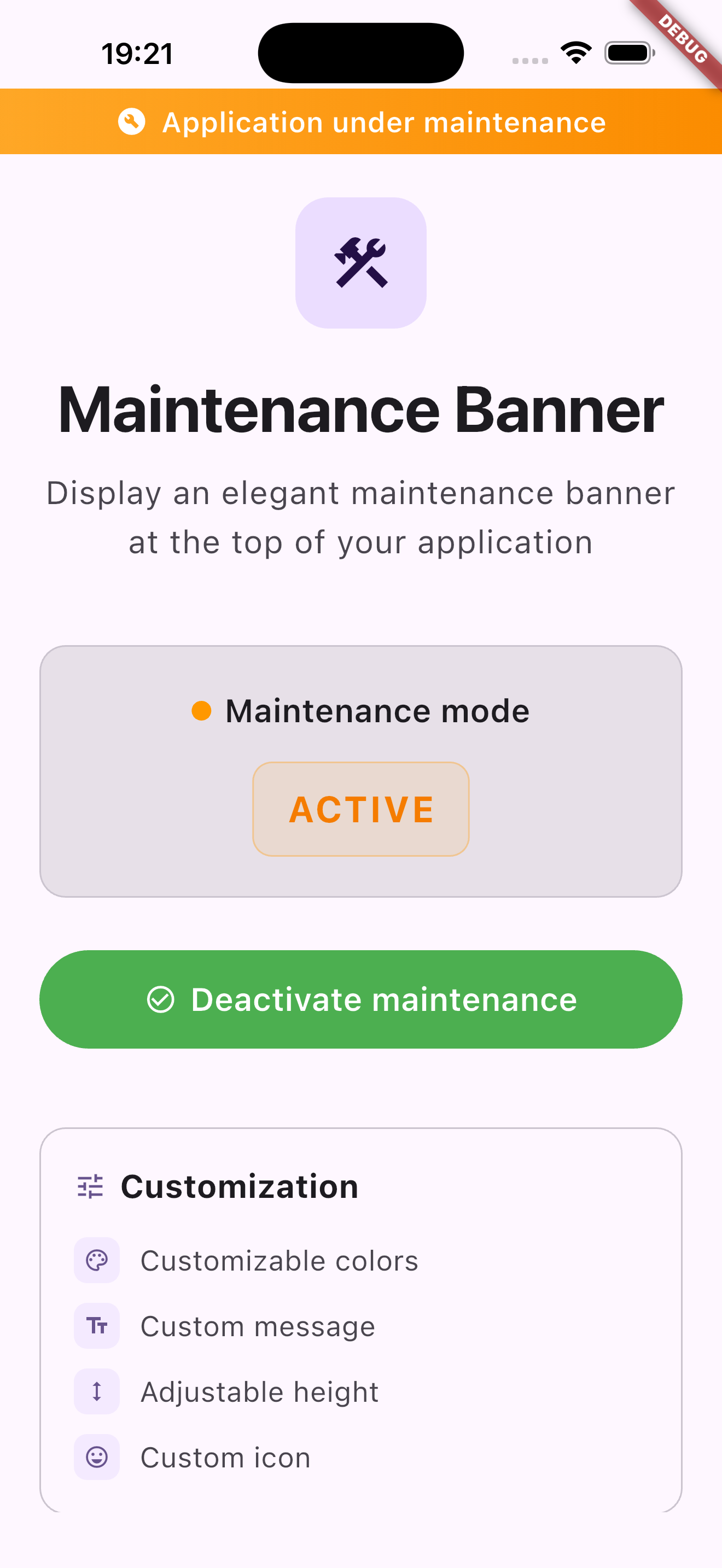
Maintenance Banner
Features #
- 🎨 Fully Customizable: Use your own banner widget or customize colors, message, height, and icon
- 📱 Safe Area Aware: Automatically handles device safe areas (notches, status bars)
- 🔄 Simple Integration: Easy to integrate with
MaintenanceWrapper - 🎯 Flexible: Works with any state management solution (setState, Provider, Bloc, etc.)
- ⚡ Lightweight: No external dependencies except Flutter
- ✨ Smooth Animations: Beautiful slide and fade animations when banner appears/disappears
- 🔔 Callbacks Support: Get notified when banner is shown or hidden
Installation #
Add this to your package's pubspec.yaml file:
dependencies:
  maintenance_banner: ^0.2.1
Then run:
flutter pub get
Usage #
Basic Usage #
Wrap your app with MaintenanceWrapper and provide a custom banner widget:
import 'package:flutter/material.dart';
import 'package:maintenance_banner/maintenance_banner.dart';

class MyApp extends StatelessWidget {
  @override
  Widget build(BuildContext context) {
    return MaterialApp(
      home: MaintenanceWrapper(
        isUnderMaintenance: true, // or use a state variable
        banner: Container(
          height: 32,
          color: Colors.orange,
          child: const Center(
            child: Text('Application under maintenance'),
          ),
        ),
        child: HomePage(),
      ),
    );
  }
}
With State Management #
class MyApp extends StatefulWidget {
  @override
  State<MyApp> createState() => _MyAppState();
}

class _MyAppState extends State<MyApp> {
  bool isUnderMaintenance = false;

  @override
  Widget build(BuildContext context) {
    return MaterialApp(
      home: MaintenanceWrapper(
        isUnderMaintenance: isUnderMaintenance,
        banner: Container(
          height: 32,
          color: Colors.orange,
          child: const Center(
            child: Text(
              'Application under maintenance',
              style: TextStyle(color: Colors.white),
            ),
          ),
        ),
        child: HomePage(),
      ),
    );
  }
}
Customization Options #
The MaintenanceWrapper widget accepts the following parameters:
| Parameter | Type | Required | Description |
|---|---|---|---|
isUnderMaintenance |
bool |
Yes | Whether the app is currently under maintenance |
banner |
Widget |
Yes | The custom banner widget to display |
child |
Widget |
Yes | The child widget (your app content) |
topPadding |
double? |
No | Custom top padding. If null, uses safe area padding - 8 |
animationDuration |
Duration? |
No | Duration of the animation. Defaults to 300ms |
onBannerShown |
VoidCallback? |
No | Callback called when the banner is shown |
onBannerHidden |
VoidCallback? |
No | Callback called when the banner is hidden |
Advanced Example with Animations and Callbacks #
MaintenanceWrapper(
  isUnderMaintenance: maintenanceController.isMaintenanceMode,
  topPadding: 0, // Override default padding
  animationDuration: const Duration(milliseconds: 500), // Custom animation speed
  onBannerShown: () {
    print('Maintenance banner is now visible');
    // Track analytics, show notification, etc.
  },
  onBannerHidden: () {
    print('Maintenance banner is now hidden');
  },
  banner: Container(
    height: 40,
    decoration: BoxDecoration(
      gradient: LinearGradient(
        colors: [Colors.orange.shade400, Colors.orange.shade600],
      ),
    ),
    child: Row(
      mainAxisAlignment: MainAxisAlignment.center,
      children: [
        Icon(Icons.build, color: Colors.white, size: 20),
        SizedBox(width: 8),
        Text(
          'Maintenance in progress',
          style: TextStyle(
            color: Colors.white,
            fontWeight: FontWeight.bold,
            fontSize: 14,
          ),
        ),
      ],
    ),
  ),
  child: YourApp(),
)
How It Works #
The MaintenanceWrapper widget:
- Checks the
isUnderMaintenanceboolean - If
true, wraps your app withMaintenanceBannerWidgetwhich displays the banner in aStack - The banner is positioned at the top, respecting safe areas
- Your app content is automatically padded to avoid overlap
Example App #
Check out the example directory for a complete working example:
cd example
flutter pub get
flutter run
Maintenance Banner Example
Requirements #
- Flutter SDK:
>=3.0.0 - Dart SDK:
>=3.0.0 <4.0.0
Contributing #
Contributions are welcome! Please feel free to submit a Pull Request.
License #
MIT License - see LICENSE file for details.
Metadata
1
likes
160
points
126
downloads
Publisher
unverified uploader
Weekly Downloads
Metadata
A Flutter package for displaying maintenance banners in your app
Repository (GitHub)
View/report issues
Documentation
License
 MIT (license)

