
livoforms 1.0.2  livoforms: ^1.0.2 copied to clipboard
Reactive forms for Flutter, built on top of LIVO – field- and object-level reactivity with validation.
LIVO Forms #


LIVO Forms is a lightweight Flutter package for reactive form widgets built on top of **LIVO > 👉
livo.
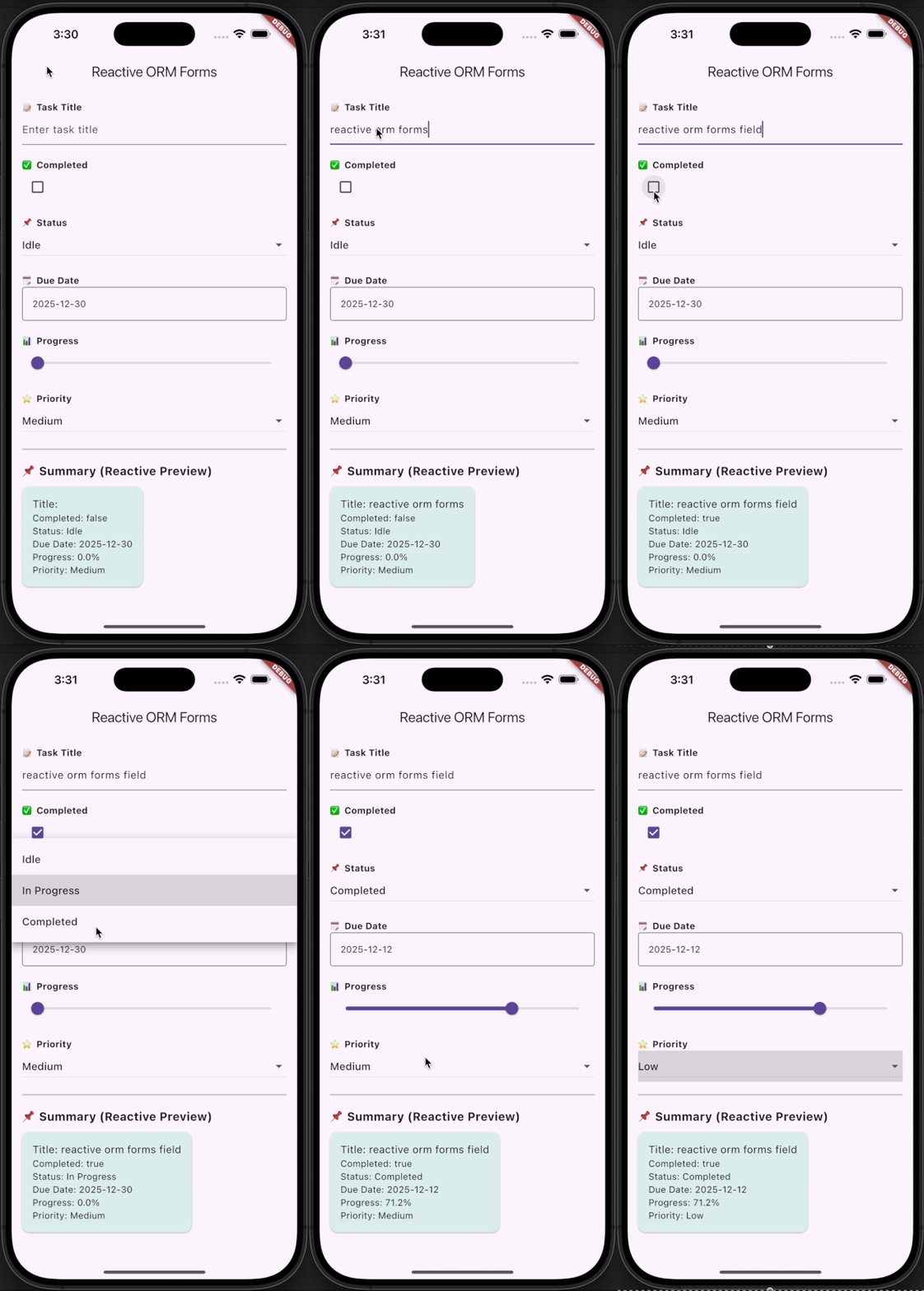
It provides field- and object-level reactivity, computed/watch helpers, and ready-to-use reactive form controls.
🎬 Demo #
✨ Features #
- ✅ Fully reactive form widgets for Flutter
- ✅ Works seamlessly with
ReactiveModelfrom LIVO - ✅ Field-wise and object-wise updates for optimized UI performance
- ✅ Includes ready-to-use reactive form widgets:
ReactiveTextField– Text input bound to a model fieldReactiveCheckbox– Boolean inputReactiveSwitch– Toggle inputReactiveSelectorF– Dropdown / selectorReactiveDropdown– Generic dropdownReactiveDatePicker– Date selectionReactiveSlider– Slider input
- ✅ Supports watchField() and watchComputed() for ergonomic reactive UI updates
- ✅ Nested and shared models supported
- ✅ Minimal boilerplate; integrates directly with domain models
🚀 Getting Started #
Installation #
dependencies:
  livoforms: <latest_version>
🧩 Usage Example: #
import 'package:flutter/material.dart';
import 'package:livo/livo.dart';
import 'package:livoforms/livoforms.dart';

class Task extends ReactiveModel {
  String _title;
  bool _completed = false;

  Task({required String title}) : _title = title;

  String get title => _title;
  set title(String value) {
    if (_title != value) {
      _title = value;
      notifyListeners(#title);
    }
  }

  bool get completed => _completed;
  set completed(bool value) {
    if (_completed != value) {
      _completed = value;
      notifyListeners(#completed);
    }
  }
}

void main() => runApp(const MyApp());

class MyApp extends StatelessWidget {
  const MyApp({super.key});

  @override
  Widget build(BuildContext context) {
    return MaterialApp(home: HomePage());
  }
}

class HomePage extends StatelessWidget {
  final Task task = Task(title: "Design UI");

  @override
  Widget build(BuildContext context) {
    return Scaffold(
      appBar: AppBar(title: const Text("LIVO Forms Demo")),
      body: Padding(
        padding: const EdgeInsets.all(16),
        child: Column(
          children: [
            ReactiveTextField(
              model: task,
              fieldName: "title",
              hintText: "Task title",
            ),
            ReactiveCheckbox(model: task, fieldName: "completed"),
            ReactiveSwitch(model: task, fieldName: "completed"),
            ReactiveBuilder<Task>(
              model: task,
              fields: [#title, #completed],
              builder: (t) => Text(
                  "Title: ${t.title}, Completed: ${t.completed}"),
            ),
          ],
        ),
      ),
    );
  }
}
🔧 Widgets Overview: #
ReactiveTextField– Text input bound to a reactive model fieldReactiveCheckbox– Boolean inputReactiveSwitch– Toggle inputReactiveSelectorF– SelectorReactiveDropdown– Generic dropdownReactiveDatePicker– Date selectionReactiveSlider– Slider input
🧠 How It Works: #
- Models extend
ReactiveModelfromLIVO. - Form widgets automatically listen to field changes and rebuild UI as needed.
watchField()andwatchComputed()allow fine-grained reactive updates for high performance.- Nested and shared models propagate updates upward automatically.
- Minimal boilerplate; fully declarative, ORM-style reactive forms.
📌 Summary: #
LIVO Forms is ideal for: #
- Building reactive Flutter forms with minimal boilerplate
- Fine-grained field-level reactivity
- Computed and watched UI updates
- Nested and shared reactive models
- Seamless integration with LIVO state management
LIVO Forms leverages LIVO’s reactive object–relationship model to create forms that scale with your application while keeping the code clean and maintainable.
🔗 Migration from reactive_orm_forms: #
reactive_orm_formsis deprecated.- All existing functionality has moved to livoforms.
Replace imports: #
// Old
import 'package:reactive_orm_forms/reactive_orm_forms.dart';

// New
import 'package:livoforms/livoforms.dart';
- Update base model references from
ReactiveModelinreactive_orm→ReactiveModelinlivo.
Metadata
1
likes
160
points
--
downloads
Publisher
unverified uploader
Metadata
Reactive forms for Flutter, built on top of LIVO – field- and object-level reactivity with validation.
Homepage
Repository (GitHub)
View/report issues
Documentation
License
 MIT (license)

