
liquid_glass_components 1.0.1  liquid_glass_components: ^1.0.1 copied to clipboard
A Flutter package for beautiful glass morphism UI components with customizable form elements.
Liquid Glass Components #
A beautiful Flutter package for glass morphism UI components with customizable form elements. Create stunning glass liquid effects for your Flutter applications.
Screenshots #

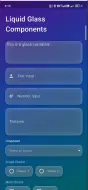
Main components showcase

All components in action
Features #
✨ Glass Morphism Effects - Beautiful frosted glass appearance with backdrop blur
🎨 Fully Customizable - Extensive theming options for all components
📱 Form Components - Complete set of form inputs and controls
🎯 Easy to Use - Simple API with sensible defaults
🌙 Dark & Light Themes - Built-in theme presets
Components #
- Container - Glass morphism container widget
- Input Text - Text input field with glass styling
- Input Number - Number input with validation
- Textarea - Multi-line text input
- Dropdown - Select dropdown with glass styling
- Choice - Single select radio group
- Multi Choice - Multi-select checkbox group
- Checkbox - Individual checkbox component
- Radio - Radio button component
- Button - Glass styled buttons (primary, secondary, danger)
Installation #
Add this to your package's pubspec.yaml file:
dependencies:
  liquid_glass_components:
    path: .  # or use git/pub.dev if published
Then run:
flutter pub get
Quick Start #
import 'package:flutter/material.dart';
import 'package:liquid_glass_components/liquid_glass_components.dart';

void main() {
  runApp(MyApp());
}

class MyApp extends StatelessWidget {
  @override
  Widget build(BuildContext context) {
    return MaterialApp(
      home: Scaffold(
        body: Container(
          decoration: BoxDecoration(
            gradient: LinearGradient(
              colors: [Colors.purple.shade900, Colors.blue.shade900],
            ),
          ),
          child: Center(
            child: LiquidGlassContainer(
              padding: EdgeInsets.all(20),
              child: Text('Hello Glass!'),
            ),
          ),
        ),
      ),
    );
  }
}
Usage Examples #
Container #
LiquidGlassContainer(
  padding: EdgeInsets.all(20),
  margin: EdgeInsets.all(16),
  child: Text('Glass Container'),
)
Text Input #
LiquidGlassInputText(
  labelText: 'Name',
  hintText: 'Enter your name',
  prefixIcon: Icon(Icons.person),
  onChanged: (value) => print(value),
)
Number Input #
LiquidGlassInputNumber(
  labelText: 'Age',
  hintText: 'Enter your age',
  allowDecimal: false,
  min: 0,
  max: 120,
  onChanged: (value) => print(value),
)
Dropdown #
LiquidGlassDropdown<String>(
  labelText: 'Country',
  hintText: 'Select a country',
  items: [
    LiquidGlassDropdownItem(value: 'us', label: 'United States'),
    LiquidGlassDropdownItem(value: 'uk', label: 'United Kingdom'),
  ],
  value: selectedCountry,
  onChanged: (value) => setState(() => selectedCountry = value),
)
Choice (Single Select) #
LiquidGlassChoice<String>(
  options: [
    LiquidGlassChoiceOption(value: 'option1', label: 'Option 1'),
    LiquidGlassChoiceOption(value: 'option2', label: 'Option 2'),
  ],
  value: selectedOption,
  direction: Axis.horizontal,
  onChanged: (value) => setState(() => selectedOption = value),
)
Multi Choice #
LiquidGlassMultiChoice<String>(
  options: [
    LiquidGlassMultiChoiceOption(value: 'item1', label: 'Item 1'),
    LiquidGlassMultiChoiceOption(value: 'item2', label: 'Item 2'),
  ],
  values: selectedItems,
  onChanged: (values) => setState(() => selectedItems = values),
)
Button #
LiquidGlassButton(
  text: 'Submit',
  type: LiquidGlassButtonType.primary,
  onPressed: () => print('Pressed'),
)

LiquidGlassButton(
  text: 'Cancel',
  type: LiquidGlassButtonType.secondary,
  onPressed: () => print('Cancelled'),
)
Checkbox #
LiquidGlassCheckbox(
  value: isChecked,
  label: 'Accept terms',
  onChanged: (value) => setState(() => isChecked = value ?? false),
)
Radio #
LiquidGlassRadio<String>(
  value: 'option1',
  groupValue: selectedRadio,
  label: 'Option 1',
  onChanged: (value) => setState(() => selectedRadio = value),
)
Theming #
Customize the glass effect with LiquidGlassTheme:
const customTheme = LiquidGlassTheme(
  baseColor: Colors.white,
  opacity: 0.2,
  blurIntensity: 15.0,
  borderRadius: 16.0,
  borderWidth: 1.5,
  borderColor: Colors.white,
  textColor: Colors.white,
  hintColor: Colors.white70,
  focusColor: Colors.blueAccent,
  errorColor: Colors.redAccent,
);

// Use with any component
LiquidGlassInputText(
  theme: customTheme,
  // ... other properties
)
Predefined Themes #
// Light theme
LiquidGlassTheme.light

// Dark theme
LiquidGlassTheme.dark
Customization Options #
All components support extensive customization:
- Colors - baseColor, borderColor, textColor, focusColor, errorColor
- Effects - opacity, blurIntensity, shadow properties
- Layout - padding, margin, width, height, borderRadius
- Gradients - gradientColors and gradientStops for liquid effects
Example App #
See lib/example.dart for a complete example demonstrating all components.
License #
This project is licensed under the MIT License.
Contributing #
Contributions are welcome! Please feel free to submit a Pull Request.
Metadata

Publisher
unverified uploader
Weekly Downloads
Metadata
A Flutter package for beautiful glass morphism UI components with customizable form elements.
Repository (GitHub)
View/report issues
Documentation
License
 MIT (license)

