
large_content_viewer 0.1.4  large_content_viewer: ^0.1.4 copied to clipboard
 manuelasakurarommel.com
A Flutter widget that mimics the iOS Large Content Viewer behavior.
Large Content Viewer #


A Flutter widget that mimics the iOS Large Content Viewer behavior, showing a magnified view of its child on long-press. This is particularly useful for improving accessibility for all users by making UI elements easier to see on demand.
Works on both iOS and Android.
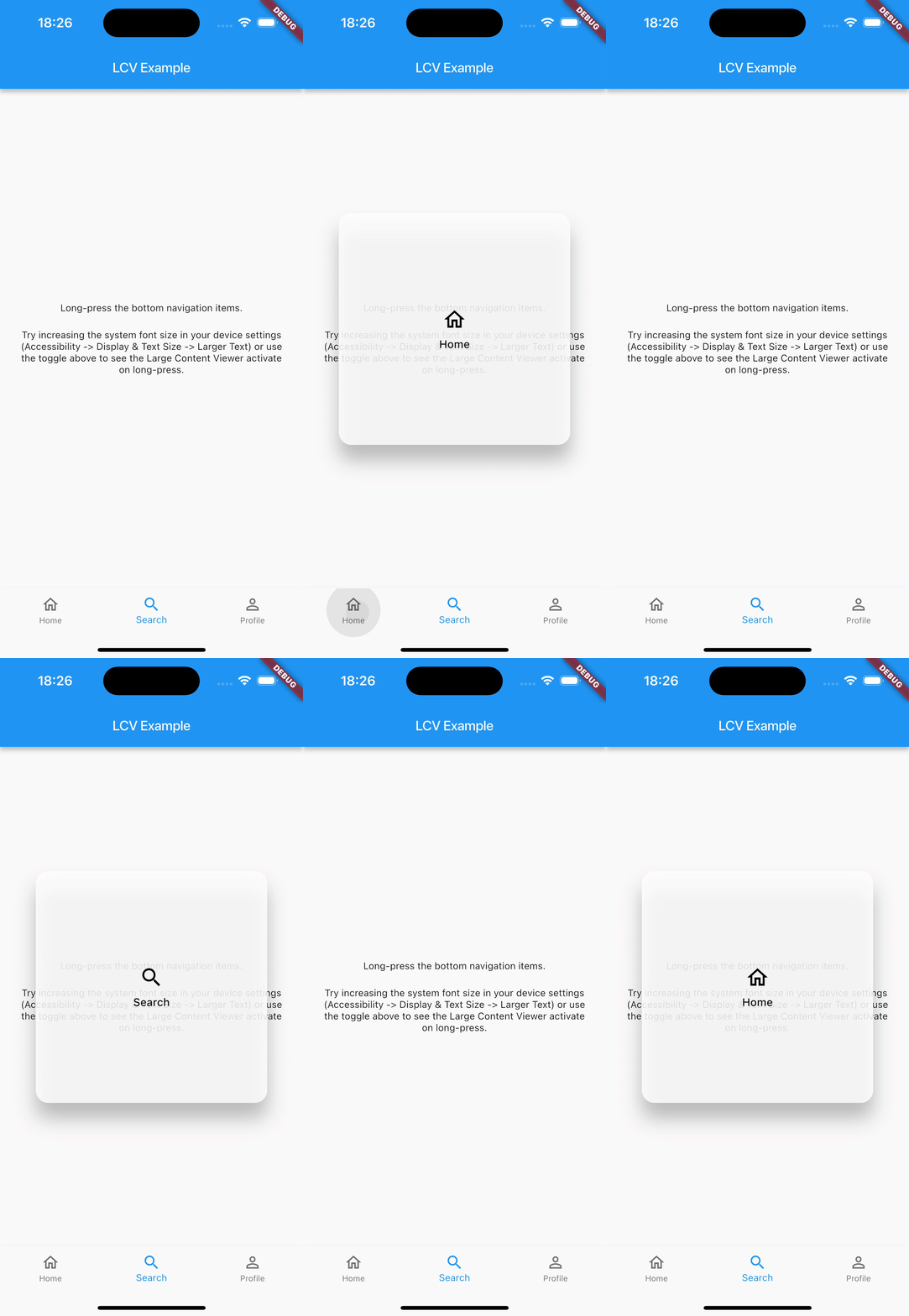
Features #
- Wraps any widget (
child). - Activates on long-press.
- Shows a styled, magnified popup above the
child. - Popup content can be a scaled version of the
child(controlled byscaleFactor) or a completely customcustomOverlayChildwidget. - Smooth popup appearance/disappearance.
- Includes haptic feedback on activation.
- Highly customizable appearance (background color, border radius, elevation, padding, constraints, text style, icon theme, content scale factor) via
LargeContentViewerThemeandLargeContentViewerThemeData. - Lightweight and uses only Flutter SDK components.
Usage #
Wrap the widget you want to provide a large content view for with LargeContentViewer.
Basic Example (Scaled Child):
LargeContentViewer(
  scaleFactor: 2.5, // How much to scale the child if customOverlayChild is null
  child: IconButton(
    icon: Icon(Icons.settings),
    onPressed: () {
      // Action for settings
    },
    tooltip: 'Settings',
  ),
)
Example with Custom Overlay Child and Theming:
LargeContentViewerTheme(
  data: LargeContentViewerThemeData(
    backgroundColor: Colors.blueGrey.withOpacity(0.9),
    borderRadius: BorderRadius.circular(16.0),
    elevation: 10.0,
    padding: const EdgeInsets.all(16.0),
    textStyle: const TextStyle(fontSize: 18, color: Colors.white),
    iconTheme: const IconThemeData(size: 32, color: Colors.white),
  ),
  child: LargeContentViewer(
    child: Column(
      mainAxisSize: MainAxisSize.min,
      children: const [
        Icon(Icons.home),
        Text('Home'),
      ],
    ),
    // Optional: Provide a completely custom widget for the popup
    customOverlayChild: Container(
      padding: const EdgeInsets.all(20.0),
      child: Row(
        mainAxisSize: MainAxisSize.min,
        children: const [
          Icon(Icons.home, size: 40, color: Colors.lightBlueAccent),
          SizedBox(width: 12),
          Text('Enlarged Home', style: TextStyle(fontSize: 22, color: Colors.lightBlueAccent)),
        ],
      ),
    ),
  ),
)
See the example/ directory for a more detailed example using BottomNavigationBar.
Configuration #
LargeContentViewer Widget Parameters #
| Parameter | Description | Default |
|---|---|---|
child |
Required. The widget to wrap and display normally. | |
customOverlayChild |
An optional widget to display in the popup instead of the scaled child. |
null |
scaleFactor |
How much to scale the child in the popup (if customOverlayChild is null). |
2.0 |
enabledFromTextScaleFactor |
The minimum text scale factor at which the popup becomes active. This allows the viewer to appear only for users with larger accessibility text. | 1.6 |
LargeContentViewerThemeData Properties #
Use LargeContentViewerTheme to provide custom styling for all LargeContentViewer widgets in a subtree.
| Property | Description | Default |
|---|---|---|
backgroundColor |
Background color of the popup. | Theme-based grey with opacity (colorScheme.surface.withOpacity(0.85)) |
elevation |
Shadow elevation of the popup. | 20.0 |
borderRadius |
Border radius of the popup. | BorderRadius.circular(16.0) |
padding |
Padding inside the popup. | EdgeInsets.symmetric(vertical: 20.0, horizontal: 24.0) |
constraints |
Constraints for the size of the popup. | min/maxWidth: 150/300, min/maxHeight: 80/300 |
textStyle |
Default text style for content within the popup. | Theme's bodyLarge with onSurface color, w500 weight |
iconTheme |
Default icon theme for icons within the popup. | Theme's onSurface color, size 32.0 |
contentScaleFactor |
Overrides scaleFactor of individual LargeContentViewer widgets in the subtree. |
null (uses widget's scaleFactor) |
Additional information #
Contributing #
Contributions are welcome! If you find a bug or have a feature request, please file an issue on the GitHub repository. If you'd like to contribute code, please fork the repository and submit a pull request.
Filing Issues #
When filing an issue, please provide a clear description of the problem, steps to reproduce it, and any relevant code snippets or screenshots. This will help in quickly understanding and addressing the issue.
License #
This package is licensed under the MIT License - see the LICENSE file for details.
Metadata
Publisher
Weekly Downloads
Metadata
A Flutter widget that mimics the iOS Large Content Viewer behavior.
Repository (GitHub)
View/report issues
Documentation
License
 MIT (license)

