
keyboard_safe 0.0.2  keyboard_safe: ^0.0.2 copied to clipboard
A lightweight Flutter widget that prevents keyboard overflow by automatically adjusting layout, scrolling input fields into view, and providing sticky footers above the keyboard.
📱 keyboard_safe #
A lightweight Flutter widget that prevents keyboard overflow by automatically adjusting padding and optionally scrolling input fields into view.


✅ Why KeyboardSafe? #
Flutter apps often struggle with keyboard handling, especially in complex forms.
KeyboardSafe solves this with a single, configurable wrapper that offers:
- ✅ Automatically adjusts padding when the keyboard appears
- 🎯 Auto-scrolls to focused input fields
- 📌 Optional sticky footer support above the keyboard
- 👆 Tap outside to dismiss keyboard
- 📦 Optional SafeArea wrapping
- 🎬 Smooth animated transitions
🔧 Install it #
Add it to your pubspec.yaml:
dependencies:
  keyboard_safe: ^0.0.1
Then run:
flutter pub get
🔨 Usage #
Wrap your form or layout with KeyboardSafe:
import 'package:keyboard_safe/keyboard_safe.dart';

@override
Widget build(BuildContext context) {
  return KeyboardSafe(
    scroll: true,
    dismissOnTapOutside: true,
    footer: ElevatedButton(
      onPressed: () {},
      child: const Text('Submit'),
    ),
    child: Column(
      crossAxisAlignment: CrossAxisAlignment.stretch,
      children: const [
        TextField(decoration: InputDecoration(labelText: 'Email')),
        SizedBox(height: 16),
        TextField(decoration: InputDecoration(labelText: 'Password')),
      ],
    ),
  );
}
Advanced Example #
import 'package:keyboard_safe/keyboard_safe.dart';

@override
Widget build(BuildContext context) {
  return Scaffold(
    appBar: AppBar(
      title: const Text('KeyboardSafe Advanced Example'),
    ),
    body: KeyboardSafe(
      scroll: true,
      autoScrollToFocused: true,
      dismissOnTapOutside: true,
      persistFooter: true,
      safeArea: true,
      padding: const EdgeInsets.all(24),
      keyboardAnimationDuration: const Duration(milliseconds: 300),
      keyboardAnimationCurve: Curves.easeInOut,
      onKeyboardChanged: (visible, height) {
        debugPrint('Keyboard is ${visible ? 'visible' : 'hidden'} ($height px)');
      },
      footer: Padding(
        padding: const EdgeInsets.symmetric(vertical: 16),
        child: ElevatedButton.icon(
          onPressed: () {
            KeyboardSafe.dismissKeyboard(context);
            ScaffoldMessenger.of(context).showSnackBar(
              const SnackBar(content: Text('Form submitted')),
            );
          },
          icon: const Icon(Icons.send),
          label: const Text('Submit'),
          style: ElevatedButton.styleFrom(
            backgroundColor: Theme.of(context).colorScheme.primary,
            foregroundColor: Colors.white,
            padding: const EdgeInsets.symmetric(vertical: 16),
            shape: RoundedRectangleBorder(
              borderRadius: BorderRadius.circular(12),
            ),
          ),
        ),
      ),
      child: Column(
        crossAxisAlignment: CrossAxisAlignment.stretch,
        children: const [
          TextField(
            decoration: InputDecoration(
              labelText: 'Full Name',
              hintText: 'Enter your name',
            ),
          ),
          SizedBox(height: 16),
          TextField(
            decoration: InputDecoration(
              labelText: 'Email',
              hintText: '[email protected]',
            ),
          ),
          SizedBox(height: 16),
          TextField(
            decoration: InputDecoration(
              labelText: 'Message',
              hintText: 'Type something...',
            ),
            maxLines: 4,
          ),
        ],
      ),
    ),
  );
}
📱 Example App #
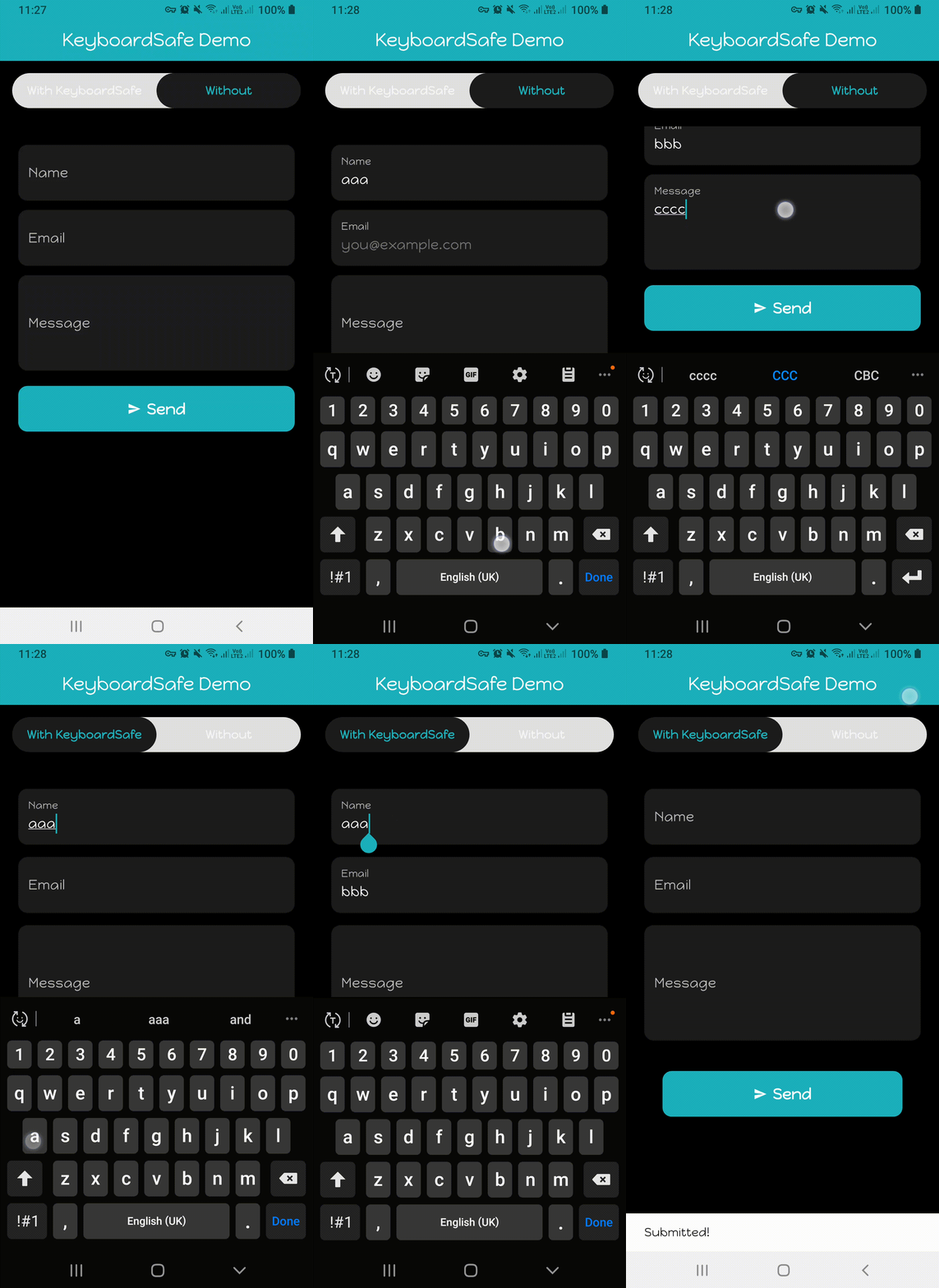
The example/ app demonstrates the benefits of using KeyboardSafe:
✅ Includes a toggle for 'With' vs 'Without KeyboardSafe'
✅ Demonstrates auto-scroll to input, sticky footer, keyboard avoidance, and tap-outside dismissal
To run:
flutter run example
💡 If you use FVM, replace
flutterwithfvm flutterin the command above.
🎬 Demo #
Here's a quick demo of KeyboardSafe in action 👇
🧪 Try it on DartPad #
Want to test it live? Here's a minimal demo running in DartPad 👇

🧪 Run the DartPad demo locally #
To run the DartPad-compatible demo on your device/emulator:
# Make sure you're in the example/ folder
cd example

# Then run the custom demo entry point
flutter run -t lib/dartpad_demo.dart
💡 If you use FVM, replace
flutterwithfvm flutterin the command above.
📦 Parameters #
| Parameter | Type | Default | Description |
|---|---|---|---|
child |
Widget |
— (required) | Main content inside the wrapper |
footer |
Widget? |
null |
Optional footer shown above the keyboard (e.g. Submit button) |
scroll |
bool |
false |
Whether to wrap in SingleChildScrollView |
autoScrollToFocused |
bool |
true |
Automatically scroll focused field into view |
dismissOnTapOutside |
bool |
false |
Tap anywhere to dismiss keyboard |
safeArea |
bool |
false |
Wrap in a SafeArea widget |
persistFooter |
bool |
false |
Whether footer should remain visible when keyboard appears |
padding |
EdgeInsets |
EdgeInsets.zero |
Base padding applied before keyboard adjustment |
reverse |
bool |
false |
Reverses scroll direction |
onKeyboardChanged |
void Function(bool, double)? |
null |
Callback when keyboard appears/disappears |
keyboardAnimationDuration |
Duration |
Duration(milliseconds: 250) |
Duration of keyboard transitions |
keyboardAnimationCurve |
Curve |
Curves.easeOut |
Curve used in AnimatedPadding and AnimatedContainer |
⌨️ Dismiss Keyboard #
You can programmatically dismiss the keyboard using:
KeyboardSafe.dismissKeyboard(context);
🧪 Testing #
This package includes widget tests that verify key behaviors:
flutter test
Covered features:
✅ Padding applied when MediaQuery.viewInsets.bottom is non-zero
✅ Keyboard dismissal when tapping outside of input
📄 License #
MIT License. See LICENSE for details.
💡 Contribute #
Feel free to file issues or submit PRs to help improve this package.
Star ⭐ the repo if you found this helpful!
💬 Maintainer #
Made by @ChathraNavoda
Metadata
Publisher
unverified uploader
Weekly Downloads
Metadata
A lightweight Flutter widget that prevents keyboard overflow by automatically adjusting layout, scrolling input fields into view, and providing sticky footers above the keyboard.
Repository (GitHub)
View/report issues
Topics
#keyboard #layout #textfields #overflow #focus
Documentation
License
 MIT (license)

