
just_audio_windows_plus 0.5.5  just_audio_windows_plus: ^0.5.5 copied to clipboard
 omar-afifi.com
Hardened native Windows audio engine for Flutter: files, assets, streams, and playlists over WinRT MediaPlayer with full just_audio compatibility and a C++20 core.
just_audio_windows_plus #
Production-Grade Native Windows Audio Engine for Flutter #


Seamless, crash-free, high-fidelity audio playback for Flutter desktop applications.
Built on the native WinRT `Windows.Media.Playback.MediaPlayer` engine with an ultra-reliable C++20 core and complete drop-in compatibility with just_audio.
Why This Package? • Comparison • Quickstart • Ready Widget • Code Recipes • Under the Hood • FAQ

⚡ Why just_audio_windows_plus? #
Building desktop audio on Windows has notoriously tricky edge cases: WinRT background threadpool callbacks, asynchronous COM item lifetimes, and memory race conditions during fast disposal or page switches.
The existing just_audio_windows (v0.2.3) implementation suffered from unhandled thread warnings, access violation crashes (0xC0000005), infinite hanging loads on 404s, and broken playlist looping.
just_audio_windows_plus was re-engineered from the ground up to provide an uncompromising, rock-solid native foundation:
- 🚀 Zero External Dependencies: Built directly on the WinRT
Windows.Media.Playback.MediaPlayerengine that ships with Windows. Zero third-party DLLs to bundle, zero FFmpeg dependencies, and zero external installers required. - 🧵 Zero Platform Thread Warnings: All background WinRT callbacks are safely marshalled onto Flutter's UI platform thread through a dedicated Win32 message window (
HWND_MESSAGE). No dropped callbacks, no engine warnings. - 🛡️ Bulletproof Lifecycle & Disposal: Native callbacks utilize
std::weak_ptrwith atomic generation tracking. Disposing of a player mid-playback, fast page switching, or triggering hot restart never causes native crashes. - 🎯 Strict
just_audioContract Compliance:await player.setFilePath(...)resolves with the exact microsecond duration or throws a catchablePlayerExceptionon missing files / 404s (no infinite hangs).await player.play()stays active until pause or completion. - 🔀 True Playlist & Shuffle Architecture: Native recursive source tree supports nested concatenating, looping, and clipping sources with linear, permutation-validated shuffling and dynamic mutations (even starting from an empty playlist).
- 🧪 174 Automated Verification Tests: 34 real Windows end-to-end playback integration scenarios run against the compiled plugin (Debug and Release), 40 native C++ unit tests exercising the production headers, and 100 Dart contract tests that pin the exact channel protocol, argument shapes, and error codes the native engine implements.
🏛️ Architectural Comparison #
See how just_audio_windows_plus compares to just_audio_windows (0.2.3):
| Capability / Reliability Dimension | just_audio_windows (0.2.3) |
just_audio_windows_plus (0.5.5) |
|---|---|---|
| Platform Thread Marshalling | ❌ Background Threadpool (Engine logs non-platform thread warnings) | ✅ Win32 Message Window (HWND_MESSAGE) serialization |
| C++ Toolchain Standard | ❌ C++17 (Breaks on modern MSVC 14.51 / VS 2026 STL1011) |
✅ Modern C++20 Core (Clean /W4 /WX on VS 2026) |
| Callback Lifetime & Teardown | ❌ Raw this captured in WinRT handlers (Fatal 0xC0000005 on disposal) |
✅ std::weak_ptr + generation token validation |
| Failed Load Resolution | ❌ Returns premature success; pending loads hang forever on 404 | ✅ Settles immediately with exact duration or PlayerException |
await play() Semantics |
❌ Returns prematurely after ~12 ms before track plays | ✅ Resolves upon pause or end-of-file per just_audio contract |
Full Playlist Looping (LoopMode.all) |
❌ Repeats track 1 indefinitely when set before load | ✅ ApplyModes() guarantees complete playlist cycling |
| Nested Audio Sources | ❌ Rejects nested concatenating & looping sources with corrupt errors | ✅ Recursive Source Tree model with ID-targeted mutations |
| Dynamic Playlist Insertion | ❌ Adding items to an initially empty playlist remains silent | ✅ Automatically attaches WinRT source upon first insertion |
| Playlist Shuffling Engine | ❌ Index-shifting loop that corrupts track indices | ✅ Permutation-validated mapping (SourceNode::Permutation + Order) |
| Live Buffering Clamping | ❌ Unchecked float (NaN/Inf crashes Dart assertions) |
✅ Guarded ClampBufferedPosition with std::isfinite, and bufferedPosition bounded by the duration |
| Native Error Text Integrity | ❌ Temporary c_str() dangling pointer (FormatException) |
✅ Owned ArgumentError strings preserve UTF-8 text |
| System Media Transport Controls | ❌ Automatically hijacks OS lockscreen with blank overlays | ✅ De-conflicted SMTC (Integrate cleanly with audio_service) |
| Multi-Engine Isolation | ❌ Namespace globals share state across Flutter engines | ✅ Instance-scoped players and dispatchers |
| Windows Playback Verification | ❌ None (Only mock channel handlers) | ✅ 34 Real Playback Scenarios + 40 C++ Tests + 100 Contract Tests |
| Restart from Completed State | ❌ Engine parks in completed after EOF; replaying the same source stays silent until a fresh source load |
✅ completed → ready re-arm + commit-on-success delivery + transactional mutation rollback |
🚀 Quickstart (30 Seconds) #
1. Add Dependencies #
Add just_audio and just_audio_windows_plus to your pubspec.yaml:
dependencies:
  flutter:
    sdk: flutter
  just_audio: ^0.10.6
  just_audio_windows_plus: ^0.5.5
Tip
Zero Platform Configuration Needed: Flutter automatically detects and registers just_audio_windows_plus on Windows. You can use standard just_audio APIs without any platform-conditional boilerplate!
2. Basic Playback Example #
import 'package:flutter/material.dart';
import 'package:just_audio/just_audio.dart';

void main() async {
  WidgetsFlutterBinding.ensureInitialized();

  final player = AudioPlayer();
  try {
    // Stream remote HTTP/HTTPS audio, play local files, or bundled assets
    await player.setUrl('https://server10.mp3quran.net/minsh/001.mp3');

    // Play until user pauses or track finishes
    await player.play();
  } finally {
    await player.dispose();
  }
}
📦 Complete Ready-to-Copy Player Widget #
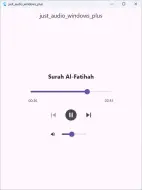
Here is a full, production-ready desktop audio bar widget featuring an interactive seek slider, real-time position/duration timestamps (01:23 / 03:45), buffering spinner, and play/pause controls:
import 'package:flutter/material.dart';
import 'package:just_audio/just_audio.dart';

/// A production-ready desktop audio player bar widget.
class DesktopAudioBar extends StatelessWidget {
  final AudioPlayer player;

  const DesktopAudioBar({super.key, required this.player});

  String _formatDuration(Duration? d) {
    if (d == null) return '--:--';
    final minutes = d.inMinutes.remainder(60).toString().padLeft(2, '0');
    final seconds = d.inSeconds.remainder(60).toString().padLeft(2, '0');
    return '$minutes:$seconds';
  }

  @override
  Widget build(BuildContext context) {
    final theme = Theme.of(context);

    return Card(
      elevation: 2,
      shape: RoundedRectangleBorder(borderRadius: BorderRadius.circular(16)),
      child: Padding(
        padding: const EdgeInsets.symmetric(horizontal: 16, vertical: 10),
        child: StreamBuilder<Duration?>(
          stream: player.durationStream,
          builder: (context, durationSnapshot) {
            final duration = durationSnapshot.data ?? Duration.zero;

            return StreamBuilder<Duration>(
              stream: player.positionStream,
              builder: (context, positionSnapshot) {
                var position = positionSnapshot.data ?? Duration.zero;
                if (position > duration) position = duration;

                return Row(
                  children: [
                    // Play / Pause / Buffering Indicator
                    StreamBuilder<PlayerState>(
                      stream: player.playerStateStream,
                      builder: (context, snapshot) {
                        final isPlaying = snapshot.data?.playing ?? false;
                        final processingState = snapshot.data?.processingState;
                        final isBusy = processingState == ProcessingState.loading ||
                            processingState == ProcessingState.buffering;

                        if (isBusy) {
                          return const Padding(
                            padding: EdgeInsets.all(8.0),
                            child: SizedBox(
                              width: 32,
                              height: 32,
                              child: CircularProgressIndicator(strokeWidth: 2.5),
                            ),
                          );
                        }

                        return IconButton(
                          icon: Icon(
                            isPlaying ? Icons.pause_circle_filled : Icons.play_circle_filled,
                            color: theme.colorScheme.primary,
                          ),
                          iconSize: 44,
                          tooltip: isPlaying ? 'Pause' : 'Play',
                          onPressed: () => isPlaying ? player.pause() : player.play(),
                        );
                      },
                    ),
                    const SizedBox(width: 12),

                    // Current Position
                    Text(
                      _formatDuration(position),
                      style: const TextStyle(fontWeight: FontWeight.w600),
                    ),
                    const SizedBox(width: 8),

                    // Interactive Seek Scrubber
                    Expanded(
                      child: Slider(
                        min: 0.0,
                        max: duration.inMilliseconds.toDouble(),
                        value: position.inMilliseconds.toDouble().clamp(
                              0.0,
                              duration.inMilliseconds.toDouble(),
                            ),
                        onChanged: (value) {
                          player.seek(Duration(milliseconds: value.round()));
                        },
                      ),
                    ),
                    const SizedBox(width: 8),

                    // Total Duration
                    Text(
                      _formatDuration(duration),
                      style: const TextStyle(fontWeight: FontWeight.w600),
                    ),
                  ],
                );
              },
            );
          },
        ),
      ),
    );
  }
}
💡 Practical Recipes #
1. Local Audio Files & Bundled Assets #
// Local file paths (Windows paths with spaces and Unicode are safely handled)
await player.setFilePath(r'C:\Audio\Recordings\01 Surah Al-Fatihah.mp3');

// Bundled Flutter assets (declared under flutter.assets in pubspec.yaml)
await player.setAsset('assets/audio/notification.mp3');
2. Seamless Playlists, Looping & Shuffle #
// Build a playlist
final playlist = ConcatenatingAudioSource(children: [
  AudioSource.uri(Uri.parse('https://server10.mp3quran.net/minsh/001.mp3')),
  AudioSource.uri(Uri.parse('https://server10.mp3quran.net/minsh/112.mp3')),
  AudioSource.uri(Uri.parse('https://server10.mp3quran.net/minsh/113.mp3')),
  AudioSource.uri(Uri.parse('https://server10.mp3quran.net/minsh/114.mp3')),
]);

await player.setAudioSource(playlist, initialIndex: 0);

// Loop modes: LoopMode.off, LoopMode.one (repeat track), LoopMode.all (repeat playlist)
await player.setLoopMode(LoopMode.all);

// Enable randomized playback with permutation safety
await player.setShuffleModeEnabled(true);

// Next / Previous navigation
await player.seekToNext();
await player.seekToPrevious();

// Dynamic mutations: add or remove items at runtime
await playlist.add(AudioSource.uri(Uri.parse('https://server10.mp3quran.net/minsh/110.mp3')));
3. Volume, Speed & Seeking #
// Volume: 0.0 (silent) to 1.0 (maximum)
await player.setVolume(0.85);

// Variable playback speed: e.g. 0.75x, 1.25x, 1.5x, 2.0x
await player.setSpeed(1.25);

// Seek by time or playlist track index
await player.seek(const Duration(minutes: 1, seconds: 30));
await player.seek(Duration.zero, index: 2); // Jump directly to track 2
4. Robust Error Handling #
try {
  await player.setUrl('https://example.invalid/audio.mp3');
} on PlayerException catch (e) {
  // Immediately catches 404 Not Found, unsupported codecs, or missing native files
  debugPrint('Native load failed with code: ${e.code}, message: ${e.message}');
}

// Listen for background decoding errors or network stream dropouts
player.errorStream.listen((error) {
  debugPrint('Asynchronous playback error: $error');
});
🔬 Under the Hood: Built for Desktop Reliability #
Developing desktop audio means interfacing with COM and WinRT media notifications. just_audio_windows_plus is designed with strict engineering governance:
-
Win32 Message-Only Window Dispatcher (
platform_thread.hpp): WinRT fires media notifications on background ThreadPool threads. Writing directly to Flutter's binary messenger from background threads violates Flutter's threading model and causes dropped events. Every native callback is therefore marshalled through anHWND_MESSAGEWin32 message window, so the event sink is only ever touched on the platform thread. Callbacks are also guarded by a weak owner handle and a generation token, so any that arrive after a disposal, an engine restart, or a source swap are dropped instead of touching freed state. -
Weak Ownership & Generation Tokens (
player.hpp):AudioPlayerextendsstd::enable_shared_from_this<AudioPlayer>. Native callbacks capture astd::weak_ptr<AudioPlayer>paired with ageneration_counter captured at subscription time.generation_is deliberately not atomic: it is only ever read and written on the platform thread, because the dispatch above already serializes every path that touches player state. A callback whose captured generation no longer matches is discarded. If a player is disposed while WinRT callbacks are in flight, they expire harmlessly. -
Permutation-Validated Playlist Shuffling (
source_model.hpp): Everyconcatenatingnode must carry ashuffleOrderthat is an exact mathematical permutation of its children: the length must match, andSourceNode::Permutationrejects duplicates and out-of-range indices before any state changes.SourceNode::Orderthen walks the tree once to produce the linear automatic-progression order thatApplyShuffle()hands toMediaPlaybackList::SetShuffledItems, so an invalid order can never corrupt the playlist.native_utils.hppalso carriesReorderByShuffleOrder, a standalone validated-permutation helper for callers that hold a plain index list.ApplyShuffle()runs only while shuffling is enabled.SetShuffledItemsdefines the progression order regardless ofShuffleEnabled, andjust_audiosends a permutedshuffleOrderwith every load even when shuffling is off, so applying it unconditionally would play every playlist of three or more tracks out of order. -
Two Event Channels With Different Contracts (
player.hpp): The state channel carries samples - position, duration, processing state, current index - and is published on every change, because Dart must keep up to date with the media. The data channel carries intent -playing, volume, speed, loop and shuffle mode - and is published only when one of those values changes, becausejust_audioapplies every value it receives. A redundant copy is not harmless: it can overwrite a decision Dart already made, which in a Release build meantawait player.play()resolved while the media stayed silent. -
Floating-Point NaN & Infinity Shielding: All volume, speed, and buffering inputs/outputs are guarded by
std::isfiniteandClampBufferedPosition, preventing corrupt float values from crashing Dart's runtime assertions during live streaming.bufferedPositionis additionally clamped to[0, duration]inBroadcast(). The reported position is deliberately not clamped to the duration: across an item switch the session can still be describing the previous item, so clamping would report a position the user never seeked to. -
Clean System Media Transport Controls (SMTC) Separation: By explicitly disabling WinRT's automatic command manager (
mediaPlayer.CommandManager().IsEnabled(false)),just_audio_windows_plusprevents blank OS lockscreen overlays and allows applications to manage hardware keyboard media keys seamlessly viaaudio_service.
🧪 Comprehensive Verification & Quality Gates #
Every capability in this package is proven by automated tests. We believe in evidence over assertions:
# 1. Run the Dart channel-contract suite (100 tests)
flutter test

# 2. Run native C++ source tree and dispatcher unit tests (40 tests)
powershell -ExecutionPolicy Bypass tool/test_native.ps1

# 3. Run the real Windows playback regression suite (34 scenarios)
powershell -ExecutionPolicy Bypass tool/test_windows.ps1 -Mode debug
powershell -ExecutionPolicy Bypass tool/test_windows.ps1 -Mode release
Summary of Verified Scenarios: #
- Exact Microsecond Duration: Asserts 3-second WAV fixture returns exact 3000ms duration from
load. - Missing Files & HTTP 404: Asserts immediate resolution with
PlayerException(no hanging Futures). play()Completion Semantics: Asserts Future completes at pause or EOF; preservesplaying=true.- Full Playlist Looping: Asserts exact track progression
0 → 1 → 0underLoopMode.all. - Deterministic Shuffle: Asserts custom shuffle sequence
0 → 2 → 1in automatic playback. - Cross-Item Seeking: Asserts seeking to a non-zero position across different items preserves exact timeline offset.
- Dynamic Playlist Insertion: Asserts adding items to an initially empty playlist attaches source and plays.
- Nested Source Trees: Concatenating within concatenating, finite looping expansion, and ID mutations.
- Disposal Under Heavy Stress: Rapid create/load/seek/dispose iterations with callbacks in-flight without crash.
- Concurrent Independent Players: Multiple simultaneous players running concurrently without cross-talk.
- Play Before Load: Asserts
play()issued before itsloadstill waits for the real end of media, which is the pathjust_audiotakes on platform activation. - Play Without a Source: Asserts a
playwith nothing attached stays pending and is settled by an explicit pause, matching thejust_audiocontract. - Natural Order With Shuffle Off: Asserts a permuted
shuffleOrderdoes not reorder playback while shuffling is disabled. - Mid-Playback Mode Changes: Asserts toggling shuffle or loop during playback keeps the current track and position.
- Rejected Load Is Isolated: Asserts an out-of-range
initialIndexreportsargument_errorand leaves another player's playback running. - Buffered Position Bounds: Asserts
bufferedPositionnever exceedsduration. - Late Data Subscriber: Asserts a data-channel subscriber that attaches after earlier publishes still receives the current intent.
(See test/README.md for full instructions and coverage scope).
❓ Frequently Asked Questions (FAQ) #
Q: Do users need to install external runtimes, FFmpeg, or codecs?
No additional runtime is required. just_audio_windows_plus drives the built-in WinRT Windows.Media.Playback.MediaPlayer, which is present on every Windows 10 and 11 machine, so there is no FFmpeg and no third-party DLL to bundle. Individual codecs are still an operating-system capability: if a format is missing on a given Windows edition, this package cannot supply it.
Q: What audio formats are supported?
Whatever the host's Windows Media Foundation can decode, which on a typical Windows 10 or 11 install covers MP3, AAC, WAV, M4A/AAC and WMA. Format support is a property of the operating system, not of this package, and the exact set varies by Windows edition, version, and installed Media Feature Pack. The test suites in this repository use generated PCM WAV fixtures and a local HTTP server; they do not establish codec coverage, so verify your own formats on the Windows versions you ship to. Adaptive streaming (HLS, DASH) is passed to the system player as a progressive/hls/dash source and inherits the same OS-dependent support.
Q: Can I run multiple AudioPlayer instances simultaneously?
Yes. All state, method channels, and event sinks are strictly isolated per player instance. You can run multiple players simultaneously (e.g. background music + voice-over) with zero interference.
Q: How do I handle background audio or keyboard media keys?
Because just_audio_windows_plus cleanly disables automatic WinRT SMTC hijacking, you can use audio_service to manage OS lockscreen widgets and keyboard media keys with total control.
Q: Can I pass custom HTTP headers with audio URLs?
Direct native URL playback in WinRT does not support custom request headers. For audio sources requiring authentication tokens or custom headers, route them through just_audio's built-in local HTTP proxy (AudioSource.uri(uri, headers: {...})).
Q: Why do setPitch and setSkipSilence return errors?
WinRT's native media player does not support independent pitch shifting or silence skipping in this architecture. Rather than silently pretending to succeed, the engine follows a fail-fast design and returns an explicit unsupported error for non-default values.
📜 Author & License #
- Engineered, hardened, and maintained by Omar Afifi (@OmarAfifi-CSE).
- Foundational architectural heritage credited to Bruno D'Luka and Ryan Heise.
- Licensed under the MIT License. See LICENSE for details.
Metadata

Documentation
Publisher
Weekly Downloads
Metadata
Hardened native Windows audio engine for Flutter: files, assets, streams, and playlists over WinRT MediaPlayer with full just_audio compatibility and a C++20 core.
Repository (GitHub)
View/report issues
Topics
#audio #windows #just-audio #audio-player #media-player
License
 MIT (license)
Dependencies
More
Packages that depend on just_audio_windows_plus
Packages that implement just_audio_windows_plus