
japan_post_api_client 0.9.0  japan_post_api_client: ^0.9.0 copied to clipboard
 satoyan.net
A Flutter client for the Japan Post API.
English | 日本語
japan_post_api_client #




A Flutter client for the Japan Post API (https://lp-api.da.pf.japanpost.jp/). This package simplifies interaction with Japan Post services, making it incredibly straightforward to integrate postal code and address search functionalities into your Flutter applications.
日本郵便API(https://lp-api.da.pf.japanpost.jp/) のFlutterクライアントです。 このパッケージは日本郵便サービスとの連携を簡素化し、郵便番号や住所検索機能をFlutterアプリケーションに非常に簡単に統合できるようにします。
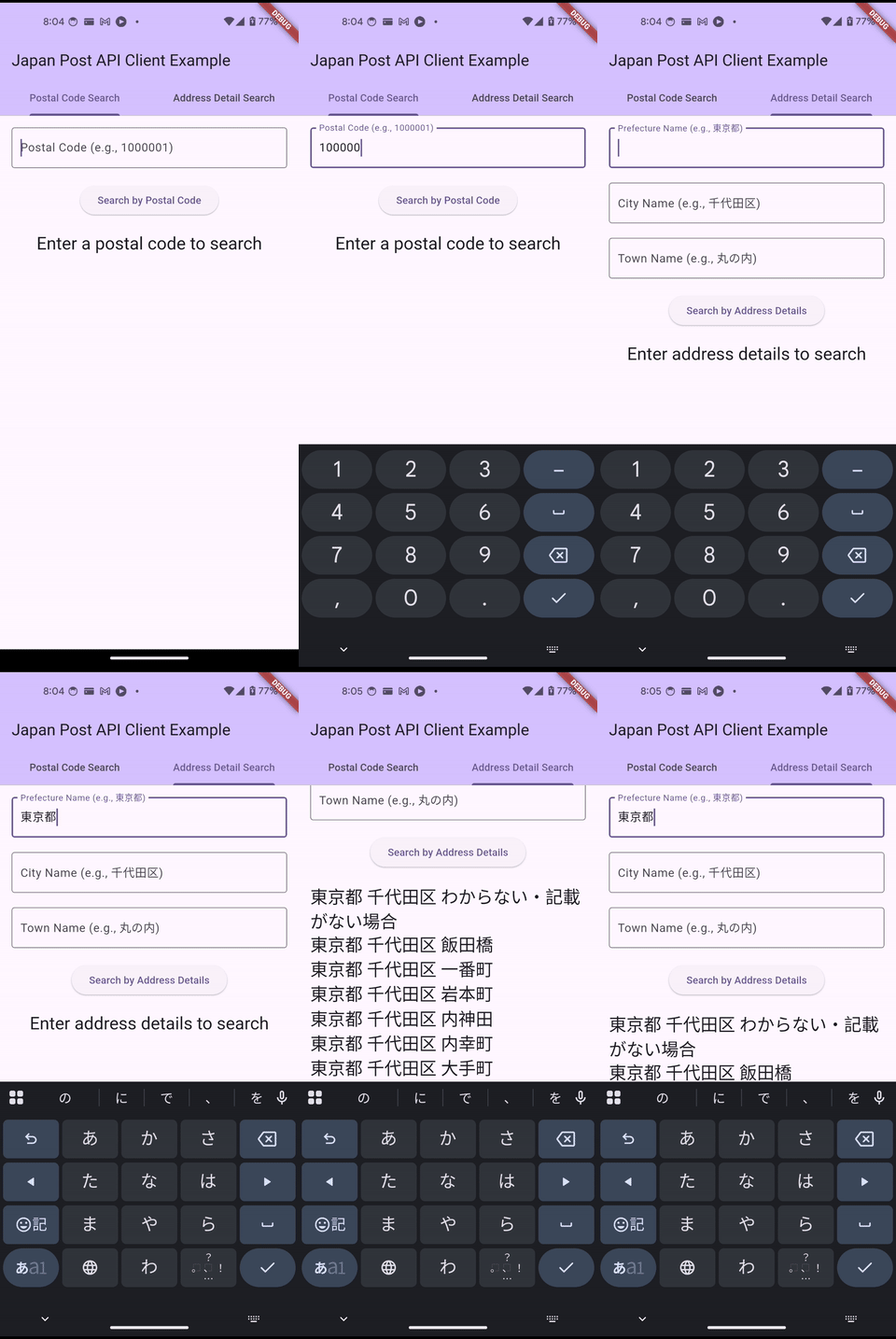
Features #
- Postal Code Search: Easily search for addresses using a Japanese postal code.
- Address Detail Search: Search for addresses by providing prefecture, city, and town names.
- API Token Management: Handles API token acquisition and management for seamless integration.
- Error Handling: Provides clear error handling for API responses.
Getting started #
-
Add to
pubspec.yaml: Add thejapan_post_api_clientto your project'spubspec.yamlfile:dependencies: japan_post_api_client: ^0.0.1 # Use the latest version -
Install dependencies: Run
flutter pub getin your project's root directory.
Usage #
Initialize the API Client #
Initialize the JapanPostApiClient with your client ID and secret key.
You will also need to obtain an API token using your public IP address. The getToken method handles this process.
import 'package:japan_post_api_client/japan_post_api_client.dart';

// Replace with your actual client ID and secret key
final JapanPostApiClient apiClient = JapanPostApiClient;

Future<void> initializeApiClient(String publicIp) async {
  final result = await apiClient.getToken(publicIp);
  switch (result) {
    case ApiResultOk():
      // API Client initialized and token obtained.
      // TODO: Update UI state to indicate successful initialization
      // For example: setState(() { _isApiClientInitialized = true; });
      break;
    case ApiResultError(error: final e, stackTrace: final s):
      // TODO: Handle initialization error, e.g., show a SnackBar or dialog
      // print('Error initializing API Client or getting token: $e');
      break;
  }
}
Obtaining Public IP Address (Example)
The Japan Post API requires your public IP address for token acquisition. You can obtain this programmatically using packages like public_ip_address.
First, add the dependency to your pubspec.yaml:
dependencies:
  public_ip_address: ^latest_version # Use the latest version
Then, you can get the IP address like this:
import 'package:public_ip_address/public_ip_address.dart';

Future<String?> getPublicIp() async {
  final ipChecker = IpAddress();
  try {
    final ipAddress = await ipChecker.getIp();
    return ipAddress;
  } catch (e) {
    // Handle error, e.g., log it or show a message
    return null;
  }
}
You would then pass the result of getPublicIp() to the initializeApiClient function.
Postal Code Search #
To search for an address using a postal code:
import 'package:japan_post_api_client/japan_post_api_client.dart';

Future<List<SearchcodeSearchResAddressesInner>> searchByPostalCode(String postalCode) async {
  final result = await apiClient.searchByPostalCode(postalCode);
  switch (result) {
    case ApiResultOk(data: final searchcodeRes):
      if (searchcodeRes != null && searchcodeRes.addresses.isNotEmpty) {
        // TODO: Update UI with the list of addresses
        // For example: setState(() { _addresses = searchcodeRes.addresses; });
        return searchcodeRes.addresses;
      } else {
        // TODO: Handle no address found, e.g., show a message to the user
        // print('No address found for postal code: $postalCode');
        return [];
      }
    case ApiResultError(error: final e, stackTrace: final s):
      // TODO: Handle search error, e.g., show a SnackBar or dialog
      // print('Error searching by postal code: $e');
      return [];
  }
}
Address Detail Search #
To search for an address using prefecture, city, and town names:
import 'package:japan_post_api_client/japan_post_api_client.dart';
import 'package:japan_post_api_client/src/model/address_req.dart';

Future<List<AddressResAddressesInner>> searchByAddressDetails(String prefName, String cityName, String townName) async {
  final addressReq = AddressReq(
    prefName: prefName,
    cityName: cityName,
    townName: townName,
  );
  final result = await apiClient.searchByAddress(addressReq);
  switch (result) {
    case ApiResultOk(data: final addressRes):
      if (addressRes != null && addressRes.addresses.isNotEmpty) {
        // TODO: Update UI with the list of addresses
        // For example: setState(() { _addresses = addressRes.addresses; });
        return addressRes.addresses;
      } else {
        // TODO: Handle no address found
        // print('No address found for the provided details.');
        return [];
      }
    case ApiResultError(error: final e, stackTrace: final s):
      // TODO: Handle search error, e.g., show a SnackBar or dialog
      // print('Error searching by address details: $e');
      return [];
  }
}
For a complete, runnable example, please refer to the example/ directory in this repository.
Direct API Access #
For more granular control or to access specific API endpoints directly, you can use the apiClient.searchcodeApi and apiClient.addresszipApi fields after successful token initialization. These fields expose the underlying API client objects, allowing you to call their methods with all available parameters.
Example: Using searchcodeApi directly
import 'package:japan_post_api_client/japan_post_api_client.dart';
import 'package:japan_post_api_client/src/api/searchcode_api.dart'; // Import if not already available
import 'package:japan_post_api_client/src/model/searchcode_search_res.dart'; // Import if not already available

Future<List<SearchcodeSearchResAddressesInner>> directSearchCode(String postalCode, {
  String? dgacode,
  String? prefCode,
  String? prefName,
  String? prefKana,
  String? prefRoma,
  int? cityCode,
  String? cityName,
  String? cityKana,
  String? cityRoma,
  String? townName,
  String? townKana,
  String? townRoma,
  String? bizName,
  String? bizKana,
  String? bizRoma,
  String? blockName,
  String? otherName,
  String? address,
  String? longitude,
  String? latitude,
  int? page,
  int? limit,
}) async {
  // Ensure API client is initialized and token is valid
  // await apiClient.getToken(publicIp); // Call this if token is not yet obtained or expired

  final SearchcodeApi? searchcodeApi = apiClient.searchcodeApi;

  if (searchcodeApi == null) {
    // Handle case where searchcodeApi is not initialized (e.g., token not obtained)
    return [];
  }

  try {
    final searchcodeRes = await searchcodeApi.searchCode(
      postalCode,
      dgacode: dgacode,
      prefCode: prefCode,
      prefName: prefName,
      prefKana: prefKana,
      prefRoma: prefRoma,
      cityCode: cityCode,
      cityName: cityName,
      cityKana: cityKana,
      cityRoma: cityRoma,
      townName: townName,
      townKana: townKana,
      townRoma: townRoma,
      bizName: bizName,
      bizKana: bizKana,
      bizRoma: bizRoma,
      blockName: blockName,
      otherName: otherName,
      address: address,
      longitude: longitude,
      latitude: latitude,
      page: page,
      limit: limit,
    );

    if (searchcodeRes != null && searchcodeRes.addresses.isNotEmpty) {
      // TODO: Process and display the addresses
      return searchcodeRes.addresses;
    } else {
      // TODO: Handle no address found
      return [];
    }
  } catch (e) {
    // TODO: Handle API error
    return [];
  }
}
Example: Using addresszipApi directly
import 'package:japan_post_api_client/japan_post_api_client.dart';
import 'package:japan_post_api_client/src/api/addresszip_api.dart'; // Import if not already available
import 'package:japan_post_api_client/src/model/address_req.dart'; // Import if not already available
import 'package:japan_post_api_client/src/model/address_res.dart'; // Import if not already available

Future<List<AddressResAddressesInner>> directSearchAddress(AddressReq addressReq) async {
  // Ensure API client is initialized and token is valid
  // await apiClient.getToken(publicIp); // Call this if token is not yet obtained or expired

  final AddresszipApi? addresszipApi = apiClient.addresszipApi;

  if (addresszipApi == null) {
    // Handle case where addresszipApi is not initialized (e.g., token not obtained)
    return [];
  }

  try {
    final addressRes = await addresszipApi.searchAddress(addressReq);

    if (addressRes != null && addressRes.addresses.isNotEmpty) {
      // TODO: Process and display the addresses
      return addressRes.addresses;
    } else {
      // TODO: Handle no address found
      return [];
    }
  } catch (e) {
    // TODO: Handle API error
    return [];
  }
}
Additional information #
Metadata
Publisher
Weekly Downloads
Metadata
A Flutter client for the Japan Post API.
Repository (GitHub)
View/report issues
License
 unknown (license)
Dependencies
collection, flutter, http, intl, meta

