
infinite_calendar_view 2.5.2  infinite_calendar_view: ^2.5.2 copied to clipboard
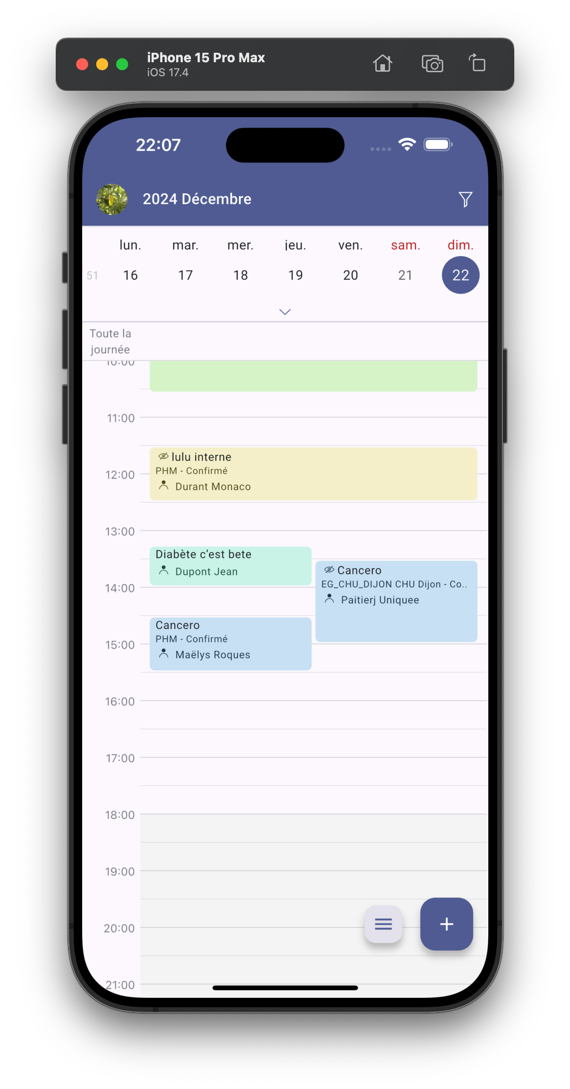
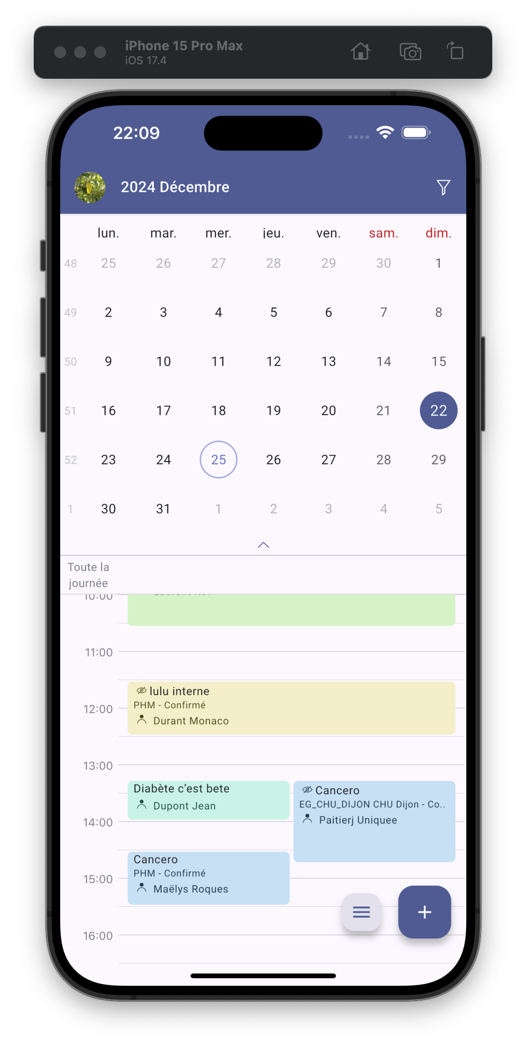
Easily build your different views of your calendar with this package. Month, week, three days, one day, list ... and many features.

infinite_calendar_view #


A Flutter package allows you to easily implement all calendar UI.
Web Demo #
https://pickywawa.github.io/infinite_calendar_view_demo/
Features #
- 💙 Inspired by Outlook and Teams mobile. Easy to use
- 🍻 Three views. Planner, Month and List views
- ♾️ Infinite scroll. Lazy build and best user experience
- 🚀 Good performance. With several dozen appointments per day
- ✏️ All configurable. Everything is configurable!
- 🗂️ Events filter. Easy filter day events
- 🗓️ Events types. Managing all-day events and multi-day events
- 🎲 Customizable number of days. Depending on the screen size
- 🤏 Pinch to zoom. Change the time scale with two fingers
- 👆🏼 Drag and drop. Move appointments easily
- 👩👧👦 Multi columns. Manage multiple calendars in the same view !
- 🗓️ Events arranger. Customize the placement of appointments in the schedule
- ♾️ ...
Preview #
|
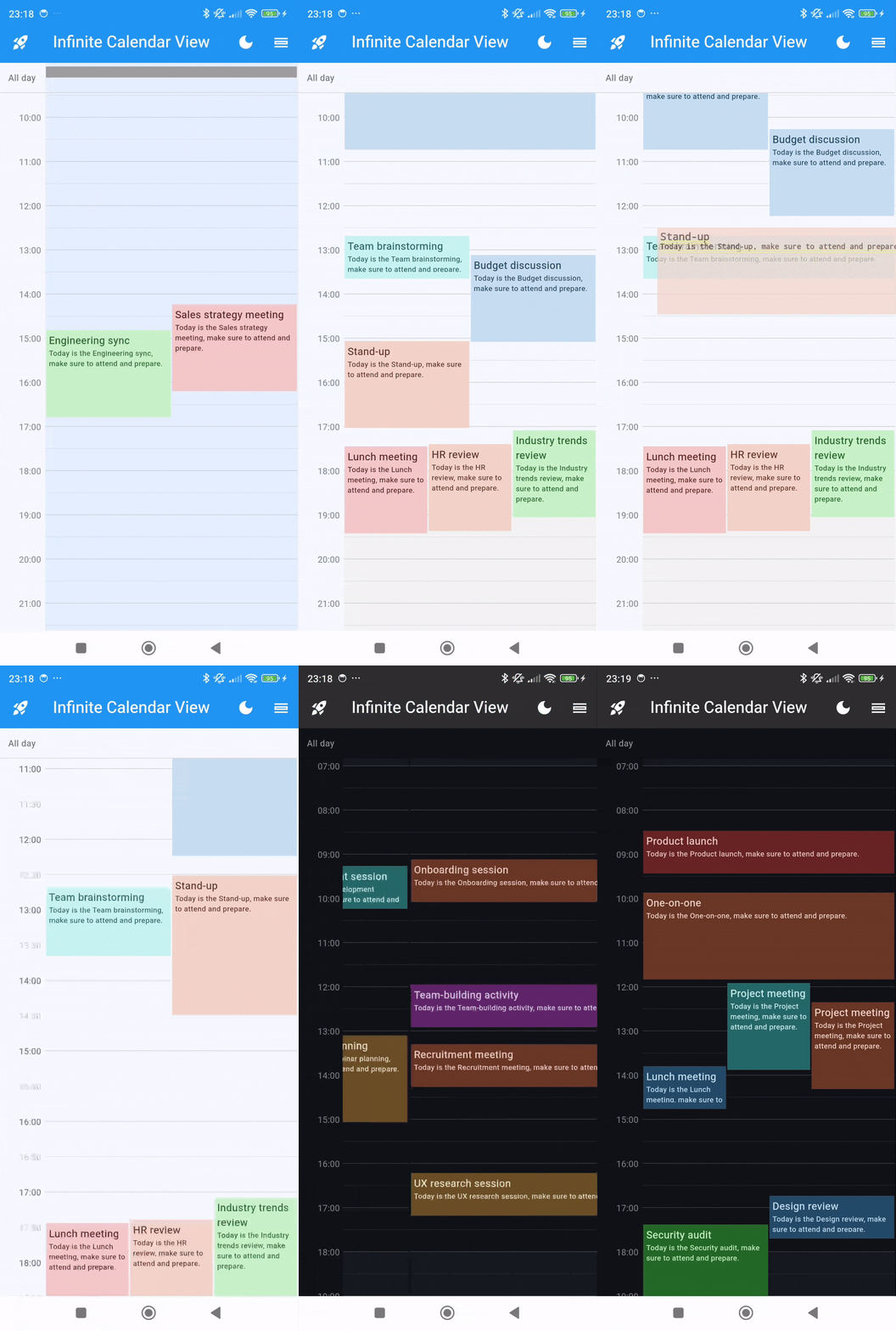
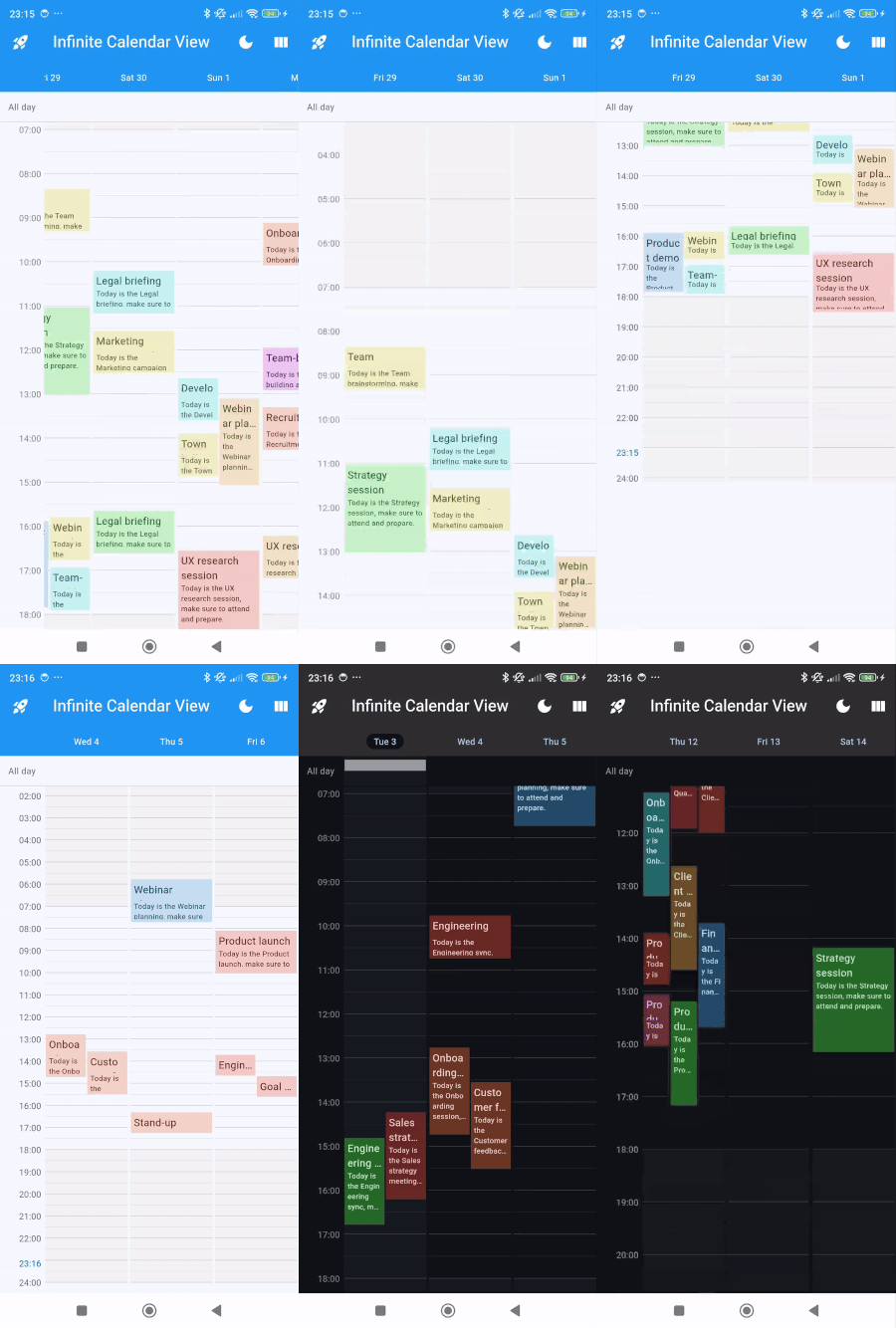
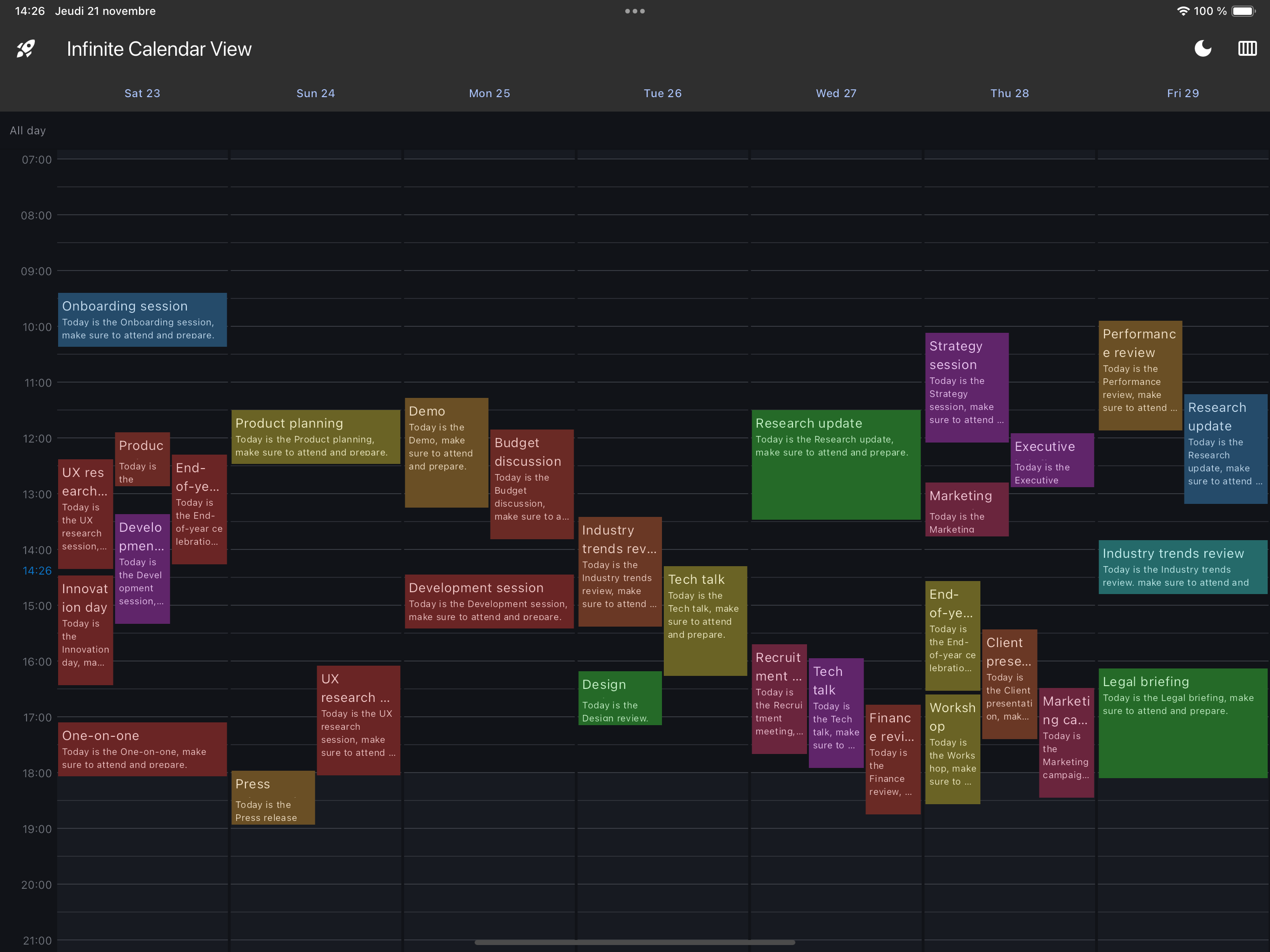
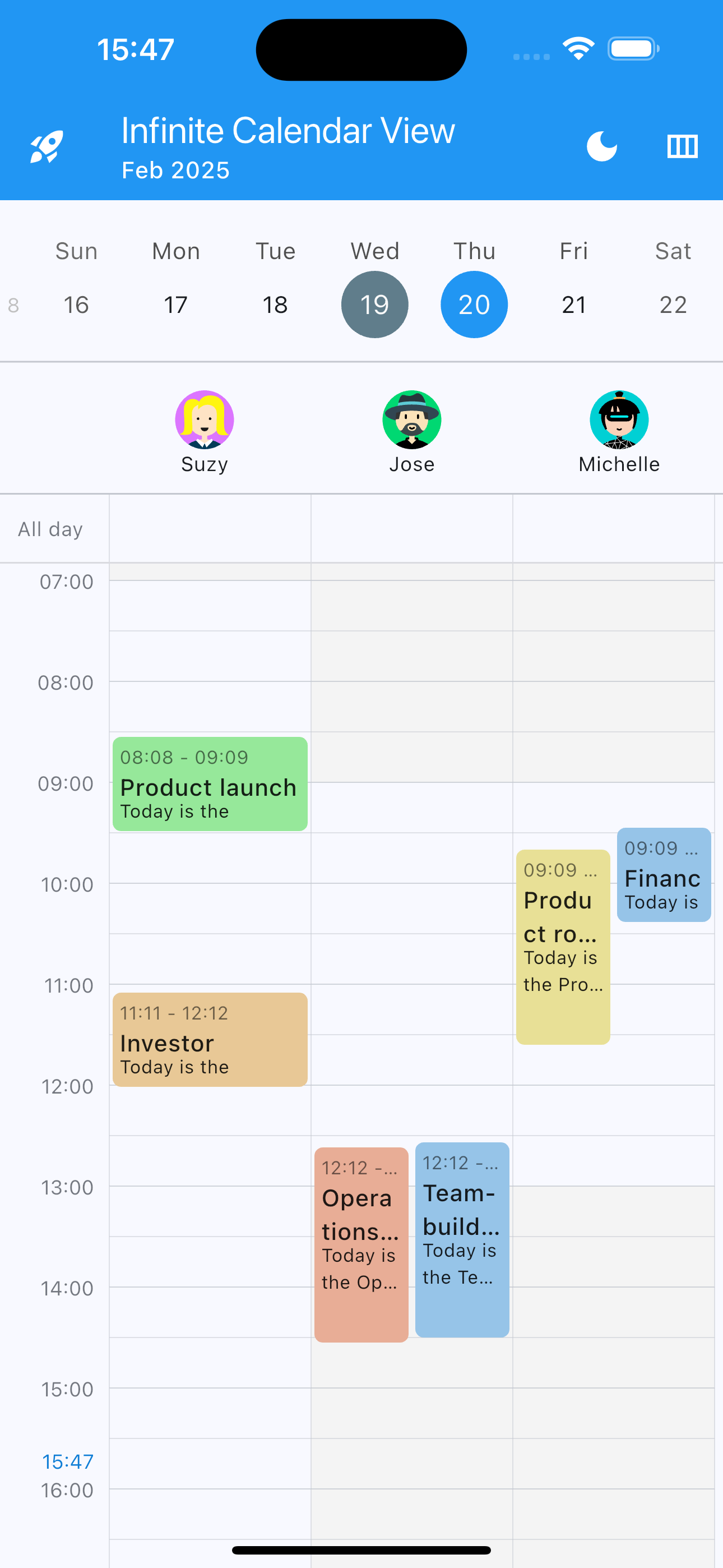
Planner View
|
|
|
1 day
|
3 days
|
|
7 day (web or tablet)
|
|
|
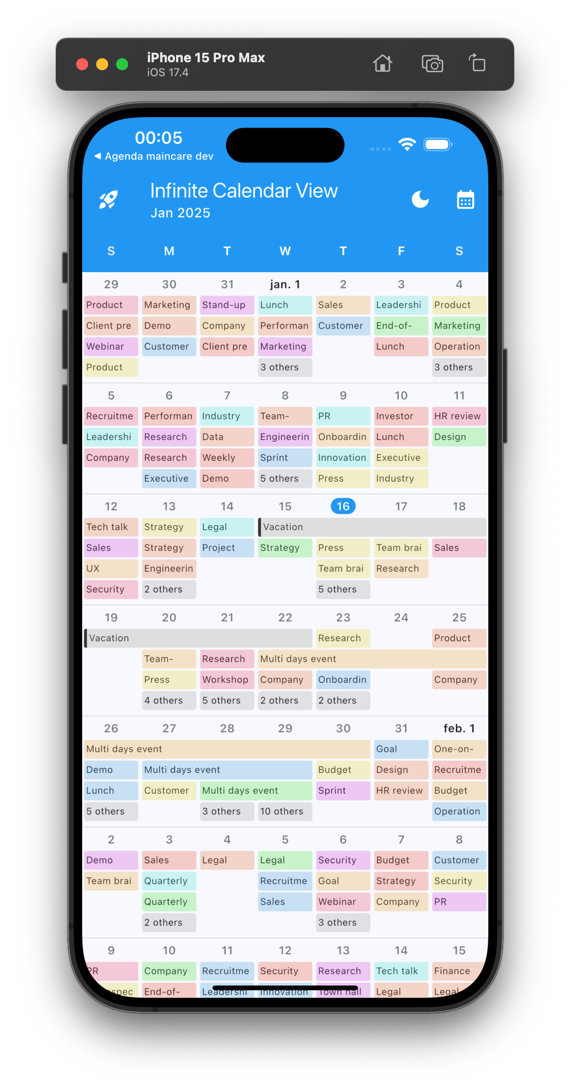
Month View
|
|
|
|
|
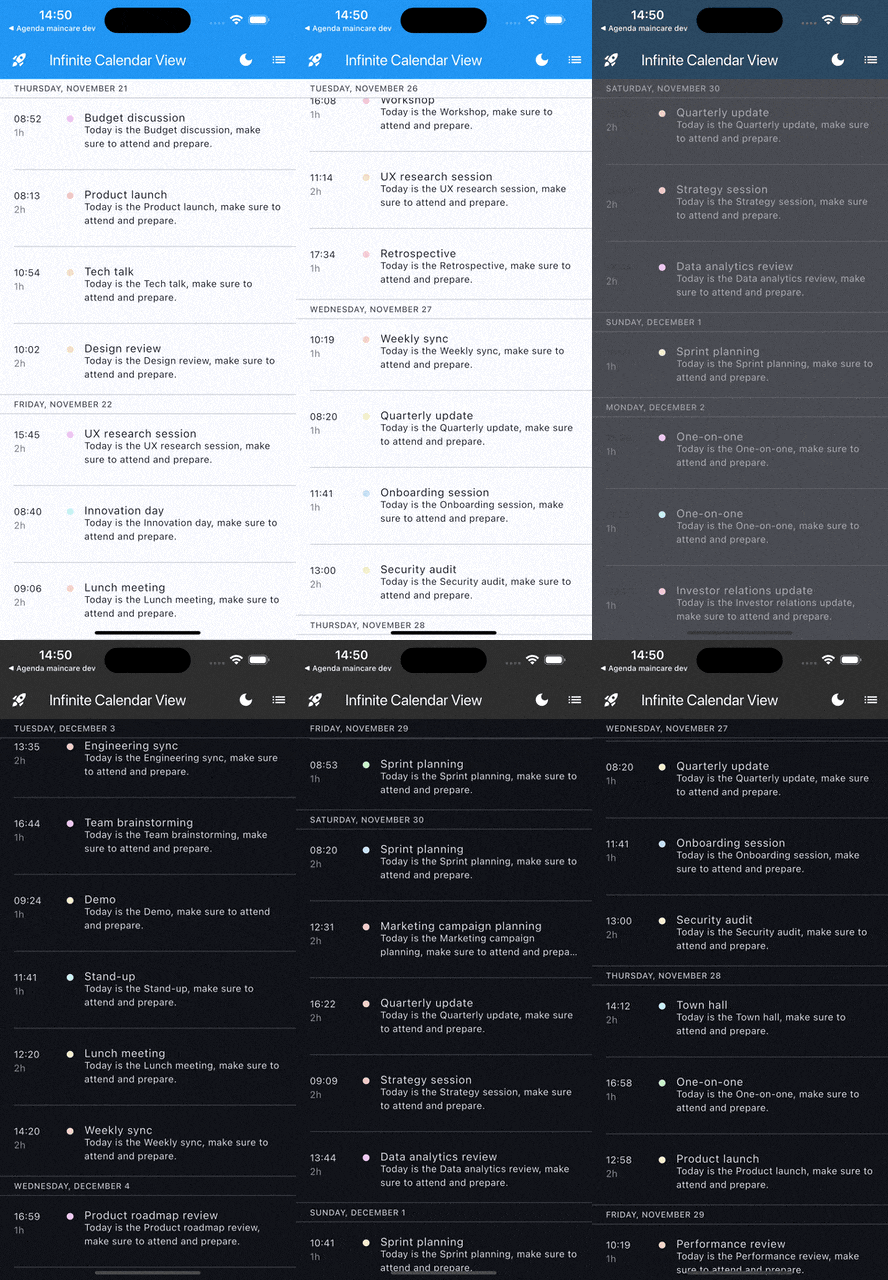
List View
|
|
|
|
Installing #
-
Add dependencies to
pubspec.yamlGet the latest version in the 'Installing' tab on pub.dev
dependencies: infinite_calendar_view: <latest-version> -
Run pub get.
flutter pub get -
Import package.
import 'package:infinite_calendar_view/infinite_calendar_view.dart';
Implementation #
Make sure to check out examples and API docs for more details.
-
Init controller.
EventsController controller = EventsController(); -
Add calendar views.
For 1 Day Planner View
Scaffold(
    body: EventsPlanner(
      controller: controller,
      daysShowed : 1
    ),
);
For 3 Days Planner View
Scaffold(
    body: EventsPlanner(
      controller: controller,
      daysShowed : 3
    ),
);
For List View
Scaffold( body: EventsList( controller: controller, ), ); -
Use
controllerto add or remove events when you want.To Add event:
final event = Event(
   startTime: DateTime(2024, 8, 10, 8, 0),
   endTime: DateTime(2024, 8, 10, 9, 0),
   title: "Event1"
);

controller.updateCalendarData((calendarData) {
  calendarData.addEvents([event]);
});
To Add full day event:
final fullDayEvent = FullDayEvent(
   title: "Full Day Event1"
);

controller.updateCalendarData((calendarData) {
  calendarData.addFullDayEvents(DateTime(2024, 8, 10), [event]);
});
As soon as you add or remove events from the controller, it will automatically update the calendar view assigned to that controller.
-
Use
GlobalKeyto jump to a specific date.GlobalKey<InfiniteEventPlannerState> key = GlobalKey<InfiniteEventPlannerState>();Add key in EventsPlanner or EventsList
 EventsPlanner(
   key : key
   ...
 )
Jump to date
key.currentState?.jumpToDate(DateTime(2024, 8, 10))
More on the infinite calendar view #
-
For Pinch To Zoom
EventsPlanner( controller: controller, pinchToZoomParam: PinchToZoomParameters( pinchToZoom: true, onZoomChange: (heightPerMinute) {}, pinchToZoomMinHeightPerMinute: 0.5, pinchToZoomMaxHeightPerMinute: 2.5, pinchToZoomSpeed: 1, ), ); -
For Draggable Event
EventsPlanner(
   controller: controller,
   dayParam: DayParam(
     dayEventBuilder: (event, height, width, heightPerMinute) {
       return DraggableEventWidget(
         event: event,
         height: height,
         width: width,
         heightPerMinute: heightPerMinute,
         onDragEnd: (exactStartDateTime, exactEndDateTime, roundStartDateTime, roundEndDateTime) {
           moveEvent(event, roundStartDateTime, roundEndDateTime);
         },
         child: DefaultDayEvent(
           height: height,
           width: width,
           title: event.title,
           description: event.description,
         ),
       );
     },
   ),
);
void moveEvent(Event oldEvent, DateTime roundStartDateTime, DateTime roundEndDateTime) { controller.updateCalendarData((calendarData) { calendarData.updateEvent( oldEvent: oldEvent, newEvent: oldEvent.copyWith( startTime: roundStartDateTime, endTime: roundEndDateTime, ), ); }); } -
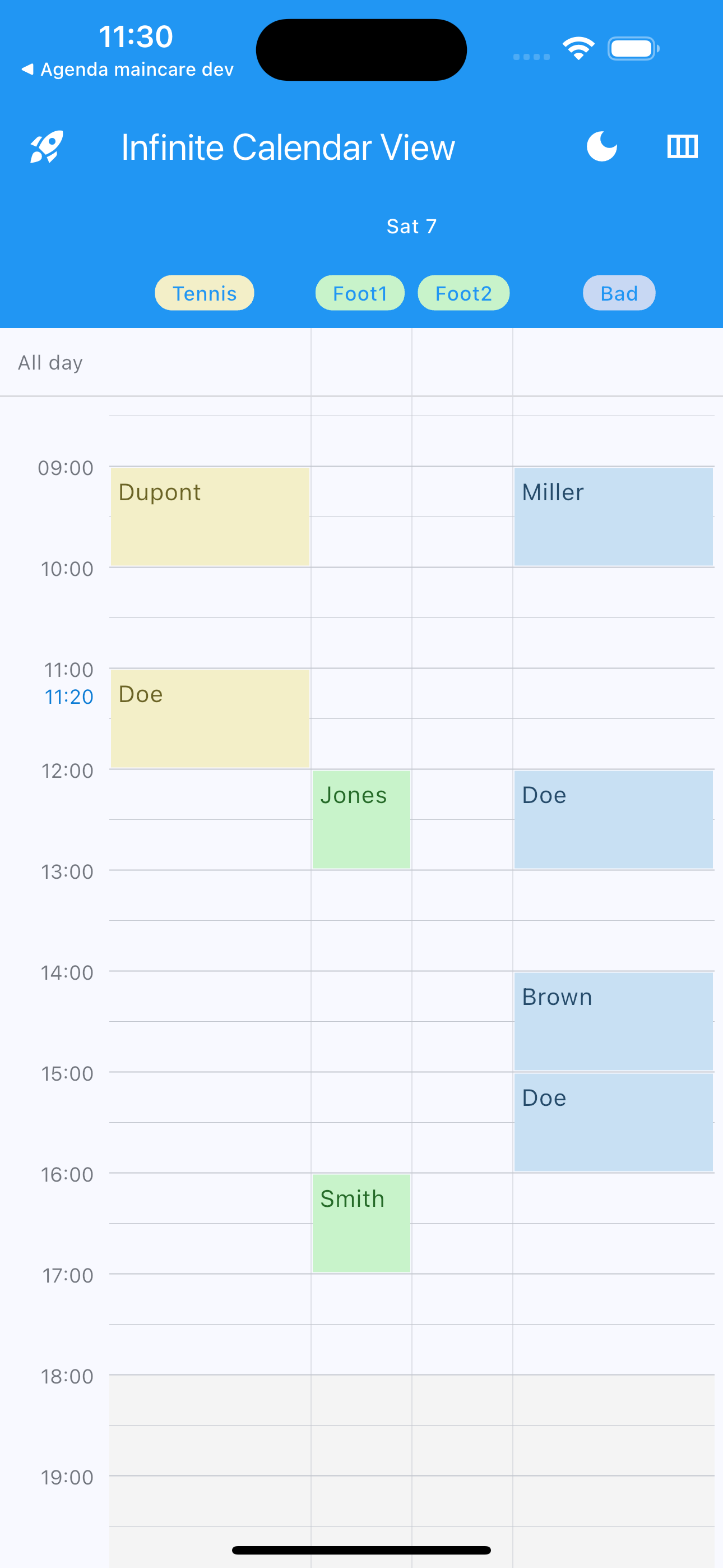
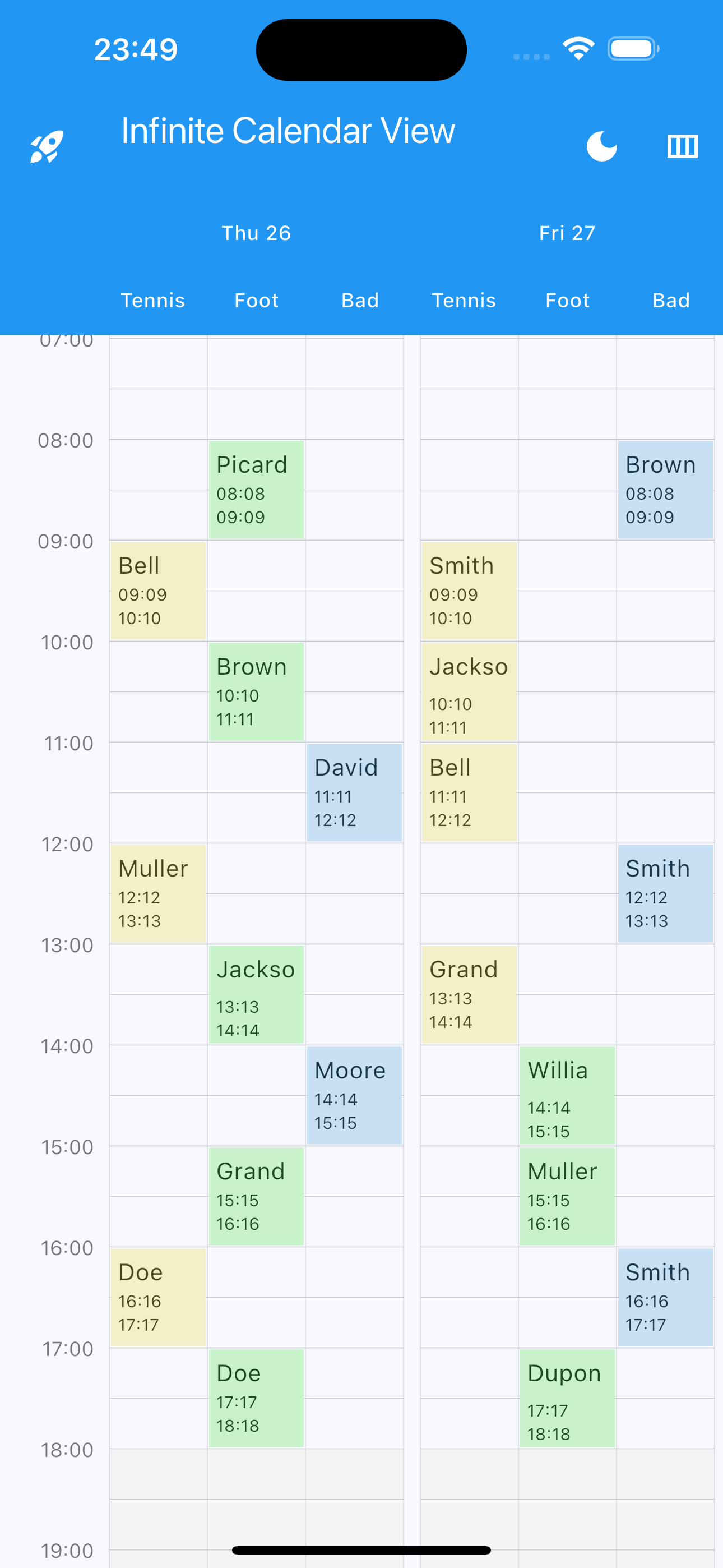
Manage multiple calendars in the same view with multiple columns
Set columnIndex in Event
Event(
   columnIndex: 2,
   ...
 )
Set columns number, labels, colors and ratio (optional)
EventsPlanner(
   controller: controller,
   columnsParam: ColumnsParam(
     columns: 4,
     columnsLabels: ["Tennis", "Foot", "Bad"],
     columnsWidthRatio: [1 / 3, 1 / 3, 1 / 3],
     columnsColors: [
       Colors.yellow.pastel,
       Colors.green.pastel,
       Colors.blueAccent.pastel,
     ],
   ),
);
All parameters #
-
Events planner all parameters
EventsPlanner( key: GlobalKey<EventsPlannerState>(), controller: controller, daysShowed: 3, initialDate: DateTime.now(), maxNextDays: 365, maxPreviousDays: 365, heightPerMinute: 1.0, initialVerticalScrollOffset: 1.0 * 7 * 60, daySeparationWidth: 3, onDayChange: (firstDay) {}, onVerticalScrollChange: (offset) {}, automaticAdjustHorizontalScrollToDay: true, onAutomaticAdjustHorizontalScroll: (day) {}, horizontalScrollPhysics: const BouncingScrollPhysics( decelerationRate: ScrollDecelerationRate.fast, ), dayEventsArranger: SideEventArranger(paddingLeft: 0, paddingRight: 0), daysHeaderParam: DaysHeaderParam( daysHeaderVisibility: true, daysHeaderHeight: 40.0, daysHeaderColor: Theme.of(context).appBarTheme.backgroundColor, dayHeaderBuilder: (day, isToday) { return DefaultDayHeader( dayText: DateFormat("E d").format(day), isToday: isToday, foregroundColor: Colors.white, ); }, ), offTimesParam: OffTimesParam( offTimesAllDaysRanges: [ OffTimeRange( TimeOfDay(hour: 0, minute: 0), TimeOfDay(hour: 7, minute: 0), ), OffTimeRange( TimeOfDay(hour: 18, minute: 0), TimeOfDay(hour: 24, minute: 0), ) ], offTimesDayRanges: { DateTime(2024, 10, 8): [ OffTimeRange( TimeOfDay(hour: 8, minute: 0), TimeOfDay(hour: 18, minute: 0), ), ], }, offTimesColor: Color(0xFFF4F4F4), offTimesAllDaysPainter: (isToday, heightPerMinute, ranges, color) => OffSetAllDaysPainter( isToday, heightPerMinute, [], Color(0xFFF4F4F4)), offTimesDayPainter: (isToday, heightPerMinute, ranges, color) => OffSetAllDaysPainter( isToday, heightPerMinute, [], Color(0xFFF4F4F4)), ), dayParam: DayParam( todayColor: Colors.black12, dayTopPadding: 10, dayBottomPadding: 15, onSlotMinutesRound: 15, onSlotTap: (exactDateTime, roundDateTime) {}, onSlotLongTap: (exactDateTime, roundDateTime) {}, onSlotDoubleTap: (exactDateTime, roundDateTime) {}, onDayBuild: (day) {}, dayEventBuilder: (event, height, width, heightPerMinute) { return DefaultDayEvent( height: height, width: width, title: event.title, description: event.description, ); }, dayCustomPainter: (heightPerMinute, isToday) => LinesPainter( heightPerMinute: heightPerMinute, isToday: isToday, lineColor: Colors.black12, ), ), fullDayParam: FullDayParam( fullDayEventsBarVisibility: true, fullDayEventsBarLeftText: 'All day', fullDayEventsBarLeftWidget: Text('All day'), fullDayEventsBarHeight: 40, fullDayEventsBarDecoration: const BoxDecoration( border: Border(bottom: BorderSide(color: Colors.black12))), ), timesIndicatorsParam: TimesIndicatorsParam( timesIndicatorsWidth: 60.0, timesIndicatorsHorizontalPadding: 4.0, timesIndicatorsCustomPainter: (heightPerMinute) => HoursPainter( heightPerMinute: 1.0, showCurrentHour: true, hourColor: Colors.black12, halfHourColor: Colors.black12, quarterHourColor: Colors.black12, currentHourIndicatorColor: Colors.black12, halfHourMinHeightPerMinute: 1.3, quarterHourMinHeightPerMinute: 2, ), ), currentHourIndicatorParam: CurrentHourIndicatorParam( currentHourIndicatorHourVisibility: true, currentHourIndicatorLineVisibility: true, currentHourIndicatorColor: Colors.blue, currentHourIndicatorCustomPainter: (heightPerMinute, isToday) => TimeIndicatorPainter(heightPerMinute, isToday, Colors.blue), ), pinchToZoomParam: PinchToZoomParameters( pinchToZoom: true, onZoomChange: (heightPerMinute) {}, pinchToZoomMinHeightPerMinute: 0.5, pinchToZoomMaxHeightPerMinute: 2.5, pinchToZoomSpeed: 1, ), ); -
Events List all parameters
EventsList(
   controller: controller,
   initialDate: DateTime.now(),
   maxPreviousDays: 365,
   maxNextDays: 365,
   onDayChange: (day) {},
   todayHeaderColor: const Color(0xFFf4f9fd),
   verticalScrollPhysics: const BouncingScrollPhysics(
     decelerationRate: ScrollDecelerationRate.fast,
   ),
   dayEventsBuilder: (day, events) {
     return DefaultDayEvents(
       events: events,
       eventBuilder: (event) => DefaultDetailEvent(event: event),
       nullEventsWidget: DefaultDayEvents.defaultEmptyEventsWidget,
       eventSeparator: DefaultDayEvents.defaultEventSeparator,
       emptyEventsWidget: DefaultDayEvents.defaultEmptyEventsWidget,
     );
   },
   dayHeaderBuilder: (day, isToday) => DefaultHeader(
     dayText: DateFormat.MMMMEEEEd().format(day).toUpperCase(),
   ),
);
Local #
The package does not support locales itself, so as not to import additional dependencies like intl which may cause dependency conflicts.
However, all texts are easily customizable. You can use intl to translate the texts into the desired language. Local example
Showcase #
License #
MIT License

Copyright (c) 2025 Pickywawa

Permission is hereby granted, free of charge, to any person obtaining a copy
of this software and associated documentation files (the "Software"), to deal
in the Software without restriction, including without limitation the rights
to use, copy, modify, merge, publish, distribute, sublicense, and/or sell
copies of the Software, and to permit persons to whom the Software is
furnished to do so, subject to the following conditions:

The above copyright notice and this permission notice shall be included in all
copies or substantial portions of the Software.

THE SOFTWARE IS PROVIDED "AS IS", WITHOUT WARRANTY OF ANY KIND, EXPRESS OR
IMPLIED, INCLUDING BUT NOT LIMITED TO THE WARRANTIES OF MERCHANTABILITY,
FITNESS FOR A PARTICULAR PURPOSE AND NON INFRINGEMENT. IN NO EVENT SHALL THE
AUTHORS OR COPYRIGHT HOLDERS BE LIABLE FOR ANY CLAIM, DAMAGES OR OTHER
LIABILITY, WHETHER IN AN ACTION OF CONTRACT, TORT OR OTHERWISE, ARISING FROM,
OUT OF OR IN CONNECTION WITH THE SOFTWARE OR THE USE OR OTHER DEALINGS IN THE
SOFTWARE.
Metadata
Publisher
unverified uploader
Weekly Downloads
Metadata
Easily build your different views of your calendar with this package. Month, week, three days, one day, list ... and many features.
Repository (GitHub)
View/report issues
License
 unknown (license)

