
image_ffi 1.2.3  image_ffi: ^1.2.3 copied to clipboard
 developeryusuf.com
Fast native image resize, thumbnail and JPEG/PNG encode for Dart over FFI. Several times quicker than the pure-Dart image package; stb-backed, no prebuilt binary.
image_ffi #

Native image decode, resize and encode for Dart, backed by Sean Barrett's stb single-file C libraries over FFI. A Dart build hook compiles the stb sources at build time: there is no prebuilt binary to ship and nothing to install beyond a C toolchain.
The pure-Dart image package is the right
choice when you need its wide manipulation and filter suite. image_ffi is
narrower on purpose: it does decode, high-quality resize, JPEG/PNG encode and
one-call thumbnails, and it runs those in native code. If your workload is
"read an image, make a thumbnail, write it back", this is several times faster.
For cropping, drawing, filters, format conversions and animation, use image.

Why this instead of what you already have #
Instead of package:image. There is no capability gap here: both decode,
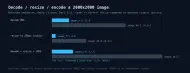
resize, and re-encode PNG and JPEG. The difference is time. bench/bench.dart
synthesizes a 2000x2000 PNG, decodes it, resizes the longer side to 256 px,
and re-encodes, timing both libraries on the same bytes. The last run on an
M4 Pro: decode 23.7 ms against 99.4, resize 5.1 ms against 47.1, and 29.5 ms
against 150.2 for the whole pipeline. Run dart run bench/bench.dart and get
your own numbers.
Instead of pixer. Pixer is the closest native competitor and it is
carefully built, but its build hook pulls a prebuilt binary over the network:
downloadUri returns
https://github.com/hawkkiller/pixer/releases/download/$version/$target
(lib/src/hook/download_asset.dart:9). The download is hash-verified, but you
still need the network at build time, and you run a binary you did not
compile. This package's hook/build.dart makes no network calls; it compiles
the vendored stb_image and stb_image_write sources locally through
CBuilder, so an offline CI runner still ends up with a working library.
Reach for it when
- You generate thumbnails on a server and the resize step is in your latency budget.
- You process images in a batch job where throughput per core matters.
- Your CI has no outbound network and every native dependency must build from source.
Skip it if you need anything past decode, resize, and JPEG/PNG encode:
package:image writes WebP, TIFF, GIF, and ICO as well (see its
lib/src/formats/), and ships drawing, filters, and font rendering that this
package has no answer for.
Formats #
- Decode: PNG, JPEG, BMP, GIF, PSD, TGA, HDR, PIC (whatever stb_image reads).
- Encode: JPEG and PNG.
Install #
dart pub add image_ffi
Building the native library needs a C toolchain and Dart's native build hooks enabled (see Platforms).
Quick start #
import 'dart:io';
import 'package:image_ffi/image_ffi.dart';

void main() {
  final bytes = File('photo.jpg').readAsBytesSync();

  // Dimensions without decoding the pixels.
  final info = imageInfo(bytes);
  print('${info.width}x${info.height}, ${info.channels} channels');

  // Decode to raw pixels (native channel count, or force one).
  final image = decodeImage(bytes, forceChannels: 4);

  // High-quality, sRGB-correct resize.
  final small = resizePixels(
    image.pixels,
    srcWidth: image.width,
    srcHeight: image.height,
    dstWidth: image.width ~/ 2,
    dstHeight: image.height ~/ 2,
    channels: image.channels,
  );

  // Encode back to JPEG or PNG.
  File('half.jpg').writeAsBytesSync(
    encodeJpeg(small, width: image.width ~/ 2, height: image.height ~/ 2,
        channels: 4, quality: 90),
  );

  // Or do decode, downscale and encode in one call.
  File('thumb.jpg').writeAsBytesSync(thumbnailJpeg(bytes, maxDimension: 256));
}
Decode and encode copy the native bytes into a Dart Uint8List and free the
native buffer before returning. You never manage native memory. Invalid input
throws ImageFfiException with stb's own failure reason; bad arguments throw
ArgumentError.
Phone photos come out upright #
Hold a phone in portrait and the sensor still records a landscape buffer. What makes the photo upright is a number in the EXIF header saying how to turn it. Viewers read that number. Code that decodes pixels does not, which is how a thumbnailer produces sideways thumbnails and reports no error at all.
thumbnailJpeg and thumbnailPng read the tag and apply it. Nothing to pass:
final thumb = thumbnailJpeg(photoBytes, maxDimension: 128);
example/upright_thumbnails.dart takes a 400x300 sensor buffer tagged
orientation 6 and prints what each path returns:
EXIF orientation tag       6  (6: turn 90 CW)
decodeImage                400x300    the sensor buffer
thumbnailJpeg              96x128     upright, nothing asked for
  ...applyOrientation off  128x96     the sideways version
applyExifOrientation       300x400    same result, by hand
Pass applyOrientation: false when you want the sensor framing, and reach for
exifOrientation and applyExifOrientation when you decode and resize
yourself:
final image = decodeImage(photoBytes);
final upright = applyExifOrientation(image, exifOrientation(photoBytes));
exifOrientation returns 1 for a file with no EXIF, a value out of range, or a
malformed tag, so a bad header costs you a rotation rather than a decode.
A downscale that does not go dark #
Resampling is averaging, and averaging sRGB bytes averages the wrong thing. A byte is not light: code 128 emits about 22% of what 255 does, not half. Take the mean of the codes and every downscale comes out darker than the image it came from.

resizePixels converts to linear light, resamples, and converts back, and
ResizeColorSpace.srgb is the default, so photographs and UI images get this
without asking. ResizeColorSpace.linear skips the conversion, which is right
only when the bytes already are light — a mask, a depth map, a channel you keep
linear on purpose. Alpha is always resampled linearly either way.
dart run example/gamma_correct_resize.dart measures both against the value the
checkerboard actually emits, and tool/gamma_figure.dart paints the swatches
from the bytes that run produced. Getting this wrong throws nothing and looks
fine in isolation, which is why it survives in so much image code.
Benchmark #
Decode a 2000x2000 PNG and downscale it to a 256px thumbnail, image_ffi
against the pure-Dart image package doing the same work. Medians of 15 runs on
an Apple M-series laptop:

| Operation | image_ffi | image | Speedup |
|---|---|---|---|
| decode PNG | 21.9 ms | 94.5 ms | 4.3x |
| resize to 256px | 4.8 ms | 44.0 ms | 9.3x |
| decode + resize + JPEG encode | 27.3 ms | 141.7 ms | 5.2x |
The resize row uses cubic interpolation for the image package so both sides do
a comparable high-quality filter. The image package's default nearest-neighbor
resize is faster than either (about 0.4 ms here) at much lower quality;
measuring against that would not be like-for-like. Numbers are
machine-dependent; reproduce them with dart run bench/bench.dart.
API #
decodeImage(bytes, {forceChannels})returns aDecodedImagewithwidth,height,channelsand row-majorpixels.imageInfo(bytes)returns(width, height, channels)from the header only.resizePixels(pixels, {srcWidth, srcHeight, dstWidth, dstHeight, channels, colorSpace}).colorSpaceisResizeColorSpace.srgbby default (right for photographic and UI images) or.linearfor masks and data pixels. Two-channel input is resampled as grayscale + alpha, four-channel as non-premultiplied RGBA, so edges against transparency stay clean.encodeJpeg(pixels, {width, height, channels, quality})andencodePng(pixels, {width, height, channels}).exifOrientation(bytes)reads a JPEG's orientation tag, returning 1 to 8, and 1 for anything it cannot read.applyExifOrientation(image, orientation)returns the upright version of aDecodedImage.thumbnailJpeg(bytes, {maxDimension, quality, applyOrientation})decodes, downscales so the longer side is at mostmaxDimension(never enlarging), and JPEG-encodes.applyOrientationdefaults to true, which is what keeps phone photos upright; see above.thumbnailPng(bytes, {maxDimension, applyOrientation})does the same but PNG-encodes, keeping the alpha channel a JPEG would drop.thumbnailJpegAsyncandthumbnailPngAsynctake the same arguments and return aFuture; see below.thumbnailJpegBatch(images, {maxDimension, quality, concurrency})andthumbnailPngBatch(images, {maxDimension, concurrency})thumbnail a whole folder off the main isolate while capping how many isolates run at once; see below.
Off the main isolate #
thumbnailJpegAsync and thumbnailPngAsync run the whole decode, resize and
encode on a background isolate with Isolate.run, so a large image doesn't
block the isolate that called them:
final thumb = await thumbnailJpegAsync(bytes, maxDimension: 256);
This is the reason to reach for a native writer in a Flutter app: the pure-Dart
image package runs on the calling isolate and janks the UI while a big photo
is processed, and a plain synchronous FFI call does the same. The async variants
keep the UI isolate free. The input bytes are copied to the worker and the
result copied back; for a handful of images that copy is small next to the
decode. An ImageFfiException raised in the worker surfaces from the future.
A folder of images #
Over a whole directory, do not reach for Future.wait on the async variants:
// Don't. This spawns one isolate per image at once, each holding a full
// decoded buffer, so a real folder can run the process out of memory.
final thumbs = await Future.wait(images.map(thumbnailJpegAsync));
Use thumbnailJpegBatch (or thumbnailPngBatch) instead. It runs the same
per-image work off the main isolate but caps how many isolates are live at
once, to concurrency, which defaults to Platform.numberOfProcessors:
await for (final thumb in thumbnailJpegBatch(images, concurrency: 4)) {
  // write thumb
}
maxDimension and quality mean what they do on thumbnailJpeg. Each
thumbnail is emitted as it finishes. Results arrive in completion order rather
than the order of images; pair a result with its source before the call if
you need the correspondence. A failure on one image surfaces as an error on the
stream while the rest keep going.
How it works #

Shipping a standalone binary #
dart compile exe does not run build hooks, so a program that depends on this
package stops before it starts:
$ dart compile exe bin/my_cli.dart
'dart compile' does not support build hooks, use 'dart build' instead.
dart build cli runs the hook and lays the pieces out for you:
$ dart build cli
Generated: build/cli/<os>_<arch>/bundle/bin/my_cli
$ ls build/cli/macos_arm64/bundle/*
bin/  my_cli
lib/  libimage_ffi_shim.dylib
Ship the whole bundle/ directory. The executable resolves its library through
a relative ../lib path, so a copy of the binary on its own fails at the first
call:
Failed to load dynamic library '../lib/libimage_ffi_shim.dylib'
dart build cli takes no positional target. With one file under bin/ the bare
command is enough; with more than one, pass -t. dart run and dart test are
unaffected, since both run the hook already. The command is marked preview in
Dart 3.11.
Platforms #
The native library is compiled from the vendored stb sources by
hook/build.dart using Dart's native build hooks. It works anywhere Dart runs a
C compiler for the target: Linux, macOS and Windows on the Dart CLI and server,
and in Flutter apps whose build has native assets enabled, where the same hook
runs and the async variants keep image work off the UI isolate. Requires Dart
3.10 or later.
The CI matrix builds and tests on Ubuntu, macOS and Windows.
Mobile and desktop Flutter are checked by running a decode inside the app
rather than by building it, because a green build says nothing about whether
the library loads. A Flutter app that encodes and decodes a small PNG at
startup and prints the result returns 2x2 on an iPhone 17 Pro simulator
running iOS 26.5, on an Android 15 arm64 emulator (API 35), and on macOS
desktop.
Credits #
The image codecs and resampler are Sean Barrett's
stb libraries (stb_image,
stb_image_write, stb_image_resize2), released into the public domain. Their
vendored copies live in src/third_party/stb. See LICENSE for details.
Metadata

Documentation
Publisher
Weekly Downloads
Metadata
Fast native image resize, thumbnail and JPEG/PNG encode for Dart over FFI. Several times quicker than the pure-Dart image package; stb-backed, no prebuilt binary.
Repository (GitHub)
View/report issues
Topics
#image #resize #jpeg #thumbnail #ffi
License
 MIT (license)
Dependencies
code_assets, ffi, hooks, native_toolchain_c