
hybrid_map_marker 1.0.2  hybrid_map_marker: ^1.0.2 copied to clipboard
 rudo.es
A Flutter package that allows you to create custom map markers from any widget for use with Google Maps.

A Flutter package that allows you to create custom map markers from any Flutter widget for use with Google Maps. Convert your custom widgets, including SVG images, icons, and complex layouts, into bitmap markers.
Features #
- ✨ Convert any Flutter widget into a Google Maps marker
- 🎨 Full customization - Use any widget, including containers, icons, images, and SVG
- 🚀 SVG support with built-in caching for optimal performance
- 📐 Adjustable quality - Control the resolution of generated markers
- 🎯 Simple API - Singleton pattern for easy access throughout your app
Screenshot #
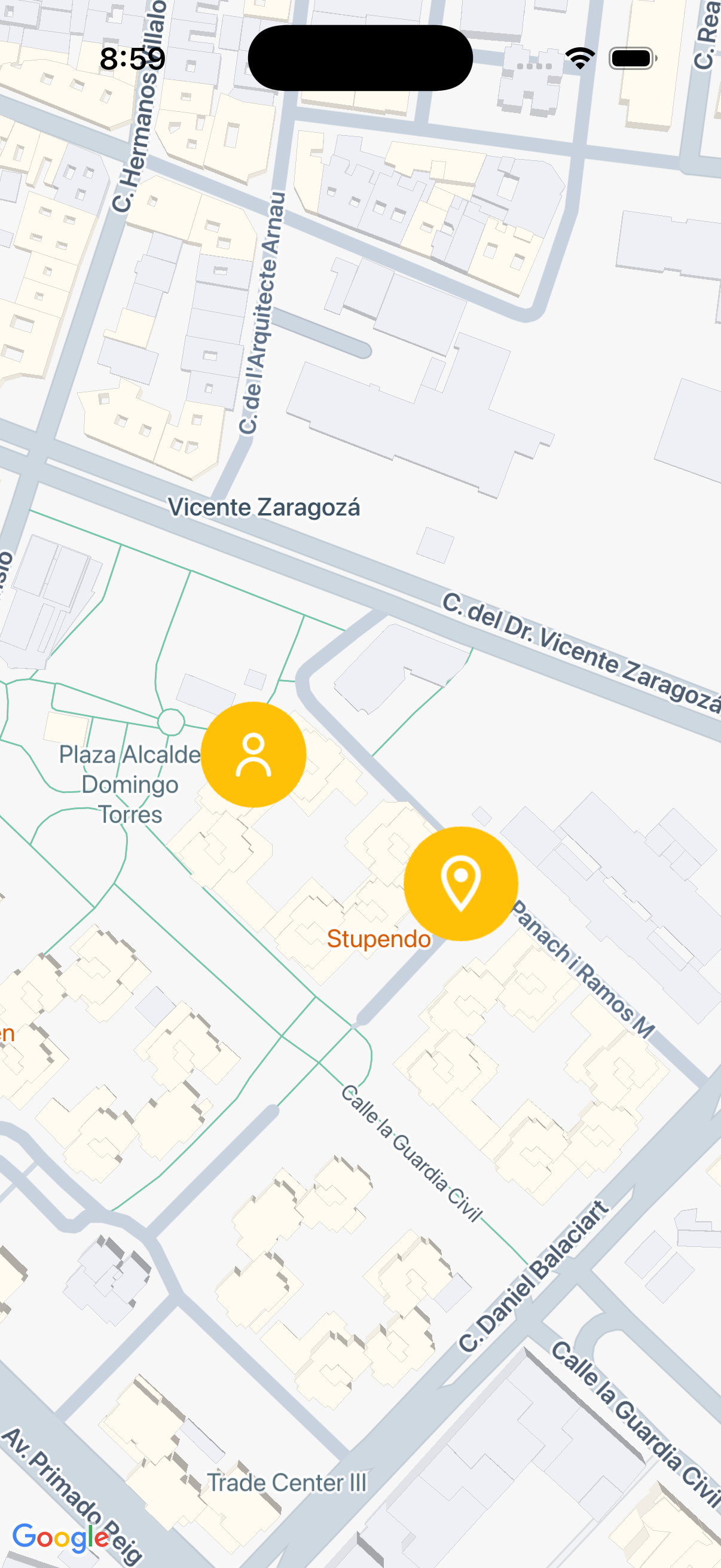
Getting started #
Prerequisites #
- Flutter SDK
google_maps_flutterpackageflutter_svgpackage (if using SVG images)
Installation #
Add this package to your pubspec.yaml:
dependencies:
  hybrid_map_marker: ^1.0.0
  google_maps_flutter: ^2.0.0
  flutter_svg: ^2.0.0  # If using SVG images
Then run:
flutter pub get
Usage #
Basic Example #
Create a custom marker from a simple widget:
import 'package:hybrid_map_marker/hybrid_map_marker.dart';
import 'package:google_maps_flutter/google_maps_flutter.dart';

// Create a custom marker
final markerIcon = await HybridMapMarker.instance.createIcon(
  Container(
    padding: EdgeInsets.all(8),
    decoration: BoxDecoration(
      color: Colors.blue,
      shape: BoxShape.circle,
    ),
    child: Icon(Icons.location_on, color: Colors.white),
  ),
  size: Size(64, 64),
);

// Use it in a Google Maps marker
final mapMarker = Marker(
  markerId: MarkerId('my-marker'),
  position: LatLng(39.4818, -0.3559),
  icon: markerIcon,
);
Using SVG Images #
When using SVG images in your markers, you must cache them first:
import 'package:flutter_svg/flutter_svg.dart';

// 1. Cache the SVG before creating the icon
await HybridMapMarker.instance.cacheSvg(path: 'assets/user.svg');

// 2. Create the marker with the SVG
final svgMarker = await HybridMapMarker.instance.createIcon(
  Container(
    padding: EdgeInsets.all(8),
    decoration: BoxDecoration(
      color: Colors.amber,
      shape: BoxShape.circle,
    ),
    child: SvgPicture.asset(
      'assets/user.svg',
      colorFilter: ColorFilter.mode(Colors.white, BlendMode.srcIn),
    ),
  ),
  size: Size(64, 64),
);
Important: If you don't call
cacheSvg()before creating an icon with SVG content, the SVG may not render correctly in the marker.
Advanced Usage #
Adjusting Quality
Control the resolution of your markers with the quality parameter:
final highQualityMarker = await HybridMapMarker.instance.createIcon(
  myWidget,
  size: Size(100, 100),
  quality: 2.0,  // Higher quality, but uses more memory
);
Complete Example
class MapScreen extends StatefulWidget {
  @override
  State<MapScreen> createState() => _MapScreenState();
}

class _MapScreenState extends State<MapScreen> {
  final _hybridMapMarker = HybridMapMarker.instance;

  Future<Set<Marker>> _createMarkers() async {
    // Cache SVG assets first
    await _hybridMapMarker.cacheSvg(path: 'assets/user.svg');

    final size = Size(64, 64);

    // Create icon marker
    final iconMarker = await _hybridMapMarker.createIcon(
      Container(
        padding: EdgeInsets.all(8),
        decoration: BoxDecoration(
          color: Colors.blue,
          shape: BoxShape.circle,
        ),
        child: Icon(Icons.location_on, color: Colors.white),
      ),
      size: size,
    );

    // Create SVG marker
    final svgMarker = await _hybridMapMarker.createIcon(
      Container(
        padding: EdgeInsets.all(8),
        decoration: BoxDecoration(
          color: Colors.amber,
          shape: BoxShape.circle,
        ),
        child: SvgPicture.asset('assets/user.svg'),
      ),
      size: size,
    );

    return {
      Marker(
        markerId: MarkerId('icon-marker'),
        position: LatLng(39.4818, -0.3559),
        icon: iconMarker,
      ),
      Marker(
        markerId: MarkerId('svg-marker'),
        position: LatLng(39.4822, -0.3568),
        icon: svgMarker,
      ),
    };
  }

  @override
  Widget build(BuildContext context) {
    return FutureBuilder<Set<Marker>>(
      future: _createMarkers(),
      builder: (context, snapshot) {
        return GoogleMap(
          markers: snapshot.data ?? {},
          initialCameraPosition: CameraPosition(
            target: LatLng(39.4818, -0.3559),
            zoom: 15,
          ),
        );
      },
    );
  }
}
API Reference #
HybridMapMarker.instance #
Singleton instance to access the marker creation functionality.
createIcon(Widget widget, {required Size size, double quality = 1.0}) #
Converts a Flutter widget into a BitmapDescriptor for use as a map marker.
Parameters:
widget- The Flutter widget to convert into a marker iconsize- The logical size of the marker in logical pixelsquality- A multiplier for the device pixel ratio (default: 1.0). Higher values produce sharper images but use more memory.
Returns: Future<BitmapDescriptor>
cacheSvg({required String path}) #
Preloads and caches an SVG asset. Must be called before createIcon() if the widget contains SVG images.
Parameters:
path- The asset path to the SVG file (e.g., 'assets/marker.svg')
Returns: Future<void>
Additional Information #
For more examples, check the /example folder in the repository.
Author #
Miguel Ángel Soto Gonzalez - msoto@laberit.com
License #
This project is licensed under the MIT License.
Metadata
Publisher
Weekly Downloads
Metadata
A Flutter package that allows you to create custom map markers from any widget for use with Google Maps.
Repository (GitHub)
View/report issues
Documentation
License
 MIT (license)
Dependencies
flutter, flutter_svg, google_maps_flutter

