
hybrid_map_marker 2.0.1  hybrid_map_marker: ^2.0.1 copied to clipboard
 rudo.es
A Flutter package that allows you to create custom map markers from any widget for use with Google Maps.

A Flutter package that allows you to create custom map markers from any Flutter widget for use with Google Maps. Convert your custom widgets and complex layouts, into bitmap markers.
Features #
- ✨ Convert any Flutter widget into a Google Maps marker
- 🎨 Full customization - Use any widget, including containers, icons, images, and SVG
- 🚀 Built-in asset caching for optimal performance
- 📐 Adjustable quality - Control the resolution of generated markers
- 🎯 Simple API - Singleton pattern for easy access throughout your app
Screenshot #
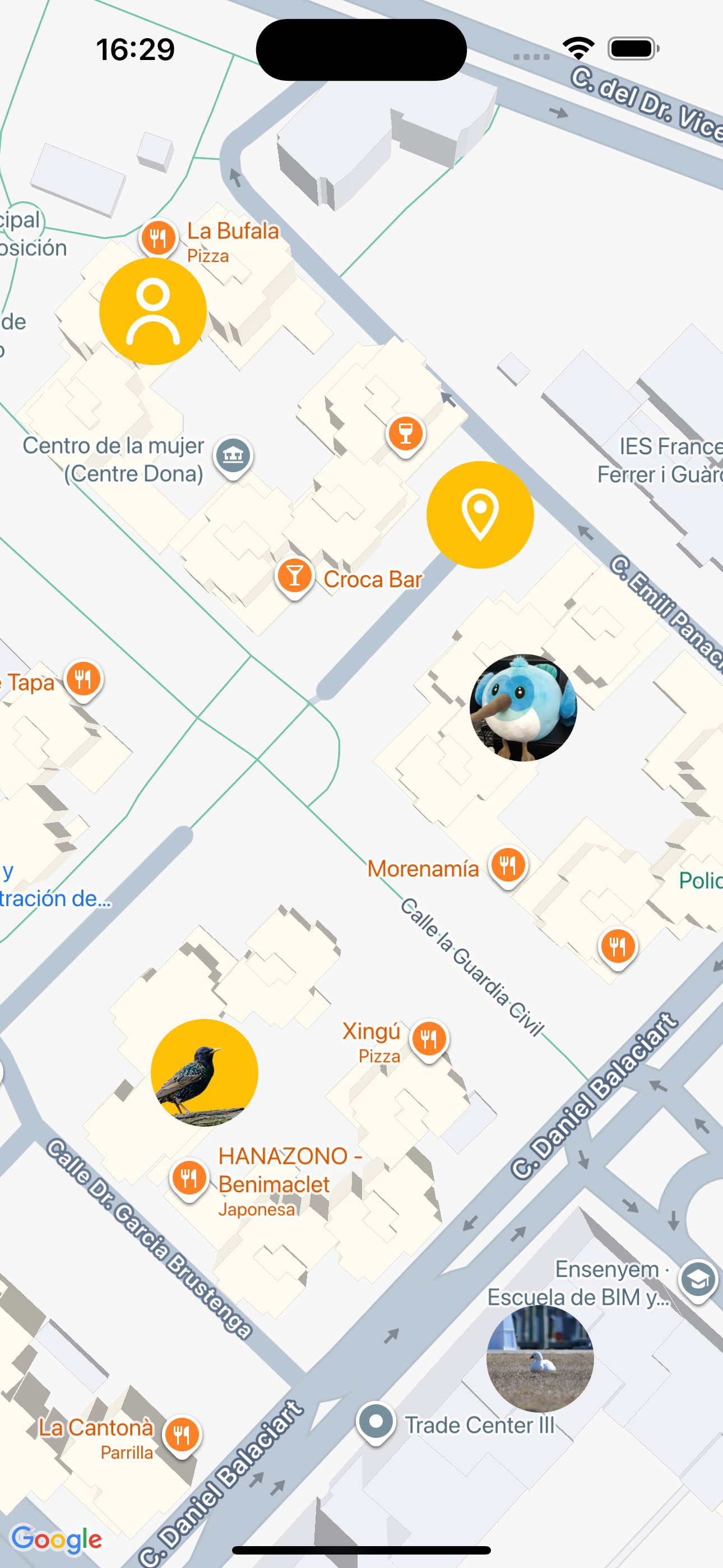
Getting started #
Prerequisites #
- Flutter SDK
google_maps_flutterpackageflutter_svgpackage (if using SVG images)
Installation #
Add this package to your pubspec.yaml:
dependencies:
  hybrid_map_marker: ^1.0.0
  google_maps_flutter: ^2.0.0
  flutter_svg: ^2.0.0  # If using SVG images
Then run:
flutter pub get
Usage #
Basic Example #
Create a custom marker from a simple widget:
import 'package:hybrid_map_marker/hybrid_map_marker.dart';
import 'package:google_maps_flutter/google_maps_flutter.dart';

// Create a custom marker
final markerIcon = await HybridMapMarker.instance.createIcon(
  Container(
    padding: EdgeInsets.all(8),
    decoration: BoxDecoration(
      color: Colors.blue,
      shape: BoxShape.circle,
    ),
    child: Icon(Icons.location_on, color: Colors.white),
  ),
  size: Size(64, 64),
);

// Use it in a Google Maps marker
final mapMarker = Marker(
  markerId: MarkerId('my-marker'),
  position: LatLng(39.4818, -0.3559),
  icon: markerIcon,
);
Using SVG Images #
When using SVG images in your markers, you must cache them first:
import 'package:flutter_svg/flutter_svg.dart';

// 1. Cache the SVG before creating the icon
await HybridMapMarker.instance.cacheSvg(path: 'assets/user.svg');

// 2. Create the marker with the SVG
final svgMarker = await HybridMapMarker.instance.createIcon(
  Container(
    padding: EdgeInsets.all(8),
    decoration: BoxDecoration(
      color: Colors.amber,
      shape: BoxShape.circle,
    ),
    child: SvgPicture.asset(
      'assets/user.svg',
      colorFilter: ColorFilter.mode(Colors.white, BlendMode.srcIn),
    ),
  ),
  size: Size(64, 64),
);
Important: If you don't call
cacheSvg()before creating an icon with SVG content, the SVG may not render correctly in the marker.
Using Asset Images #
When using asset images in your markers, you must cache them first:
// 1. Cache the image before creating the icon
await HybridMapMarker.instance.cacheImage(path: 'assets/marker.png');

// 2. Create the marker with the image
final imageMarker = await HybridMapMarker.instance.createIcon(
  Image.asset('assets/marker.png'),
  size: Size(48, 48),
);
Important: If you don't cache images before creating an icon, they may not render correctly in the marker.
Using Network Images #
When using network images in your markers, you must cache them first:
// 1. Cache the network image before creating the icon
await HybridMapMarker.instance.cacheNetworkImage(
  path: 'https://example.com/marker.png',
);

// 2. Create the marker with the network image
final networkMarker = await HybridMapMarker.instance.createIcon(
  Image.network('https://example.com/marker.png'),
  size: Size(48, 48),
);
Important: If you don't cache images before creating an icon, they may not render correctly in the marker.
Advanced Usage #
Adjusting Quality
Control the resolution of your markers with the quality parameter:
final highQualityMarker = await HybridMapMarker.instance.createIcon(
  myWidget,
  size: Size(100, 100),
  quality: 2.0,  // Higher quality, but uses more memory
);
Complete Example
class MapScreen extends StatefulWidget {
  @override
  State<MapScreen> createState() => _MapScreenState();
}

class _MapScreenState extends State<MapScreen> {
  final _hybridMapMarker = HybridMapMarker.instance;

  Future<Set<Marker>> _createMarkers() async {
    // Cache all assets first
    await Future.wait([
      _hybridMapMarker.cacheSvg(path: 'assets/user.svg'),
      _hybridMapMarker.cacheImage(path: 'assets/bird.png'),
      _hybridMapMarker.cacheNetworkImage(
        path: 'https://example.com/avatar.png',
      ),
    ]);

    final size = Size(64, 64);

    // Create icon marker
    final iconMarker = await _hybridMapMarker.createIcon(
      Container(
        padding: EdgeInsets.all(8),
        decoration: BoxDecoration(
          color: Colors.blue,
          shape: BoxShape.circle,
        ),
        child: Icon(Icons.location_on, color: Colors.white),
      ),
      size: size,
    );

    // Create SVG marker
    final svgMarker = await _hybridMapMarker.createIcon(
      Container(
        padding: EdgeInsets.all(8),
        decoration: BoxDecoration(
          color: Colors.amber,
          shape: BoxShape.circle,
        ),
        child: SvgPicture.asset('assets/user.svg'),
      ),
      size: size,
    );

    // Create asset image marker
    final assetImageMarker = await _hybridMapMarker.createIcon(
      Container(
        clipBehavior: Clip.antiAlias,
        decoration: BoxDecoration(shape: BoxShape.circle),
        child: Image.asset('assets/bird.png', fit: BoxFit.cover),
      ),
      size: size,
    );

    // Create network image marker
    final networkImageMarker = await _hybridMapMarker.createIcon(
      Container(
        clipBehavior: Clip.antiAlias,
        decoration: BoxDecoration(shape: BoxShape.circle),
        child: Image.network('https://example.com/avatar.png', fit: BoxFit.cover),
      ),
      size: size,
    );

    return {
      Marker(
        markerId: MarkerId('icon-marker'),
        position: LatLng(39.4818, -0.3559),
        icon: iconMarker,
      ),
      Marker(
        markerId: MarkerId('svg-marker'),
        position: LatLng(39.4822, -0.3568),
        icon: svgMarker,
      ),
      Marker(
        markerId: MarkerId('asset-image-marker'),
        position: LatLng(39.4800, -0.3557),
        icon: assetImageMarker,
      ),
      Marker(
        markerId: MarkerId('network-image-marker'),
        position: LatLng(39.4814, -0.3557),
        icon: networkImageMarker,
      ),
    };
  }

  @override
  Widget build(BuildContext context) {
    return FutureBuilder<Set<Marker>>(
      future: _createMarkers(),
      builder: (context, snapshot) {
        return GoogleMap(
          markers: snapshot.data ?? {},
          initialCameraPosition: CameraPosition(
            target: LatLng(39.4818, -0.3559),
            zoom: 15,
          ),
        );
      },
    );
  }
}
API Reference #
HybridMapMarker.instance #
Singleton instance to access the marker creation functionality.
createIcon(Widget widget, {required Size size, double quality = 1.0}) #
Converts a Flutter widget into a BitmapDescriptor for use as a map marker.
Parameters:
widget- The Flutter widget to convert into a marker iconsize- The logical size of the marker in logical pixelsquality- A multiplier for the device pixel ratio (default: 1.0). Higher values produce sharper images but use more memory.
Returns: Future<BitmapDescriptor>
cacheSvg({required String path}) #
Preloads and caches an SVG asset. Must be called before createIcon() if the widget contains SVG images.
Parameters:
path- The asset path to the SVG file (e.g., 'assets/marker.svg')
Returns: Future<void>
cacheImage({required String path}) #
Preloads and caches an asset image. Must be called before createIcon() if the widget contains asset images.
Parameters:
path- The asset path to the image file (e.g., 'assets/marker.png')
Returns: Future<void>
cacheNetworkImage({required String path}) #
Preloads and caches a network image. Must be called before createIcon() if the widget contains network images.
Parameters:
path- The URL of the network image (e.g., 'https://example.com/marker.png')
Returns: Future<void>
Additional Information #
For more examples, check the /example folder in the repository.
Author #
Miguel Ángel Soto Gonzalez - msoto@laberit.com
License #
This project is licensed under the MIT License.
Metadata
Publisher
Weekly Downloads
Metadata
A Flutter package that allows you to create custom map markers from any widget for use with Google Maps.
Repository (GitHub)
View/report issues
Documentation
License
 MIT (license)
Dependencies
flutter, flutter_svg, google_maps_flutter

