
grid_item_animation 0.0.2  grid_item_animation: ^0.0.2 copied to clipboard
The grid_item_animation package. These widgets are designed to create a grid view with interactive tap animations and shadow effects.
Features #
Customizable Grid View: CustomGridViewWithShadow creates a grid view with a fixed number of columns and customizable cross-axis and main-axis spacing.
Interactive Tap Animation: GridItemWidget is a grid item widget that animates when tapped. It smoothly moves up, changes its appearance, and can be customized with various animation properties.
Shadow Effects: The grid item includes a shadow effect that changes when tapped, providing an interactive and visually appealing experience.
Usage #
Installation: Add the grid_item_animation package to your pubspec.yaml file.
dependencies: grid_item_animation: ^latest_version
Import Package: Import the package in your Dart file where you plan to use it. import 'package:grid_item_animation/grid_item_animation.dart';
Implementation: Use the CustomGridViewWithShadow and GridItemWidget widgets within your Flutter application as follows:
Code #
|
class CustomGridViewWithShadow extends StatelessWidget { CustomGridViewWithShadow({super.key}); @override Widget build(BuildContext context) { return Scaffold( appBar: AppBar( title: Text('Custom GridView'), ), body: Container( padding: EdgeInsets.all(10), child: GridView.builder( gridDelegate: SliverGridDelegateWithFixedCrossAxisCount( crossAxisCount: 2, crossAxisSpacing: 16, mainAxisSpacing: 16, ), itemCount: 10, itemBuilder: (BuildContext context, int index) { return GridItemWidget(); }, ), ), ); } } class GridItemWidget extends StatefulWidget { GridItemWidget({super.key}); @override _GridItemWidgetState createState() => _GridItemWidgetState(); } class _GridItemWidgetState extends State @override
Widget build(BuildContext context) {
return GestureDetector(
onTap: () {
setState(() {
isTapped = !isTapped;
});
}, child: Center( child: AnimatedDefaultTextStyle( duration: Duration(milliseconds: 300), style: TextStyle( fontSize: isTapped ? 25 : 21, color: isTapped ? Colors.white : Colors.black, fontWeight: isTapped ? FontWeight.bold : FontWeight.normal, fontStyle: isTapped ? FontStyle.italic : FontStyle.normal, letterSpacing: isTapped ? 1.2 : 0, ), child: Text( 'Click Me!', style: TextStyle(fontSize: 21, fontWeight: FontWeight.w600), ), ), ), ), ); } } |
Code Output #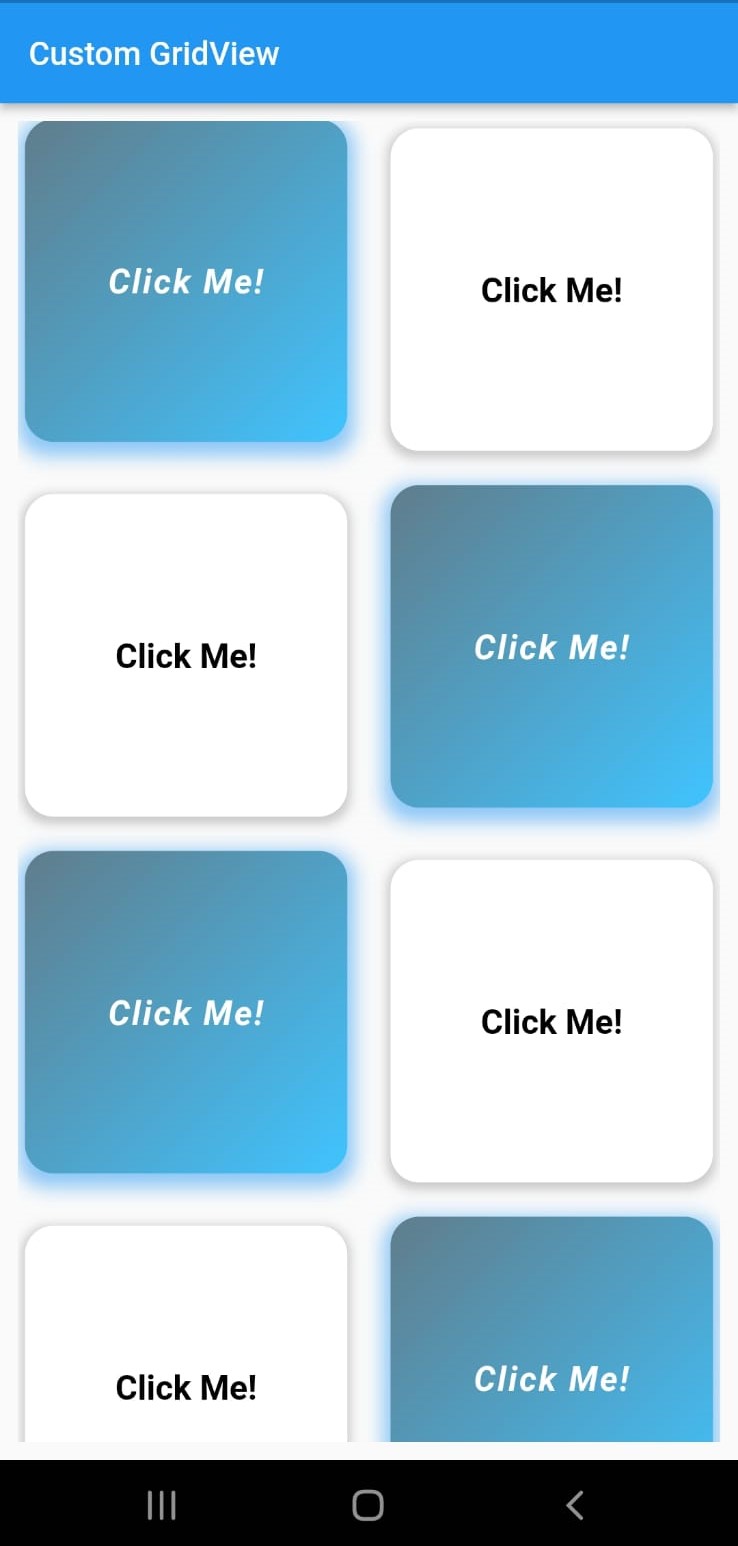
|
Metadata
Publisher
unverified uploader
Weekly Downloads
Metadata
The grid_item_animation package. These widgets are designed to create a grid view with interactive tap animations and shadow effects.
Repository (GitHub)
View/report issues
Documentation
License
 BSD-3-Clause (license)

