
folding_cell 1.0.1  folding_cell: ^1.0.1 copied to clipboard
Simple folding cell widget, pass two widgets to fold and unfold.
Simple FoldingCell widget #
Simple folding cell widget implemented in Flutter. Its a widget so add it to any container widget as a child.

Installation #
Add dependency in pubspec.yaml:
dependencies:
  folding_cell: "^1.0.1"
Import in your project:
import 'package:folding_cell/folding_cell.dart';
v 1.0.0 #
- Added new constructor to pass
frontWidgetandinnerWidget
SimpleFoldingCell.create(
    frontWidget: _buildFrontWidget(),
    innerWidget: _buildInnerWidget(),
    ...
)
Basic usage #
v 1.0.0
class FoldingCellSimpleDemo extends StatelessWidget {
  final _foldingCellKey = GlobalKey<SimpleFoldingCellState>();

  @override
  Widget build(BuildContext context) {
    return Container(
      color: Color(0xFF2e282a),
      alignment: Alignment.topCenter,
      child: SimpleFoldingCell.create(
        key: _foldingCellKey,
        frontWidget: _buildFrontWidget(),
        innerWidget: _buildInnerWidget(),
        cellSize: Size(MediaQuery.of(context).size.width, 140),
        padding: EdgeInsets.all(15),
        animationDuration: Duration(milliseconds: 300),
        borderRadius: 10,
        onOpen: () => print('cell opened'),
        onClose: () => print('cell closed'),
      ),
    );
  }

  Widget _buildFrontWidget() {
    return Container(
      color: Color(0xFFffcd3c),
      alignment: Alignment.center,
      child: Stack(
        children: <Widget>[
          Align(
            alignment: Alignment.center,
            child: Text(
              "CARD TITLE",
              style: GoogleFonts.aldrich(
                color: Color(0xFF2e282a),
                fontSize: 20.0,
                fontWeight: FontWeight.bold,
              ),
            ),
          ),
          Positioned(
            right: 5,
            bottom: 0,
            child: FlatButton(
              onPressed: () => _foldingCellKey?.currentState?.toggleFold(),
              child: Text(
                "OPEN",
              ),
              textColor: Colors.white,
              color: Colors.indigoAccent,
              splashColor: Colors.white.withOpacity(0.5),
            ),
          )
        ],
      ),
    );
  }

  Widget _buildInnerWidget() {
    return Container(
      color: Color(0xFFecf2f9),
      padding: EdgeInsets.only(top: 10),
      child: Stack(
        children: [
          Align(
            alignment: Alignment.topCenter,
            child: Text(
              "CARD TITLE",
              style: GoogleFonts.aldrich(
                color: Color(0xFF2e282a),
                fontSize: 22.0,
                fontWeight: FontWeight.bold,
              ),
            ),
          ),
          Align(
            alignment: Alignment.center,
            child: Text(
              "CARD DETAIL",
              style: GoogleFonts.aldrich(
                color: Color(0xFF2e282a),
                fontSize: 40.0,
              ),
            ),
          ),
          Positioned(
            right: 5,
            bottom: 0,
            child: FlatButton(
              onPressed: () => _foldingCellKey?.currentState?.toggleFold(),
              child: Text(
                "Close",
              ),
              textColor: Colors.white,
              color: Colors.indigoAccent,
              splashColor: Colors.white.withOpacity(0.5),
            ),
          ),
        ],
      ),
    );
  }
}
v 0.1.2
class FoldingCellSimpleDemo extends StatelessWidget {
  final _foldingCellKey = GlobalKey<SimpleFoldingCellState>();

  @override
  Widget build(BuildContext context) {
    return Container(
      color: Color(0xFF2e282a),
      alignment: Alignment.topCenter,
      child: SimpleFoldingCell(
          key: _foldingCellKey,
          frontWidget: _buildFrontWidget(),
          innerTopWidget: _buildInnerTopWidget(),
          innerBottomWidget: _buildInnerBottomWidget(),
          cellSize: Size(MediaQuery.of(context).size.width, 125),
          padding: EdgeInsets.all(15),
          animationDuration: Duration(milliseconds: 300),
          borderRadius: 10,
          onOpen: () => print('cell opened'),
          onClose: () => print('cell closed')),
    );
  }

  Widget _buildFrontWidget() {
    return Container(
        color: Color(0xFFffcd3c),
        alignment: Alignment.center,
        child: Column(
          mainAxisAlignment: MainAxisAlignment.center,
          children: <Widget>[
            Text("CARD",
                style: TextStyle(
                    color: Color(0xFF2e282a),
                    fontFamily: 'OpenSans',
                    fontSize: 20.0,
                    fontWeight: FontWeight.w800)),
            FlatButton(
              onPressed: () => _foldingCellKey?.currentState?.toggleFold(),
              child: Text(
                "Open",
              ),
              textColor: Colors.white,
              color: Colors.indigoAccent,
              splashColor: Colors.white.withOpacity(0.5),
            )
          ],
        ));
  }

  Widget _buildInnerTopWidget() {
    return Container(
        color: Color(0xFFff9234),
        alignment: Alignment.center,
        child: Text("TITLE",
            style: TextStyle(
                color: Color(0xFF2e282a),
                fontFamily: 'OpenSans',
                fontSize: 20.0,
                fontWeight: FontWeight.w800)));
  }

  Widget _buildInnerBottomWidget() {
    return Container(
      color: Color(0xFFecf2f9),
      alignment: Alignment.bottomCenter,
      child: Padding(
        padding: EdgeInsets.only(bottom: 10),
        child: FlatButton(
          onPressed: () => _foldingCellKey?.currentState?.toggleFold(),
          child: Text(
            "Close",
          ),
          textColor: Colors.white,
          color: Colors.indigoAccent,
          splashColor: Colors.white.withOpacity(0.5),
        ),
      ),
    );
  }
}
Examples #
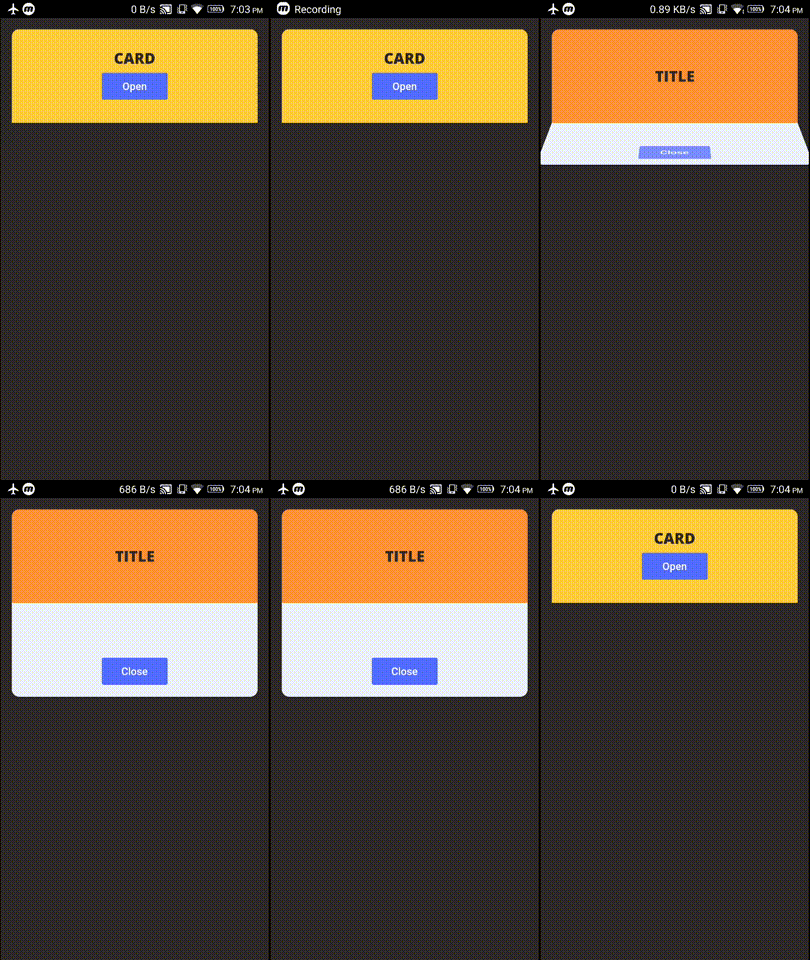
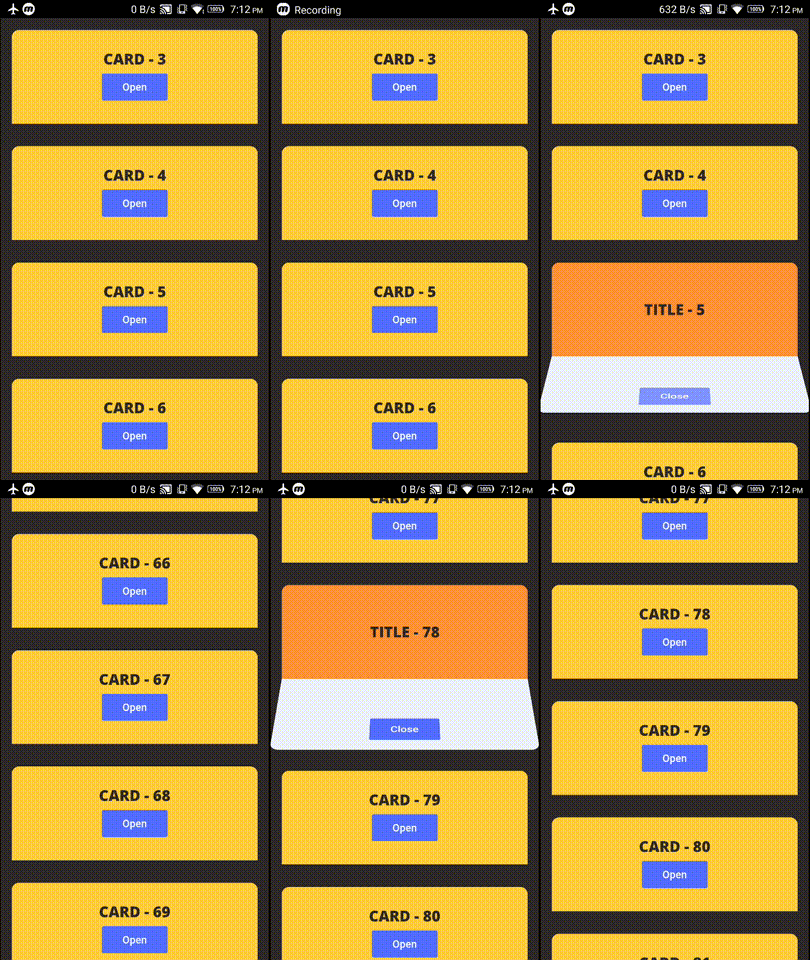
example project contains these two demos
Demo 1 - FoldingCell inside Container #
Demo 2 - FoldingCell inside ListView #
Changelog #
Check Changelog for updates
Bugs/Requests #
Reporting issues and requests for new features are always welcome.
Metadata
132
likes
140
points
135
downloads
Publisher
unverified uploader
Weekly Downloads
Metadata
Simple folding cell widget, pass two widgets to fold and unfold.
Repository (GitHub)
View/report issues
Documentation
License
 MIT (license)

