
foldable_device 1.0.1  foldable_device: ^1.0.1 copied to clipboard
Foldable posture, hinge angle, fold direction and reserved regions (fold, camera) for Android foldables and the iPhone Duo (iOS 27.1+).
foldable_device example #
A demo app for the foldable_device plugin, shown
here running on the iPhone Duo simulator (iOS 27.1).
Demo video: doc/demo.mp4 (opens on GitHub).
Screenshots #
 |
 |
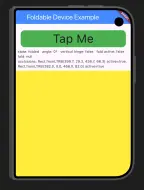
1. Folded: one yellow pane. The camera is in use (top-right), so FoldSafeArea adds top padding and the content starts below it. fold: null because there's no fold on the outer screen. |
2. Half-opened like a book (127°): fold active: true and a vertical hinge, so there are two panes, one on each side of the fold. |
 |
 |
| 3. Unfolded flat, landscape (180°): the fold is reported but inactive. It's still a vertical hinge, so the example keeps two panes. | 4. Unfolded flat, portrait: the hinge is horizontal, so there's one yellow pane. The camera isn't in use, so no padding is added. |
 |
 |
| 5. Folded and rotated, camera at the bottom: only bottom padding (the empty strip at the bottom), the size of the camera. Nothing on the sides. | 6. Folded and rotated, camera at the top-left: top padding only, so the content starts below the camera. |
The text line under the button shows the live values from the plugin: state, angle,
vertical hinge, fold active, the fold rect and the occlusions (camera) rects. All rects
are in logical pixels.
What it shows #
FoldableHelper.initialize()+FoldableScope: the app is wired up inlib/main.dart.- Hidden status bar (
SystemUiMode.immersiveSticky): only the camera is reported as an occlusion. FoldableScope.watch(context): the screen rebuilds on every fold, hinge or orientation change.FoldSafeArea(avoidCamera: true, avoidFold: false)around the whole body: the content moves out of the camera's way while it's in use, by top padding (camera at the top) or bottom padding (camera at the bottom after rotating), and the panes are still allowed to span the fold.TwoPanefromsplit_screen: two panes when open like a book (vertical hinge); one pane when folded or open like a laptop.
pubspec.yaml #
name: foldable_device_example
description: "Demo of the foldable_device plugin: fold-aware TwoPane layout and FoldSafeArea."
publish_to: 'none'
version: 1.0.0+1

environment:
  sdk: ^3.10.3

dependencies:
  flutter:
    sdk: flutter
  cupertino_icons: ^1.0.8
  split_screen: ^1.0.5
  foldable_device: ^1.0.1

dev_dependencies:
  flutter_test:
    sdk: flutter
  flutter_lints: ^6.0.0

flutter:
  uses-material-design: true
Inside this repo, the example uses foldable_device: path: ../ instead, so it runs against the
local code.
lib/main.dart #
import 'package:flutter/material.dart';
import 'package:flutter/services.dart';
import 'package:foldable_device/foldable_device.dart';

import 'home_screen.dart';

Future<void> main() async {
  WidgetsFlutterBinding.ensureInitialized();
  // Hide the status bar, so only the camera is reported as an occlusion.
  await SystemChrome.setEnabledSystemUIMode(SystemUiMode.immersiveSticky);
  // Start listening to the native hinge events (Android foldables, iPhone Duo).
  FoldableHelper.initialize();
  runApp(const MyApp());
}

class MyApp extends StatelessWidget {
  const MyApp({super.key});

  @override
  Widget build(BuildContext context) {
    // FoldableScope above the whole app: any widget that calls
    // FoldableScope.watch(context) rebuilds on every fold/hinge change.
    return FoldableScope(
      child: const MaterialApp(
        home: HomeScreen(),
      ),
    );
  }
}
lib/home_screen.dart #
import 'package:flutter/material.dart';
import 'package:foldable_device/foldable_device.dart';
import 'package:split_screen/split_screen.dart';

class HomeScreen extends StatelessWidget {
  const HomeScreen({super.key});

  @override
  Widget build(BuildContext context) {
    // Rebuild this screen whenever the posture, hinge angle or orientation changes.
    FoldableScope.watch(context);

    // Open (half-opened or flat) -> two panes; folded / not foldable -> one.
    final isOpen = FoldableHelper.isUnfolded || FoldableHelper.isHalfOpened;

    return Scaffold(
      appBar: AppBar(
          title: Center(
            child: const Text('Foldable Device Example', style: TextStyle(fontSize: 28, color: Colors.white)),
          ),
        backgroundColor: Colors.blueAccent,
      ),

      // Pads the whole body away from the camera while it's in use (top
      // padding when the camera is at the top, bottom padding after rotating
      // it to the bottom). avoidFold: false lets the panes span the fold.
      body: FoldSafeArea(
        avoidCamera: true,
        avoidFold: false,
        child: Column(
          crossAxisAlignment: CrossAxisAlignment.center,
          children: [
              InkWell(
                onTap: () => debugPrint('Pressed'),
                child: Padding(
                  padding: const EdgeInsetsGeometry.symmetric(horizontal: 20),
                  child: Container(
                    decoration: BoxDecoration(
                      borderRadius: BorderRadius.circular(16),
                      color: Colors.green,
                    ),
                    width: double.infinity,
                    child: Center(child: const Text('Tap Me', style: TextStyle(fontSize: 48)),),
                  ),
                ),
              ),

            // Live values from the plugin.
            Padding(
              padding: const EdgeInsets.all(8),
              child: Text(
                'state: ${FoldableHelper.currentState.name}   '
                'angle: ${FoldableHelper.hingeAngle?.toStringAsFixed(0) ?? '-'}°   '
                'vertical hinge: ${FoldableHelper.isVerticalHinge}   '
                'fold active: ${FoldableHelper.isFoldActive}\n'
                'fold: ${FoldableHelper.fold?.bounds}\n'
                'occlusions: ${FoldableHelper.occlusions.map((o) => '${o.bounds} active=${o.isActive}').join(', ')}',
              ),
            ),

            // Two panes only when open like a book (vertical fold);
            // open like a laptop or folded -> one yellow pane.
            // TwoPane / Container need a bounded height inside a Column.
            Expanded(
              child: isOpen && FoldableHelper.isVerticalHinge
                  ? TwoPane(
                      // Vertical fold (book pose) -> panes side by side,
                      // horizontal fold (laptop pose) -> panes on top of each other.
                      direction: FoldableHelper.isVerticalHinge ? Axis.horizontal : Axis.vertical,
                      panePriority: TwoPanePriority.both,
                      startPane: const ColoredBox(color: Colors.blueAccent),
                      endPane: const ColoredBox(color: Colors.red),
                    )
                  : Container(color: Colors.yellow),
            ),
          ],
        ),
      ),
    );
  }
}
Run #
cd example
flutter run            # pick the iPhone Duo simulator (iOS 27.1) or an Android foldable
- iOS: needs Xcode 27.1 or later and an iOS 27.1 simulator runtime with the iPhone Duo. Change the hinge from the simulator's device controls.
- Android: use a foldable emulator (for example the Pixel Fold or 7.6" Fold-in) and its posture controls.
Metadata

Documentation
Publisher
unverified uploader
Weekly Downloads
Metadata
Foldable posture, hinge angle, fold direction and reserved regions (fold, camera) for Android foldables and the iPhone Duo (iOS 27.1+).
Repository (GitHub)
View/report issues
Topics
#foldable #hinge #dual-screen #iphone #layout
License
 MIT (license)
Dependencies
More
Packages that depend on foldable_device
Packages that implement foldable_device