
flutter_screen_lock 3.0.2  flutter_screen_lock: ^3.0.2 copied to clipboard
 incrementleaf.net
Provides the ability to lock the screen on ios and android. Biometric authentication can be used in addition to passcode.
Flutter Screen Lock #
This Flutter plugin provides an feature for screen lock. Enter your passcode to unlock the screen. You can also use biometric authentication as an option.
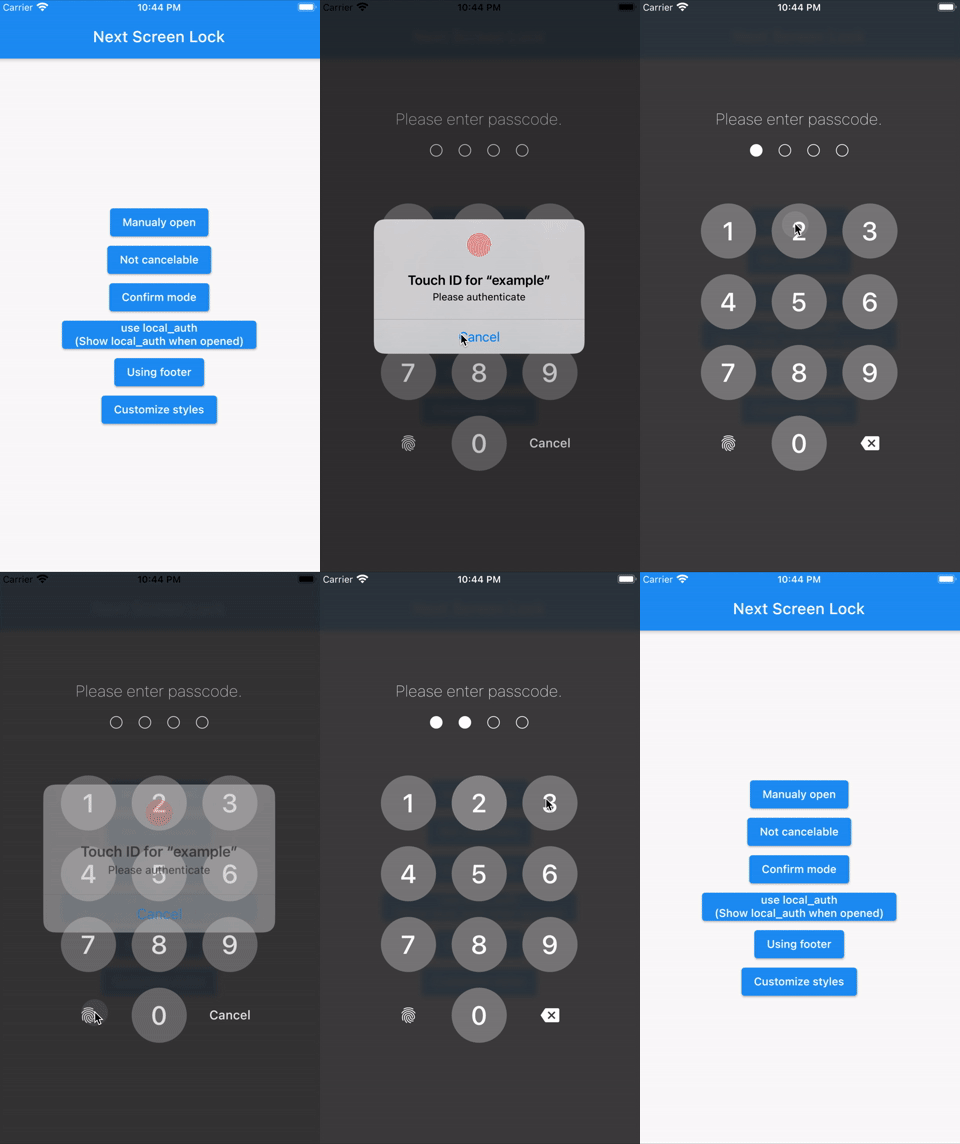
⚠Attention #
A detailed API description will be provided later. Only tentatively necessary information is provided.
Features #
- By the length of the character count
- You can change
CancelandDeletewidget - Optimizes the UI for device size and orientation
- You can disable cancellation
- You can use biometrics (local_auth plugin)
- Biometrics can be displayed on first launch
- Unlocked callback
- You can specify a mismatch event.
- Limit the maximum number of retries
Usage #
You can easily lock the screen with the following code.
To unlock, enter correctString.
Simple #
If you give the same input as correctString, it will automatically close the screen.
import 'package:flutter_screen_lock/functions.dart';

screenLock(
  context: context,
  correctString: '1234',
);
Change digits #
Provides a screen lock that cannot be canceled.
import 'package:flutter_screen_lock/functions.dart';

screenLock(
  context: context,
  correctString: '1234',
  canCancel: false,
);
Confirmation screen #
You can display the confirmation screen and get the first input with didConfirmed if the first and second inputs match.
import 'package:flutter_screen_lock/functions.dart';

screenLock(
  context: context,
  correctString: '',
  confirmation: true,
  didConfirmed: (matchedText) {
    print(matchedText);
  },
);
Use local_auth #
Add the local_auth package to pubspec.yml.
https://pub.dev/packages/local_auth
It includes an example that calls biometrics as soon as screenLock is displayed in didOpened.
import 'package:flutter_screen_lock/functions.dart';
import 'package:local_auth/local_auth.dart';
import 'package:flutter/material.dart';

/// Method extraction to call by initial display and custom buttons.
Future<void> localAuth(BuildContext context) async {
  final localAuth = LocalAuthentication();
  final didAuthenticate = await localAuth.authenticateWithBiometrics(
      localizedReason: 'Please authenticate');
  if (didAuthenticate) {
    Navigator.pop(context);
  }
}

screenLock(
  context: context,
  correctString: '1234',
  customizedButtonChild: Icon(
    Icons.fingerprint,
  ),
  customizedButtonTap: () async {
    await localAuth(context);
  },
  didOpened: () async {
    await localAuth(context);
  },
);
Full customize #
import 'package:flutter/material.dart';
import 'package:flutter_screen_lock/configurations/input_button_config.dart';
import 'package:flutter_screen_lock/configurations/screen_lock_config.dart';
import 'package:flutter_screen_lock/configurations/secret_config.dart';
import 'package:flutter_screen_lock/configurations/secrets_config.dart';
import 'package:flutter_screen_lock/functions.dart';
import 'package:flutter_screen_lock/screen_lock.dart';

screenLock(
  context: context,
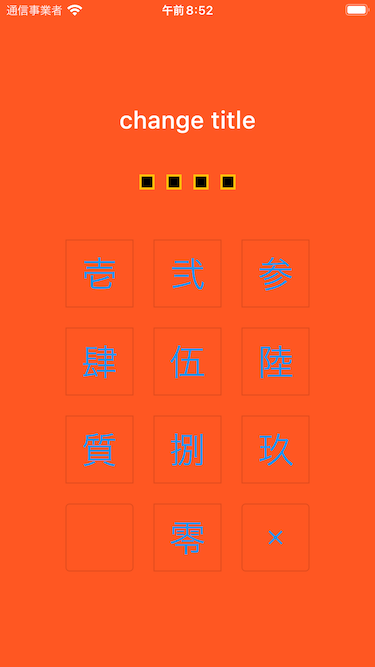
  title: Text('change title'),
  confirmTitle: Text('change confirm title'),
  correctString: '1234',
  confirmation: true,
  screenLockConfig: ScreenLockConfig(
    backgroundColor: Colors.deepOrange,
  ),
  secretsConfig: SecretsConfig(
    spacing: 15, // or spacingRatio
    padding: const EdgeInsets.all(40),
    secretConfig: SecretConfig(
      borderColor: Colors.amber,
      borderSize: 2.0,
      disabledColor: Colors.black,
      enabledColor: Colors.amber,
      height: 15,
      width: 15,
      build: (context, {config, enabled}) {
        return SizedBox(
          child: Container(
            decoration: BoxDecoration(
              shape: BoxShape.rectangle,
              color: enabled
                  ? config.enabledColor
                  : config.disabledColor,
              border: Border.all(
                width: config.borderSize,
                color: config.borderColor,
              ),
            ),
            padding: EdgeInsets.all(10),
            width: config.width,
            height: config.height,
          ),
          width: config.width,
          height: config.height,
        );
      },
    ),
  ),
  inputButtonConfig: InputButtonConfig(
    textStyle:
        InputButtonConfig.getDefaultTextStyle(context).copyWith(
      color: Colors.orange,
      fontWeight: FontWeight.bold,
    ),
    buttonStyle: OutlinedButton.styleFrom(
      shape: RoundedRectangleBorder(),
      backgroundColor: Colors.deepOrange,
    ),
  ),
  cancelButton: const Icon(Icons.close),
  deleteButton: const Icon(Icons.delete),
);
API References #
screenLock / ScreenLock API #
| Property | Type | Description |
|---|---|---|
| context | BuildContext | (Required) [screenLock] only |
| correctString | String | (Required) Input correct String If [confirmation] is true, it will be ignored, so set it to any string or empty. |
| screenLockConfig | ScreenLockConfig | Refer to the API of ScreenLockConfig (Default: [ScreenLockConfig()]) |
| secretsConfig | SecretsConfig | Refer to the API of SecretsConfig (Default: [SecretsConfig()]) |
| inputButtonConfig | InputButtonConfig | Refer to the API of InputButtonConfig (Default: [InputButtonConfig()]) |
| canCancel | bool | true is show cancel button. (Default: true) |
| confirmation | bool | Make sure the first and second inputs are the same. |
| digits | int | Set the maximum number of characters to enter when [confirmation] is true. |
| maxRetries | int | 0 is unlimited. For example, if it is set to 1, didMaxRetries will be called on the first failure. (Default 0) |
| didUnlocked | void Function() | Called if the value matches the correctString. |
| didError | void Function(int retries) | Called if the value does not match the correctString. |
| didMaxRetries | void Function(int retries) | Events that have reached the maximum number of attempts. |
| didOpened | void Function() | For example, when you want to perform biometric authentication. [screenLock] only |
| didConfirmed | void Function(String matchedText) | Called when the first and second inputs match during confirmation. It is possible to receive the matched text as an argument. |
| customizedButtonTap | Future<void> Function() | Tapped for left side lower button. |
| customizedButtonChild | Widget | Child for bottom left side button. |
| footer | Widget | Add a Widget to the footer. |
| cancelButton | Widget | Change the child widget for the cancel button. |
| deleteButton | Widget | Change the child widget for the delete button. |
| title | Widget | Change the title widget. Default HeadingTitle(text: 'Please enter passcode.') |
| confirmTitle | Widget | Change the confirm title widget. Default HeadingTitle(text: 'Please enter confirm passcode.')) |
ScreenLockConfig API #
| Property | Type | Description |
|---|---|---|
| backgroundColor | Color | Specifies the background color of the screen. By default, themeData will be set. |
| themeData | ThemeData | (Default [ScreenLockConfig.defaultThemeData]) |
SecretsConfig API #
| Property | Type | Description |
|---|---|---|
| spacing | double | Absolute space between secret widgets. If specified together with spacingRatio, this will take precedence. |
| spacingRatio | double | Space ratio between secret widgets. (Default 0.05) |
| padding | EdgeInsetsGeometry | padding of Secrets Widget. (Default [EdgeInsets.only(top: 20, bottom: 50)]) |
| secretConfig | SecretConfig | Refer to the API of SecretConfig (Default: [SecretConfig()]) |
SecretConfig API #
| Property | Type | Description |
|---|---|---|
| width | double | Widget width. (Default 16) |
| height | double | Widget height. (Default 16) |
| borderSize | double | border size. (Default [EdgeInsets.only(top: 20, bottom: 50)]) |
| borderColor | Color | border color. (Default Color(0xFFFFFFFF)) |
| enabledColor | Color | Fill color when input is active. (Default Color(0xFFFFFFFF)) |
| disabledColor | Color | Fill color for unentered. (Default Color(0xFFFFFFFF)) |
InputButtonConfig API #
| Property | Type | Description |
|---|---|---|
| height | double | Button height. (Default MediaQuery.of(context).size.height * 0.6 * 0.16) |
| width | double | Button width. (Default MediaQuery.of(context).size.width * 0.22) |
| autoSize | bool | Automatically adjust the size of the square to fit the orientation of the device. (Default true) |
| inputStrings | List<String> | A string to be matched against correctString. (Default ['0','1','2','3','4','5','6','7','8','9']) |
| displayStrings | List<String> | The string to be displayed on the screen. (Default ['0','1','2','3','4','5','6','7','8','9']) |
| style | ButtonStyle | It is recommended that you use [OutlinedButton.styleFrom()] to change it. |
| textStyle | TextStyle | Changes the text style of the button. |
Apps I use #
TimeKey
Metadata
Publisher
Weekly Downloads
Metadata
Provides the ability to lock the screen on ios and android. Biometric authentication can be used in addition to passcode.
Repository (GitHub)
View/report issues
License
 unknown (license)

