
flutter_print_label 0.2.0  flutter_print_label: ^0.2.0 copied to clipboard
Bluetooth label printer plugin (TSPL) for Android and iOS. Supports budget Chinese label printers (VOZY, Xprinter, Gprinter, ...) that advertise BLE without a name.
import 'dart:async';
import 'dart:io';

import 'package:flutter/material.dart';
import 'package:flutter_print_label/flutter_print_label.dart';

void main() {
  runApp(const MyApp());
}

class MyApp extends StatelessWidget {
  const MyApp({super.key});

  @override
  Widget build(BuildContext context) {
    return const MaterialApp(
      title: 'flutter_print_label example',
      home: PrinterPage(),
    );
  }
}

class PrinterPage extends StatefulWidget {
  const PrinterPage({super.key});

  @override
  State<PrinterPage> createState() => _PrinterPageState();
}

class _PrinterPageState extends State<PrinterPage> {
  final _printer = FlutterPrintLabel.instance;

  final List<PrinterDevice> _devices = [];
  PrinterDevice? _selected;
  PrinterConnectionStatus _status = PrinterConnectionStatus.disconnected;
  bool _scanning = false;

  StreamSubscription<PrinterDevice>? _scanSub;
  StreamSubscription<PrinterConnectionStatus>? _statusSub;

  @override
  void initState() {
    super.initState();
    _statusSub = _printer.connectionStatus.listen((status) {
      setState(() => _status = status);
    });
    _scan();
  }

  @override
  void dispose() {
    _scanSub?.cancel();
    _statusSub?.cancel();
    super.dispose();
  }

  void _scan() {
    _scanSub?.cancel();
    setState(() {
      _devices.clear();
      _scanning = true;
    });

    // iOS always scans BLE. On Android a BLE scan also finds printers that
    // are not paired in system settings.
    _scanSub = _printer.scan(isBle: Platform.isIOS).listen(
      (device) {
        setState(() {
          final index = _devices.indexWhere((d) => d.address == device.address);
          if (index >= 0) {
            _devices[index] = device; // name update for the same device
          } else {
            _devices.add(device);
          }
        });
      },
      onDone: () => setState(() => _scanning = false),
    );
  }

  Future<void> _connect(PrinterDevice device) async {
    // Already connected to this device — nothing to do.
    if (_status == PrinterConnectionStatus.connected &&
        _printer.connectedDevice?.address == device.address) {
      return;
    }
    setState(() => _selected = device);
    await _printer.connect(device);
    // Wait for PrinterConnectionStatus.connected via the status stream.
  }

  Future<void> _printTestLabel() async {
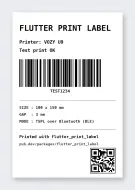
    // A complete 100 x 150 mm (800 x 1200 dots @ 203 dpi) TSPL test label:
    // title, printer info, Code 128 barcode, divider lines, label specs,
    // footer, and a QR code — matching the sample image shipped with the
    // package (image/sample_label.png).
    await _printer.printTspl(
      'SIZE 100 mm,150 mm\r\n'
      'GAP 3 mm,0 mm\r\n'
      'DIRECTION 1\r\n'
      'CLS\r\n'
      // --- Header ---
      'TEXT 50,80,"3",0,2,2,"FLUTTER PRINT LABEL"\r\n'
      'TEXT 50,195,"3",0,1,1,"Printer: ${_selected?.name ?? "-"}"\r\n'
      'TEXT 50,255,"3",0,1,1,"Test print OK"\r\n'
      // --- Code 128 barcode, 200 dots tall, human-readable below ---
      'BARCODE 50,340,"128",200,2,0,3,3,"TEST1234"\r\n'
      // --- Divider line (BAR x,y,width,height) ---
      'BAR 50,640,700,3\r\n'
      // --- Label specs ---
      'TEXT 50,675,"3",0,1,1,"SIZE : 100 x 150 mm"\r\n'
      'TEXT 50,725,"3",0,1,1,"GAP  : 3 mm"\r\n'
      'TEXT 50,775,"3",0,1,1,"MODE : TSPL over Bluetooth (BLE)"\r\n'
      // --- Divider line ---
      'BAR 50,850,700,3\r\n'
      // --- Footer ---
      'TEXT 50,885,"3",0,1,1,"Printed with flutter_print_label"\r\n'
      'TEXT 50,940,"2",0,1,1,"pub.dev/packages/flutter_print_label"\r\n'
      // --- QR code, bottom right (cell size 7 ~= 200 dots wide) ---
      'QRCODE 540,960,M,7,A,0,"https://pub.dev/packages/flutter_print_label"\r\n'
      'PRINT 1,1\r\n',
    );

    if (!mounted) return;
    ScaffoldMessenger.of(context).showSnackBar(
      const SnackBar(content: Text('Test label sent')),
    );
  }

  @override
  Widget build(BuildContext context) {
    final connected = _status == PrinterConnectionStatus.connected;

    return Scaffold(
      appBar: AppBar(
        title: const Text('flutter_print_label'),
        actions: [
          IconButton(
            icon: const Icon(Icons.refresh),
            tooltip: 'Rescan',
            onPressed: _scan,
          ),
        ],
      ),
      body: Column(
        children: [
          ListTile(
            leading: Icon(
              connected ? Icons.bluetooth_connected : Icons.bluetooth_disabled,
              color: connected ? Colors.green : Colors.grey,
            ),
            title: Text('Status: ${_status.name}'),
            subtitle: _selected == null ? null : Text(_selected!.name),
            trailing: ElevatedButton(
              onPressed: connected ? _printTestLabel : null,
              child: const Text('Print test label'),
            ),
          ),
          const Divider(height: 1),
          Expanded(
            child: _devices.isEmpty
                ? Center(
                    child: Text(
                      _scanning
                          ? 'Scanning for printers...'
                          : 'No printers found.\n'
                              'Power-cycle the printer and rescan.',
                      textAlign: TextAlign.center,
                    ),
                  )
                : ListView.builder(
                    itemCount: _devices.length,
                    itemBuilder: (context, index) {
                      final device = _devices[index];
                      // The connected device is injected into scan results by
                      // the plugin (it stops advertising while connected).
                      final isConnectedDevice = connected &&
                          _printer.connectedDevice?.address == device.address;
                      return ListTile(
                        leading: const Icon(Icons.print),
                        title: Text(device.name),
                        subtitle: Text(device.address),
                        trailing: isConnectedDevice
                            ? const Icon(Icons.check_circle,
                                color: Colors.green)
                            : null,
                        onTap: () => _connect(device),
                      );
                    },
                  ),
          ),
          if (connected)
            const Padding(
              padding: EdgeInsets.all(12),
              child: Text(
                'Tip: a connected printer stops advertising, '
                'so it will not appear in new scan results.',
                style: TextStyle(fontSize: 12, color: Colors.grey),
              ),
            ),
        ],
      ),
    );
  }
}Metadata
9
likes
150
points
350
downloads

Documentation
Publisher
unverified uploader
Weekly Downloads
Metadata
Bluetooth label printer plugin (TSPL) for Android and iOS. Supports budget Chinese label printers (VOZY, Xprinter, Gprinter, ...) that advertise BLE without a name.
Repository (GitHub)
View/report issues
Topics
#bluetooth #printer #label #tspl #thermal-printer
License
 MIT (license)
Dependencies
More
Packages that depend on flutter_print_label
Packages that implement flutter_print_label