
flutter_pagination_pro 0.0.1  flutter_pagination_pro: ^0.0.1 copied to clipboard
 almasum.dev
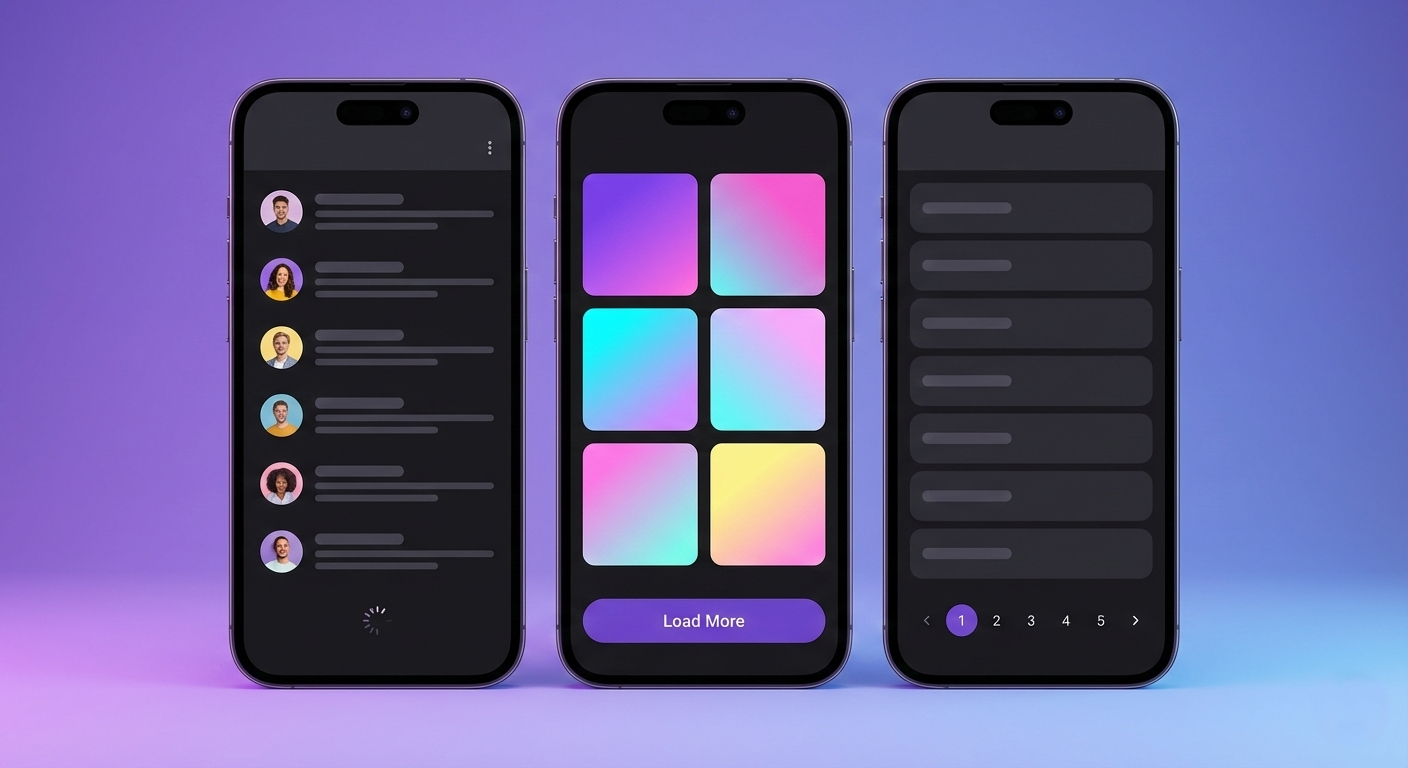
A lightweight Flutter pagination package supporting infinite scroll, load more button, and numbered pagination with zero dependencies.
Flutter Pagination Pro #




A lightweight, zero-dependency Flutter pagination package.
Supports infinite scroll, load more button, and numbered pagination.
Features #
- 🚀 Zero dependencies - Pure Flutter, no external packages
- 📜 Infinite Scroll - Auto-loads when scrolling near the bottom
- 🔘 Load More Button - Manual trigger for loading next page
- 🔢 Numbered Pagination - Traditional page navigation
- 🎨 Fully Customizable - Override any widget (loading, error, empty states)
- 🔄 Controller Support - Programmatic refresh, retry, and state access
- ✅ Type-safe - Generic type support for your data models
- 📱 Cross-platform - Works on iOS, Android, Web, macOS, Windows, Linux
Installation #
Add to your pubspec.yaml:
dependencies:
  flutter_pagination_pro: ^latest
Then run:
flutter pub get
Quick Start #
Infinite Scroll (Default) #
The simplest way to add pagination - items load automatically as user scrolls:
PaginationListView<User>(
  fetchPage: (page) => api.getUsers(page: page),
  itemBuilder: (context, user, index) => ListTile(
    leading: CircleAvatar(child: Text(user.name[0])),
    title: Text(user.name),
    subtitle: Text(user.email),
  ),
)
Load More Button #
Let users control when to load more items:
PaginationListView<User>(
  fetchPage: (page) => api.getUsers(page: page),
  itemBuilder: (context, user, index) => UserCard(user: user),
  paginationType: PaginationType.loadMore,
)
Grid View #
Perfect for image galleries, product listings, etc:
PaginationGridView<Photo>(
  fetchPage: (page) => api.getPhotos(page: page),
  itemBuilder: (context, photo, index) => PhotoCard(photo: photo),
  gridDelegate: SliverGridDelegateWithFixedCrossAxisCount(
    crossAxisCount: 2,
    mainAxisSpacing: 8,
    crossAxisSpacing: 8,
  ),
)
Numbered Pagination #
Traditional page navigation with page numbers:
NumberedPagination(
  totalPages: 20,
  currentPage: _currentPage,
  onPageChanged: (page) => setState(() => _currentPage = page),
)
Using Controller #
For programmatic control over pagination (refresh, retry, access state):
class _MyPageState extends State<MyPage> {
  late final PaginationController<User> _controller;

  @override
  void initState() {
    super.initState();
    _controller = PaginationController<User>(
      fetchPage: (page) => api.getUsers(page: page),
    );
  }

  @override
  void dispose() {
    _controller.dispose();
    super.dispose();
  }

  @override
  Widget build(BuildContext context) {
    return Scaffold(
      appBar: AppBar(
        title: Text('Users'),
        actions: [
          IconButton(
            icon: Icon(Icons.refresh),
            onPressed: () => _controller.refresh(),
          ),
        ],
      ),
      body: PaginationListView<User>.withController(
        controller: _controller,
        itemBuilder: (context, user, index) => UserTile(user: user),
      ),
    );
  }
}
Controller Methods #
| Method | Description |
|---|---|
refresh() |
Clear all items and reload from first page |
retry() |
Retry the last failed request |
reset() |
Reset to initial state |
loadNextPage() |
Manually trigger loading next page |
Controller Properties #
| Property | Type | Description |
|---|---|---|
items |
List<T> |
Current loaded items |
currentPage |
int |
Current page number |
hasMorePages |
bool |
Whether more pages are available |
status |
PaginationStatus |
Current pagination status |
error |
Object? |
Last error if any |
Customization #
Custom Loading Widget #
PaginationListView<User>(
  fetchPage: (page) => api.getUsers(page: page),
  itemBuilder: (context, user, index) => UserTile(user: user),
  firstPageLoadingBuilder: (context) => Center(
    child: Column(
      mainAxisAlignment: MainAxisAlignment.center,
      children: [
        CircularProgressIndicator(),
        SizedBox(height: 16),
        Text('Loading users...'),
      ],
    ),
  ),
)
Custom Error Widget #
PaginationListView<User>(
  fetchPage: (page) => api.getUsers(page: page),
  itemBuilder: (context, user, index) => UserTile(user: user),
  firstPageErrorBuilder: (context, error, onRetry) => Center(
    child: Column(
      mainAxisAlignment: MainAxisAlignment.center,
      children: [
        Icon(Icons.error, size: 64, color: Colors.red),
        SizedBox(height: 16),
        Text('Failed to load: $error'),
        SizedBox(height: 16),
        ElevatedButton(
          onPressed: onRetry,
          child: Text('Try Again'),
        ),
      ],
    ),
  ),
)
Custom Empty State #
PaginationListView<User>(
  fetchPage: (page) => api.getUsers(page: page),
  itemBuilder: (context, user, index) => UserTile(user: user),
  emptyBuilder: (context) => Center(
    child: Column(
      mainAxisAlignment: MainAxisAlignment.center,
      children: [
        Icon(Icons.inbox, size: 64, color: Colors.grey),
        SizedBox(height: 16),
        Text('No users found'),
      ],
    ),
  ),
)
Custom Load More Button #
PaginationListView<User>(
  fetchPage: (page) => api.getUsers(page: page),
  itemBuilder: (context, user, index) => UserTile(user: user),
  paginationType: PaginationType.loadMore,
  loadMoreButtonBuilder: (context, onLoadMore, isLoading) => Padding(
    padding: EdgeInsets.all(16),
    child: ElevatedButton(
      onPressed: isLoading ? null : onLoadMore,
      child: isLoading
          ? SizedBox(
              width: 20,
              height: 20,
              child: CircularProgressIndicator(strokeWidth: 2),
            )
          : Text('Load More'),
    ),
  ),
)
Parameters #
PaginationListView / PaginationGridView #
| Parameter | Type | Default | Description |
|---|---|---|---|
fetchPage |
FetchPage<T> |
required | Function to fetch items for a page |
itemBuilder |
ItemBuilder<T> |
required | Builds widget for each item |
paginationType |
PaginationType |
infiniteScroll |
Pagination mode |
config |
PaginationConfig |
defaults | Pagination settings |
separatorBuilder |
SeparatorBuilder? |
null |
Separator between items (ListView only) |
scrollController |
ScrollController? |
null |
Custom scroll controller |
firstPageLoadingBuilder |
LoadingBuilder? |
null |
Custom first page loading widget |
loadMoreLoadingBuilder |
LoadingBuilder? |
null |
Custom load more indicator |
firstPageErrorBuilder |
ErrorBuilder? |
null |
Custom first page error widget |
loadMoreErrorBuilder |
ErrorBuilder? |
null |
Custom load more error widget |
emptyBuilder |
EmptyBuilder? |
null |
Custom empty state widget |
endOfListBuilder |
EndOfListBuilder? |
null |
Custom end of list widget |
loadMoreButtonBuilder |
LoadMoreBuilder? |
null |
Custom load more button |
onPageLoaded |
OnPageLoaded<T>? |
null |
Callback when page loads |
onError |
OnError? |
null |
Callback on error |
PaginationConfig #
| Parameter | Type | Default | Description |
|---|---|---|---|
pageSize |
int |
20 |
Items per page |
firstPage |
int |
1 |
Starting page number |
loadMoreThreshold |
double |
200.0 |
Pixels from bottom to trigger load |
initialPage |
int? |
null |
Initial page to load |
NumberedPagination #
| Parameter | Type | Default | Description |
|---|---|---|---|
totalPages |
int |
required | Total number of pages |
currentPage |
int |
required | Current active page |
onPageChanged |
ValueChanged<int> |
required | Page change callback |
visiblePages |
int |
5 |
Number of visible page buttons |
config |
NumberedPaginationConfig |
defaults | Styling configuration |
NumberedPaginationConfig #
| Parameter | Type | Default | Description |
|---|---|---|---|
buttonSize |
double |
40 |
Size of page buttons |
spacing |
double |
4 |
Space between buttons |
showFirstLastButtons |
bool |
true |
Show first/last page buttons |
selectedButtonColor |
Color? |
primary | Selected button background |
unselectedButtonColor |
Color? |
surface | Unselected button background |
selectedTextColor |
Color? |
onPrimary | Selected button text color |
unselectedTextColor |
Color? |
onSurface | Unselected button text color |
Example #
Check out the example directory for a complete demo app showcasing all features.
License #
This project is licensed under the MIT License - see the LICENSE file for details.
Metadata
Publisher
Weekly Downloads
Metadata
A lightweight Flutter pagination package supporting infinite scroll, load more button, and numbered pagination with zero dependencies.
Repository (GitHub)
View/report issues
Topics
#pagination #infinite-scroll #paging #list #ui
Documentation
License
 MIT (license)

