
flutter_mpesa_stk 1.0.0+1  flutter_mpesa_stk: ^1.0.0+1 copied to clipboard
 muthomikathurima.com
Flutter Mpesa STK push plugin that allows you to integrate Express Mpesa to your app.
A flutter plugin that allows you to easily do lipa na mpesa stk push using the daraja API with minimal set up
Features #
Mpesa STK push Safaricom currently only supports STK push for paybills
Getting started #
you can get your specific variables from Safaricom Daraja Developer Portal. Create a developer account, then creating an app on MyApp Page. - consumer key - consumer Secret
Then get your MpesaExpress password for STK_PASSWORD from Mpesa Simulate Page as highlighted below.
- stk password
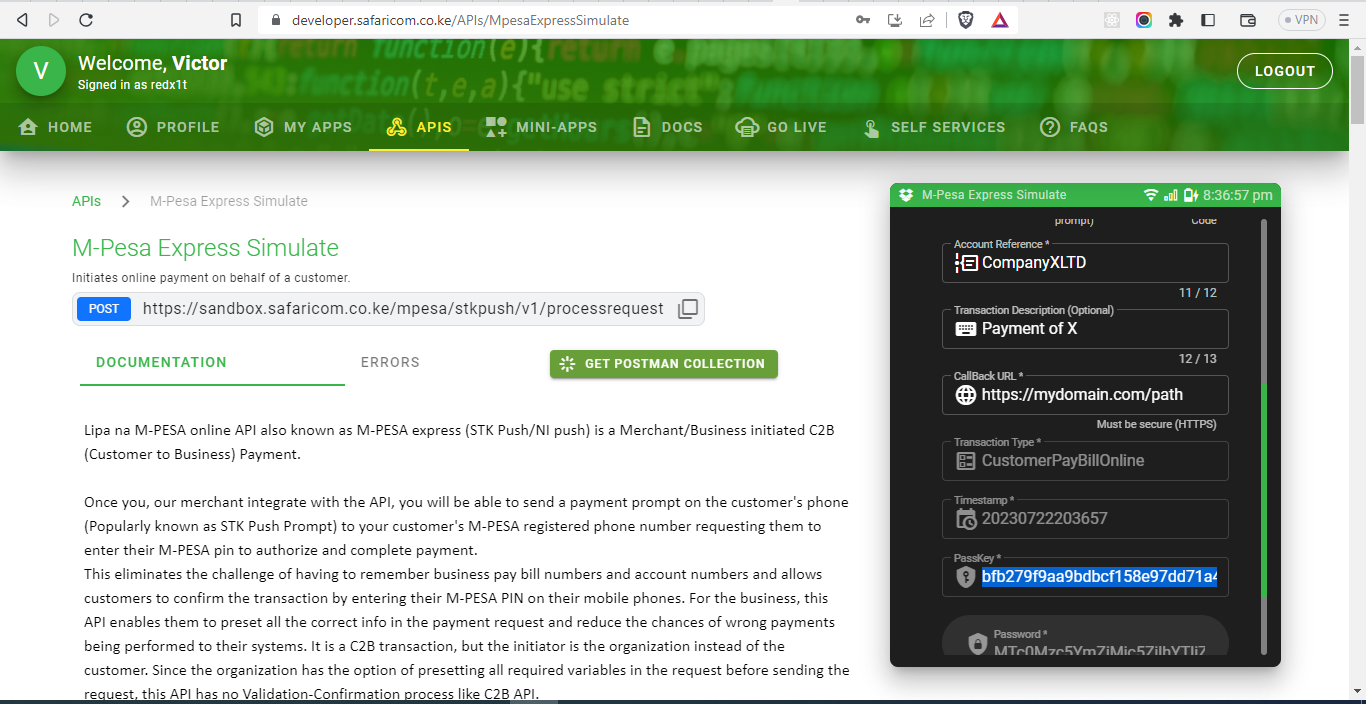
You require this values to using the Mpesa STK service.
consumerKeyconsumerSecretstkPasswordshortCodecallbackURL
To learn more about Daraja and how to prepare production ready app, read this documentation
Usage #
install the latest package by running:
flutter pub get flutter_mpesa_stk
An example of mpesa stk on usage:
import 'package:flutter_mpesa_stk/flutter_mpesa_stk.dart';
import 'package:flutter_mpesa_stk/models/Mpesa.dart';
import 'package:flutter_mpesa_stk/models/MpesaResponse.dart';

MpesaResponse response = await FlutterMpesaSTK(
            consumerKey, consumerSecret, stkPassword,
            //this paybill is default for testing
            "174379",
            // an exposed callback url for knowing if the transaction is successful or not
            "https://94f9-41-90-65-205.ngrok-free.app/api/secret-url/callback",
            // message to show if something goes wrong
            // if not defined the env defaults to `testing`
            "default Message", env: "production")
        .stkPush(
            // includes the amount and phone number of the person making payment. amount and phone number are required
            Mpesa(amount, phoneNumber,
            // account reference and transactionDesc are not required and can be absent
            accountReference: , transactionDesc));
    if (response.status) {
        // the response body has data you can use to query success or failure
      print(response.body);
      notify("successful stk push. please enter pin");
    } else {
        // can help you handle errors better based on the response
      print(response.body);
      notify("failed. please try again");
    }
Additional information #
how to contribute #
- Raise an issue on github issues
- Clone the project
- Create your feature branch:
git checkout -b ${issueNumber}-my-new-feature - Commit your changes:
git commit -m 'Add some feature' - Push to the branch:
git push origin my-new-feature - Submit a pull request.
how to report a bug #
- Send an email at muthomi[at]muthomikathurima.com if its a security issue.
- File an issue if its not security related at issues page
Credits #
[---Muthomi Kathurima ---]
Metadata
Publisher
Weekly Downloads
Metadata
Flutter Mpesa STK push plugin that allows you to integrate Express Mpesa to your app.
Repository (GitHub)
View/report issues
License
 unknown (license)

