
flutter_carousel_intro 1.0.5  flutter_carousel_intro: ^1.0.5 copied to clipboard
The FlutterCarouselIntro is an amazing package that makes it easy to build and implement animated onboarding screens in Flutter applications.
English | Português
flutter_carousel_intro #
by: Eliezer António

Swipe the carousel to the current clicked indicator

Current Features #
- ✅ Custom child widgets
- ✅ Slide transition
- ✅ Rotate transition
- ✅ Auto play
- ✅ Horizontal transition
- ✅ Vertical transition
- ✅ Swipe the carousel to the current clicked indicator
Features to be implemented #
- ❌ Repeat
- ❌ Forward button & Back button (i'snt very important)
Supported Platforms #
- Flutter Android
- Flutter iOS
- Flutter web
- Flutter desktop
Preview #
Installation #
Add flutter_carousel_intro: ^1.0.5 to your pubspec.yaml dependencies. And import it:
import 'package:flutter_carousel_intro/flutter_carousel_intro.dart';
How to use #
FlutterCarouselIntro(
      slides: [
        SvgPicture.asset("assets/slide-1.svg"),
        SvgPicture.asset("assets/slide-2.svg"),
        SvgPicture.asset("assets/slide-3.svg"),
        SvgPicture.asset("assets/slide-4.svg"),
        SvgPicture.asset("assets/slide-5.svg"),
      ],
    );
General Example #
class MySlideShow extends StatelessWidget {
  const MySlideShow({Key? key}) : super(key: key);
  @override
  Widget build(BuildContext context) {
    return FlutterCarouselIntro(
       animatedRotateX: false,
        animatedRotateZ: false,
        scale: false,
        autoPlay: false,
        animatedOpacity: false,
        autoPlaySlideDuration: const Duration(milliseconds: 1000),
        autoPlaySlideDurationTransition: const Duration(milliseconds: 1000),
        primaryColor: Colors.pink,
        secondaryColor: Colors.grey,
        scrollDirection: Axis.horizontal,
        indicatorAlign: IndicatorAlign.bottom,
        indicatorEffect: IndicatorEffects.worm,
      slides: [
        SvgPicture.asset("assets/slide-1.svg"),
        SvgPicture.asset("assets/slide-2.svg"),
        SvgPicture.asset("assets/slide-3.svg"),
        SvgPicture.asset("assets/slide-4.svg"),
        SvgPicture.asset("assets/slide-5.svg"),
      ],
    );
  }
}
Gif #
Normal Example:

Animated Opacity
[normal]

animatedOpacity: true
Animated Scale

scale: true
Animated Rotation on the X Axis

animatedRotateX: true
Animated Rotation on the Z Axis

animatedRotateZ: true
Example Using Custom Widgets #
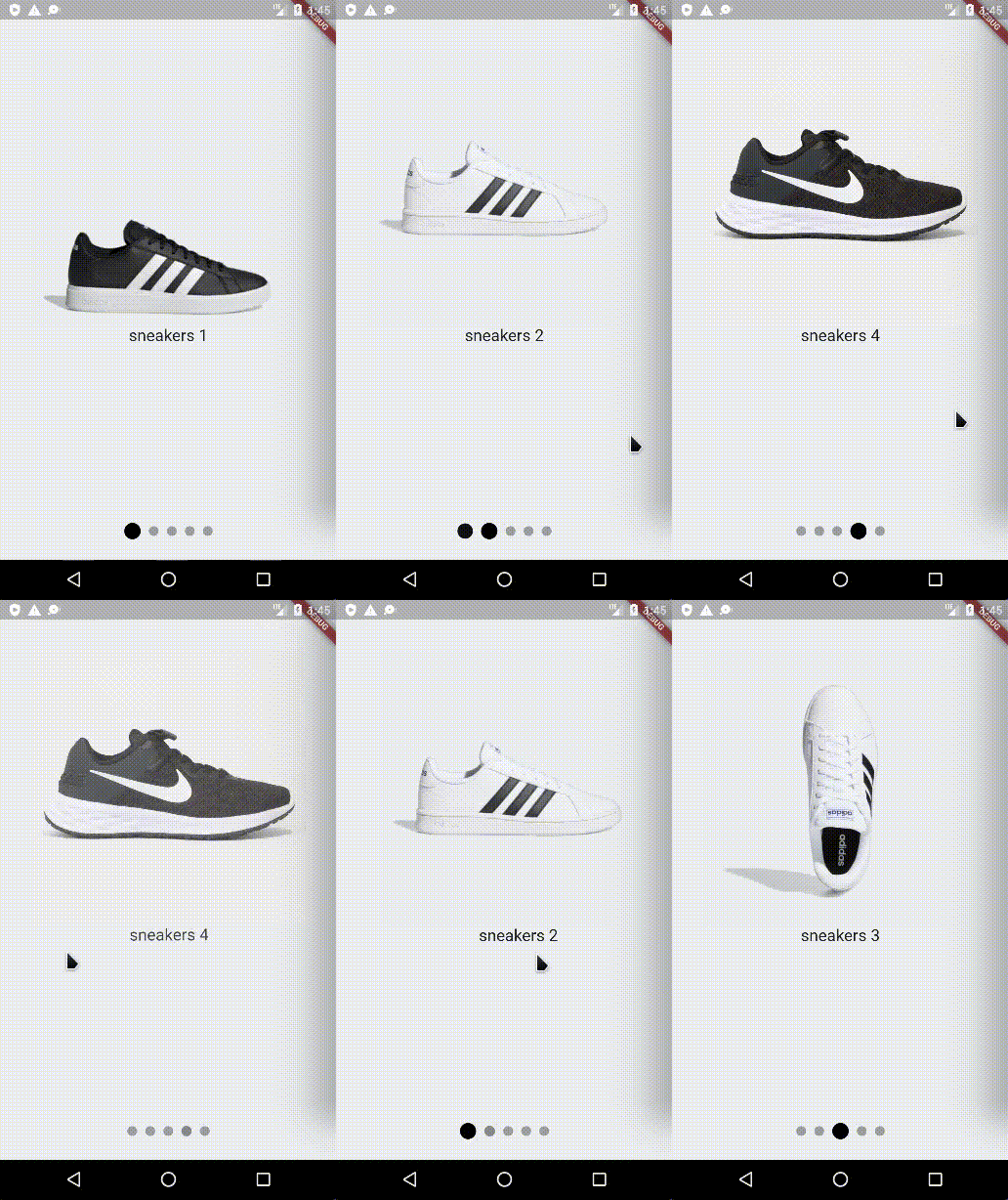
import 'package:flutter/material.dart';
import 'package:flutter_carousel_intro/flutter_carousel_intro.dart';

void main() {
runApp(const MyApp());
}

class MyApp extends StatelessWidget {
const MyApp({super.key});

@override
Widget build(BuildContext context) {
  return const MaterialApp(
    title: 'Example',
    home: MyHomePage(),
  );
}
}

class MyHomePage extends StatefulWidget {
const MyHomePage({super.key});

@override
State<MyHomePage> createState() => _MyHomePageState();
}

class _MyHomePageState extends State<MyHomePage> {
@override
Widget build(BuildContext context) {
  return const Scaffold(
    backgroundColor: Color(0xffEDEEF1),
    body: MySlideShow(),
  );
}
}

class MySlideShow extends StatelessWidget {
const MySlideShow({Key? key}) : super(key: key);
@override
Widget build(BuildContext context) {
  return const FlutterCarouselIntro(
      animatedRotateX: false,
      animatedRotateZ: false,
      scale: false,
      autoPlay: false,
      animatedOpacity: false,
      autoPlaySlideDuration: const Duration(milliseconds: 1000),
      autoPlaySlideDurationTransition: const Duration(milliseconds: 1000),
      primaryColor: Colors.pink,
      secondaryColor: Colors.grey,
      scrollDirection: Axis.horizontal,
      indicatorAlign: IndicatorAlign.bottom,
      indicatorEffect: IndicatorEffects.worm,
    slides: [SlideOne(), SlideTwo(), SlideThree(), SlideFour(), SlideFive()],
  );
}
}

class SlideOne extends StatelessWidget {
const SlideOne({
  Key? key,
}) : super(key: key);

@override
Widget build(BuildContext context) {
  return Center(
    child: Column(
      children: [
        Image.network(
          "http://assets.adidas.com/images/w_383,h_383,f_auto,q_auto,fl_lossy,c_fill,g_auto/0dcdf10d34a94f5c8bb1ae2b005082c5_9366/tenis-grand-court-td-lifestyle-court-casual.jpg",
          fit: BoxFit.cover,
        ),
        const Text("sneakers 1", style: TextStyle(fontSize: 20)),
      ],
    ),
  );
}
}

class SlideTwo extends StatelessWidget {
const SlideTwo({
  Key? key,
}) : super(key: key);

@override
Widget build(BuildContext context) {
  return Center(
    child: Column(
      children: [
        Image.network(
          "http://assets.adidas.com/images/w_600,f_auto,q_auto/1790130ab31944ddbb90aa4300cd10a9_9366/Tenis_Grand_Court_Base_Branco_EE7904_01_standard.jpg",
          fit: BoxFit.cover,
        ),
        const Text("sneakers 2", style: TextStyle(fontSize: 20)),
      ],
    ),
  );
}
}

class SlideThree extends StatelessWidget {
const SlideThree({
  Key? key,
}) : super(key: key);

@override
Widget build(BuildContext context) {
  return Center(
    child: Column(
      children: [
        Image.network(
          "http://assets.adidas.com/images/w_600,f_auto,q_auto/eacdcb3f8a0846bea871aa4300cd2765_9366/Tenis_Grand_Court_Base_Branco_EE7904_02_standard_hover.jpg",
          fit: BoxFit.cover,
        ),
        const Text("sneakers 3", style: TextStyle(fontSize: 20)),
      ],
    ),
  );
}
}

class SlideFour extends StatelessWidget {
const SlideFour({super.key});

@override
Widget build(BuildContext context) {
  return Center(
    child: Column(
      children: [
        Image.network(
          "https://static.netshoes.com.br/produtos/tenis-nike-revolution-6-flyease-feminino/04/2IC-7561-304/2IC-7561-304_zoom1.jpg?ts=1650968148",
          fit: BoxFit.cover,
        ),
        const Text("sneakers 4", style: TextStyle(fontSize: 20)),
      ],
    ),
  );
}
}

class SlideFive extends StatelessWidget {
const SlideFive({super.key});

@override
Widget build(BuildContext context) {
  return Center(
    child: Column(
      children: [
        Image.network(
          "https://static.zattini.com.br/produtos/tenis-juvenil-nike-revolution-6-flyease-nn-gs/26/2IC-7520-026/2IC-7520-026_zoom2.jpg?ts=1648734986&ims=544x",
          fit: BoxFit.cover,
        ),
        const Text("sneakers 5", style: TextStyle(fontSize: 20)),
      ],
    ),
  );
}
}
My Packages #
Metadata
32
likes
0
points
20
downloads
Publisher
unverified uploader
Weekly Downloads
Metadata
The FlutterCarouselIntro is an amazing package that makes it easy to build and implement animated onboarding screens in Flutter applications.
Homepage
Repository (GitHub)
View/report issues
License
 unknown (license)

