
flutter_calenders 1.0.0  flutter_calenders: ^1.0.0 copied to clipboard
Its a flutter package for calenders Predefined and custom templates
📅 Flutter Custom Calendar #
A fully customizable calendar package for Flutter that supports all platforms (iOS, Android, Web, Desktop). Easily integrate beautiful and interactive calendars into your apps with flexible design customization, event management, and multi-platform compatibility.
✨ Features #
- 📆 Customizable UI – Colors, fonts, shapes, and layouts.
- 🎨 Theming Support – Custom mode ready.
- 🗓 Multiple Views – Month, Week, Day.
- 🔄 Multi-Platform Support – Android, iOS, Web, Windows, macOS, Linux.
- ⚡ Performance Optimized – Smooth scrolling & rendering.
- 🛠 Developer Friendly – Simple APIs and clean architecture.
🚀 Installation #
Add the dependency in your pubspec.yaml:
dependencies:
  flutter_calenders: ^0.0.7
Run:
flutter pub get
📖 Usage #
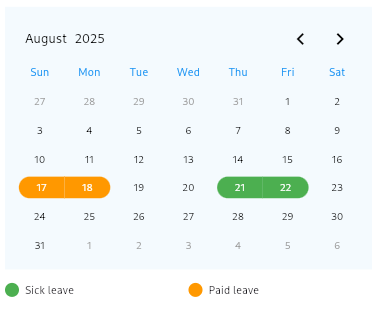
1️⃣ Event Based Calendar #
import 'package:flutter/material.dart';
import 'package:flutter_calenders/flutter_calenders.dart';

class MyCalendarPage extends StatelessWidget {
  @override
  Widget build(BuildContext context) {
    return Scaffold(
      body: Center(
        child: EventBasedCalender(
          margin: EdgeInsets.symmetric(horizontal: 10),
          padding: EdgeInsets.all(10),
          events: [
            Event(
              eventName: 'Sick leave',
              dates: [DateTime(2025, 8, 21), DateTime(2025, 8, 22)],
              color: Colors.green,
            ),
            Event(
              eventName: 'Paid leave',
              dates: [DateTime(2025, 8, 17), DateTime(2025, 8, 18)],
              color: Colors.orange,
            ),
          ],
          primaryColor: Colors.blue,
          backgroundColor: Colors.blue.withValues(alpha: .05),
          chooserColor: Colors.black,
          endYear: 2028,
          startYear: 2020,
          currentMonthDateColor: Colors.black,
          pastFutureMonthDateColor: Colors.grey,
          isSelectedColor: Colors.amber,
          isSelectedShow: true,
          showEvent: true,
          onDateTap: (date) {
            print(date);
          },
        ),
      ),
    );
  }
}
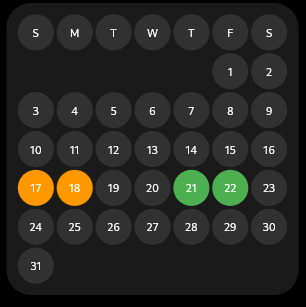
2️⃣ Schedule Based Calendar #
import 'package:flutter/material.dart';
import 'package:flutter_calenders/flutter_calenders.dart';

class MySchedulePage extends StatelessWidget {
  @override
  Widget build(BuildContext context) {
    return Scaffold(
      backgroundColor: Colors.black,
      body: Center(
        child: ScheduleBasedCalender(
          events: [
            Event(
              eventName: 'Sick leave',
              dates: [DateTime(2025, 8, 21), DateTime(2025, 8, 22)],
              color: Colors.green,
            ),
            Event(
              eventName: 'Paid leave',
              dates: [DateTime(2025, 8, 17), DateTime(2025, 8, 18)],
              color: Colors.orange,
            ),
          ],
          currentMonth: 8,
          currentYear: 2025,
          backgroundColor: Colors.white.withValues(alpha: .1),
          monthDateColor: Colors.white.withValues(alpha: .1),
          weekdayColor: Colors.white.withValues(alpha: .1),
          monthTextColor: Colors.white,
          weekdayTextColor: Colors.white,
          isSelectedShow: true,
          isSelectedColor: Colors.deepOrange,
          onDateTap: (date) {
            print(date);
          },
        ),
      ),
    );
  }
}
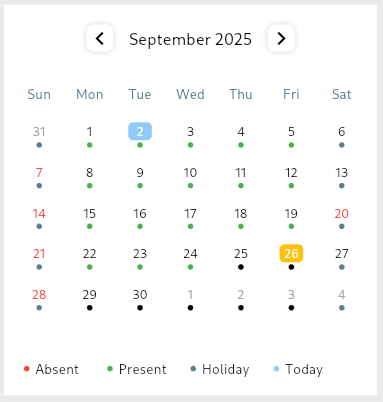
2️⃣ Event Based Calendar Theme 2 #
import 'package:flutter/material.dart';
import 'package:flutter_calenders/flutter_calenders.dart';

class MyEventPage extends StatelessWidget {
  @override
  Widget build(BuildContext context) {
    return Scaffold(
      backgroundColor: Colors.black,
      body: Center(
        child: EventCalendarTheme2(
              markAllDates: true,
              coloredEvents: [
                Event(
                  eventName: 'Absent',
                  dates: [7, 14, 21, 28, 20].map((e) => DateTime(2025, 9, e)).toList(),
                  color: Colors.red,
                ),
              ],
              margin: EdgeInsets.symmetric(horizontal: 10),
              padding: EdgeInsets.all(10),
              events: [
                Event(
                  eventName: 'Present',
                  dates: [
                    1,
                    2,
                    3,
                    4,
                    5,
                    8,
                    9,
                    10,
                    11,
                    12,
                    15,
                    16,
                    17,
                    18,
                    19,
                    22,
                    23,
                    24,
                  ].map((element) => DateTime(2025, 9, element)).toList(),
                  color: Colors.green,
                ),
              ],
              primaryColor: Colors.blueGrey,
              backgroundColor: Colors.white,
              chooserColor: Colors.black,
              todayColor: Colors.blue.withValues(alpha: .5),
              endYear: 2028,
              startYear: 2020,
              currentMonthDateColor: Colors.black,
              pastFutureMonthDateColor: Colors.grey,
              isSelectedColor: Colors.amber,
              isSelectedShow: true,
              showEvent: true,
              onDateTap: (date) {
                print(date);
              },
            ),
      ),
    );
  }
}
📸 Screenshots #
Event Based Calendar #
Schedule Based Calendar #
Event Based Calendar Thme 2 #
🎨 Customization Options #
You can customize:
- Colors (primary, background, chooser, event markers, selected date, etc.)
- Fonts & Styling
- Date Ranges (startYear, endYear)
- Event Display (enable/disable, custom colors)
🤝 Contributing #
Contributions are welcome!
- Fork the repo
- Create a new branch (
feature/my-feature) - Commit your changes
- Open a Pull Request 🚀
📜 License #
This project is licensed under the MIT License.
💙 Support #
If you like this package, please ⭐ the repo on GitHub and share it with others. Issues and feature requests are welcome in the GitHub Issues section.
Metadata
Publisher
unverified uploader
Weekly Downloads
Metadata
Its a flutter package for calenders Predefined and custom templates
Homepage
Repository (GitHub)
View/report issues
Documentation
License
 MIT (license)

