
flutter_background_geolocation 1.4.2  flutter_background_geolocation: ^1.4.2 copied to clipboard
 transistorsoft.comDart 3 incompatible• Latest: 4.18.2 / Prerelease: 5.0.0-beta.4
The most sophisticated background location-tracking & geofencing module with battery-conscious motion-detection intelligence for iOS and Android.
CHANGELOG #
1.4.2 - 2019-12-03 #
- [Fixed] iOS crash when launching first time
-[__NSDictionaryM setObject:forKey:]: object cannot be nil (key: authorization)' - [Changed] Remove Android warning
In order to enable encryption, you must provide the com.transistorsoft.locationmanager.ENCRYPTION_PASSWORDwhen usingencrypt: false. - [Fixed] Added headless implementation for
geofenceschangeevent.
1.4.1 - 2019-12-02 #
- [Fixed] Android bug rendering
Authorization.toJsonwhen noConfig.authorizationdefined.
1.4.0 - 2019-12-02 #
- [Added] New
Config.authorizationoption for automated authorization-token support. If the SDK receives an HTTP response status401 Unauthorizedand you've provided anauthorizationconfig, the plugin will automatically send a request to your configuredrefreshUrlto request a new token. The SDK will take care of adding the requiredAuthorizationHTTP header withBearer accessToken. In the past, one would manage token-refresh by listening to the SDK'sonHttplistener for HTTP401. This can now all be managed by the SDK by providing aConfig.authorization. - [Added] Implemented strong encryption support via
Config.encrypt. When enabled, the SDK will encrypt location data in its SQLite datbase, as well as the payload in HTTP requests. See API docsConfig.encryptfor more information, including the configuration of encryption password. - [Added] New JSON Web Token API for the Demo server at http://tracker.transistorsoft.com. It's now easier than ever to configure the plugin to post to the demo server. See API docs
Config.transistorAuthorizationToken. The old method usingConfig.deviceParamsis now deprecated. - [Added] New
DeviceInfomodule for providing simple device-info (model,manufacturer,version,platform). - [Removed] The SDK no longer requires the dependency
device_info.
1.3.3 - 2019-10-31 #
- [Added] New HTTP config
disableAutoSyncOnCellular. Settrueto allowautoSynconly when device is connected to Wifi. - [Changed] Re-factor iOS HTTP Service to be more robust; Replace deprecated
NSURLConnectionwithNSURLSession.
1.3.2 - 2019-10-24 #
- [Fixed] Resolve Dart analysis warnings related to
@deprecated.
1.3.1 - 2019-10-23 #
- [Fixed] Android NPE
Caused by: java.lang.NullPointerException:
  at com.transistorsoft.locationmanager.service.TrackingService.b (TrackingService.java:172)
  at com.transistorsoft.locationmanager.service.TrackingService.onStartCommand (TrackingService.java:135)
- [Added] new
uploadLogfeature for uploading logs directly to a server. This is an alternative toemailLog. - [Changed] Migrated logging methods
getLog,destroyLog,emailLogto newLoggermodule. See docs for more information. Existing log methods onBackgroundGeolocationare now@deprecated. - [Changed] All logging methods (
getLog,emailLoganduploadLog) now accept an optionalSQLQuery. Eg:
SQLQuery query = new SQLQuery(
  start: DateTime.parse('2019-10-23 09:00'),
  end: DateTime.parse('2019-10-23 19:00'),
  limit: 1000,
  order: SQLQuery.ORDER_ASC
);

String log = await Logger.getLog(query)
Logger.emailLog('[email protected]', query);
Logger.uploadLoad('http://your.server.com/logs', query);
1.3.0 - 2019-10-17 #
- [Fixed] Android: Fixed issue executing
#changePaceimmediately after#start. - [Fixed] Android: Add guard against NPR in
calculateMedianAccuracy - [Added] Add new Geofencing methods:
#getGeofence(identifier)and#geofenceExists(identifier). - [Fixed] iOS issue using
disableMotionActivityUpdates: falsewithuseSignificantChangesOnly: trueandreset: true. Plugin will accidentally ask for Motion Permission. - [Fixed] Resolved a number of Android issues exposed by booting the app in StrictMode. This should definitely help alleviate ANR issues related to
Context.startForegroundService. - [Added] Android now supports
disableMotionActivityUpdatesfor Android 10 which now requires run-time permission for "Physical Activity". Setting totruewill not ask user for this permission. The plugin will fallback to using the "stationary geofence" triggering, like iOS. - [Changed] Android: Ensure all code that accesses the database is performed in background-threads, including all logging (addresses
Context.startForegroundServiceANR issue). - [Changed] Android: Ensure all geofence event-handling is performed in background-threads (addresses
Context.startForegroundServiceANR issue). - [Added] Android: implement logic to handle operation without Motion API on Android 10. v3 has always used a "stationary geofence" like iOS as a fail-safe, but this is now crucial for Android 10 which now requires run-time permission for "Physical Activity". For those users who [Deny] this permission, Android will trigger tracking in a manner similar to iOS (ie: requiring movement of about 200 meters). This also requires handling to detect when the device has become stationary.
1.2.4 - 2019-09-20 #
- [Fixed] [email protected] deprecated a method
FlutterMain.findBundleAppPath(Context), replacing with a new signature the receives noContext. Changing to the new signature breaks people using < flutter 1.9.1. Will use old signature for now. - [Fixed] Custom layouts were not working properly for older OS version < O. Custom layout will use setBigContentLayout now. The user will be able to expand the notification to reveal the custom layout.
1.2.3 - 2019-09-16 #
- [Changed] Bump background_fetch version to 0.3.0
- [Changed] Android: move more location-handling code into background-threads to help mitigate against ANR referencing
Context.startForegroundService - [Changed] Android: If BackgroundGeolocation adapter is instantiated headless and is enabled, force ActivityRecognitionService to start.
- [Added] Add
mocktolocationTemplatedata. - [Added] Android now adds 2 extra setup steps. (1) The plugin now hosts its own
proguard-rules.prowhich must be manually added toapp/build.gradle. (2) The plugin now hosts its own custom gradle file which must also be manuallyapply fromin yourapp/build.gradle. This extra gradle file contains a simple method to strip the SDK's debug sound-effects from your release build (1.5M):
android/app/build.gradle
📂 android/app/build.gradle:
// flutter_background_geolocation
+Project background_geolocation = project(':flutter_background_geolocation')
// 1.  Extra gradle file
+apply from: "${background_geolocation.projectDir}/background_geolocation.gradle"

android {
    .
    .
    .
    buildTypes {
        release {
            .
            .
            .
            minifyEnabled true
            // 2.  background_geolocation requires custom Proguard Rules when used with minifyEnabled
+           proguardFiles "${background_geolocation.projectDir}/proguard-rules.pro"
        }
    }
}
1.2.2 - 2019-09-05 #
- [Changed] Rebuild iOS
TSLocationManager.frameworkwith XCode 10 (previous build used XCode 11-beta6). Replace@availablemacro withSYSTEM_VERSION_GREATER_THAN_OR_EQUAL_TO. - [Fixed] iOS 13 preventSuspend was not working with iOS 13. iOS has once again decreased the max time for UIApplication beginBackgroundTask from 180s down to 30s.
- [Fixed] Android
Geofences.extrasnot being provided to#onGeofencesChangeevent (issue #110). - [Fixed] iOS 10 provides
boolattributes asintinState. CheckruntimeType == int. Issue #111. - [Changed] Upgrade
android-logbackdependency to2.0.0 - [Changed] Android: move some plugin initialization into background-threads (eg:
performLogCleanup) to help mitigate against ANR "Context.startForegroundServicedid not then callService.startForeground".
1.2.1 - 2019-08-22 #
- [Fixed] Android Initial headless events can be missed when app booted due to motion transition event.
- [Fixed] Android crash with EventBus
Subscriber already registered error. - [Fixed] iOS
Crash: [TSHttpService postBatch:error:] + 6335064 (TSHttpService.m:253)
1.2.0 - 2019-08-17 #
- [Added] iOS 13 support.
1.1.0 - 2019-08-07 #
- [Fixed] Android Geofence
DWELLtransition (notifyOnDwell: true) not firing. - [Fixed] iOS
logMaxDayswas hard-coded to7; Config option not being respected. - [Added] Android
Qsupport (API 29) with new location permission modelWhen In Use. Android now supports the config optionlocationAuthorizationRequestwhich was traditionally iOS-only. Also, Android Q now requires runtime permission from user forACTIVITY_RECOGNITION. - [Changed] Another Android tweak to mitigate against error
Context.startForegroundService() did not then call Service.startForeground(). - [Changed] Add new Android gradle config parameter
appCompatVersionto replacesupportLibVersionfor better AndroidX compatibility. IfappCompatVersionis not found, the plugin's gradle file falls back to oldsupportLibVersion.
1.0.12 - 2019-07-23 #
- [Fixed] Found a few more cases where Android callbacks are being executed in background-thread. References issue #70.
1.0.11 - 2019-07-10 #
- [Fixed] Android issue running enabledchange event in background-thread with flutter 1.7
1.0.10 - 2019-06-25 #
- [Fixed] iOS / Android issues with odometer and
getCurrentPositionwhen used withmaximumAgeconstraint. Incorrect, old location was being returned instead of latest available. - [Fixed] Some Android methods were executing the callback in background-thread, exposed when using flutter dev channel (
#insertLocation,#getLocations,#getGeofences,#sync). - [Fixed] Add
intent.setFlags(Intent.FLAG_ACTIVITY_NEW_TASK)toDeviceSettingsrequest for Android 9 compatibility. - [Changed] Tweaks to Android services code to help guard against error
Context.startForegroundService() did not then call Service.startForeground(). - [Fixed] iOS manual
synccrash in simulator while executing callback when error response is returned from server.
1.0.9 - 2019-06-17 #
- [Fixed] Android bug with
getCurrentPositionandmaximumAge, Fixes #80. - [Fixed] Odometer issues: clear odometer reference location on
#stop,#startGeofences. - [Fixed] Odometer issues: Android must persist its odometer reference location since the foreground-service is no longer long-lived and the app may be terminated between motionchange events.
- [Fixed] Return
Service.START_REDELIVER_INTENTfromHeartbeatService. Fixes #79 to preventnullIntent being delivered toHeartbeatService. - [Added] Implement Android LocationSettingsRequest. Determines if device settings is currently configured according to the plugin's desired-settings (eg: gps enabled, location-services enabled). If the device settings differs, an automatic dialog will perform the required settings changes automatically when user clicks [OK].
- [Fixed] Android
triggerActivitieswas not implemented refactor of1.x.
1.0.8 - 2019-06-04 #
- [Fixed] Android
destroyLocationscallback was being executed in background-thread. - [Fixed] When Android geofence API receives a
GEOFENCE_NOT_AVAILABLEerror (can occur is Wifi is disabled), geofences must be re-registered. - [Fixed] Android
Config.disableStopDetectionwas not implemented.
1.0.7 - 2019-05-13 #
- [Fixed] Android issue with Firebase Adapter support not working when app is terminated.
1.0.6 - 2019-05-12 #
- [Added] New Android config
Config.scheduleUseAlarmManagerto force Android scheduler to use more preciseAlarmManagerinstead ofJobScheduler. - [Added] Support for background_geolocation_firebase adapter.
1.0.5 - 2019-05-10 #
- [Changed] Rollback
android-permissionsversion back to0.1.8. It relies onsupport-annotations@28. This isn't a problem if one simply upgrades theirtargetSdkVersionbut the support calls aren't worth the hassle, since the latest version doesn't offer anything the plugin needs.
1.0.4 - 2019-05-09 #
- [Changed] Update docs.
1.0.3 - 2019-05-08 #
- [Fixed] Dart analysis warnings, re: initializing null values in new Notification class.
1.0.2 - 2019-05-08 #
- [Fixed] iOS: changing
pauseslocationUpdatesAutomaticallywas not being applied. - [Changed]
resetparameter provided to#readyhas now been default totrue. This causes too many support issues for people using the plugin the first time. - [Fixed] Android threading issue where 2 distinct
SingleLocationRequestwere issued the same id. This could result in the foreground service quickly starting/stopping untillocationTimeoutexpired. - [Fixed] Android issue where geofences could fail to query for new geofences-in-proximity after a restart.
- [Fixed] Android issues re-booting device with location-services disabled or location-authorization revoked.
- [Added] Implement support for Custom Android Notification Layouts.
- [Fixed] Android bug where Service repeatedly stops / starts after rebooting device with plugin in moving state.
- [Fixed] Android scheduler bug. When app is terminated & restarted during a scheduled ON period, tracking-service does not restart.
- [Fixed] Android headless
heartbeatevents were failing (incorrectContextwas supplied to the event).
1.0.1 - 2019-04-09 #
- [Fixed] iOS: Incorrect return type BOOL from native method stopBackgroundTask. Should have been int.
- [Changed] Add Geofence test panel in example Settings screen. Allows to add a series of test-geofences along the iOS simulator Freeway Drive route.
1.0.0 - 2019-04-05 #
- [RELEASE] Release 1.0.0
1.0.0-rc.4 - 2019-03-31 #
- [Fixed] Android: Another
NullPointerExceptionwithBundle#getExtras.
1.0.0-rc.3 - 2019-03-29 #
- [Fixed] Android
NullPointerExceptionwithBundle#getExtras(#674). - [Fixed] Android not persisting
providerchangelocation when location-services re-enabled.
1.0.0-rc.2 - 2019-03-27 #
- [Fixed] An Android foreground-service is launched on first install and fails to stop.
1.0.0-rc.1 - 2019-03-25 #
Breaking Changes #
- [Changed] The license format has changed. New
1.0.0licenses are now available for customers in the product dashboard.
Fixes #
- [Fixed] iOS missing native
destroyLogimplementation (thanks to @joserocha3) - [Fixed] Missing Dart implementation for
requestPermissionmethod (thanks to @joserocha3) - [Fixed] Logic bugs in MotionActivity triggering between stationary / moving states.
- [Fixed] List.map Bug in Dart api
addGeofences.
New Features #
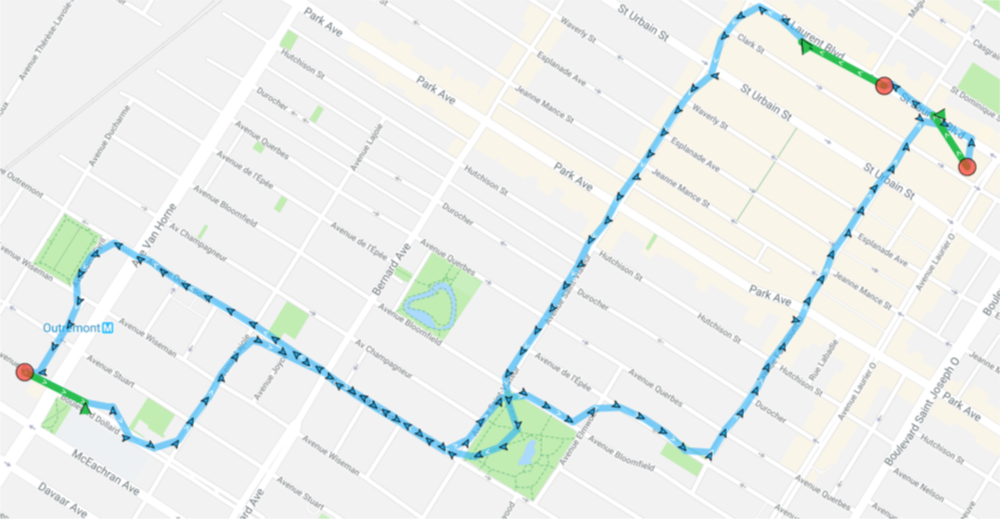
- [Added] Android implementation for
useSignificantChangesOnlyConfig option. Will request Android locations without the persistent foreground service. You will receive location updates only a few times per hour:useSignificantChangesOnly: true: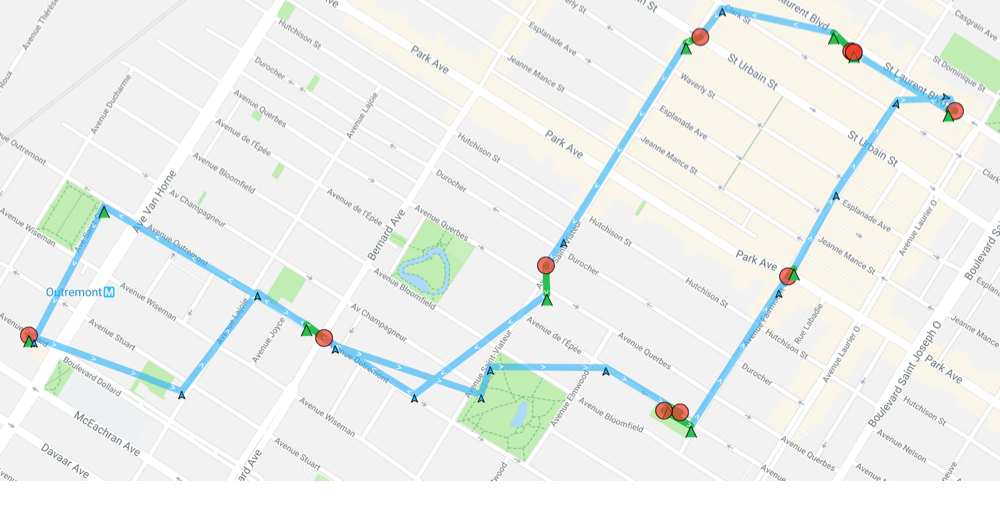
useSignificantChangesOnly: false:
-
[Added] Android now implements a "stationary geofence", just like iOS. It currently acts as a secondary triggering mechanism along with the current motion-activity API. You will hear the "zap" sound effect when it triggers. This also has the fortunate consequence of allowing mock-location apps (eg: Lockito) of being able to trigger tracking automatically.
-
[Added] The SDK detects mock locations and skips trigging the
stopTimeoutsystem, improving location simulation workflow. -
[Added] Android-only Config option
geofenceModeHighAccuracyfor more control over geofence triggering responsiveness. Runs a foreground-service during geofences-only mode (#startGeofences). This will, of course, consume more power.
await BackgroundGeolocation.ready(Config
  geofenceModeHighAccuracy: true,
  desiredAccuracy: Config.DESIRED_ACCURACY_MEDIUM,
  locationUpdateInterval: 5000,
  distanceFilter: 50
));

BackgroundGeolocation.startGeofences();
- [Added] Android implementation of
startBackgroundTask/stopBackgroundTask. This implementation uses a foreground-service. I've tried using Android'sJobServicebut these tasks are queued by the OS and run only periodically.
  // an Android foreground-service has just launched (in addition to its persistent notification).
  int taskId = await BackgroundGeolocation.startBackgroundTask();

  // Do any work you like -- it's guaranteed to run, regardless of background/terminated.
  // Your task has exactly 30s to do work before the service auto-stops itself.

  // Execute an HTTP request to test an async operation.
  String url = "http://tracker.transistorsoft.com/devices?company_token=$_username";
  String result = await http.read(url).then((String result) {
    print("[http test] success: $result");
    // Terminate the foreground-service.
    BackgroundGeolocation.stopBackgroundTask(taskId);
  }).catchError((dynamic error) {
    print("[http test] failed: $error");
    // Always be sure to stop your tasks, just like iOS.
    BackgroundGeolocation.stopBackgroundTask(taskId);
  });
Logging for background-tasks looks like this (when you see an hourglass, a foreground-service is active)
 [BackgroundTaskManager onStartJob] ⏳ startBackgroundTask: 6
 .
 .
 .
 [BackgroundTaskManager$Task stop] ⏳ stopBackgroundTask: 6
- [Added] New custom Android debug sound FX. More documentation will be added to the docs but here's a basic description from the code:
    public static final String LOCATION_RECORDED        = OOOOIII;
    public static final String LOCATION_SAMPLE          = CLICK_TAP_DONE;
    public static final String LOCATION_ERROR           = DIGI_WARN;

    public static final String MOTIONCHANGE_FALSE       = MARIMBA_DROP;
    public static final String MOTIONCHANGE_TRUE        = CHIME_SHORT_CHORD_UP;
    public static final String STATIONARY_GEOFENCE_EXIT = ZAP_FAST;

    public static final String STOP_TIMER_ON            = CHIME_BELL_CONFIRM;
    public static final String STOP_TIMER_OFF           = BELL_DING_POP;

    public static final String HEARTBEAT                = PEEP_NOTE;

    public static final String GEOFENCE_ENTER           = BEEP_TRIP_UP_DRY;
    public static final String GEOFENCE_DWELL           = BEEP_TRIP_UP_ECHO;
    public static final String GEOFENCE_EXIT            = BEEP_TRIP_DRY;

    public static final String WARNING                  = DIGI_WARN;
    public static final String ERROR                    = MUSIC_TIMPANI_ERROR;
⚠️ These debug sound FX consume about 1.4MB in the plugin's tslocationmanager.aar. These assets can easily be stripped in your release builds by adding the following gradle task to your app/build.gradle (I'm working on an automated solution within the context of the plugin's build.gradle; so far, no luck). Big thanks to @mikehardy.
/**
 * Purge flutter_background_geolocation debug sounds from release build.
 */
def purgeBackgroundGeolocationDebugResources(applicationVariants) {
    applicationVariants.all { variant ->
        if (variant.buildType.name == 'release') {
            variant.mergeResources.doLast {
                delete(fileTree(dir: variant.mergeResources.outputDir, includes: ['raw_tslocationmanager*']))

            }
        }
    }
}

android {
    //Remove debug sounds from background_geolocation plugin
    purgeBackgroundGeolocationDebugResources(applicationVariants)

    compileSdkVersion rootProject.ext.compileSdkVersion
    .
    .
    .
}
Removed #
- [Changed] Removed Android config option
activityRecognitionInterval. The Android SDK now uses the more modern ActivityTransistionClient API which is a higher level wrapper for the traditional ActivityReconitionClient.AcitvityTransitionClientdoes not accept a pollinginterval, thusactiivtyRecognitionIntervalis now unused. Also,ActivityTransitionClientemits similaron_foot,in_vehicleevents but no longer provides aconfidence, thusconfidenceis now reported always as100. If you've been implementing your own custom triggering logic based uponconfidence, it's now pointless. TheActivityTransitionClientwill open doors for new features based upon transitions between activity states.
╔═════════════════════════════════════════════
║ Motion Transition Result
╠═════════════════════════════════════════════
╟─ 🔴  EXIT: walking
╟─ 🎾  ENTER: still
╚═════════════════════════════════════════════
Maintenance #
- [Changed] Update
android-permissionsdependency to0.1.8.
Metadata
Publisher
Weekly Downloads
Metadata
The most sophisticated background location-tracking & geofencing module with battery-conscious motion-detection intelligence for iOS and Android.
Repository (GitHub)
View/report issues
License
 unknown (license)
Dependencies
More
Packages that depend on flutter_background_geolocation
Packages that implement flutter_background_geolocation

