
fhir_renderer_questionnaire 0.0.3  fhir_renderer_questionnaire: ^0.0.3 copied to clipboard
 alphacodelabs.de
A flutter package to render FHIR questionnaires, based on the FHIR R4 specification.
FHIR Renderer Questionnaire #


A Flutter package for FHIR® Questionnaires. HL7®, and FHIR® are the registered trademarks of Health Level Seven International and their use of these trademarks does not constitute an endorsement by HL7.
This package was inspired by fhir_questionnaire. Built to allow isolated customization and different ways to render a FHIR R4 Questionnaire.
🔆 Why fhir_renderer_questionnaire? #
- 🎨 Customization — Replace the default Questionnaire Item widgets with your own to achieve the desired UI.
- 🤸 Flexibility — Use the RendererView that suits you the best (ListViewRenderer, PageViewRenderer, SliversViewRenderer).
- 🚀 Rapid Development: Automatically generates UI from FHIR R4 Questionnaires, saving time compared to building forms manually.
- 📝 Automatic QuestionnaireResponse Generation: Collects user input and produces a valid
QuestionnaireResponse. - ⚙️ Behavior Handling: Manages conditional logic (
enableWhenandrequired) out of the box.
🔆 Widgets #
✳️ In order to provide full customization, not only for the QuestionnaireItems but also the Questionnaire itself, there are three widgets for rendering a questionnaire: QuestionnaireListViewRenderer, QuestionnairePageViewRenderer and QuestionnaireSliversViewRenderer.
✳️ The three Renderer widgets use by default the theme of your application.
💫 QuestionnaireListViewRenderer #
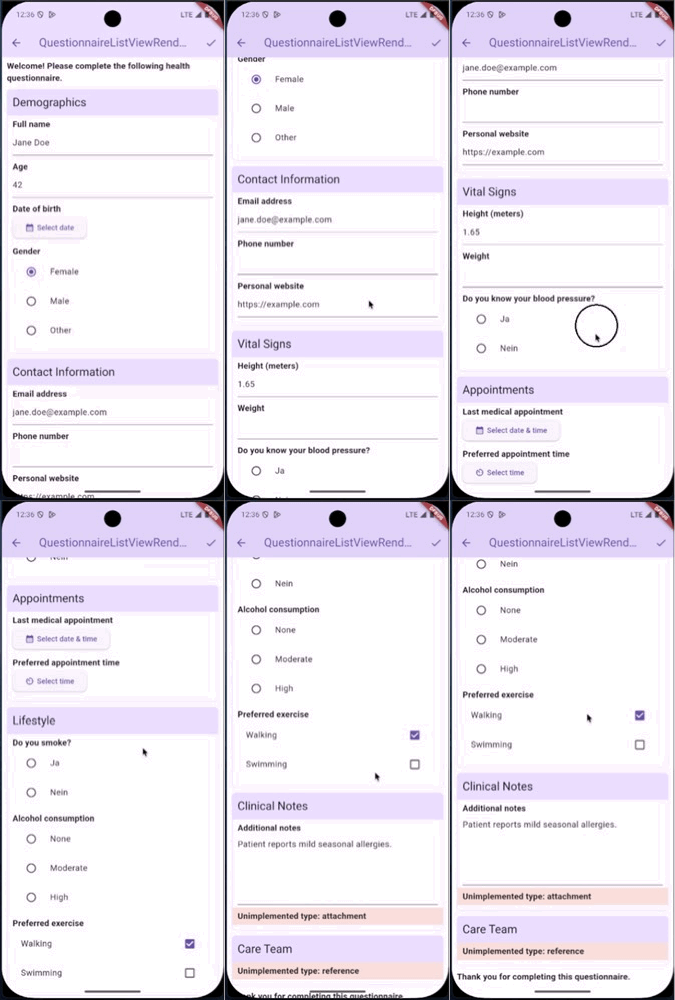
💡 Ideal for long questionnaires as it uses ListView.builder under the hook.
QuestionnaireListViewRenderer(
    questionnaire: questionnaire,
    getRendererControllerInstance: (QuestionnaireRendererController controller) {
        //Assign here the instance of the Renderer Controller
    }
);
💫 QuestionnairePageViewRenderer #
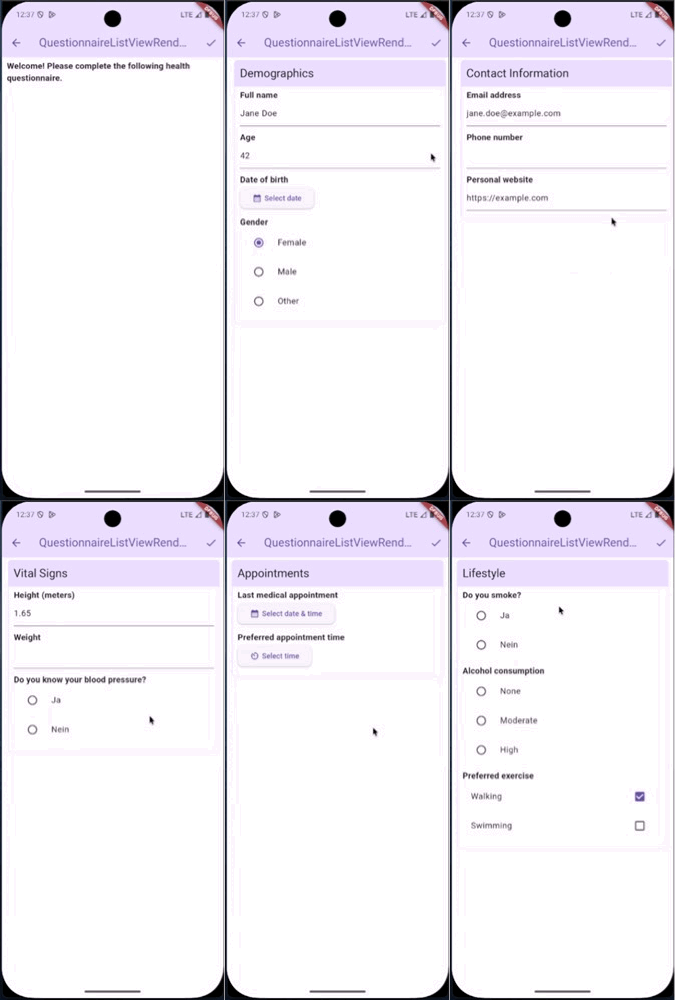
💡 Ideal for strict grouping in the questionnaires as gives the user a clear separation of the QuestionnaireItems.
QuestionnairePageViewRenderer(
    questionnaire: questionnaire,
    getRendererControllerInstance: (QuestionnaireRendererController controller) {
        //Assign here the instance of the Renderer Controller
    };
)
💫 QuestionnaireSliversViewRenderer #
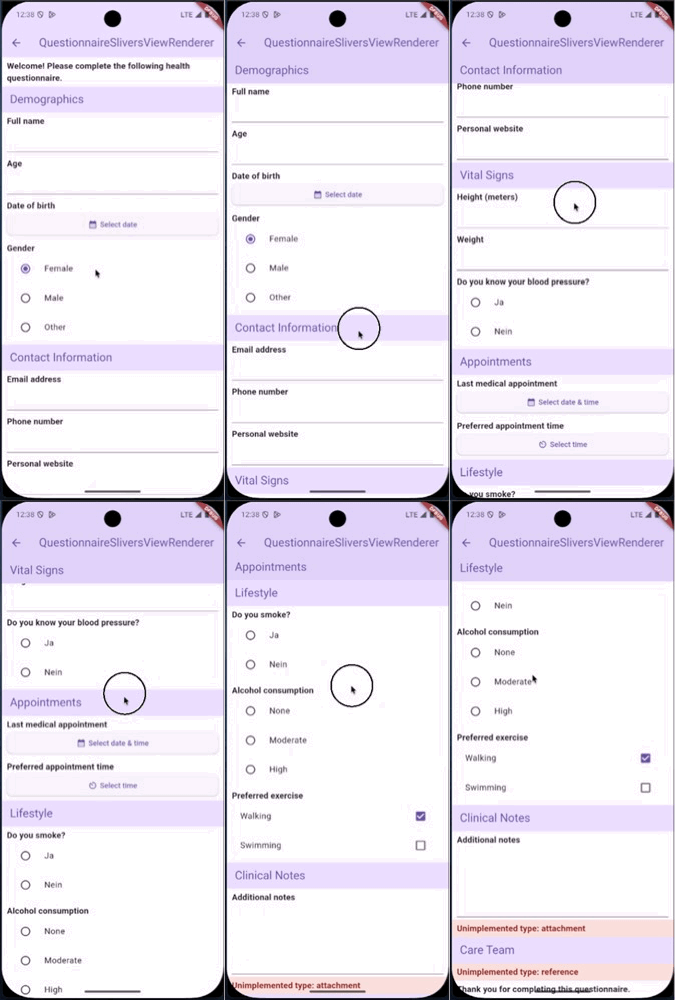
💡 Ideal for fancy behaviors through your questionnaire.
QuestionnaireSliversViewRenderer(
    questionnaire: questionnaire,
    getRendererControllerInstance: (QuestionnaireRendererController controller) {
        //Assign here the instance of the Renderer Controller
    };
)
🔆 Usage #
✳️ The instance of the QuestionnaireRendererController allows you to access the ScrollController of the list view, the PageController of the page view and the generated questionnaire response.
✳️ The QuestionnaireListViewRenderer, QuestionnairePageViewRenderer and QuestionnaireSliversViewRenderer allow you to customize each QuestionnaireItem widget by using builders.
Each builder receives:
index, to know its own position within the group or set of items.isLastItem, a boolean to allow last-item customization.questionnaireItem, the questionnaire item to display.
The builders for the questionnaire items that allow a user answer receive also:
selectedResponse, the selected questionnaire response item.onAnswerChanged/onAnswerOptionSelected, to notify when the answer changes.
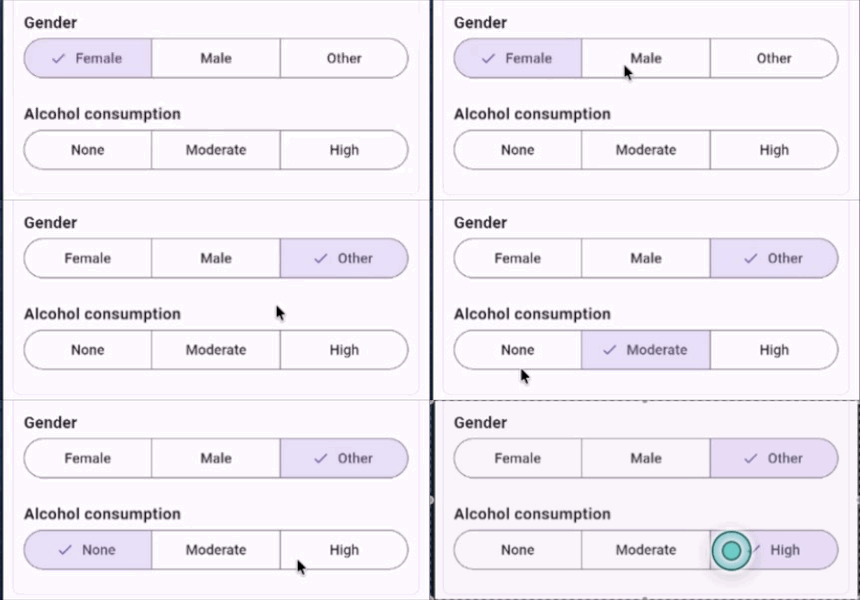
The following example uses the choiceItemBuilder to replace the default UI of the choice item type for a custom one:
import 'package:example/widgets/segmented_choice.dart';
import 'package:fhir_r4/fhir_r4.dart';
import 'package:fhir_renderer_questionnaire/fhir_renderer_questionnaire.dart';
import 'package:flutter/material.dart';

//Cubit or Bloc or Controller for the view to assign
//the QuestionnaireRendererController instance.
class CubitOrBlocOrController {
  QuestionnaireRendererController? rendererController;
}

class ListViewExamplePage extends StatelessWidget {
  final Questionnaire questionnaire;
  ListViewExamplePage({super.key, required this.questionnaire});

  final CubitOrBlocOrController controller = CubitOrBlocOrController();

  @override
  Widget build(BuildContext context) {
    return Scaffold(
      appBar: AppBar(
        title: Text("QuestionnaireListViewRenderer"),
        actions: [
          IconButton(
            onPressed: () {
              final generatedQuestionnaireResponse =
                  controller.rendererController
                      ?.getGeneratedQuestionnaireResponse();

              //Do something with the generated response
            },
            icon: Icon(Icons.check),
          ),
        ],
      ),
      body: QuestionnaireListViewRenderer(
        questionnaire: questionnaire,
        getRendererControllerInstance:
            (QuestionnaireRendererController controller) =>
                this.controller.rendererController = controller,
        choiceItemBuilder: (
          index,
          isLastItem,
          selectedResponse,
          questionnaireItem,
          onAnswerOptionSelected,
        ) {
          return Padding(
            padding: const EdgeInsets.all(10.0),
            child: Column(
              crossAxisAlignment: CrossAxisAlignment.start,
              children: [
                Text(
                  "${questionnaireItem.text}",
                  style: TextStyle(fontWeight: FontWeight.bold, fontSize: 16),
                ),
                SegmentedChoice<QuestionnaireAnswerOption>(
                  selectedValue:
                      questionnaireItem.answerOption
                          ?.where(
                            (item) =>
                                item.valueCoding ==
                                selectedResponse
                                    ?.answer
                                    ?.firstOrNull
                                    ?.valueCoding,
                          )
                          .firstOrNull,
                  values: questionnaireItem.answerOption!,
                  valueNameResolver:
                      (value) => "${value.valueCoding?.display?.valueString}",
                  enabled: true,
                  onSelectedValueChanged: (value) {
                    onAnswerOptionSelected(value);
                  },
                ),
              ],
            ),
          );
        },
      ),
    );
  }
}
Using choiceItemBuilder:
🔆 Supported Questionnaire Items #
Currently, fhir_renderer_questionnaire only supports the following Questionnaire Item types from FHIR R4: group, display, boolean, decimal, integer, date, dateTime, time, string, text, url, choice, open-choice and quantity.
🔆 📣 🔜 Roadmap #
🔳 Support validation with regular expressions for the types that use a text field.
🔳 Support for Questionnaire Item type attachment.
🔳 Support for Questionnaire Item type reference.
🔳 Support for localization extensions.
❗ The roadmap above was created out of specific needs, if you have any ideas of good features to implement or important things to support please create a issue with your idea.
Metadata
Publisher
Weekly Downloads
Metadata
A flutter package to render FHIR questionnaires, based on the FHIR R4 specification.
Homepage
Repository (GitHub)
View/report issues
Funding
Consider supporting this project:
buymeacoffee.com
License
 unknown (license)

