
fancy_stack_carousel 0.0.3  fancy_stack_carousel: ^0.0.3 copied to clipboard
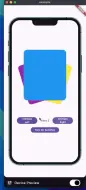
A highly customizable and animated stack carousel widget for Flutter, allowing for dynamic card transformations, autoplay, and programmatic control.
import 'package:device_preview/device_preview.dart';
import 'package:fancy_stack_carousel/fancy_stack_carousel.dart';
import 'package:flutter/material.dart';

void main() {
  runApp(const MyApp());
}

class MyApp extends StatelessWidget {
  const MyApp({super.key});

  // This widget is the root of your application.
  @override
  Widget build(BuildContext context) {
    return MaterialApp(
      home: DevicePreview(
        enabled: true,
        isToolbarVisible: true,
        tools: DevicePreview.defaultTools,
        builder: (context) {
          return ExampleApp();
        },
      ),
    );
  }
}

class ExampleApp extends StatefulWidget {
  const ExampleApp({super.key, this.carouselController});

  final FancyStackCarouselController? carouselController;

  @override
  State<ExampleApp> createState() => _ExampleAppState();
}

class _ExampleAppState extends State<ExampleApp> {
  FancyStackCarouselController carouselController =
      FancyStackCarouselController();

  bool autoPlay = false;
  int currentIndex = 0;

  @override
  Widget build(BuildContext context) {
    return Scaffold(
      body: Column(
        mainAxisAlignment: MainAxisAlignment.center,
        children: [
          FancyStackCarousel(
            items: [
              FancyStackItem(
                id: 1,
                color: Colors.red,
                child: Container(
                  decoration: BoxDecoration(
                    color: Colors.red,
                    borderRadius: BorderRadius.circular(20),
                  ),
                ),
              ),
              FancyStackItem(
                id: 2,
                color: Colors.green,
                child: Container(
                  decoration: BoxDecoration(
                    color: Colors.green,
                    borderRadius: BorderRadius.circular(20),
                  ),
                ),
              ),
              FancyStackItem(
                id: 3,
                color: Colors.blue,
                child: Container(
                  decoration: BoxDecoration(
                    color: Colors.blue,
                    borderRadius: BorderRadius.circular(20),
                  ),
                ),
              ),
              FancyStackItem(
                id: 4,
                color: Colors.yellow,
                child: Container(
                  decoration: BoxDecoration(
                    color: Colors.yellow,
                    borderRadius: BorderRadius.circular(20),
                  ),
                ),
              ),
              FancyStackItem(
                id: 5,
                color: Colors.purple,
                child: Container(
                  decoration: BoxDecoration(
                    color: Colors.purple,
                    borderRadius: BorderRadius.circular(20),
                  ),
                ),
              ),
            ],
            carouselController: carouselController,
            options: FancyStackCarouselOptions(
              size: Size(250, 300),
              autoPlay: autoPlay,
              autoplayDirection: AutoplayDirection.bothSide,
              autoPlayInterval: Duration(seconds: 3),
              duration: Duration(milliseconds: 350),
              onPageChanged: (index, reason, direction) {
                setState(() {
                  currentIndex = index;
                });

                print(
                  "Index change: $index, Reason: $reason, Direction: $direction",
                );
              },
            ),
          ),
          SizedBox(height: 80),

          Padding(
            padding: const EdgeInsets.symmetric(horizontal: 30, vertical: 20),
            child: Row(
              spacing: 20,
              children: [
                Expanded(
                  child: FilledButton(
                    onPressed: () {
                      carouselController.animateToLeft();
                    },
                    child: Text("Animate Left", textAlign: TextAlign.center),
                  ),
                ),
                Text("Index $currentIndex"),
                Expanded(
                  child: FilledButton(
                    onPressed: () {
                      carouselController.animateToRight();
                    },
                    child: Text("Animate Right", textAlign: TextAlign.center),
                  ),
                ),
              ],
            ),
          ),
          FilledButton(
            onPressed: () {
              setState(() {
                autoPlay = !autoPlay;
              });
            },
            child: Text("Turn ${autoPlay ? "Off" : "On"} AutoPlay"),
          ),
        ],
      ),
    );
  }
}Metadata
17
likes
155
points
78
downloads

Publisher
unverified uploader
Weekly Downloads
Metadata
A highly customizable and animated stack carousel widget for Flutter, allowing for dynamic card transformations, autoplay, and programmatic control.
Repository (GitHub)
View/report issues
Documentation
License
 MIT (license)

