
draggable_animation 0.0.3  draggable_animation: ^0.0.3 copied to clipboard
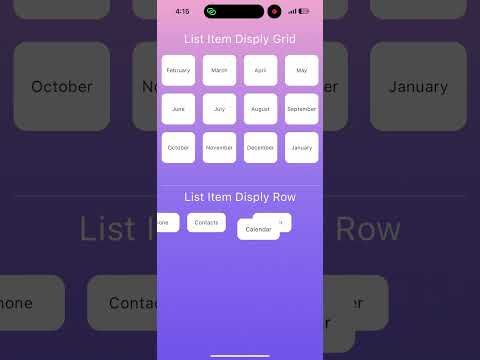
A Flutter package that enables smooth drag-and-drop animations between menu areas, inspired by iOS-style rearranging. Perfect for custom animated menus and item sorting.
draggable_animation #
A smooth, customizable drag-and-drop animation library for Flutter — inspired by iOS-style app rearranging. Create interactive menus or reorderable UI elements with ease.
Demo #
✨ Features #
- Drag & drop between menu areas
- Animated movement and reordering
- Works with
Stack,AnimatedPositioned, and global coordinate tracking - Responsive design — works on different screen sizes
- Support for both grid and row layouts
🚀 Getting Started #
1. Add dependency #
dependencies:
  draggable_animation : ^0.0.1
Usage #
SizedBox(
  height: 300,
  width: double.infinity,
  child: DraggaleAnimation(
    items: monthList,
    displayer: DraggableAnimationGridDisplay(
      columnCount: 4,
      rowHeight: 80,
      spacingX: 20,
      spacingY: 20
    ),
    // duration: Duration(milliseconds: 100),
    builder: (data) => _buildCard(data),
    // feedbackBuilder: (data) => _buildCard(data,feedback: true), //custom style
  ),
),
items #
list your item , it's also support generice type
DraggableAnimation(
  items: ['Google','Photo','Notepad','Facebook','etc'],
)
builder #
is function that build your custom widget
DraggableAnimation(
  builder: (data) => _buildCard(data), //data row of your items
)
feedbackBuilder #
Optional field , The function provide you build your custom widget when dragging
DraggableAnimation(
  feedbackBuilder: (data) => _buildCustomDragItem(data), //data row of your items
)
displayer #
Property determine each item display as grid or row
DraggableAnimationGridDisplay
displayer: DraggableAnimationGridDisplay(
  columnCount: 4, // number of column per row
  rowHeight: 80, // height of each row
  spacingX: 20, // space between each column
  spacingY: 20 // space between each row
),
DraggableAnimationRowDisplay
displayer: DraggableAnimationRowDisplay(
  colWidth: 100, // width of each columns
  spacingX: 20 // space between each column
),
compareItemPosition #
Optional field, Property customize compare position of drag_item and each items in list
return true mean change item position
DraggableAnimationGridDisplay (
  compareItemPosition: (dragItem, item) {
    print(dragItem.toString()); // show information detail relate to item
    print(item.toString()); // show information detail relate to item
    return false;
  },
)
percentag #
Optional field,
Property determine whether drag item and item match to change position
default value percentag is 0.5
DraggableAnimationGridDisplay (
  percentag : 0.5 // 50% match position
)
onChange #
Function for trigger when item change position
DraggableAnimation (
  onChange: (from, to) {},
)
onDragStart #
Function for trigger when long press on item
DraggableAnimation (
  onDragStart: () {},
)
onDragStop #
Function for trigger when drag item stop
DraggableAnimation (
  onDragStop: () {},
)
onDragMove #
Function for trigger when drag item moving
DraggableAnimation (
  onDragMove: (detail) {},
)
👤 Contact Me #
- GitHub: horlengg
- Portfolio: horleng.vercel.app
Feel free to open issues or pull requests if you'd like to contribute or report bugs.
Metadata
Publisher
unverified uploader
Weekly Downloads
Metadata
A Flutter package that enables smooth drag-and-drop animations between menu areas, inspired by iOS-style rearranging. Perfect for custom animated menus and item sorting.
Homepage
Repository (GitHub)
View/report issues
License
 unknown (license)

