
custom_flutter_chord 1.0.2  custom_flutter_chord: ^1.0.2 copied to clipboard
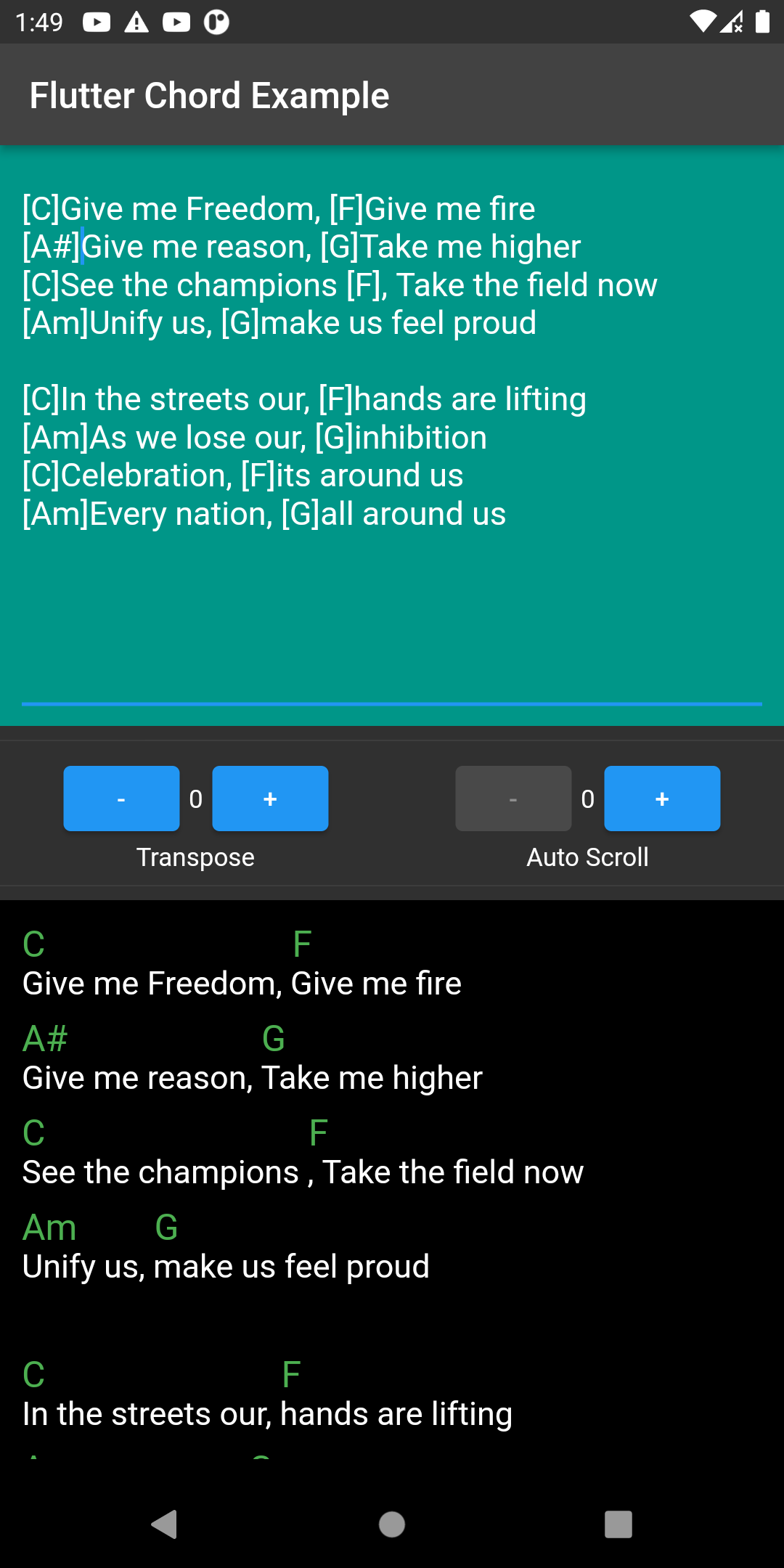
Lyrics Chord parser and renderer for Flutter. It also comes with transpose and auto-scroll features.
flutter_chord #

Chord parser for Flutter apps. Original repository at: paurakhsharma
Features #
- Transpose Chords
- Auto Scroll
- Show/Hide chords
- Show/Hide lyrics
- Minor scale
- Underline chord syllables
- Custom chord notation (presentation)
- Tap on chords callback
- Customizable text and chord styles
- Customizable widget padding
- Adjustable scroll speed
- Chord/lyrics parsing and styling via
ChordLyricsDocument - Chord transposition with semitone increment
- Chord parsing with support for modifiers and inversions
Usage #
1) Render the Lyrics and Chords directly.
final textStyle = TextStyle(fontSize: 18, color: Colors.white);
final chordStyle = TextStyle(fontSize: 20, color: Colors.green);

final lyrics = '''
[C]Give me Freedom, [F]Give me fire
[Am] Give me reason, [G]Take me higher
''';

@override
  Widget build(BuildContext context) {
    return LyricsRenderer(
    lyrics: _lyrics, // String containing the lyrics and chords in chordpro format
    textStyle: textStyle, // TextStyle for lyrics text
    chordStyle: chordStyle, // TextStyle for chord text
    widgetPadding: 50, // Padding around the widget (double)
    onTapChord: (String chord) { // Callback when a chord is tapped
      print('pressed chord: $chord');
    },
    transposeIncrement: 0, // Number of semitones to transpose chords (int)
    scrollSpeed: 0, // Auto-scroll speed (pixels per second, double)
    showChord: true, // Whether to show chords (bool)
    showText: true, // Whether to show lyrics text (bool)
    minorScale: false, // If true, transpose chords to the relative minor key (bool)
    underlineChordSyllables: true, // Underline the syllable under each chord (bool)
  );
}
2. Get a parsed ChordLyricsDocument and style it as you like.
final textStyle = TextStyle(fontSize: 18, color: Colors.white);
final chordStyle = TextStyle(fontSize: 20, color: Colors.green);

final lyrics = '''
[C]Give me Freedom , [F]Give me fire
[Am] Give me reason , [G]Take me higher
''';

ChordProcessor _chordProcessor = ChordProcessor(context);
ChordLyricsDocument chordLyricsDocument = _chordProcessor.processText(
  text: lyrics,
  lyricsStyle: textStyle,
  chordStyle: chordStyle,
  transposeIncrement: 0,
);
Implementation details #
This section explains the main logic and algorithms used for chord parsing, transposition, and rendering in this package.
Transposing chords to the relative minor #
Resumo da lógica usada para transpor acordes para a tonalidade relativa menor.
Passos principais #
- Parse do acorde com a regex
^([A-Ga-g][#b]?)(.*)$para separar o root (ex.:C,C#,Db) do resto (modificadores / inversões). - Normalização de acidentes: flats mapeados para sustenidos via um mapa (
Db -> C#,Bb -> A#, etc.) para trabalhar com um índice de semitons consistente. - Índice de semitons: usa a lista
['C','C#','D','D#','E','F','F#','G','G#','A','A#','B']. - Transposição para relativo menor: desloca o índice do root em
-3semitons (ex.:C→ índice deCmenos 3 →A→Am). - Ajuste da qualidade do acorde:
- Se o resto já começa com
moumin, mantém (ex.:Am7→Am7). - Se começa com
maj, removemaj(case-insensitive) e inserem(ex.:Dmaj7→Bm7). - Caso contrário, adiciona
mantes do resto (ex.:G7→Em7).
- Se o resto já começa com
- Ordem de aplicação: primeiro aplica-se
chordPresentation(troca de notação, se fornecida), depoistransposeToMinorquandominorScale == true.
Exemplos #
C→AmG→EmDmaj7→Bm7C/G→Am/GAm7→Am7(permanece)
Observações / limitações #
- Resultado usa notação com sustenidos (
C#,A#) após conversão. - O mapa de flats é limitado; enharmônicos mais complexos podem não ser escolhidos contextualmente.
- Modificadores exóticos podem não ser tratados perfeitamente — a prioridade é ajustar root + qualidade minor.
- A transposição para menor atua sobre o texto do acorde final (após
transposeIncremente possíveis trocas de notação).
Implementação: função usada no código —
transposeToMinor(String chord)dentro delib/src/lyrics_renderer.dart.
Metadata
8
likes
160
points
16
downloads
Publisher
unverified uploader
Weekly Downloads
Metadata
Lyrics Chord parser and renderer for Flutter. It also comes with transpose and auto-scroll features.
Documentation
License
 MIT (license)

