
curved_render_text 0.0.3  curved_render_text: ^0.0.3 copied to clipboard
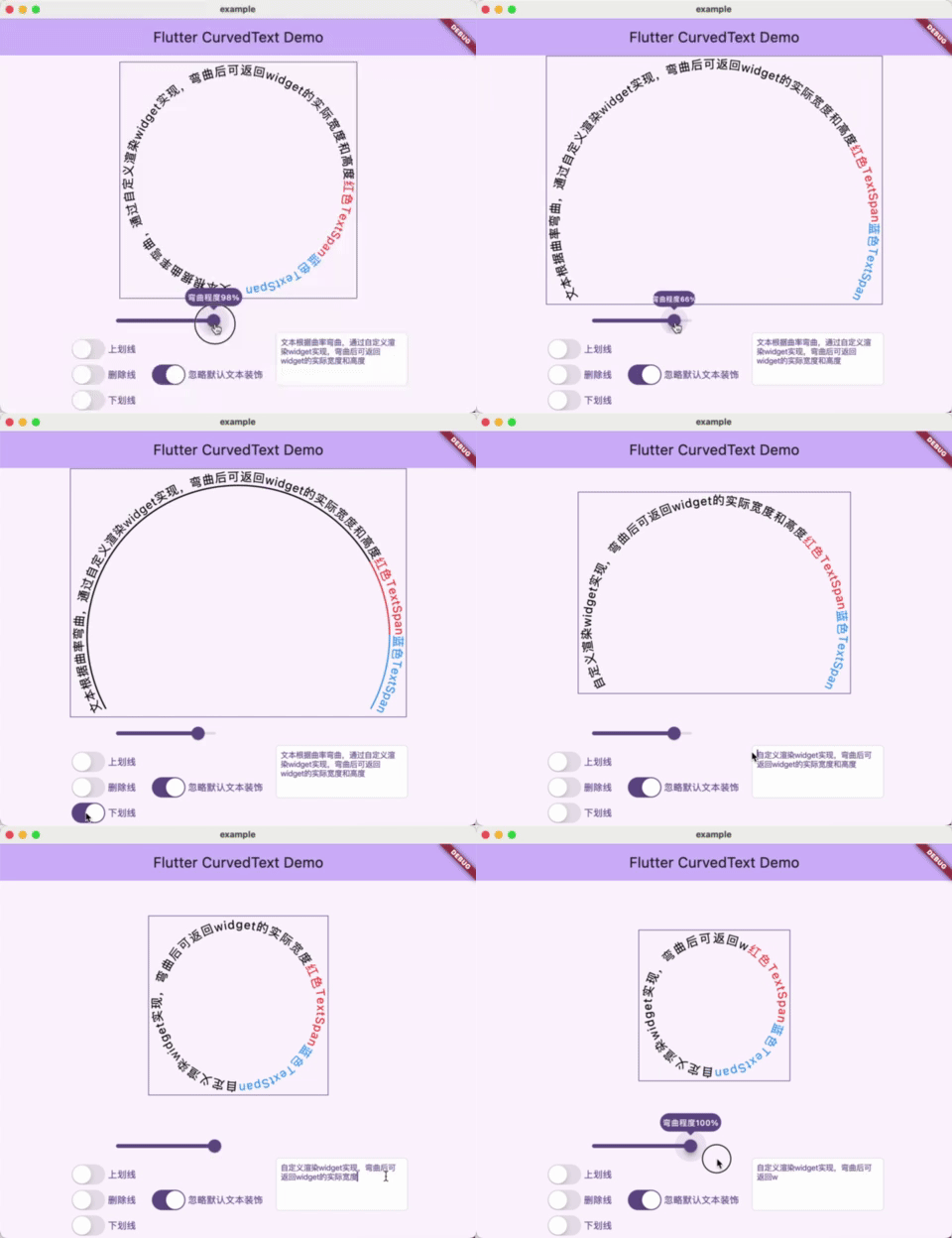
The text is bent according to the curvature, which is realized by custom rendering parts, and the actual width and height of the parts can be returned after bending.
curved_render_text #


用来将文本根据曲率进行弯曲,通过自定义渲染Widget实现,通过计算弯曲后的文本实际宽高来重新赋值Widget的Size.
使用场景:弯曲文本后需要测量实际的文本显示部分的宽高,用以给其添加跟随文本长度以及曲率变化的边框
插件同时支持拓展绘制前和绘制后的方法,允许使用者自定义绘制需要的内容,如:文本上划线、删除线、下划线等。
该插件在flutter_arc_text的基础上大幅修改的,删除了
许多原有功能及属性。
🖼️ Preview #
准备工作 🍭 #
Flutter #
执行 flutter pub add curved_render_text,
或者将 curved_render_text 手动添加至 pubspec.yaml 引用。
dependencies:
  curved_render_text: ^latest_version
🕹️ 使用方法 #
import 'package:curved_render_text/curved_render_text.dart';
...
CurvedText(
  text: '文本根据曲率设置弯曲并返回size',
  textStyle: const TextStyle(fontSize: 18, color: Colors.black),
  curvature: 0.5,//曲率范围-1到1
  beforeDrawing: ...,//文本绘制前绘制
  afterDrawing: ...,//文本绘制后绘制
)
...
Demo #
完整示例代码如下
import 'package:curved_render_text/curved_render_text.dart';
import 'package:flutter/cupertino.dart';
import 'package:flutter/material.dart';

void main() {
  runApp(const MyApp());
}

class MyApp extends StatelessWidget {
  const MyApp({super.key});

  @override
  Widget build(BuildContext context) {
    return MaterialApp(
      title: 'Flutter Demo',
      theme: ThemeData(
        colorScheme: ColorScheme.fromSeed(seedColor: Colors.deepPurple),
        // useMaterial3: true,
      ),
      home: const MyHomePage(title: 'Flutter CurvedText Demo'),
    );
  }
}

class MyHomePage extends StatefulWidget {
  const MyHomePage({super.key, required this.title});
  final String title;

  @override
  State<MyHomePage> createState() => _MyHomePageState();
}

class _MyHomePageState extends State<MyHomePage> {
  double curvature = 100;
  final TextStyle _textStyle = const TextStyle(fontSize: 18, color: Colors.black);
  TextStyle _textDecorationStyle = const TextStyle(fontSize: 18, color: Colors.black,decorationThickness: 2);
  final TextEditingController _textEditingController = TextEditingController
    (text: '文本根据曲率弯曲,通过自定义渲染widget实现,弯曲后可返回widget的实际宽度和高度');

  @override
  Widget build(BuildContext context) {
    return Scaffold(
      appBar: AppBar(
        backgroundColor: Theme.of(context).colorScheme.inversePrimary,
        title: Text(widget.title),
      ),
      body: SizedBox(
        width: double.infinity,
        height: double.infinity,
        child: Column(
          children: [
            Expanded(child: Stack(
              alignment: Alignment.center,
              clipBehavior: Clip.none,
              children: [
                OverflowBox(
                  maxWidth: double.infinity,
                  maxHeight: double.infinity,
                  child: DecoratedBox(
                    decoration: BoxDecoration(
                      border: Border.all(
                        color: Theme.of(context).primaryColor,
                        width: 1,
                      ),
                    ),
                    child: CurvedText(
                      text: _textEditingController.text,
                      textStyle: _textStyle,
                      curvature: curvature/100.0,
                      afterDrawing: _makeDelegate(_textDecorationStyle,),
                    ),
                  ),
                )
              ],
            ),),
            Row(
              mainAxisAlignment: MainAxisAlignment.center,
              children: [
                SizedBox(
                  width: 200,
                  child: Column(
                    mainAxisAlignment: MainAxisAlignment.end,
                    children: [
                      Slider(
                        value: curvature,
                        divisions: 200,
                        label: '弯曲程度${curvature.toInt()}%',
                        min: -100,
                        max: 100,
                        onChanged: (value){
                          setState(() {
                            curvature = value.floorToDouble();
                          });
                        },
                      ),
                      Row(
                        children: [
                          CupertinoSwitch(value: _textDecorationStyle.decoration==TextDecoration.overline,
                            activeColor: Theme.of(context).primaryColor,
                            onChanged: (value){
                              setState(() {
                                _textDecorationStyle = _textDecorationStyle.copyWith(
                                  decoration: value?TextDecoration.overline:TextDecoration.none,
                                );
                              });
                            },),
                          Text('上划线',style: TextStyle(fontSize: 14,color: Theme.of(context).primaryColor),),
                        ],
                      ),
                      Row(
                        children: [
                          CupertinoSwitch(value: _textDecorationStyle.decoration==TextDecoration.lineThrough,
                            activeColor: Theme.of(context).primaryColor,
                            onChanged: (value){
                              setState(() {
                                _textDecorationStyle = _textDecorationStyle.copyWith(
                                  decoration: value?TextDecoration.lineThrough:TextDecoration.none,
                                );
                              });
                            },),
                          Text('删除线',style: TextStyle(fontSize: 14,color: Theme.of(context).primaryColor),),
                        ],
                      ),
                      Row(
                        children: [
                          CupertinoSwitch(value: _textDecorationStyle.decoration==TextDecoration.underline,
                            activeColor: Theme.of(context).primaryColor,
                            onChanged: (value){
                              setState(() {
                                _textDecorationStyle = _textDecorationStyle.copyWith(
                                  decoration: value?TextDecoration.underline:TextDecoration.none,
                                );
                              });
                            },),
                          Text('下划线',style: TextStyle(fontSize: 14,color: Theme.of(context).primaryColor),),
                        ],
                      ),
                    ],
                  ),
                ),
                SizedBox(width: 200,height: 80,child: CupertinoTextField(
                  showCursor: true,
                  controller: _textEditingController,
                  style: TextStyle(
                    fontSize: 12,
                    color: Theme.of(context).primaryColor,
                  ),
                  maxLines: null,
                  onChanged: (value){
                    setState(() {});
                  },
                )),
              ],
            ),
          ],
        ),
      ),
    );
  }

  PainterDelegate _makeDelegate(TextStyle textStyle) =>
          (PaintingContext context,
          Offset offset,
          Size size,
          double radius,
          double startAngle,
          double sweepAngle,
          double finalAngle,
          Offset centerOffset,
          double letterWidth,
          double letterHeight,
          double curvature,) {
        Rect? rect;
        if(textStyle.decoration == TextDecoration.overline){
          rect = Rect.fromCircle(
            center: centerOffset,
            radius: radius,
          );
        } else if(textStyle.decoration == TextDecoration.lineThrough){
          rect = Rect.fromCircle(
            center: centerOffset,
            radius: radius+letterHeight/2,
          );
        } else if(textStyle.decoration == TextDecoration.underline){
          rect = Rect.fromCircle(
            center: centerOffset,
            radius: radius+(curvature>=0?0:1)*letterHeight,
          );
        }
        if (rect!=null) {
          context.canvas.drawArc(
            rect,
            startAngle,
            sweepAngle,
            false,
            Paint()
              ..style = PaintingStyle.stroke
              ..strokeCap = StrokeCap.round
              ..strokeWidth = textStyle.decorationThickness??1
              ..color = textStyle.decorationColor??textStyle.color??Colors.black,
          );
        }
      };
}
Metadata
4
likes
160
points
15
downloads
Publisher
unverified uploader
Weekly Downloads
Metadata
The text is bent according to the curvature, which is realized by custom rendering parts, and the actual width and height of the parts can be returned after bending.
Repository (GitHub)
View/report issues
Documentation
License
 Apache-2.0 (license)
Dependencies
characters, flutter, vector_math

